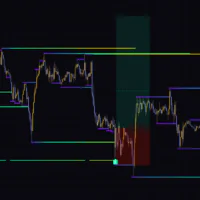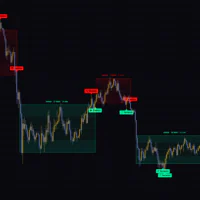

An Indicator That Maps Accumulation, Manipulation, and the Real Move Inside Every HTF Candle
If you follow ICT (Inner Circle Trader) concepts, you have almost certainly run into the term “Power of 3 (PO3).” The idea is that every daily or weekly candle is built from three phases: a period where price builds a range (Accumulation), a move against the intended direction (Manipulation), and the expansion in the real direction (Distribution). It makes sense on paper, but figuring out which phase you are in while staring at a lower timeframe chart, and drawing the levels by hand every single session, gets tedious fast.
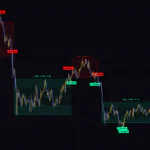
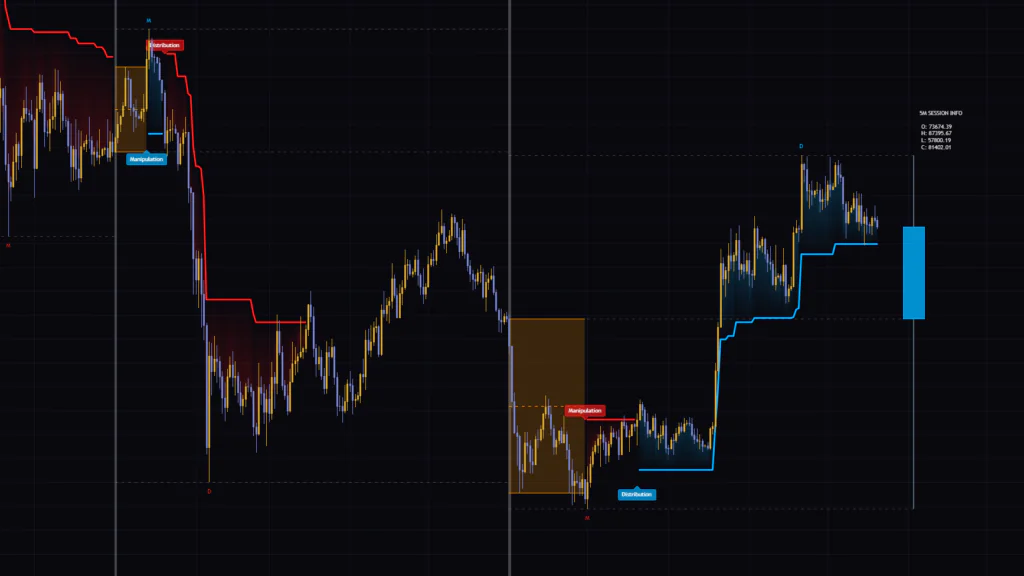
“HTF Power of 3 (PO3) with Trailing Stop” is a TradingView indicator that automates the whole process. Every time a new higher timeframe (HTF) candle opens, it frames the accumulation range with an orange box. When price closes outside that box, it prints a “Manipulation” label, and when price breaks an ATR-based (Average True Range) trailing stop, it prints “Distribution.” On the right edge of the chart, the developing HTF candle is drawn as a single candle along with its open, high, low, and current price.
After running it on live charts, my take is that this indicator is less about trade signals and more about visualizing the script of the day (or week). The labels follow mechanical rules, so you can learn to read them quickly even if you are not deep into ICT terminology. That said, if you judge the labels by their names alone without knowing the rules, a few things are easy to misread. In this review, we will go through how to read it and where its quirks are, step by step.
Accumulation, Manipulation, and the Real Move Play Out Within One Day
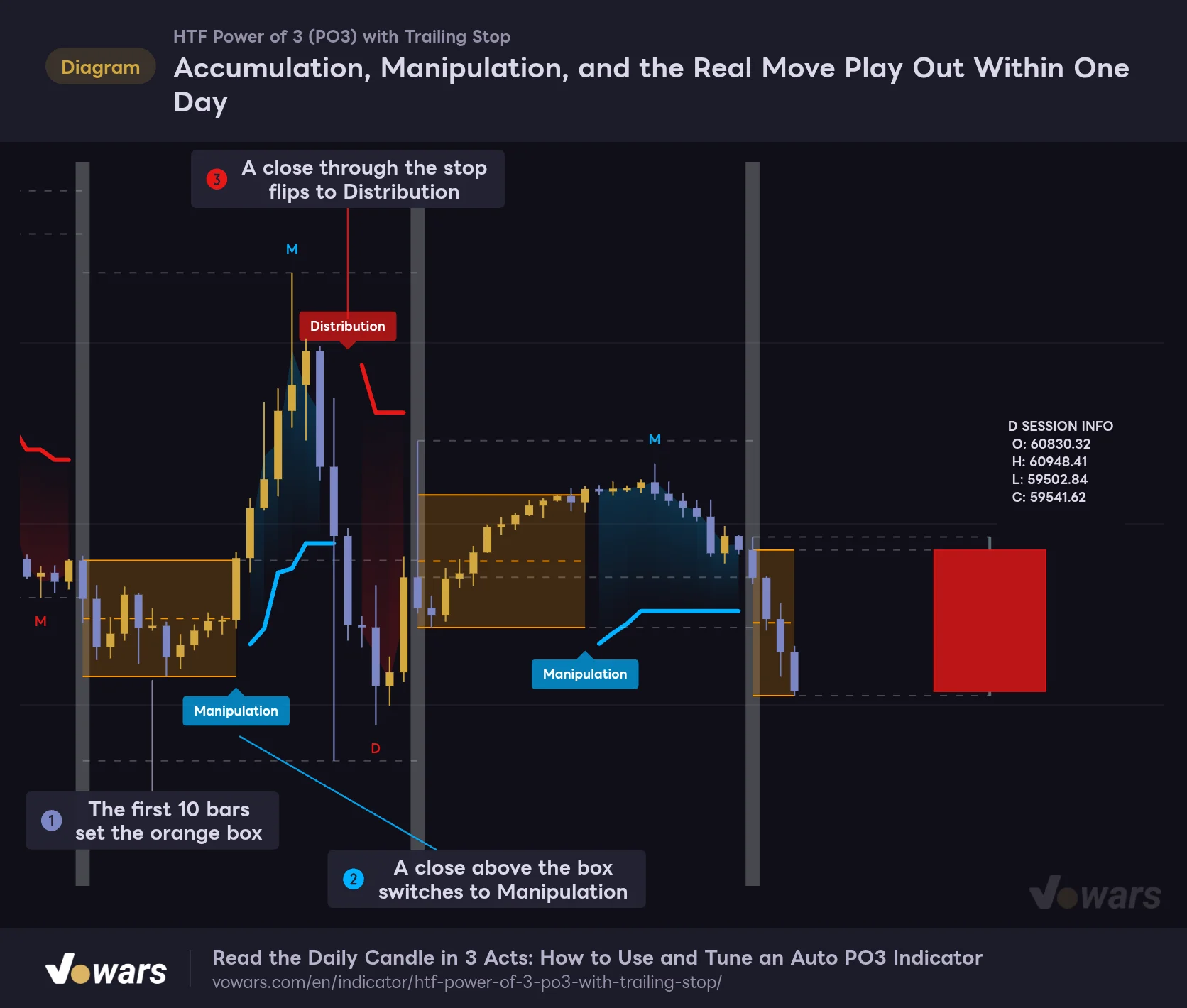
HTF Power of 3 (PO3) with Trailing Stop on the 1-hour chart with the HTF set to daily.
Vowars DE ver.3.12.34
The chart above shows a typical day on the 1-hour chart with daily sessions applied. Figure ① is the accumulation box, Figure ② is the Manipulation break above the box, and Figure ③ is the Distribution flip where price closes through the trailing stop. A blue “M” marks the top of the rally and a red “D” marks the low after the reversal, showing how far each leg extended.
What You See on the Chart and What It Means
| Element | Color / Shape | Meaning |
|---|---|---|
| Vertical band | Light gray | The bar where a new HTF (session) begins |
| Orange box and midline | Orange solid lines with fill | The accumulation range. The dashed midline sits halfway between the high and low of the box |
| Manipulation | Blue or red label | The bar that closed outside the box. Blue for an upside break, red for a downside break |
| Thick line and cloud | Blue or red | The ATR-based trailing stop (PO3 Trailing Stop) and the fill between it and price |
| Distribution | Red or blue label | The bar that closed through the stop and flipped direction |
| M / D | Colored text | The furthest extension of the Manipulation leg and the Distribution leg |
| Dashed lines (3) | Faint white | Session open, high, and low |
| Right-side candle and SESSION INFO | Blue or red block | The developing HTF candle and its open, high, low, and current price |
Following the Logic Step by Step, Starting From the Orange Box
The logic behind “HTF Power of 3 (PO3) with Trailing Stop” runs in a straight line. Build the box, wait for the break, trail it with a stop, and flip when the stop gets hit. Once you know this sequence, you can tell at a glance where you are in the cycle whenever you pull up the chart.
1 The First 10 Bars Build the Accumulation Box
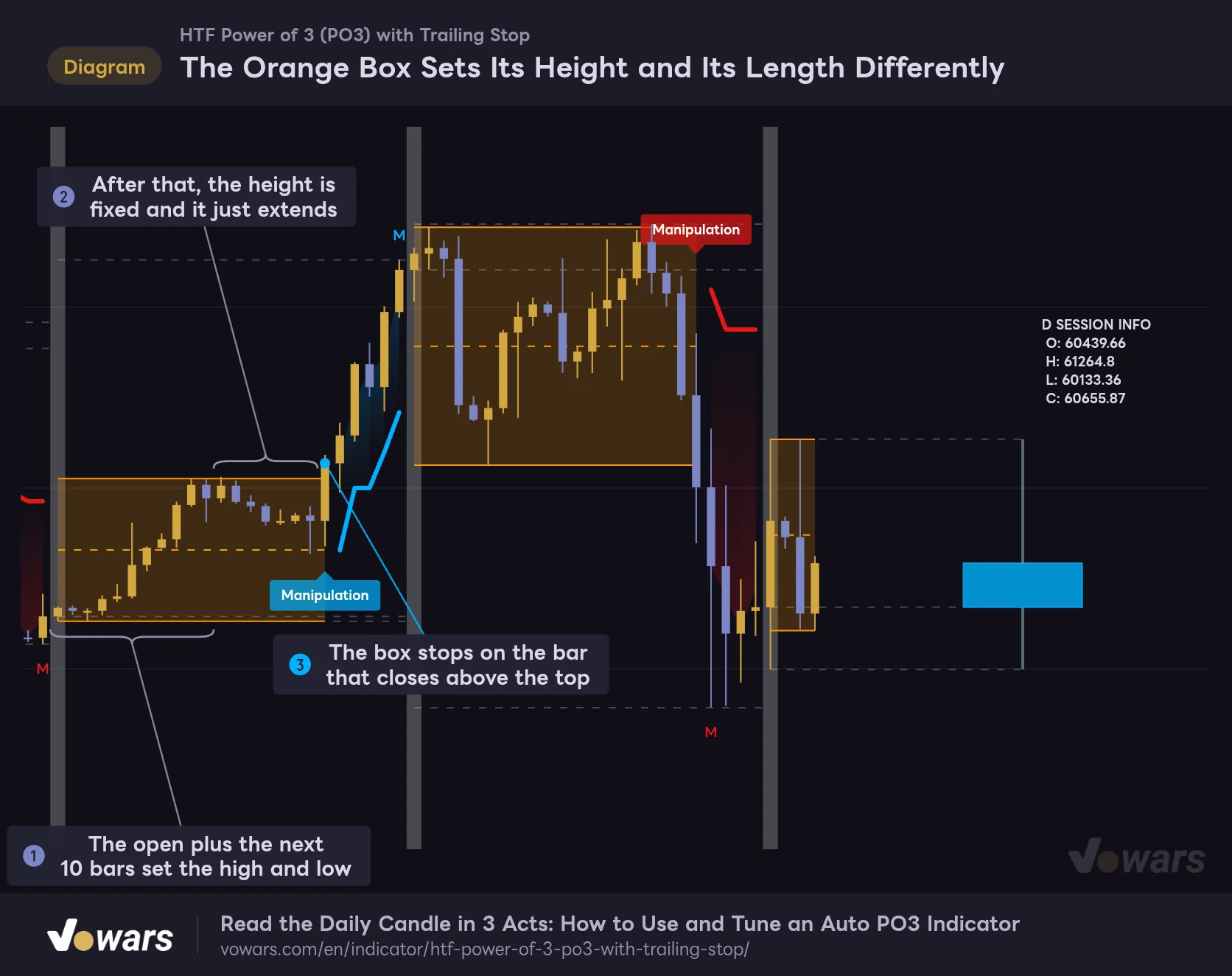
The Orange Box Sets Its Height and Its Length Differently
With Accumulation Phase Length at its default of 10, this shows where the box height is set and where the box simply keeps extending.
Vowars DE ver.3.12.34
When a new session starts, the orange box is anchored to the open of that first bar. The highs and lows of the next Accumulation Phase Length (Bars) bars (default 10) then widen the top and bottom of the box Figure ①.
One detail that is easy to miss: only the open of the first bar goes into the box. Even if that first bar prints a long wick, the wick is not included. On instruments that swing hard right after the daily open, the session high or low dashed line can sit outside the box. That is how it is designed, not a display bug.
After those 10 bars, the height of the box is locked, and the box simply keeps extending to the right until price closes outside it Figure ②. Also, no breakout can trigger during those 10 bars. The top of the box already includes the current bar’s own high, so the close can never exceed it. The earliest possible breakout is the bar 11 bars after the session open.
2 A Close Outside the Box Triggers “Manipulation”
A close above the top of the box prints a blue “Manipulation,” and a close below the bottom prints a red one Figure ③. A wick through the box is not enough. The trigger is the close on a confirmed bar. At the same time, an “M” is placed at the high of the leg (or the low on a downside break), and it moves to the newest bar every time the leg extends.
In ICT’s PO3, Manipulation refers to the move against the real direction, the Judas swing. In “HTF Power of 3 (PO3) with Trailing Stop”, however, Manipulation simply labels the direction of the first close outside the box. Some days that break turns into the trend for the whole session, so you cannot tell whether it is a fakeout at the moment the label prints. Whether it was a fakeout is decided by what happens with the stop afterward.
3 An ATR Trailing Stop Follows the Move
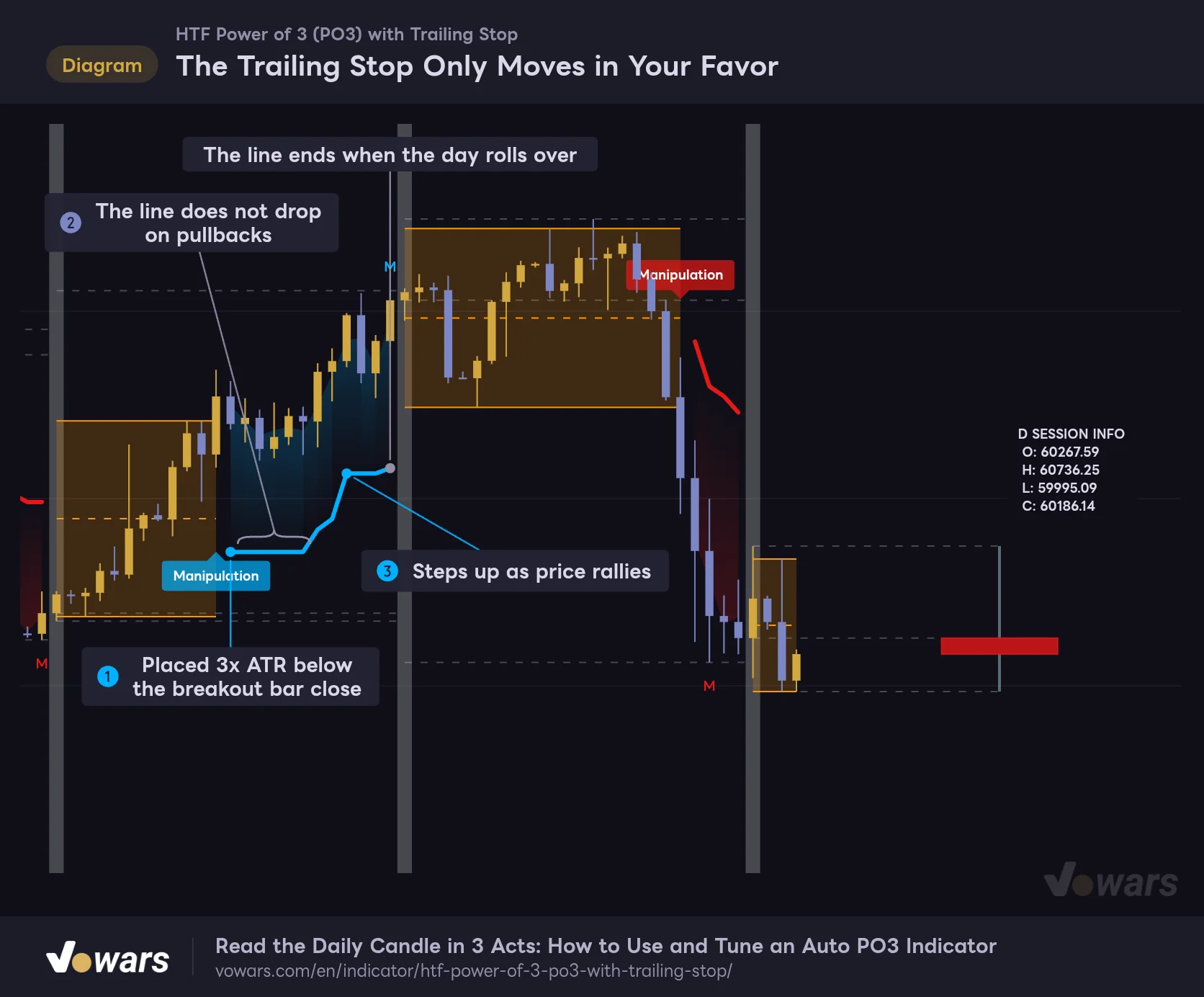
The Trailing Stop Only Moves in Your Favor
The thick line drawn after Manipulation trails price at a distance of 3x ATR (average true range).
Vowars DE ver.3.12.34
Once Manipulation triggers, a trailing stop is placed “ATR × Trailing Stop ATR Multiplier (default 3.0)” away from the close Figure ①. The ATR length is set by Trailing Stop ATR Period (default 14) and is calculated on the chart timeframe.
The line only moves in your favor. After an upside break, it stays flat while price pulls back Figure ② and only steps up when price makes a new high Figure ③. A cloud in the same color fills the space between the line and price, getting darker closer to price, so you can see the distance to your stop at a glance.
When the day (session) rolls over, the line ends right there, even if the stop was never hit. The next day starts over from a fresh box. Since nothing carries over from the previous session, it is a slightly different fit if you hold the same position across multiple days.
4 A Stop Hit Flips to “Distribution,” a Second Hit Ends the Day
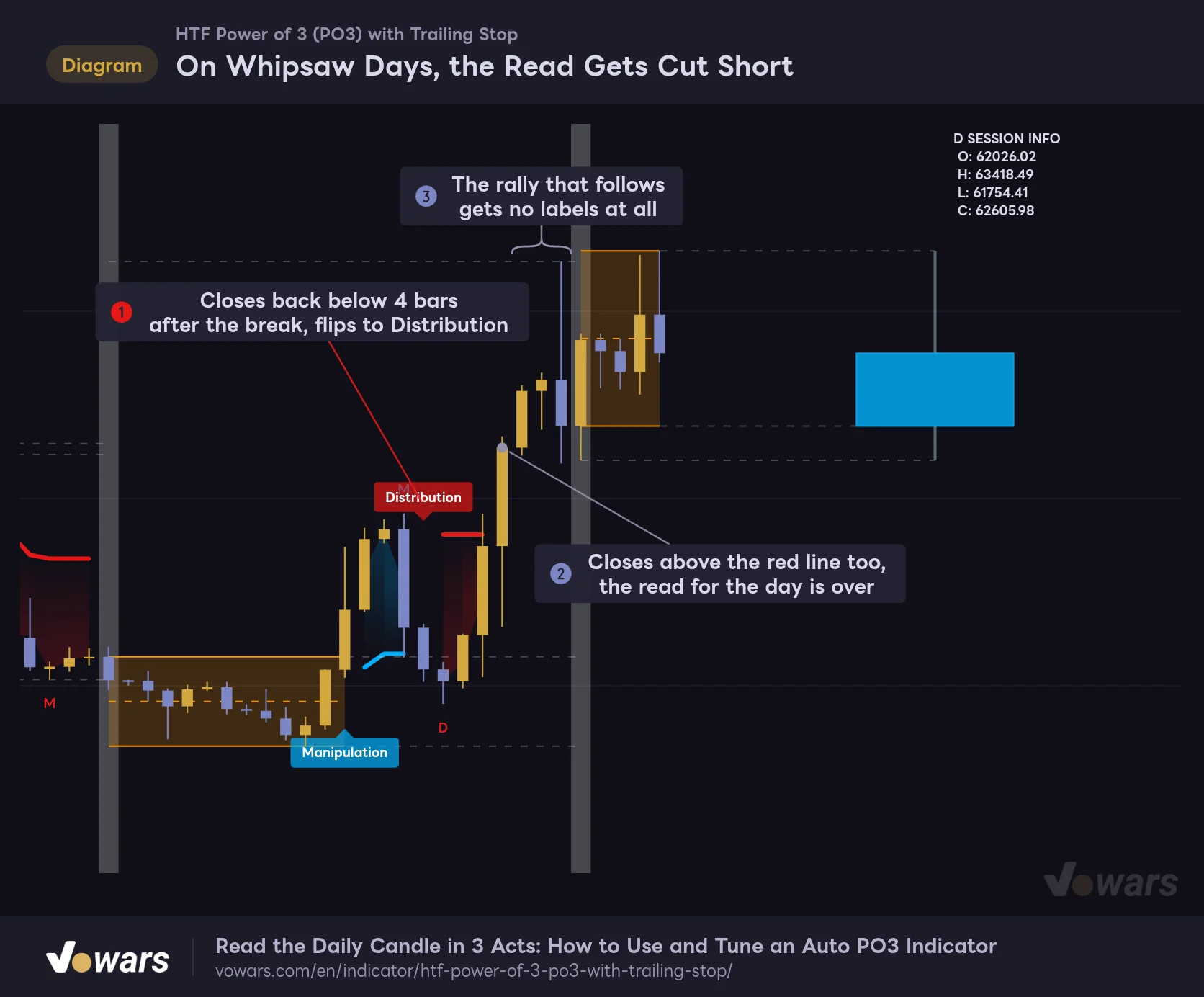
On Whipsaw Days, the Read Gets Cut Short
On choppy days, Manipulation and Distribution print back to back and the day's display stops right there.
Vowars DE ver.3.12.34
When price closes through the stop, the direction flips and a “Distribution” label prints Figure ①. A new stop is placed on the opposite side and the color switches. The line breaks for one bar on the flip, which makes the switch easy to spot. A “D” marks the low after the reversal (or the high), and it also moves as the leg extends.
Here is what really sets “HTF Power of 3 (PO3) with Trailing Stop” apart: once the Distribution stop is also hit, the read for that session is over Figure ②. The line disappears, and neither Manipulation nor Distribution will print again for the rest of that day Figure ③. As in the chart above, even if the real big move comes right after a choppy whipsaw, nothing shows up on the chart.
Whether you treat this as a weakness or as a signal changes how you use it. I started reading it as a flag for “a day when the three-act script fell apart.” On days when the read ends early, I accept that price is not following a PO3 pattern and decide whether to trade off other confluence or just sit on my hands.
The Right-Side Candle and How “Sessions” Are Defined
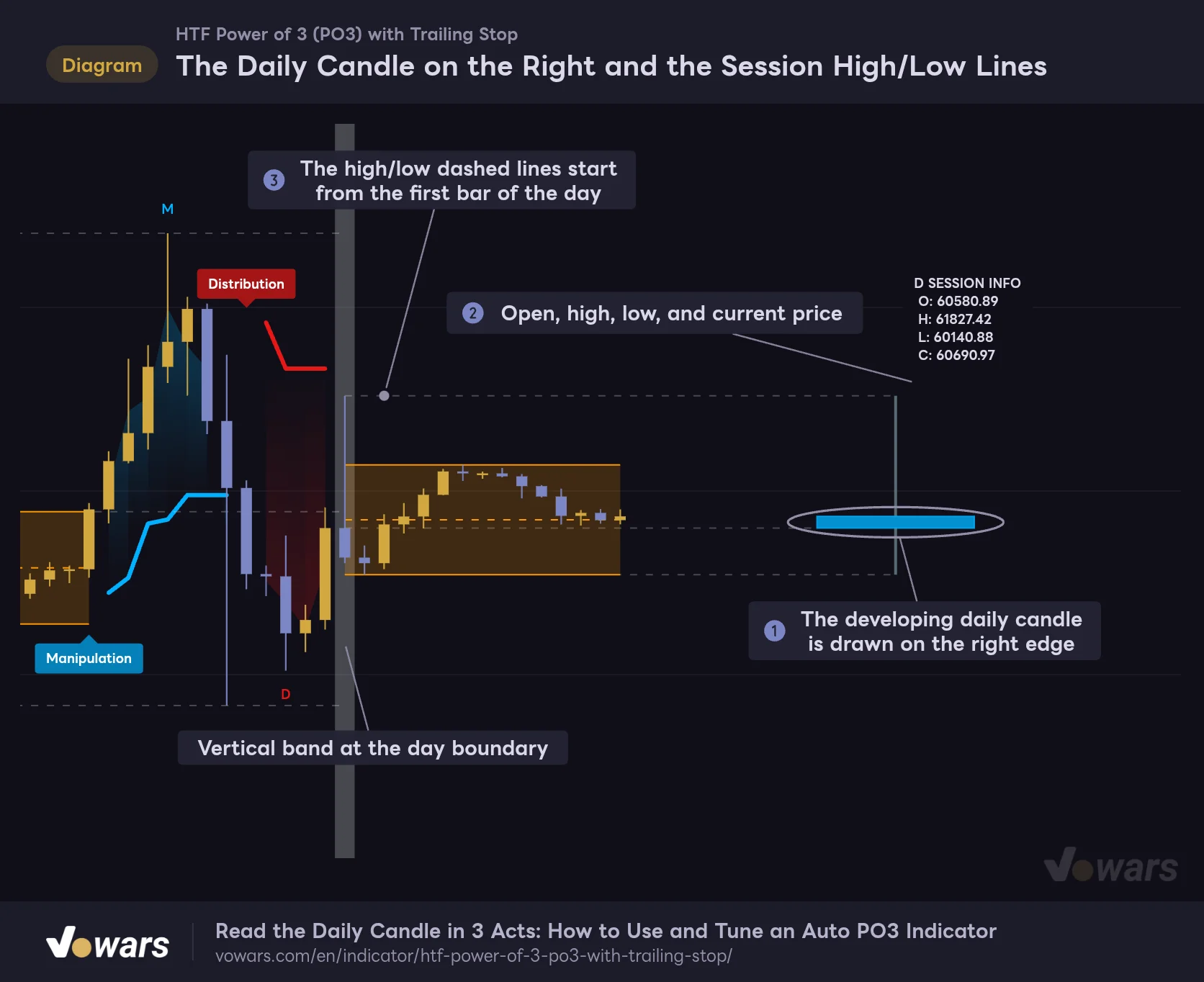
The Daily Candle on the Right and the Session High/Low Lines
To the right of the latest bar, the developing HTF is drawn as a single candle.
Vowars DE ver.3.12.34
The developing HTF candle is drawn HTF Candle Right Offset (Bars) bars (default 10) to the right of the latest bar, with a width of HTF Candle Width (Bars) bars (default 8) Figure ①. Above it, the HTF name and OHLC are listed, such as “D SESSION INFO” Figure ②. Even when you are zoomed into a lower timeframe, you can instantly see whether today’s daily candle is green or red and how far it is from the open. It is a small touch, but a genuinely useful one.
The dashed lines for the session open, high, and low start from the first bar of the session and get redrawn every time the high or low updates Figure ③. Like the box, these are drawn back to past bars. We will come back to this in a later section.
Which HTF Auto HTF Matrix Mode Picks
By default, Auto HTF Matrix Mode is enabled, and the HTF is picked automatically based on your chart timeframe. The mapping looks like this.
| Chart timeframe | Auto-selected HTF | Approx. bars per session |
|---|---|---|
| 1m | 2 hours | 120 bars |
| 2m to 5m | 12 hours | 144 bars on 5m |
| 6m to 15m | 2 days | 192 bars on 15m |
| 16m to 60m | Weekly | 168 bars on 1H |
| 61m to 120m | 2 weeks | 168 bars on 2H |
| 121m to 360m | Monthly | About 180 bars on 4H |
| Intraday above 360m | 2 months | About 120 bars on 12H |
| Daily | 5 months | About 150 bars |
| 2D and above | 6 months | About 90 bars on 2D |
| Weekly | 10 months | About 43 bars |
Bar counts are estimates for 24/7 markets like crypto. When I switched a Bitcoin chart between 5m, 15m, 30m, 1H, 4H, daily, and weekly, the label on the right showed “12H,” “2D,” “W,” “W,” “M,” “5M,” and “10M” SESSION INFO respectively, matching the table. Second-based charts are mapped to 45 minutes and monthly charts to 50 months, but I have not verified how those two actually display.
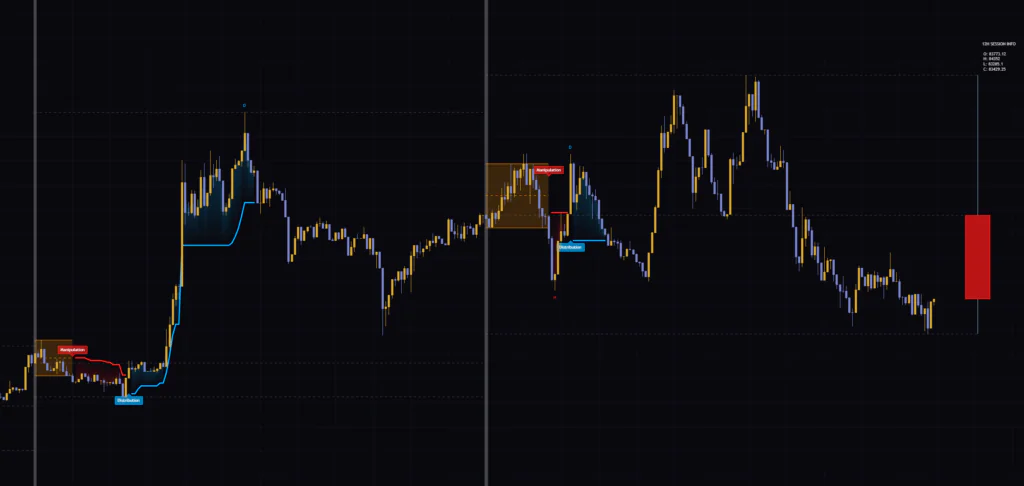
As the table shows, Auto HTF Matrix Mode picks a fairly long HTF. On 1H you get weekly, and even on 15m you get 2 days. With the default box length of 10 bars, a 1H chart on weekly sessions uses roughly the first 11 hours from the Monday open as the box. If you want daily sessions, turn off Auto HTF Matrix Mode and choose D in Manual HTF Selection (it only becomes selectable once Auto is off). Most of the charts in this review use this “1H + D” setup.
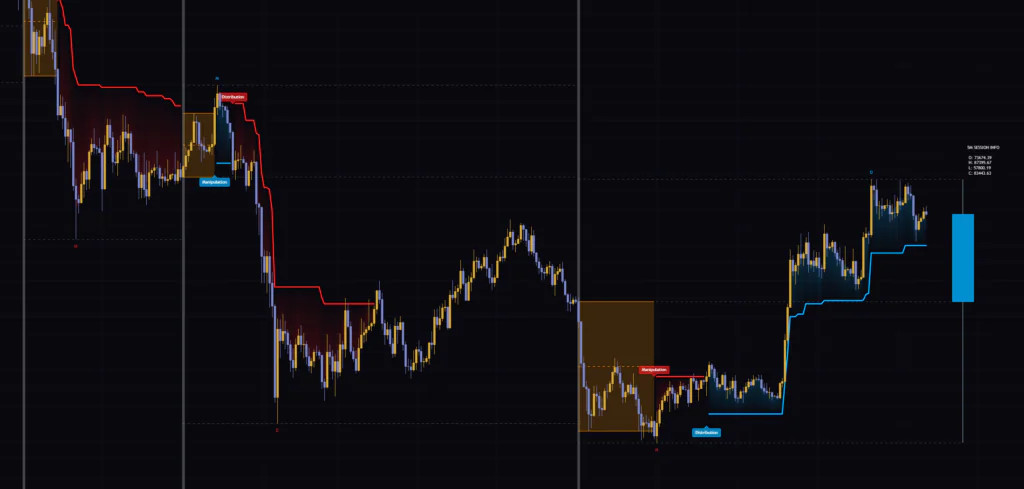
Something I noticed on the daily chart is where the sessions break. Long HTFs like 5 months or 10 months appear to be anchored to January on TradingView, so on the daily chart the vertical bands landed in January, June, and November. November to December becomes a short two-month session, which leaves too little time for the box and the read to play out. On the weekly chart (10 months), the bands also came in pairs every November and the following January.
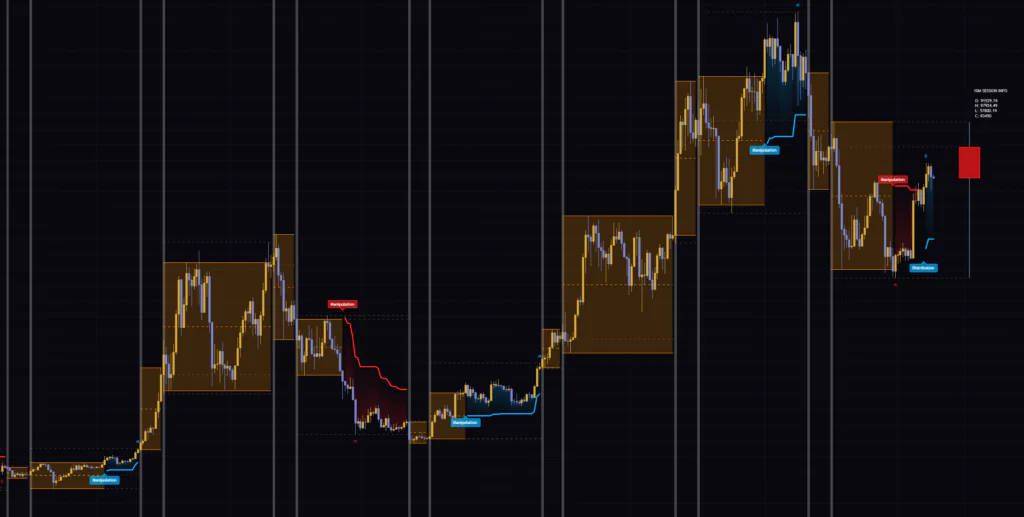
If you run weekly sessions on the 1H chart, you get one Manipulation per week and at most one Distribution. In weeks where the read ends early, nothing shows up for the rest of the week. If you are expecting short-term trade signals, it will feel thin, so for day trading, switching the HTF to daily gives you a lot more to work with.
What Two Weeks on the Bitcoin 1H Chart Taught Me
I also checked how it behaves on a real chart. I loaded it on the Bitcoin 1H chart with default settings, which puts Auto HTF Matrix Mode on weekly sessions, and followed it from the week of September 28, 2026 through October 12. The weekly session started at Monday 00:00 UTC.
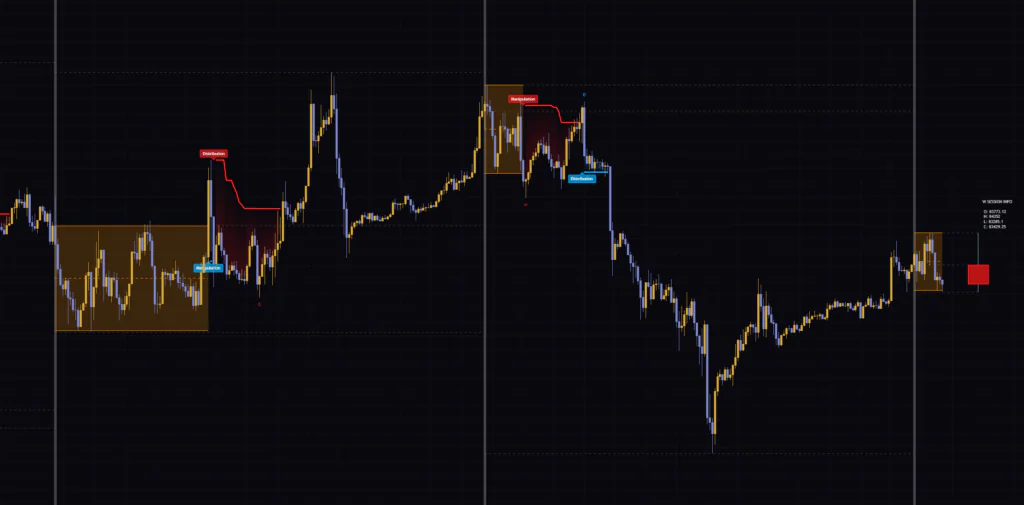
In the week of September 28, the box kept stretching sideways until October 1, when price finally broke higher and printed Manipulation. But it reversed right at the top of the very next spike candle and flipped to Distribution, and that stop was taken out to the upside the next day, ending the read. The big rally that followed, all the way up to around $87,000, got no label at all.
The week of October 5 played out the same way. A break lower printed Manipulation, a bounce flipped it to Distribution, and that stop got hit soon after, ending the read. The drop that followed, down to around $80,500, also went unmarked.
Two weeks in a row of “the real move comes after the read ends” does not look like a coincidence to me. “HTF Power of 3 (PO3) with Trailing Stop” is built to flip to Distribution against the Manipulation and then shut down once that flip is invalidated too. Once the second reversal is invalidated, you know the week is not following the script. I found it more practical to use that shutdown as a “my PO3 read was wrong this week” alert and switch to other confluence from there.
Settings and How to Tune Them for Your Goal
| Setting | Default | Suggested | Effect |
|---|---|---|---|
| Auto HTF Matrix Mode | On | Off if you want daily sessions | Automatically picks the HTF from your chart timeframe. Turning it off enables Manual HTF Selection |
| Manual HTF Selection | D | D for intraday, W for swing | The HTF used when Auto is off. The box and reads reset on this boundary |
| Accumulation Phase Length (Bars) | 10 | 10 to 20% of the bars in one session | Number of bars that set the top and bottom of the box. Higher means a wider box and later reads |
| HTF Candle Right Offset (Bars) | 10 | 10 | How many bars to the right of the latest bar the HTF candle is placed |
| HTF Candle Width (Bars) | 8 | 8 | Width of the right-side HTF candle |
| Bullish Body Color | Blue (transparency 20) | Your preference | Color of the right-side candle when it is bullish |
| Bearish Body Color | Red (transparency 20) | Your preference | Color of the right-side candle when it is bearish |
| Accumulation Lines Color | Orange | Your preference | Color of the box and its dashed midline |
| HTF Open Line Color | White (transparency 75) | Your preference | Color of the session open/high/low dashed lines and the session separator band |
| Wick Structure Color | Gray (transparency 30) | Your preference | Color of the right-side candle wicks |
| Label Text Size | Small | Small | Text size for labels and SESSION INFO |
| Trailing Stop ATR Multiplier | 3.0 | 2.0 to 3.0 intraday, 3.0 for swing | Distance of the stop (multiple of ATR). Lower means reversals trigger sooner |
| Trailing Stop ATR Period | 14 | 14 | ATR length used for the stop distance |
The blue and red used for the Manipulation/Distribution labels, the trailing stop, and the M/D markers are not part of the inputs. The color inputs only change the right-side candle, the box, the dashed lines, and the session separator band.
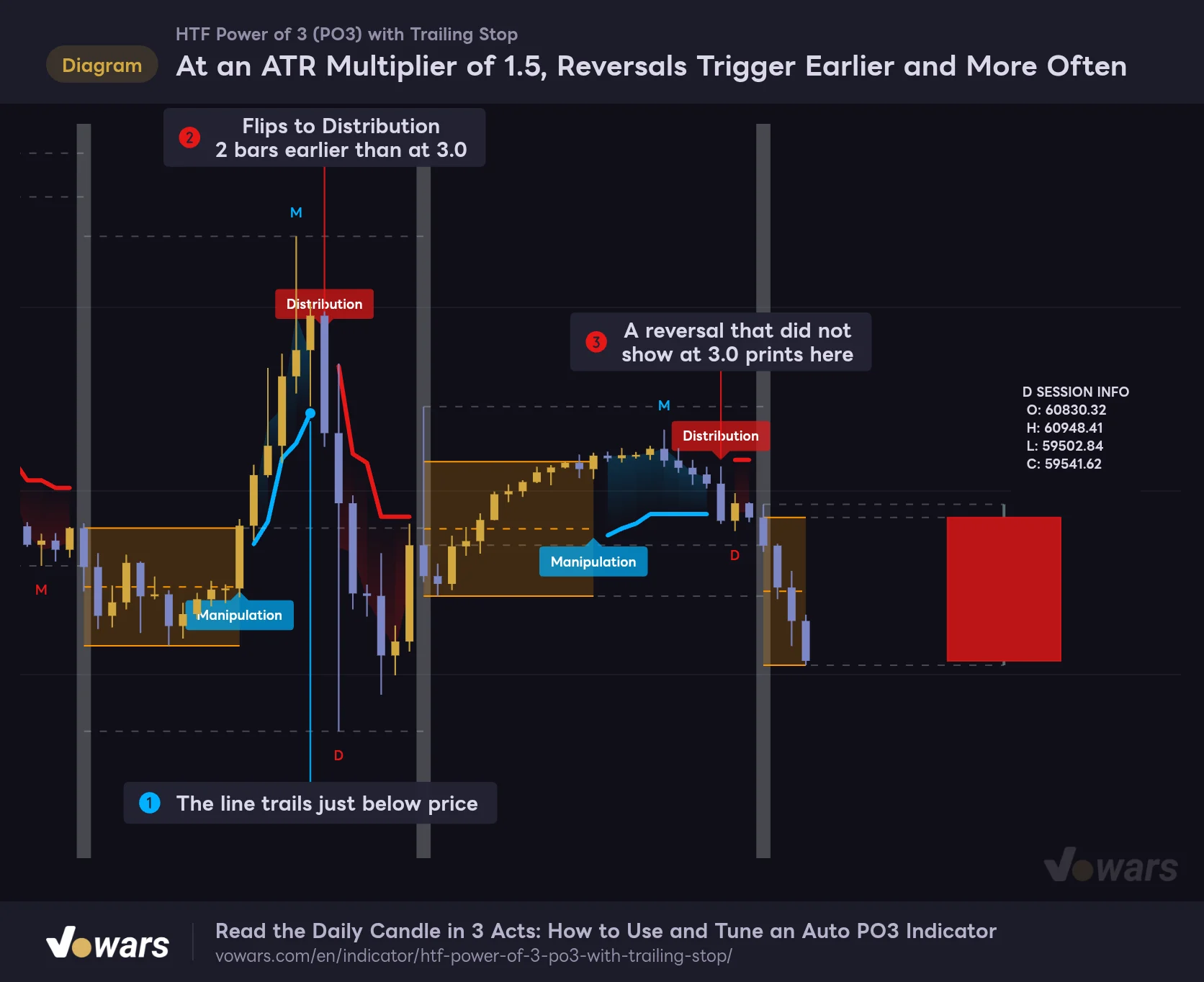
Lowering Trailing Stop ATR Multiplier Makes Reversals Trigger Earlier and More Often
At an ATR Multiplier of 1.5, Reversals Trigger Earlier and More Often
Exactly the same price action as the first chart, with only Trailing Stop ATR Multiplier lowered from 3.0 to 1.5.
Vowars DE ver.3.12.34
Same exact price action as the first chart, with only Trailing Stop ATR Multiplier lowered to 1.5. The stop now hugs price Figure ①, and Distribution prints two bars earlier on the drop from the top Figure ②. On day two, it also caught a reversal that did not show up at 3.0 Figure ③.
You catch reversals sooner, but you also get more false starts where a minor pullback counts as a reversal and then that stop gets taken out too, ending the read. If you are trading short intraday swings, dropping it to around 2.0 to 2.5 is worth trying, but 1.5 was too sensitive in my testing. For long sessions like weekly, I feel it is safer to leave it at the default 3.0.
Think of Accumulation Phase Length (Bars) as a Ratio of Bars per Session
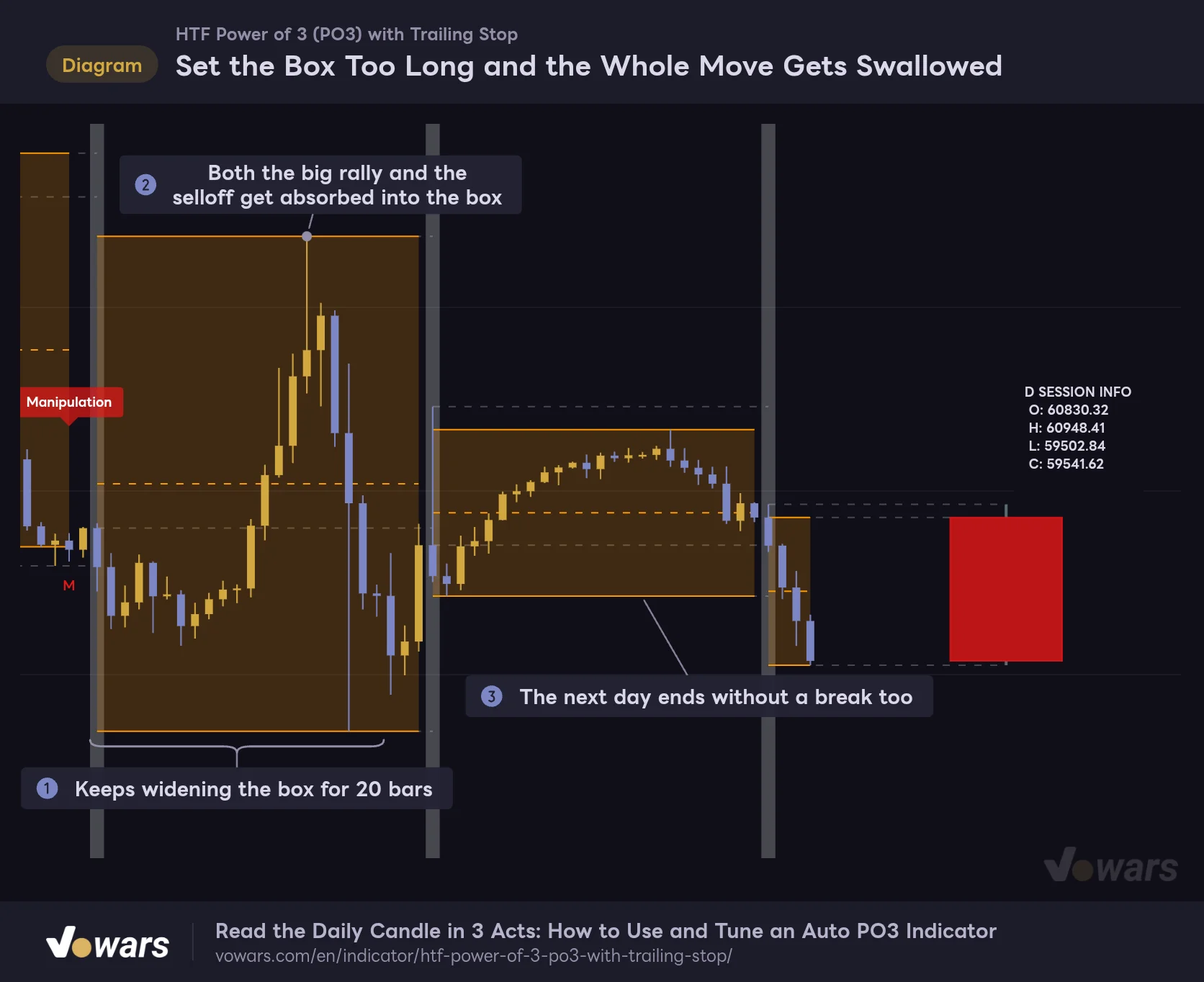
Set the Box Too Long and the Whole Move Gets Swallowed
Same price action as the first chart, with only Accumulation Phase Length raised from 10 to 20.
Vowars DE ver.3.12.34
On the same price action, setting Accumulation Phase Length (Bars) to 20 swallowed both the rally and the selloff into the box, and neither Manipulation nor Distribution printed Figure ②. A daily session on the 1H chart is only 24 bars, so if 20 of them go to the box, only the last 3 bars are left to catch a breakout.
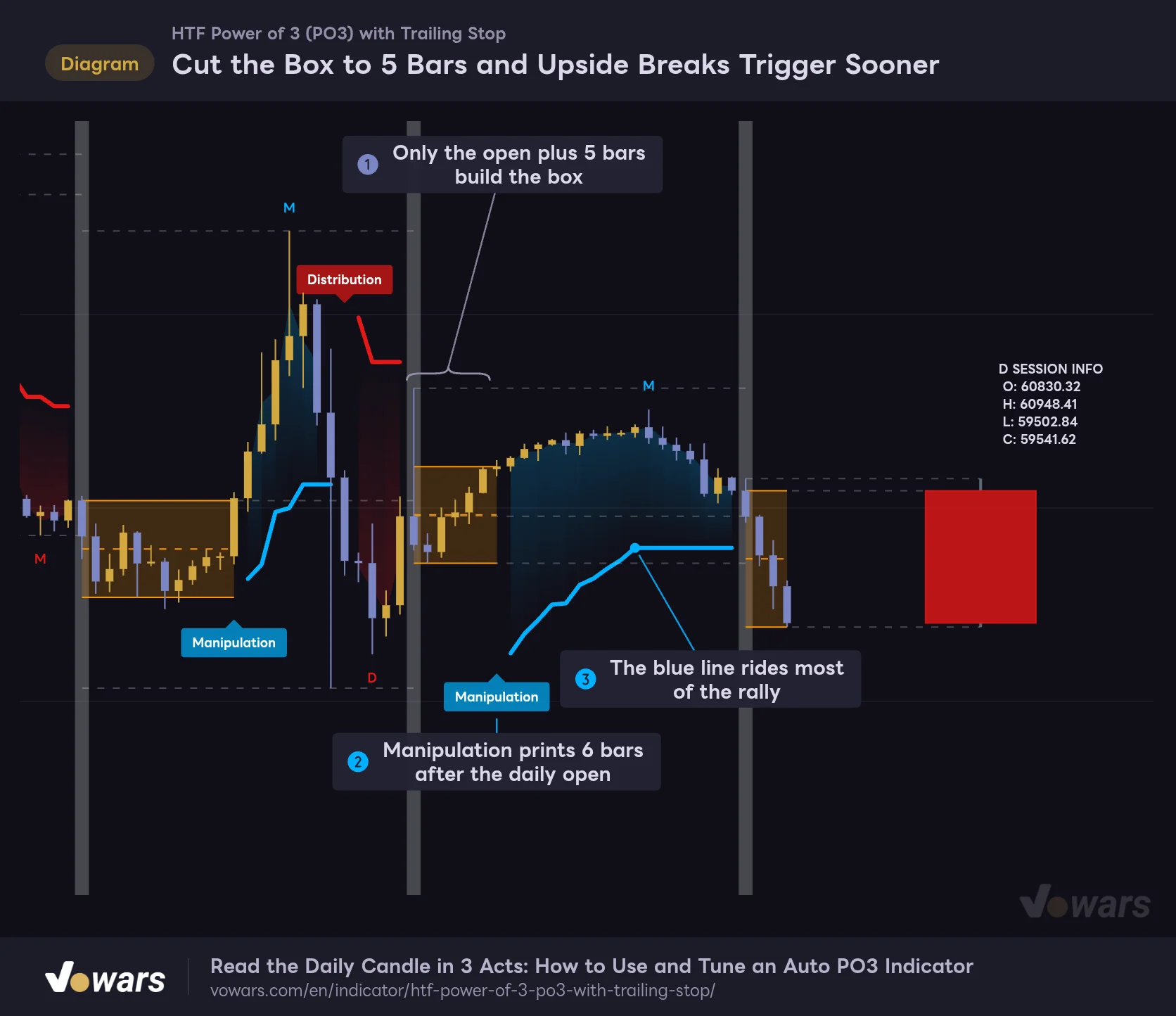
Cut the Box to 5 Bars and Upside Breaks Trigger Sooner
Same price action, with Accumulation Phase Length cut to 5.
Vowars DE ver.3.12.34
Going the other way and dropping it to 5, the day-two box closed early, and Manipulation printed 6 bars after the daily open Figure ②. At the default of 10 bars it came 12 bars after the open, so you capture more of the initial leg up. The trade-off is a narrower box, which makes it easier for small moves to break out.
The default of 10 makes sense once you see it as designed for the long sessions Auto HTF Matrix Mode picks (over 100 bars each). In setups like 1H × daily where a session is only 24 bars, cutting it down to around 4 to 6 bars keeps the box meaningful while leaving room for a breakout. On 15m × daily (96 bars), the default of around 10 bars is about the right ratio.
Example Setups by Goal
| Goal | Chart | HTF | Box bars | ATR multiplier | Rationale |
|---|---|---|---|---|---|
| Track the intraday flow | 15m | D (manual) | 8 to 12 | 2.5 to 3.0 | Out of 96 bars per day, treat the first 2 to 3 hours as accumulation |
| Read the daily candle on the 1H chart | 1H | D (manual) | 4 to 6 | 2.5 to 3.0 | Only 24 bars, so shorten the box to leave time for a read |
| Read the weekly flow | 1H | W (same as Auto) | 10 to 24 | 3.0 | At 24, the full Monday range becomes the box |
| Follow the big swings | Daily | Auto (5 months) | 10 | 3.0 | Only a few reads per year. Note that sessions follow the calendar |
Setting the box to 24 for the weekly flow follows the ICT idea of treating the first day of the week as the accumulation range. That said, it is just one setup I tried, and I have not tested it over a long period. Scroll back a few weeks on your own instrument and check how often reads trigger and how they end before using it.
Pair It With VWAP to Confirm the Real Direction
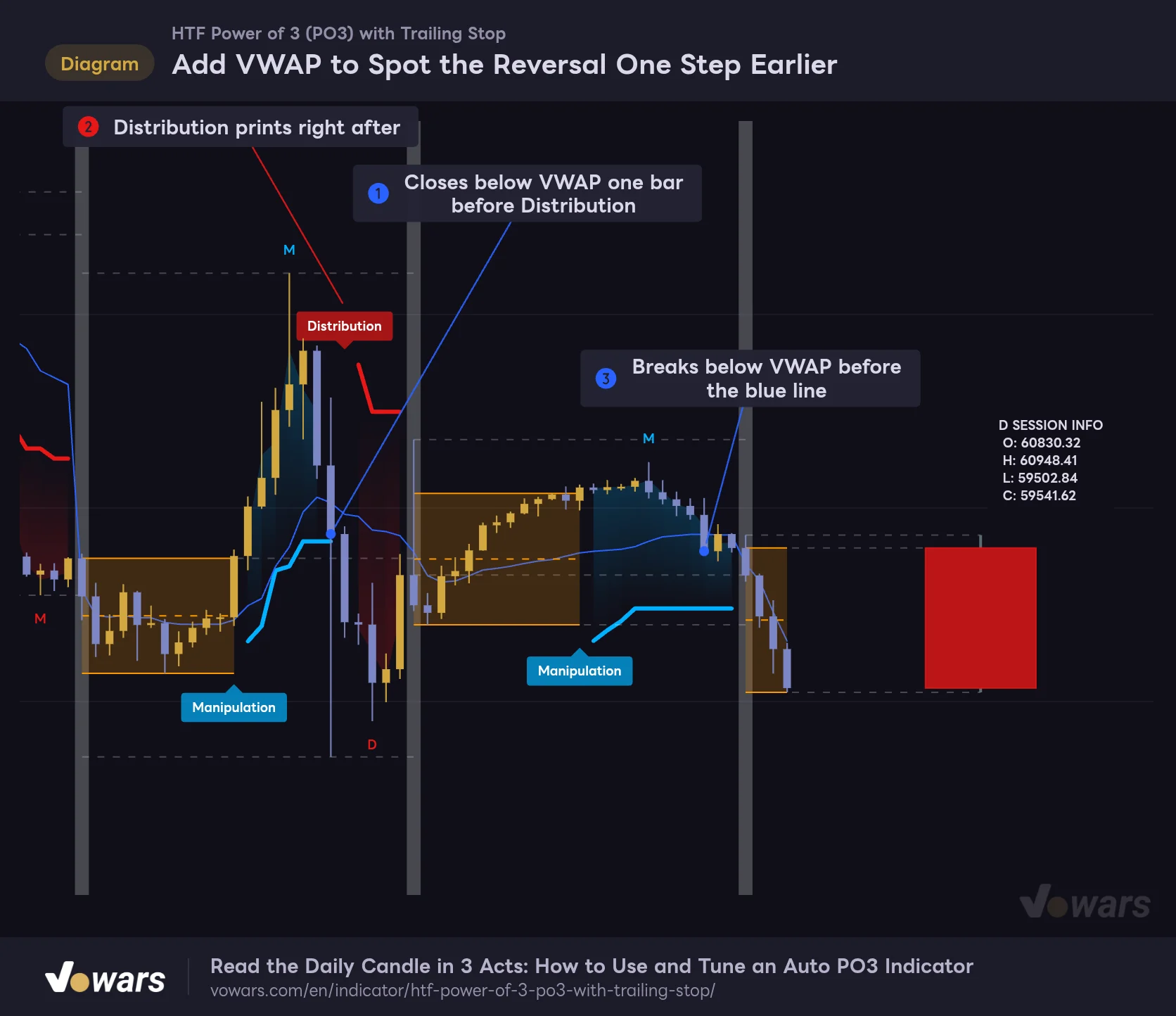
Add VWAP to Spot the Reversal One Step Earlier
HTF Power of 3 (PO3) with Trailing Stop with TradingView's built-in VWAP overlaid.
- VWAP
- PO3 Trailing Stop
Vowars DE ver.3.12.34
“HTF Power of 3 (PO3) with Trailing Stop” does not change direction until the stop is hit. A distance of 3× ATR means giving back a fair amount of range off the top before a reversal registers. That is where TradingView’s built-in VWAP (Volume Weighted Average Price) fit nicely as an intraday reference. With the anchor period set to Session, on 24/7 markets like Bitcoin it resets at the same time as the daily PO3, so you get a second angle on the same day.
In the chart, the bar breaking down from the top closes below VWAP one bar before Distribution prints Figure ①. The moment the Manipulation leg could no longer hold above the average price, the reversal was already showing. On day two as well, while the blue stop is still far below, price slips under VWAP first and flags that the rally is losing steam Figure ③.
A simple way to use them together: “While price holds above (or below) VWAP in the Manipulation direction, stay with it,” and “If price crosses VWAP the other way, think about taking profit or closing out without waiting for Distribution.” VWAP is only a supporting tool here and does not replace the Distribution read itself.
Here are a few other indicators that could pair well with it.
- An indicator that plots the previous day’s and previous week’s highs and lows. Checking whether Manipulation briefly pokes through those levels and snaps back makes it easier to tell if it was what ICT calls a liquidity sweep.
- A session volume profile. Seeing which price levels built up volume inside the orange box helps you judge which side of the box carries more weight for a breakout.
- ADX. If ADX is turning up when Manipulation prints, it helps you judge whether the breakout is likely to become the trend for the day.
Days When It Clicks and Days When It Whiffs
Where It Clicks
- Days that chop in a tight range early on, then make a big move in one direction
- Textbook PO3 days that fake one way first, then expand in the real direction
- Markets where PO3 is commonly applied (index futures, gold, major FX pairs, etc.)
- When you trade a lower timeframe but want to track the HTF candle on the same screen
Where It Whiffs
- Whipsaw days. Manipulation and Distribution print back to back and the read shuts down early
- Days with a big move on the first bar of the session. Only the open goes into the box, so the box is narrower than the actual range
- Setups where the session is short relative to the box length. The whole day ends up inside the box
- The real big move that comes after the read has ended. Nothing shows up on the chart
Its strengths and weaknesses are clear-cut, so if you know in advance which days it does not mesh with, you will rarely misread what it shows.
Behavior to Know Before Using It in Real Time
Does It Repaint After the Bar Closes?
The Manipulation/Distribution labels and the trailing stop values do not change after the bar is confirmed. It never uses future prices on past bars, and instead of pulling HTF data from another timeframe, it counts everything from the chart’s own bars.
That said, there are a few elements that get redrawn back onto past bars. The orange box and the session high/low dashed lines start from the first bar of the session and are redrawn all the way back when their values update. The “M” and “D” markers also jump to the newest bar whenever the leg extends further. On a historical chart, the box and dashed lines look as if their levels were known from the start, but keep in mind that they were not set at that point in time. If you step through bar by bar with Bar Replay, you can watch the box stretch and the dashed lines move.
What Happens Before the Bar Closes
Manipulation only triggers on the close of a confirmed bar. The flip to Distribution and the end of the session read, on the other hand, are also evaluated on the live price of the forming bar. That means a Distribution label can appear mid-bar and disappear if price recovers by the close. TradingView redraws everything on each update of the forming bar, so once the bar closes, the history matches what you would get from the close alone.
The release notes say a bar-close confirmation was added to both Manipulation and Distribution, but from what I saw tracking its behavior, only Manipulation waits for the bar to close. If you are placing orders off Distribution, it is safer to wait for the bar close before acting.
“HTF Power of 3 (PO3) with Trailing Stop” does not include any built-in alert conditions. You cannot set an alert that fires when Manipulation or Distribution prints, so if you want notifications, consider using this indicator’s line (PO3 Trailing Stop) as the condition in the alert creation dialog. Keep in mind that the line breaks on flip bars and at the end of a session.
Also, only the 50 most recent labels are displayed (TradingView’s default limit). Since each session can print up to 4 labels, if you scroll far back on a short HTF, labels from older sessions will no longer show. Lines such as the box and dashed lines are set to keep up to 500.
A Sidekick That Writes Out Each Day’s Accumulation, Manipulation, and Real Move for You
“HTF Power of 3 (PO3) with Trailing Stop” takes ICT’s Power of 3 concept and boils it down to four visuals: a box, labels, a trailing stop, and an HTF candle on the right edge. The rules are simple. A close outside the orange box is Manipulation, a close through the ATR stop is Distribution, and if that stop also gets hit, the day is done. Once you have that flow down, you can tell which phase the day is in the moment you open the chart.
On the flip side, the labels print mechanically and will not tell you whether a Manipulation is actually a fakeout. It is also worth noticing early that the default Auto mode picks a fairly long HTF, and that setting the box length too high relative to the session leaves you with no reads at all.
My suggestion is to start on the 1H or 15m chart with the HTF set to daily, tune the box length, and watch it for a few days. Once you start seeing the difference between days where the read plays out fully and days where it gets cut short, what this indicator shows turns into a read on the character of that day’s market. Make your actual trading decisions by stacking it with other confluence like VWAP or the previous day’s high and low.