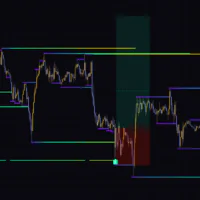

An Indicator That Maps How Each Price Level Has Been Used
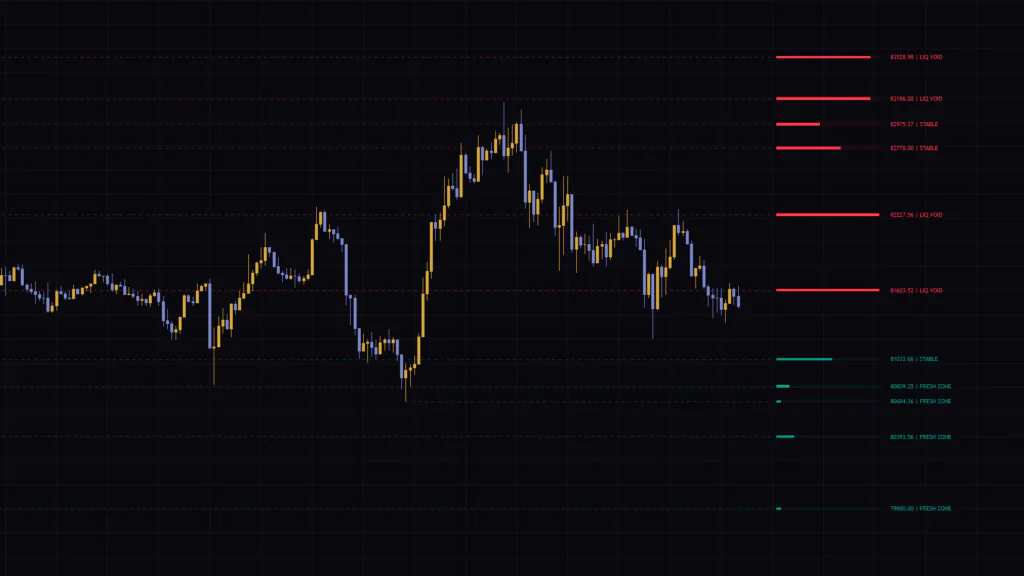
There are plenty of indicators that draw horizontal levels, but “Geometric Macro Reversal Map” comes at S/R from a slightly different angle. Plotting lines off past swing highs and lows is standard stuff. What sets it apart is what happens next: it counts how many times candles have cut through each line, then shows that amount as a gauge and a text label at the right end of the line.
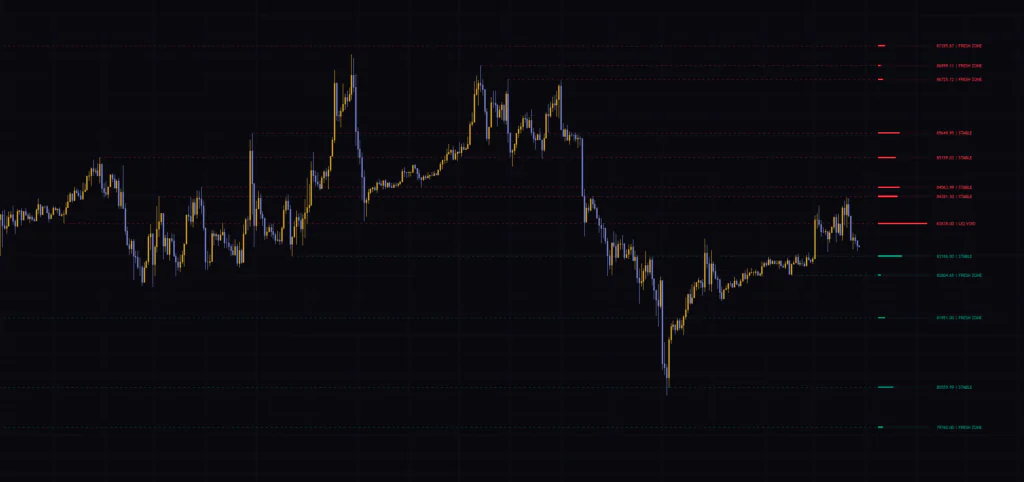
Is this a level that has barely been touched, or one that price keeps chopping back and forth through? The moment you open the chart, you can see how “used” every level is, side by side. That is the main selling point here. Despite “Reversal” being in the name, it does not print buy or sell signals. Think of it as a map: it lays out the raw material for deciding where to wait for a reaction and where to aim your target.
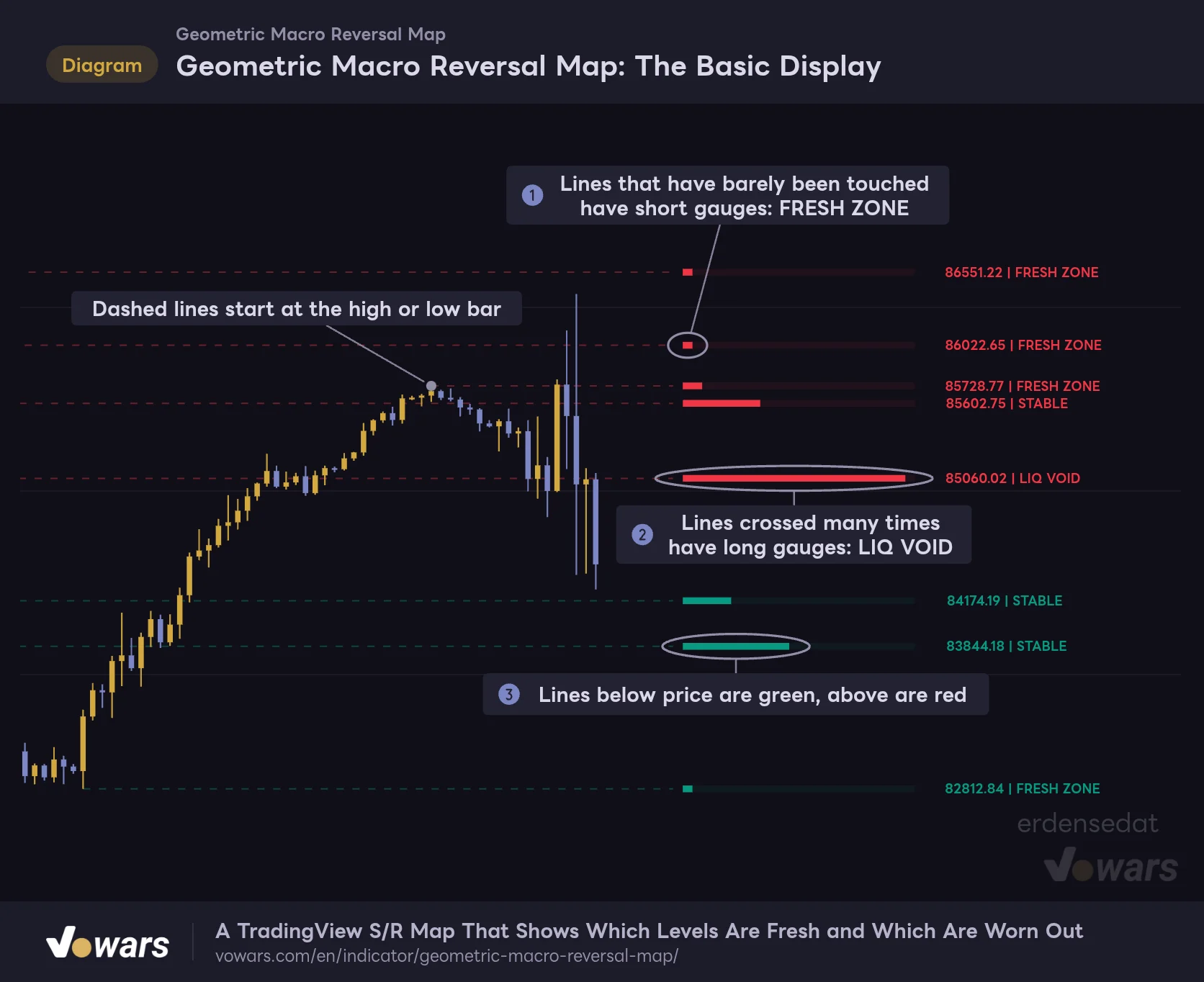
Geometric Macro Reversal Map: The Basic Display
Read how much each price zone has been used from the gauge length and the label at the right end of the line.
Vowars DE ver.3.12.34
With the default settings, you get a mix of lines with short gauges, like Figure ①, and lines whose gauges have stretched out, like Figure ②. As shown in Figure ③, lines acting as resistance above the current price are red, and lines acting as support below it are green.
Learn the Three Things on Your Chart First
The display is minimal, so once you know what each element means, there is very little to trip you up.
Dashed Lines Mark the Highs and Lows Where Big Moves Started
The dashed lines extend horizontally to the right from past highs and lows. Not every swing high becomes a line. Only highs and lows followed by a strong move get picked. We will dig into the exact rule in the next section, but the idea is simple: it only keeps the origins of moves where price “took off from here.”
The indicator holds a maximum of 15 lines. When a 16th one forms, the oldest line gets deleted. This cap cannot be changed in the settings.
The Gauge Shows How Much a Line Has Been Crossed
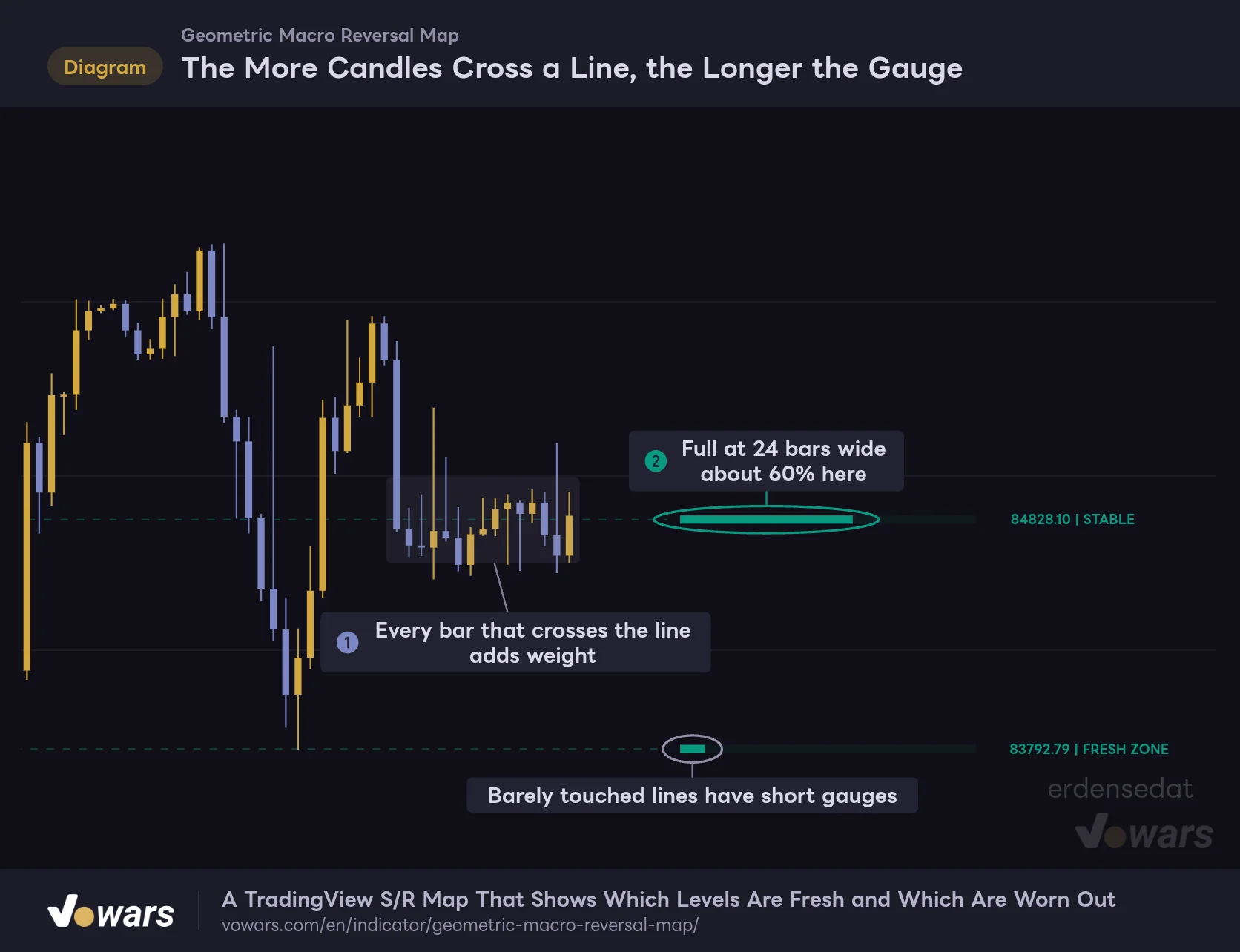
The horizontal gauge on the right shows how much candles have traded through that line. Every time a bar has its high and low on opposite sides of the line, weight is added based on how deeply it cut through, and the gauge extends to the right. The gauge is full at a width of 24 bars.
The Label Shows Price and Status
To the right of the gauge you will see a label like “84352.00 | FRESH ZONE”, showing the price of the line and its status. The status is mostly driven by how full the gauge is: 20% or less is FRESH ZONE, 90% or more is LIQ VOID. Anything in between is a bit more involved, so it gets its own table in a later section.
Which Highs and Lows Become Lines?
Once you know how lines are selected, you will stop wondering why there is no line on a particular high.
Wait 11 Bars, Keep Only Moves of 2.56x ATR
A swing high or low is confirmed when it is the highest (or lowest) bar compared with the 11 bars on each side. Since it cannot be confirmed until the 11 bars on the right have printed, the line shows up 11 bars after the high is made.
On top of that, it checks whether the close 11 bars later is at least 2.56x ATR (14) away from that high or low, and only keeps the line if it is.
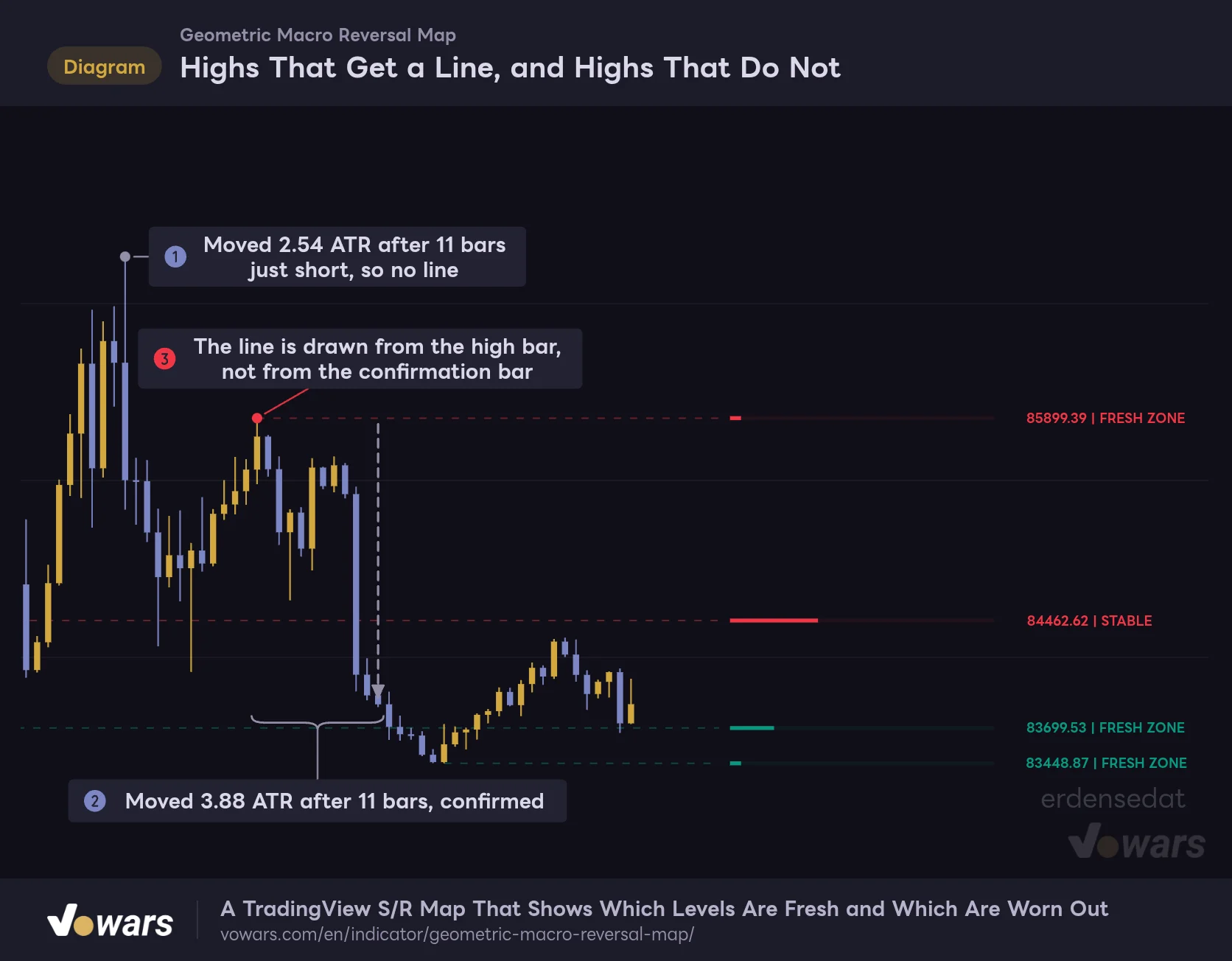
Highs That Get a Line, and Highs That Do Not
If the close is not at least 2.56x ATR away 11 bars after the high or low is confirmed, no line is kept.
Vowars DE ver.3.12.34
At the high in Figure ①, price had moved 2.54x ATR away 11 bars later. That falls just short of the 2.56x threshold, so no line was drawn. The high in Figure ②, on the other hand, was 3.88x ATR away after 11 bars, so it became a line. ATR is the average range of the market, so the more volatile things get, the bigger the move needed to count as “far enough away.”
The part to watch out for is Figure ③. Even though the line is only confirmed 11 bars later, it is drawn starting from the high bar itself. When you scroll back through history, it looks as if the line was already there the moment the high printed.
On historical charts, it can look like price “rejected right off the line drawn from that high,” but in real time the line did not exist yet at that point. The line only becomes visible 11 bars after the high. If you are backtesting a setup on past charts, always account for this lag.
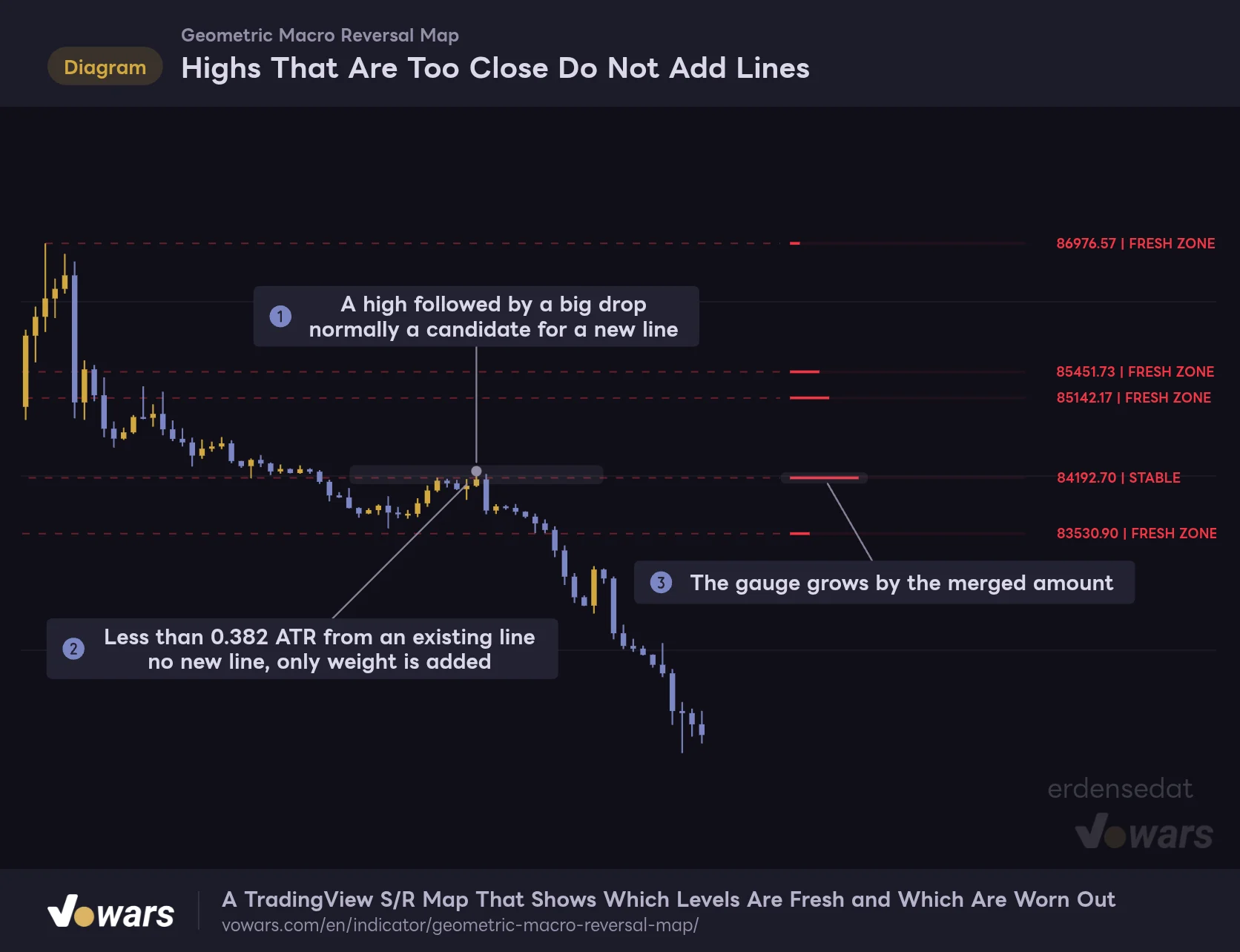
Highs That Are Too Close Do Not Add New Lines
If a new swing high or low forms within 0.382x ATR of an existing line, no new line is drawn. Instead, the nearby existing line gets extra weight.
Highs That Are Too Close Do Not Add Lines
Highs and lows that form within 0.382x ATR of an existing line are merged into it instead of becoming new lines.
Vowars DE ver.3.12.34
The high in Figure ① kicked off a drop of more than 7x ATR, so on paper it is a perfect candidate for a new line. But as Figure ② shows, there was already a line right below it, so no new line appeared. The only effect was extra weight on the gauge in Figure ③. This is why you do not end up with a stack of lines at nearly the same price.
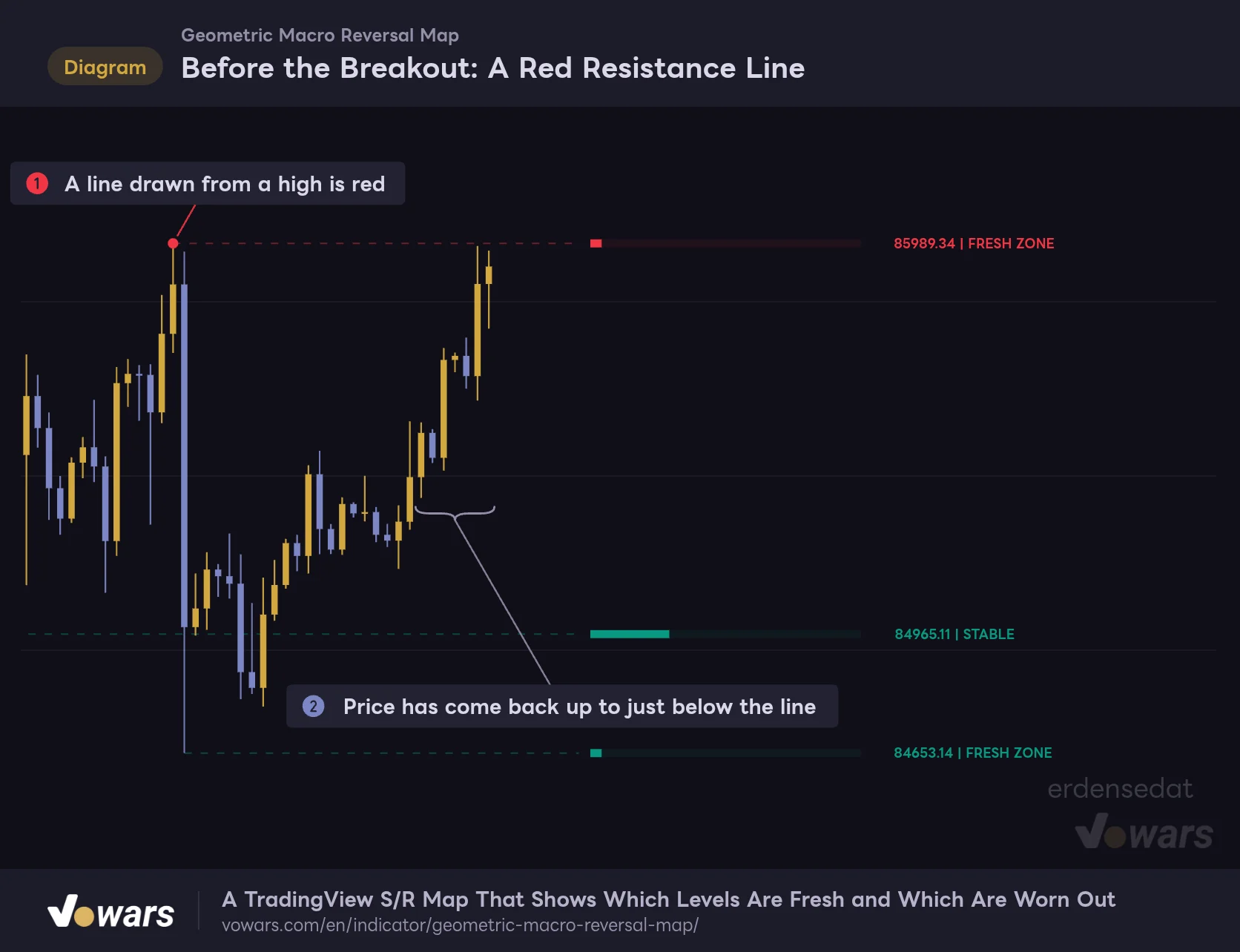
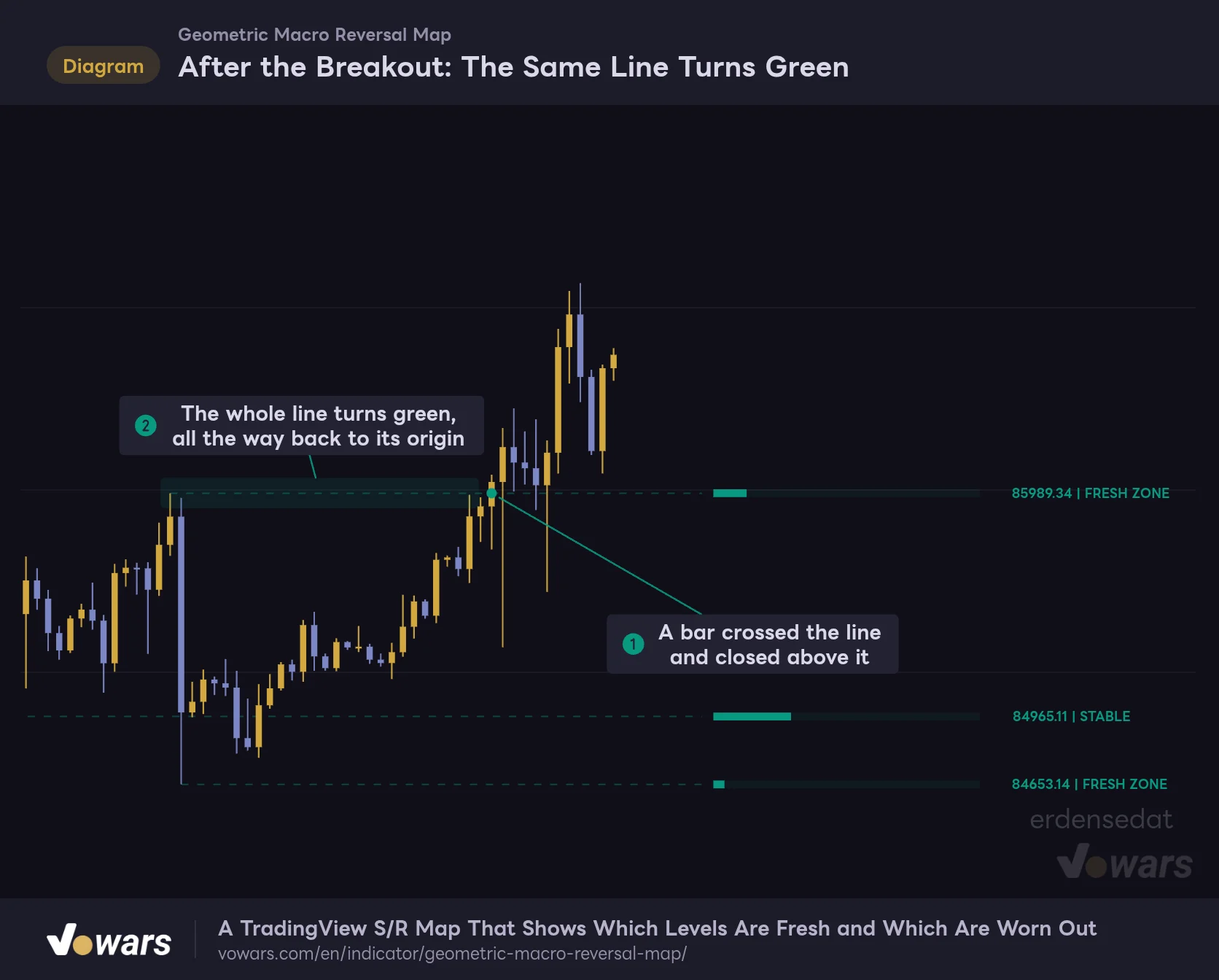
Red or Green Depends on the Close of the Last Bar That Crossed the Line
When a line is first created, a line from a high is red (resistance) and a line from a low is green (support). After that, every time a candle crosses the line, it flips to green if that bar closes above the line and to red if it closes below.
Before the Breakout: A Red Resistance Line
A line born from a high starts out as red resistance.
Vowars DE ver.3.12.34
After the Breakout: The Same Line Turns Green
If a bar that crossed the line closes above it, the line is treated as green support.
Vowars DE ver.3.12.34
The line that was red before the breakout in Figure ① turned green after the breakout, starting from the bar in Figure ①. The key takeaway is Figure ②: the color does not change on just one part of the line. The entire line, all the way back to its origin, is repainted to its current state. There is no record of which role it played in the past.
How the Gauge Fills Up, and How to Read LIQ VOID
The More Candles Cross a Line, the Longer the Gauge
The more bars cross a line, the more weight it accumulates, and the gauge extends to the right.
Vowars DE ver.3.12.34
How much the gauge grows depends not just on the number of bars crossing the line, but on how deeply they cut through it. The most weight is added when the line runs right through the middle of a bar’s range, and only a little when a wick barely grazes it. When price chops back and forth across a line in a range, like Figure ①, the gauge in Figure ② visibly extends.
What this tells you is that the longer the gauge, the more time price has spent at that level. Looking at the 15m and 30m charts, LIQ VOID lines usually ran right through the middle of the most recent consolidation.
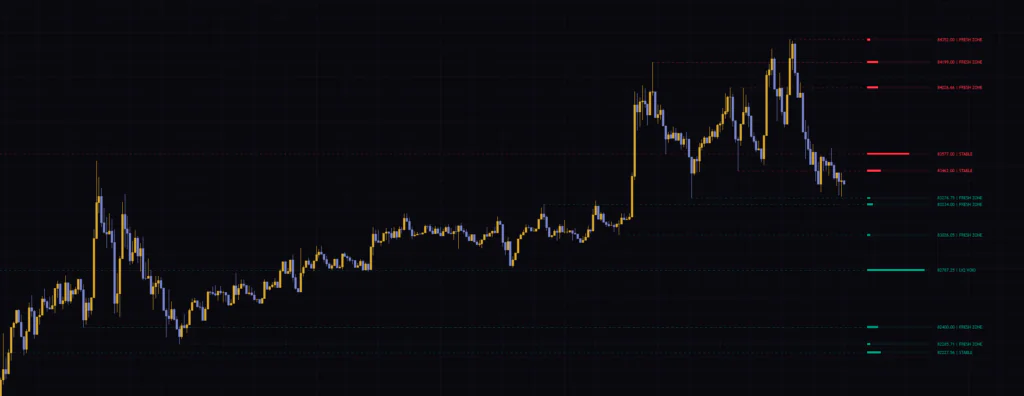
The script’s description defines LIQ VOID as a place where “resting orders have been fully absorbed and price moves through quickly.” However, this indicator only uses the candles’ high, low, and close plus ATR in its calculations. It does not look at the order book or volume. Mathematically, LIQ VOID simply means “a price zone that has been traded through many times.” Personally, reading it as “a heavily traded zone that price tends to come back to” made more sense.
Weight only gets added, never removed. Lines that have been around longer get more chances to be crossed, so FRESH ZONE tends to overlap with “new lines” and LIQ VOID with “old lines”. Do not treat a level as strong just because it says FRESH ZONE. Also check when that line formed and what kind of move it came from.
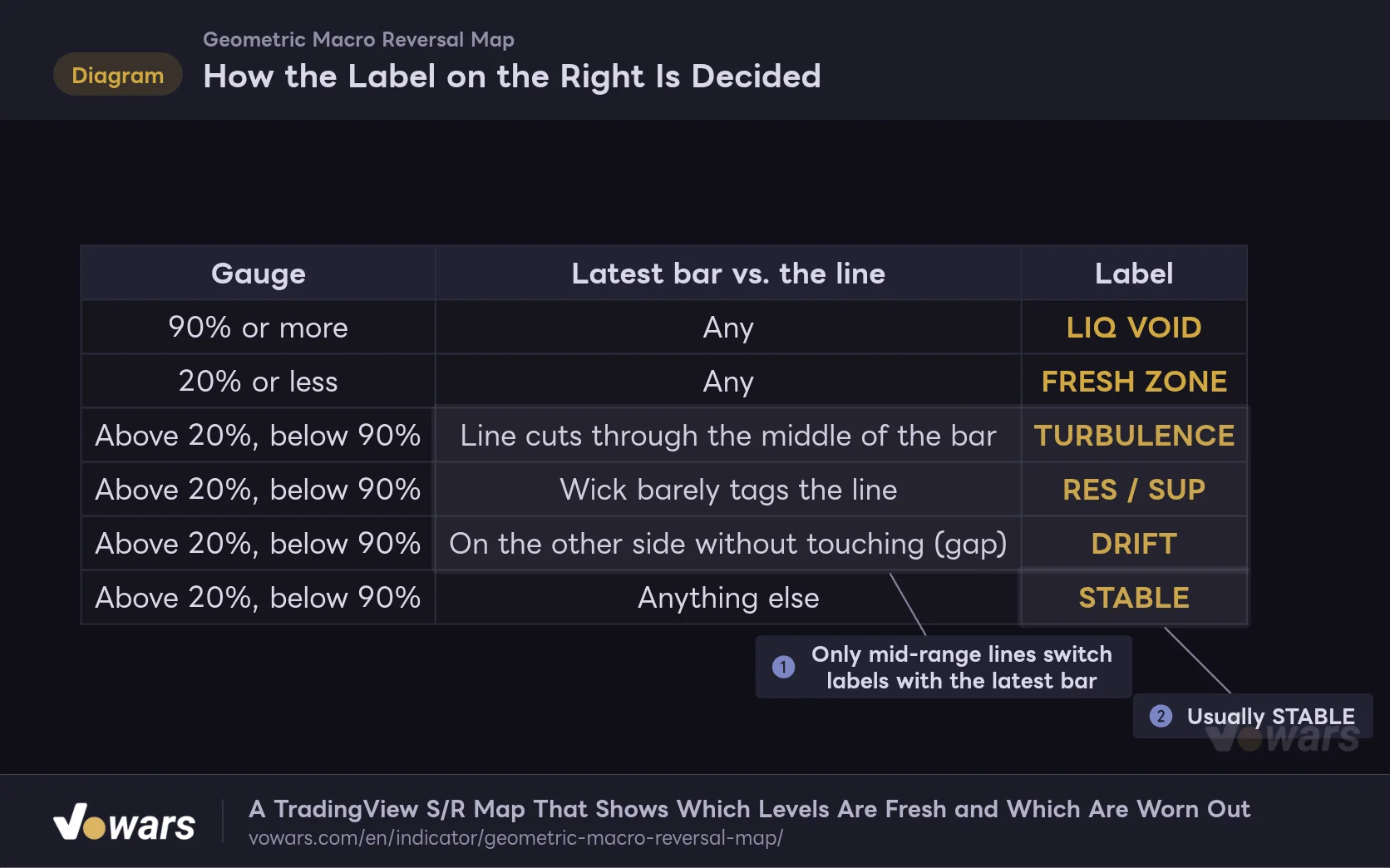
The Label Is Set by Gauge Fill and the Latest Bar
Labels other than FRESH ZONE and LIQ VOID only appear on lines with a gauge between 20% and 90%. Which one you get depends on how the latest candle is interacting with that line.
How the Label on the Right Is Decided
Gauge fill splits labels into three broad groups, and only mid-range lines change label based on how the latest bar touches them.
Vowars DE ver.3.12.34
The three rows in Figure ① switch every time a new bar prints. Most of the time you will see STABLE, as in Figure ②. When the line runs through the middle of the bar you get TURBULENCE, and when a wick just tags it you get RES or SUP. DRIFT shows up when price gaps to the other side of the line without any bar crossing it, so you will rarely see it on Bitcoin, which trades 24/7. It should show up more often on index futures and individual stocks, where gaps are common.
One more thing: “BOOM” is also one of the possible labels. However, if you trace the order of the logic, the color is updated right before that check on any bar that crosses the line, so the BOOM condition can never be met. Across the seven timeframes I checked, it never appeared once.
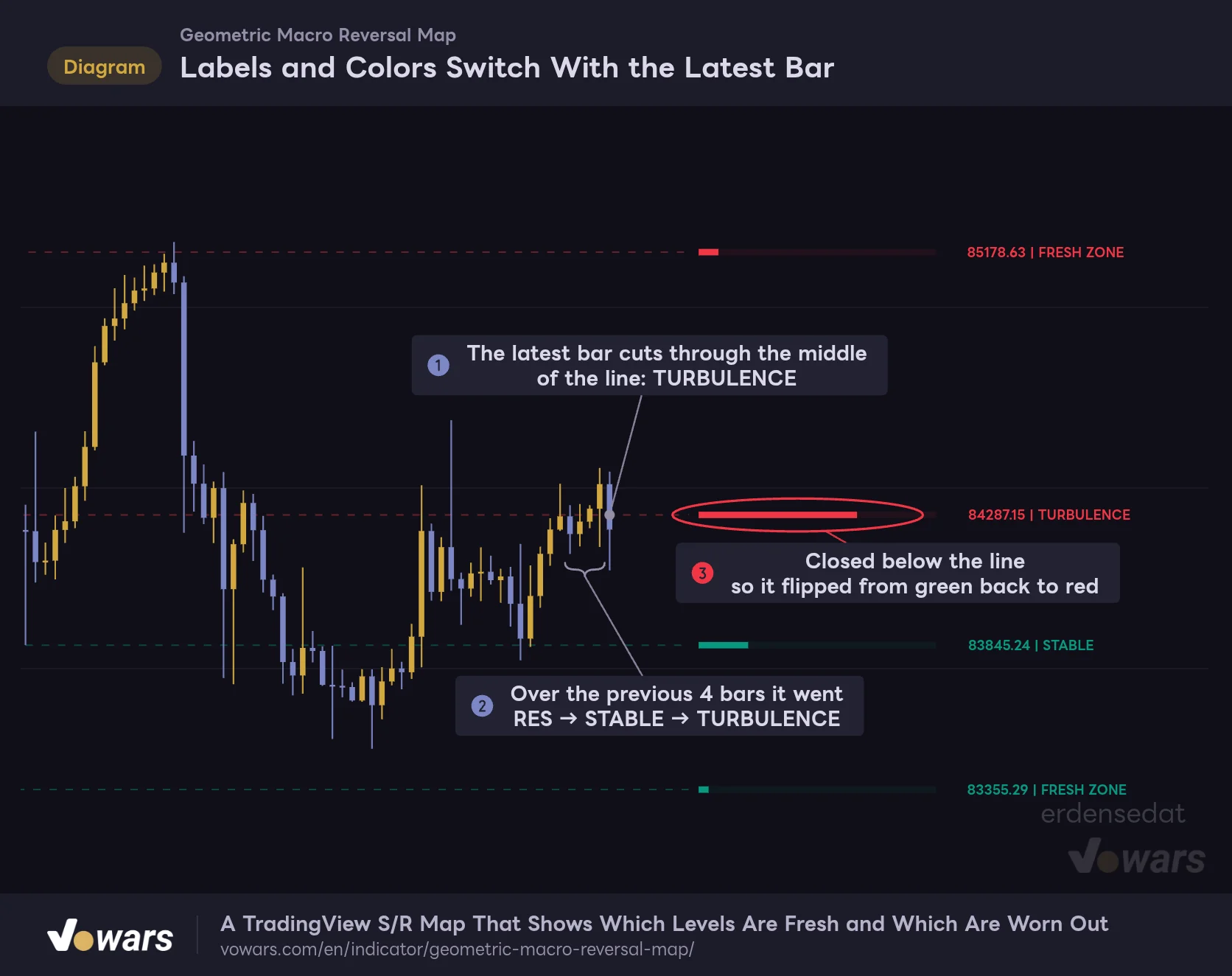
Labels and Colors Switch With the Latest Bar
For lines with a gauge between 20% and 90%, the label depends on how the latest candle touched the line.
Vowars DE ver.3.12.34
In an actual range, the label cycles through RES, STABLE, and TURBULENCE within a few bars, as in Figure ②, and even the color flips back and forth, as in Figure ③. The TURBULENCE in Figure ① also goes straight back to STABLE as soon as the next bar moves off the line.
TURBULENCE, RES, and SUP only tell you how the current bar is touching the line. They change on every bar close, so if you trade them as signals, you will get whipsawed. Stick to the gauge length and line color as your decision inputs.
How to Use It in Real Trades
The script’s description suggests using FRESH ZONE as the place to look for reversals and LIQ VOID as the take-profit target. Comparing it against the charts and breaking that approach down into steps, it looks like this.
1 Build Your Map on a Higher Timeframe
Start on the 4H or daily chart and check which lines sit above and below the current price. If you only use lower timeframes, the 15-line cap fills up with nearby lines and the major levels drop off the chart.
2 Wait for a Reaction at a FRESH ZONE Line
When price approaches a red FRESH ZONE, that is a candidate area to look for a short. A green FRESH ZONE is the opposite. That said, touching the line is not a reason to enter on its own. Wait for confirmation of the reversal, such as a wick rejection or a lower high on a lower timeframe, before getting in.
3 Target the LIQ VOID Line
Once you get a reaction, use the LIQ VOID line in the direction of the move as your take-profit guide. Since it is a heavily traded zone, it is easy to plan for price to revisit it.
4 Do Not Fade Clusters of Long-Gauge Lines
Areas where several long-gauge lines are packed into a tight range are places price has chopped through again and again. Trying to catch small reversals there usually means getting caught in the chop, so I sit those out.
The script’s description uses phrases like “high-probability entries” and “the most reliable take-profit targets,” but nothing in this indicator’s calculations backs that up. The lines and gauges are just a tally of past price action, so decide on your stop-loss before you use them.
How Much the Picture Changes Across Timeframes
I loaded it on seven timeframes and compared how each one looks.
| Timeframe | What the lines looked like | Best use |
|---|---|---|
| 5m | All 15 lines bunched into a narrow range, mostly FRESH ZONE | Spotting minor intraday levels |
| 15m / 30m | LIQ VOID tends to appear in the middle of ranges | Setting day trade targets |
| 1H / 4H | Levels from the past few days to weeks, with a reasonable number of lines | A map for day trading through swing trading |
| Daily / Weekly | Highs and lows from months or years ago remain; distant lines stay FRESH ZONE | Checking the big-picture levels |
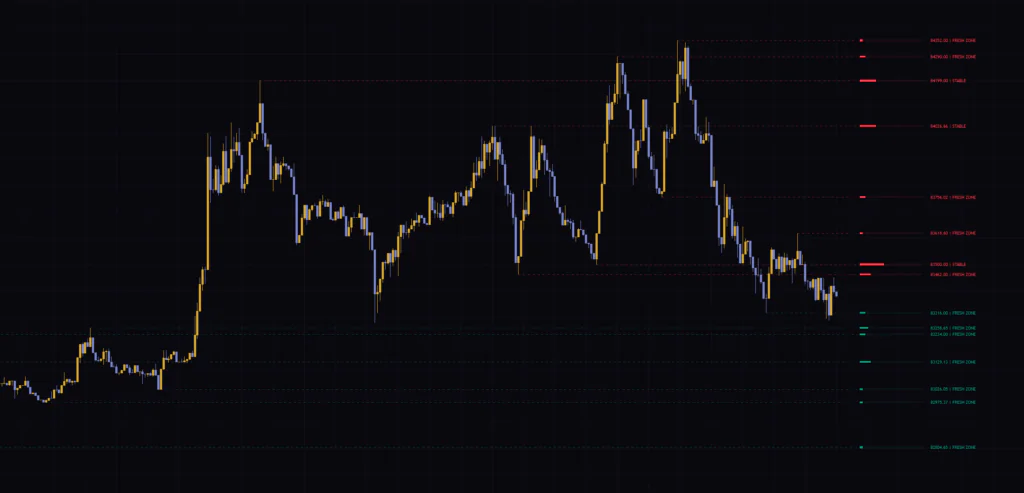
The 1H and 4H were the easiest to work with. On the 5m, the lines are so packed together that they all start to look equally important. On the weekly, meanwhile, lows from years ago remain as FRESH ZONE. Lines far from the current price simply have no chance to be crossed, so that is exactly what you would expect.
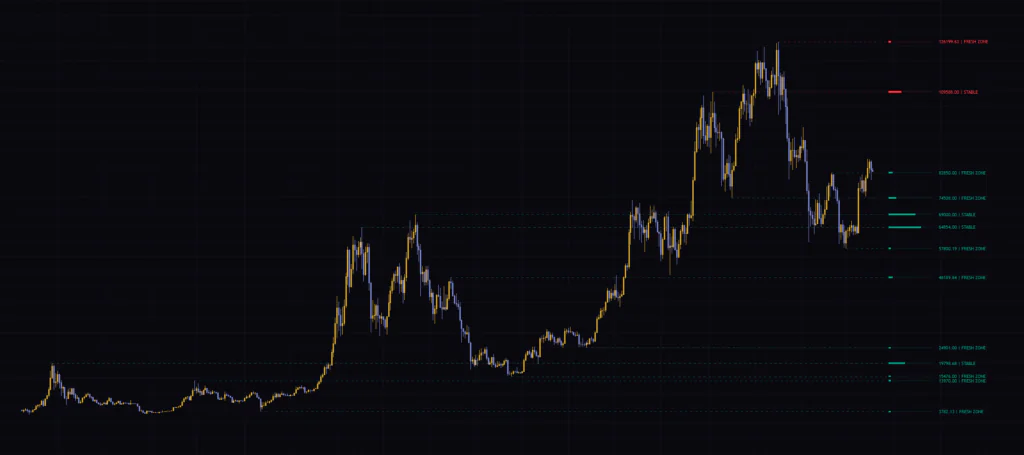
Markets It Works Well In, and Where It Struggles
The Map Shines When Price Keeps Rotating
In ranges, or in markets that grind along while swinging up and down, price keeps returning to past levels. This is where the plan of waiting for a reaction at a FRESH ZONE and targeting a return to LIQ VOID works as is. On assets that tend to consolidate after big moves, like Bitcoin and gold, the roles of the lines and gauges were clearly separated on the 1H and 4H.
In One-Way Trends, the Lines Get Left Behind
When a strong trend keeps going, price just keeps moving away from the lines, and you end up with nothing near the current price. New lines only appear when the trend pulls back and then takes off again from there. When the map is close to empty, do not force it looking for lines. Let a trend-following indicator do the work instead.
Right After Volatility Spikes
Both the rule for selecting lines and the distance for merging nearby ones are based on ATR. When a run of large bars inflates ATR, the requirement for a new line temporarily gets stricter, and the merge range widens. That is why you see fewer new lines right after a dump or a pump. It is not a bug.
Settings and How to Tune Them
The settings panel has three numeric inputs that control how lines are selected, plus a few display options.
| Setting | Default | Suggested | Effect |
|---|---|---|---|
| Inertia Threshold (ATR Mult) | 2.56 | 2.0–4.0 (adjust to your timeframe) | How many ATRs away the close must be when a high or low is confirmed for it to become a line. Higher values mean fewer lines, leaving only major levels |
| Temporal Lookback (Bars) | 11 | 11 (15–21 if you want only the major peaks and troughs on the daily) | The number of bars compared on each side to confirm a high or low (minimum 5). It is also the delay before a line appears, and a shorter value can actually reduce the number of lines |
| Phi Sensitivity Coefficient | 0.382 | 0.382 (0.6–1.0 on the 5m, where lines get crowded) | The distance (as a multiple of ATR) within which a new high or low is merged into an existing line. Higher values spread lines further apart and make merged lines’ gauges grow faster |
| Interface Theme | Classic | Classic | Line colors. Classic is red and green, Neon is magenta and cyan, Monochrome is two shades of gray |
| Label Scaling | small | small | Size of the labels on the right (tiny / small / normal) |
| Show VWAP | Off | On only when needed | Shows a VWAP that resets at the start of each new day |
| VWAP Color | Blue | Your preference | Color of the VWAP line |
Changing Inertia Threshold Has a Big Impact on Line Count
The setting that affects the number of lines most is Inertia Threshold (ATR Mult). The higher you set it, the more it narrows things down to the origins of big moves.
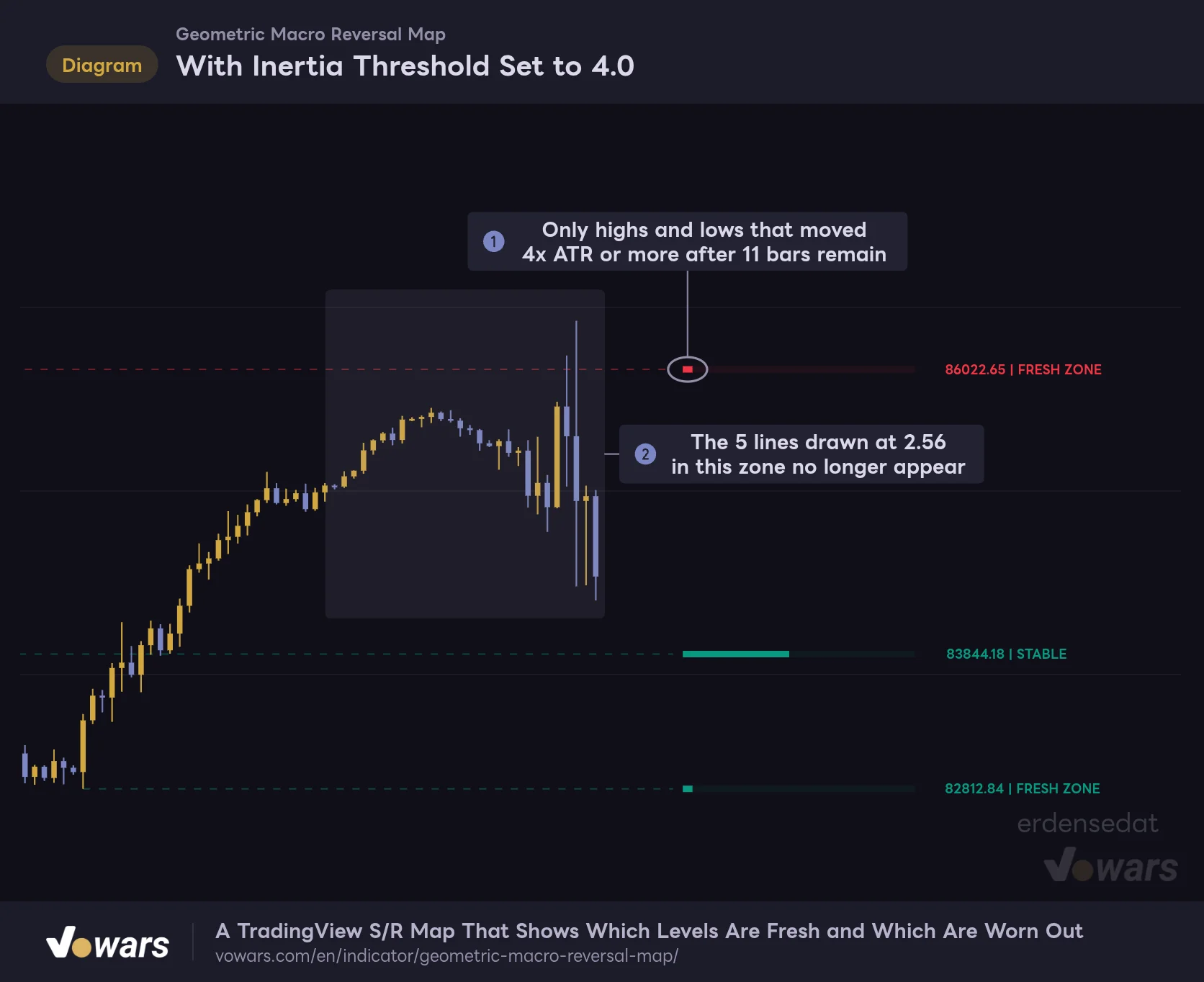
With Inertia Threshold Set to 4.0
Same candles as the first figure, with only Inertia Threshold (ATR Mult) raised to 4.0.
Vowars DE ver.3.12.34
Raising it to 4.0 on the same price action as the first figure cut the lines from eight to three. As in Figure ①, only the origins of sharp moves remain, and the lines that sat in the price zone in Figure ② no longer appear. If you only want the major levels for swing trading on the daily, try 3.5–4.0. If you want to pick up nearby levels on the 5m or 15m, start around 1.8–2.2 and you will quickly see the difference.
A Shorter Temporal Lookback Can Mean Fewer Lines
Temporal Lookback (Bars) is the number of bars compared on each side to confirm a high or low, and it is also the delay before a line appears. Since a shorter value makes lines show up sooner, you would expect it to produce more lines.
But when I set it to 5 on the same price action, the line count actually dropped from eight to five. The condition changes from “2.56x ATR away after 11 bars” to “2.56x ATR away after 5 bars,” so the high or low gets judged before the move has fully played out. If you want more lines, lowering Inertia Threshold (ATR Mult) works better than lowering Temporal Lookback (Bars). If you only want the bigger peaks and troughs on the daily, raising it to 15–21 is also an option.
Phi Sensitivity Controls Line Spacing
Phi Sensitivity Coefficient is the distance within which a new high or low gets merged into an existing line. Raising it spreads lines further apart, and the merged weight makes existing lines’ gauges grow faster. If the lines feel too cramped on the 5m, bumping it up to 0.6–1.0 cleans up the chart.
Note that the script’s description implies this value also affects the weight calculation, but in practice it only affects the merge distance. It is not used for the weight added when candles cross a line.
Display and VWAP Settings
Interface Theme has three options: Classic, Neon, and Monochrome. Monochrome replaces red and green with two shades of gray, which makes it harder to tell resistance from support. If you want to read each line’s role by color, stick with Classic or Neon.
Turning on Show VWAP adds a single VWAP line that resets at the start of each new day. It runs independently from the level map, so you only need it if you also want to track the average intraday price.
Best Pairing: Fisher Transform
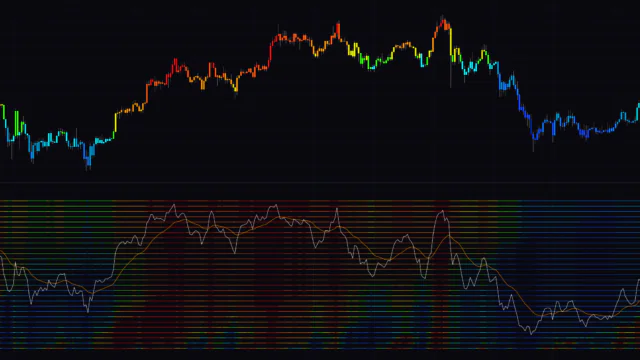
Since the idea is to wait for reversals at a FRESH ZONE, it pairs well with an oscillator that flags overextension and turns in momentum early. Here I combined it with TradingView’s built-in Fisher Transform (Length 9).
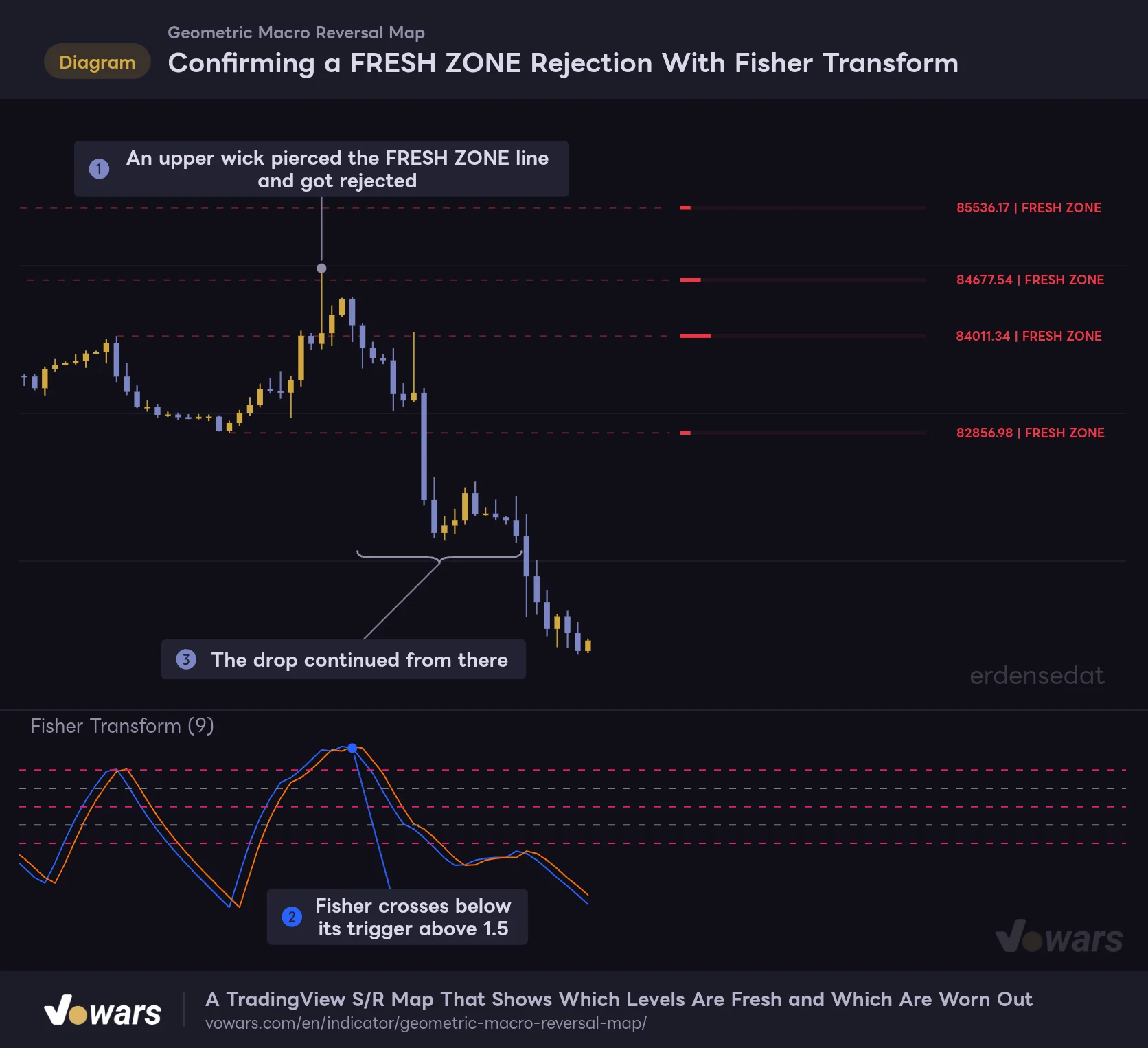
Confirming a FRESH ZONE Rejection With Fisher Transform
Instead of acting on the touch alone, this pairing uses the Fisher Transform in the lower pane to confirm the momentum turn.
Vowars DE ver.3.12.34
In Figure ①, an upper wick pierces the red FRESH ZONE and gets rejected, and in Figure ②, the Fisher line crosses below its trigger from high up, above 1.5. If you wait for both the touch of the line and the momentum turn before entering, you have a real reason to be in a move like the drop in Figure ③. The upside compared with fading the line on its own is one more piece of confluence for your entry.
It also looks like a good match with the following indicators.
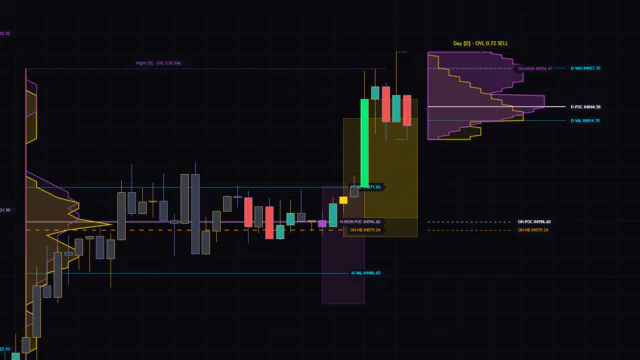
- Volume Profile (Visible Range). Checking whether a LIQ VOID line lines up with a high-volume area backs up the “heavily traded zone” reading
- ADX. In strong trends with a high ADX reading, lines get broken one after another, so it helps you decide when to hold off on fading a FRESH ZONE
- Bollinger Band Width (BBW). If the bands are squeezing while price is boxed in between long-gauge lines, you can get ready for a breakout in either direction
Where It Helps, and Where It Can Mislead
Where the map pulls its weight
- You can see at a glance how much each level has been used, just from the gauge length
- Lines are selected based on ATR, so the same settings make a reasonable starting point across assets and timeframes with different volatility
- Nearby lines get merged, so the chart does not turn into a wall of lines
- Just three numeric inputs let you choose between major levels only and picking up finer ones
Where it is easy to misread
- Lines appear 11 bars late, yet are drawn starting from the high bar
- Gauges never shrink, so older lines are more likely to become LIQ VOID
- The in-between labels and line colors can change on every bar
- There is a hard cap of 15 lines, and the ATR length cannot be changed
Behavior to Know Before You Use It
Historical View vs. Real Time
Lines wait for the swing high or low to be confirmed, so once a line is drawn, its price never moves. However, the chart history will not look the same as what you actually saw at the time, for three reasons: the line is drawn back to its origin 11 bars earlier, the color and label of the entire line repaint to the latest state, and old lines are deleted once a 16th one forms.
On the live, unconfirmed bar, the gauge, label, and color move with price. They settle once the bar closes, so base your decisions on confirmed bars. If you want to see what the chart looked like at a specific point in the past, you can reproduce it by stepping forward one bar at a time with TradingView’s Bar Replay. Keep in mind that how far back you can go depends on your plan and the timeframe.
No Built-In Alerts
This indicator has no alert conditions. If you want to be notified when price reaches a certain line, one workaround is to draw a TradingView horizontal line at the same price and set an alert on that horizontal line. You cannot get notified when a line’s color or status changes, so you will need to check that yourself.
Use It as a “Track Record” for Price Levels
 Image
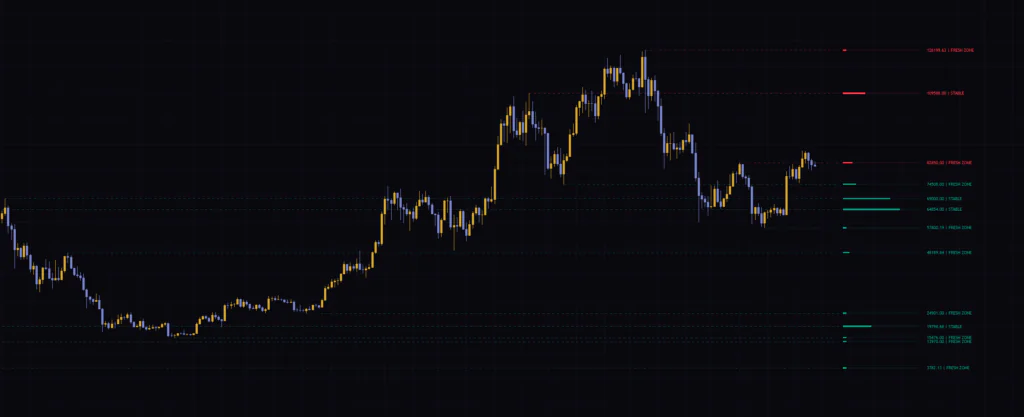
ImageWhat I found most useful about “Geometric Macro Reversal Map” is how it lays out each level’s history in a simple form: the length of a gauge. Has this line never been tested, or has it been fought over again and again? That is easy to miss when you are just drawing horizontal lines by hand.
On the other hand, the labels and colors are heavily driven by the latest bar, and gauges tend to grow longer on older lines. Rather than trading the display as signals, use it on the 4H or 1H as the groundwork for deciding where to wait for a reaction and where to aim. That is where this indicator really earns its spot on the chart. Put it next to the oscillators and volume tools you already use, and read it like a track record for each price level.