
Spot the One Oversized Candle, Then Ride the Trend All the Way
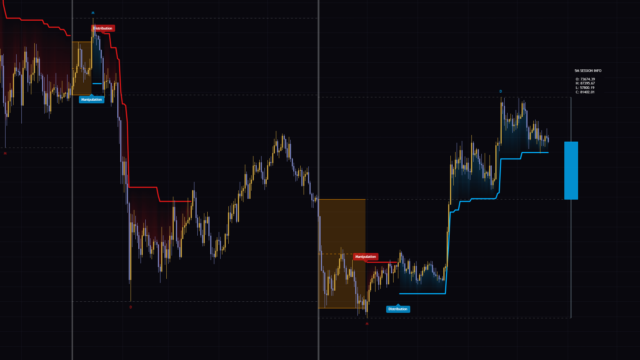
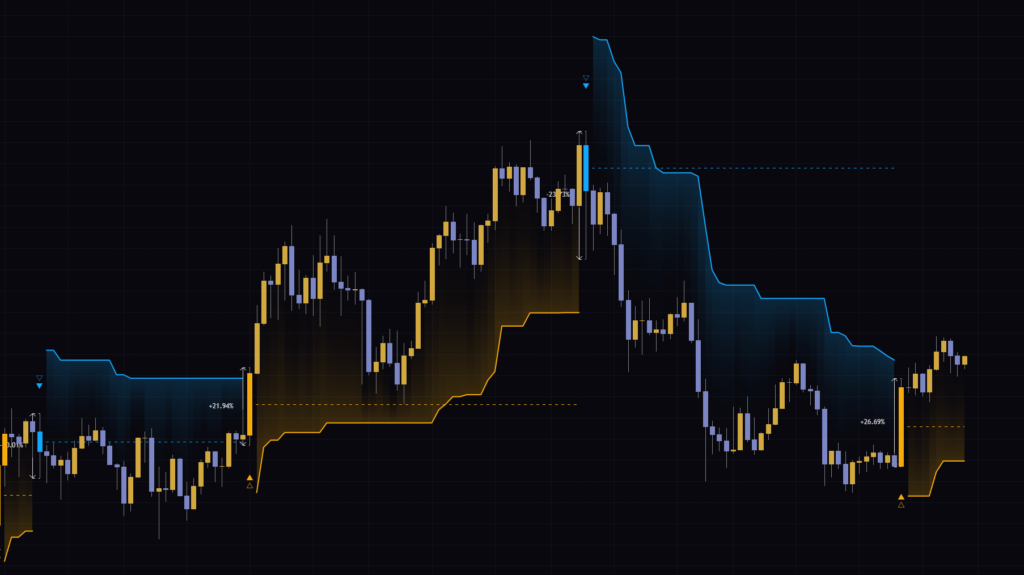
Every now and then you’ll see a single candle on the chart that’s clearly longer than everything around it, like a news-driven bar that rips in one shot or the bar that finally breaks out of a range. “Auto-ATR Volatility Spike & Trend Tracker” automatically detects that one outlier candle and starts tracking the trend from there.
In short, when a candle’s body exceeds 2x ATR, it launches a trailing stop in that direction and treats the trend as alive until price closes beyond that line. Because it gives you both an entry reference and an exit reference in one tool, I found it a particularly good fit for traders who manage breakouts and trend-following trades by hand.
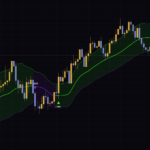
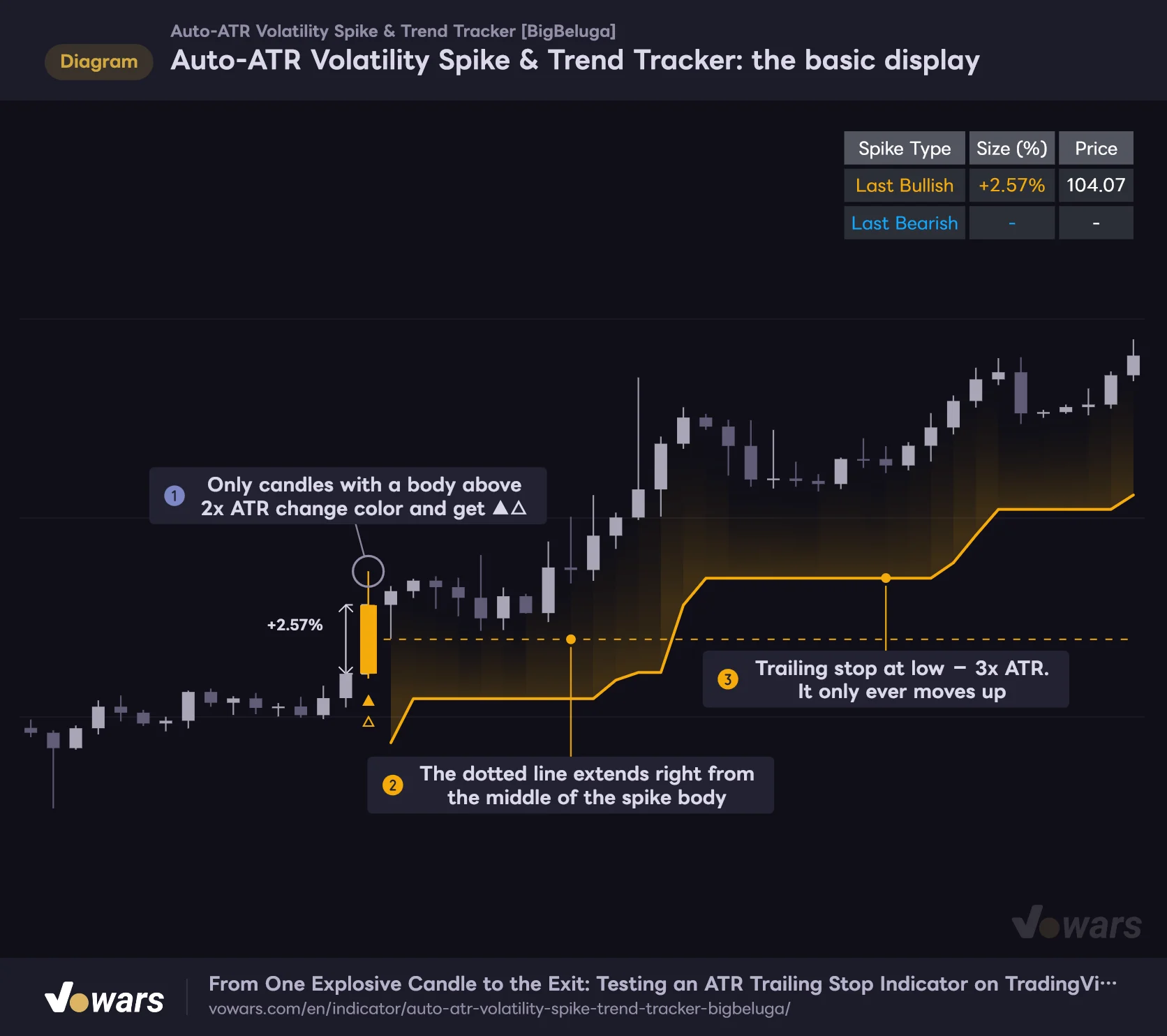
Auto-ATR Volatility Spike & Trend Tracker: the basic display
Once a candle body exceeds 2x ATR, the trailing stop and the midline start from that bar.
Vowars DE ver.3.12.35
I checked it on seven timeframes, from the 5-minute to the weekly BTCUSDT chart, and the way it plots is the same on every one of them. What changes is how big a candle has to be to count as a spike, and how long each trend gets tracked. I’ll put the actual numbers side by side later in the article.
It only reacts when a single candle’s body exceeds 2x ATR. By default, wick length is ignored.
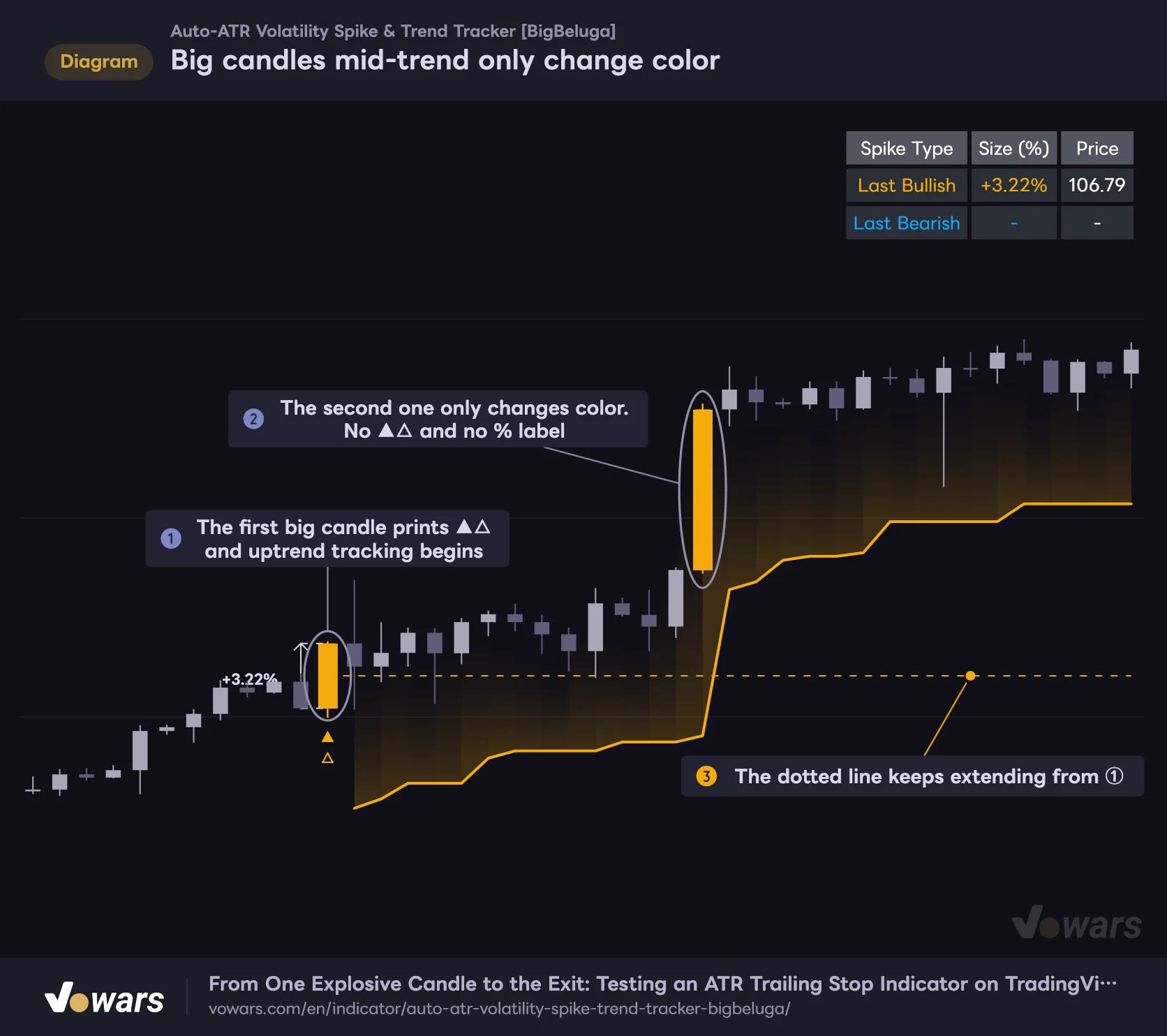
While it’s already tracking a trend in one direction, a new big candle in that same direction won’t print a new ▲△. Only the candle color changes.
A trend only ends in one of two ways: price closes beyond the trailing stop, or a spike prints in the opposite direction.
What Shows Up on the Chart and What Each Element Means
With the default settings, six elements appear on the chart. It looks busy at first, but each one has a very clear job.
| Element | Where / When | Meaning |
|---|---|---|
| Candle color (orange / light blue) | On the qualifying candle itself | A large bullish or bearish candle whose body exceeds 2x ATR |
| ▲△ / ▽▼ | Below (above) the spike candle | Marks the candle where trend tracking started |
| Arrow line and % value | One bar to the left of the spike candle | The size of that candle’s body (% change from the open) |
| Dotted line | Extends right from the spike candle | Exactly halfway between the spike candle’s open and close |
| Trailing stop and gradient fill | From the next bar on | Exit reference placed 3x ATR from the low (high) |
| Top-right table | Always visible | Size and closing price of the latest bullish and bearish spikes |
The first thing you’ll notice is the candle color. Qualifying bullish candles get repainted orange , and bearish ones light blue . More on this later, but the color is applied to every qualifying candle regardless of whether a trend is already being tracked. The ▲△ marker only appears on candles that start a new trend.
The one thing that threw me off at first was where the % value and the double-headed arrow are drawn. They don’t sit directly on the spike candle; they’re drawn one bar to the left. The arrow is the same length as the spike candle’s body, and I assume it’s shifted left so it doesn’t overlap the candle itself. If you’re ever unsure which candle a number belongs to, it’s the colored candle immediately to its right.
The dotted line (the midline) starts at the average of the spike candle’s open and close and extends to the right. It gets extended bar by bar while the trend is being tracked, and stops growing once tracking ends or the next spike prints.
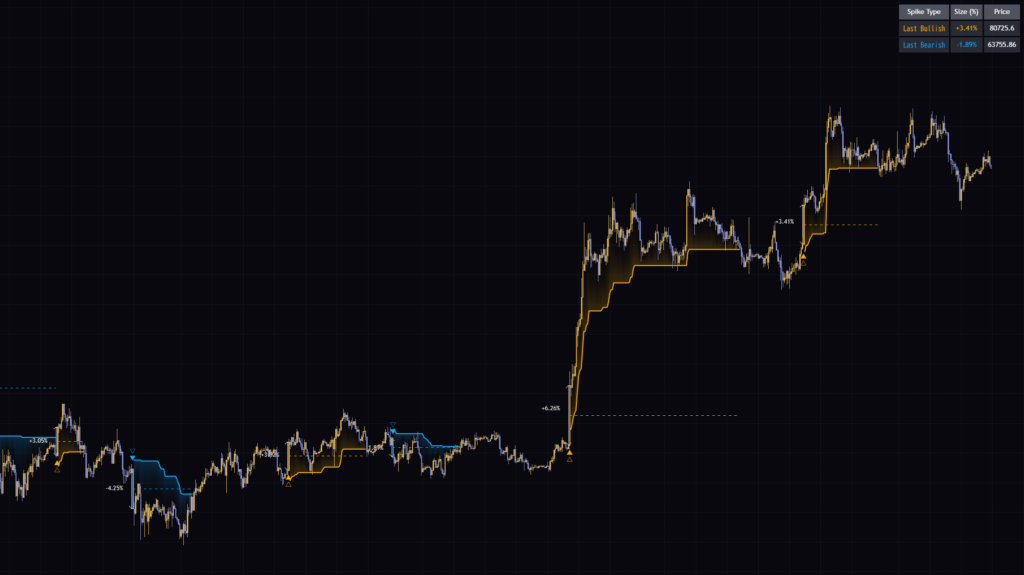
Below the trailing stop (above it in a downtrend) there’s a gradient fill that gets darker the closer it is to the line. Since the distance between price and the line shows up as the width of that fill, you can eyeball how much room you have left at any moment, which is a nice touch.
The top-right table has two rows, Last Bullish and Last Bearish, showing the % change and closing price of the most recent candle that got a ▲△ (▽▼). That’s the close, so it doesn’t mean you could have actually been filled at that price.
What Actually Counts as a “Spike”?
The logic is simple. The default Detection Mode is “Auto ATR”, and a candle becomes a spike when it meets both of the following conditions.
- The body length (the difference between open and close) exceeds ATR (14) x 2
- A bullish candle is an upside spike; a bearish candle is a downside spike
ATR (Average True Range) measures roughly how much price has been moving per bar recently. Because ATR is the yardstick, the bar for a spike automatically goes up during volatile sessions or on volatile assets, and comes down when the market is quiet. That’s why you don’t have to keep tweaking the settings even on something like Bitcoin, where volatility swings a lot depending on the session.
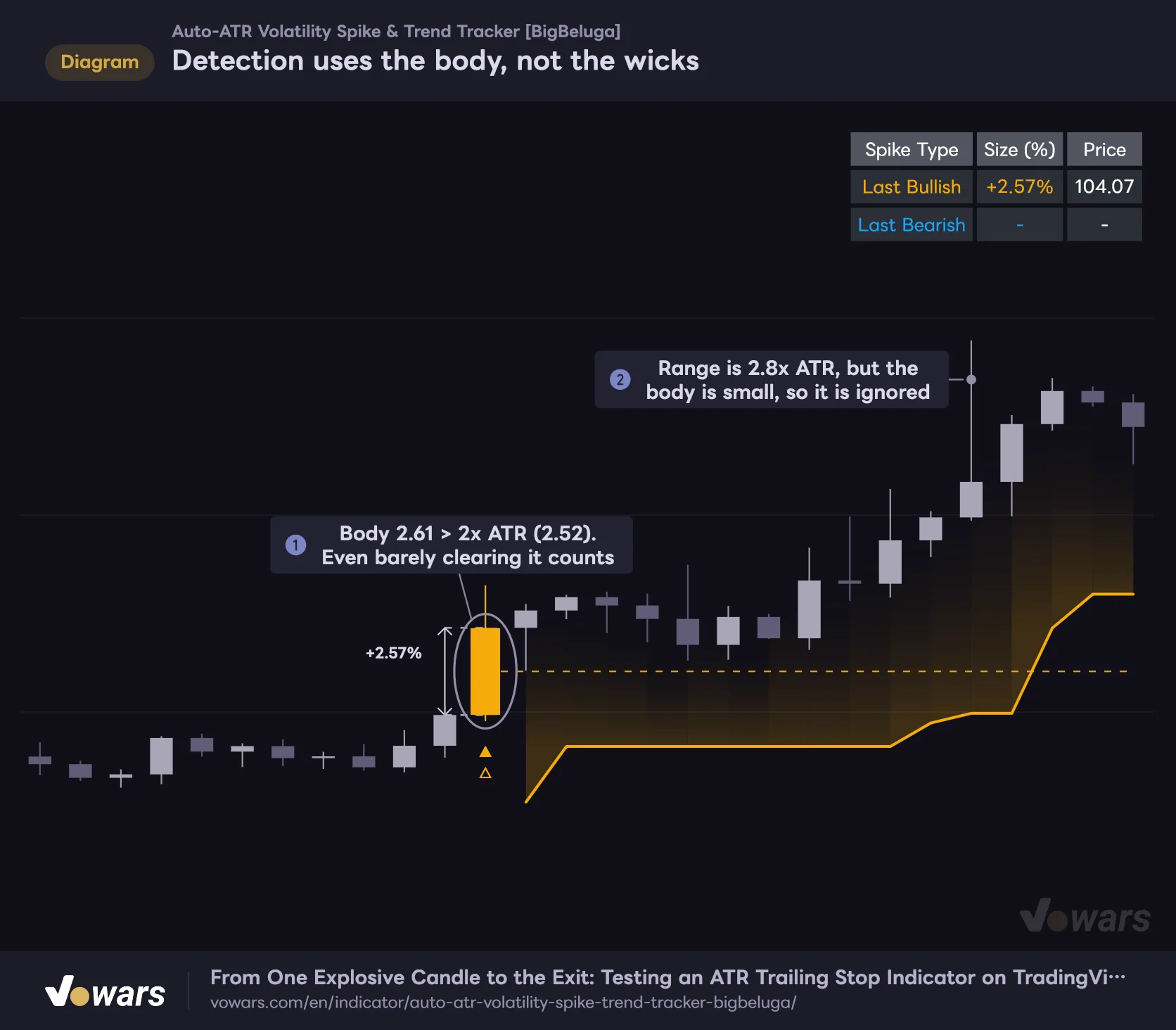
Detection uses the body, not the wicks
By default, only the body length (open to close) is compared against 2x ATR.
Vowars DE ver.3.12.35
As Figure ① shows, it fires even if the body only barely clears 2x ATR. On the other hand, a candle like Figure ②, with a long upper wick and a big range but a small body, is ignored by default. Since it doesn’t pick up candles that just got whipsawed by wicks, you get fewer fakeouts. The trade-off is that a long-wick rejection candle won’t be treated as a reversal signal.
One more detail: ATR includes the current candle’s own range. When an extreme candle prints, ATR gets pulled up along with it, so the 2x threshold works out a bit stricter than the number suggests.
Turning On Calculate From Wicks (High/Low)
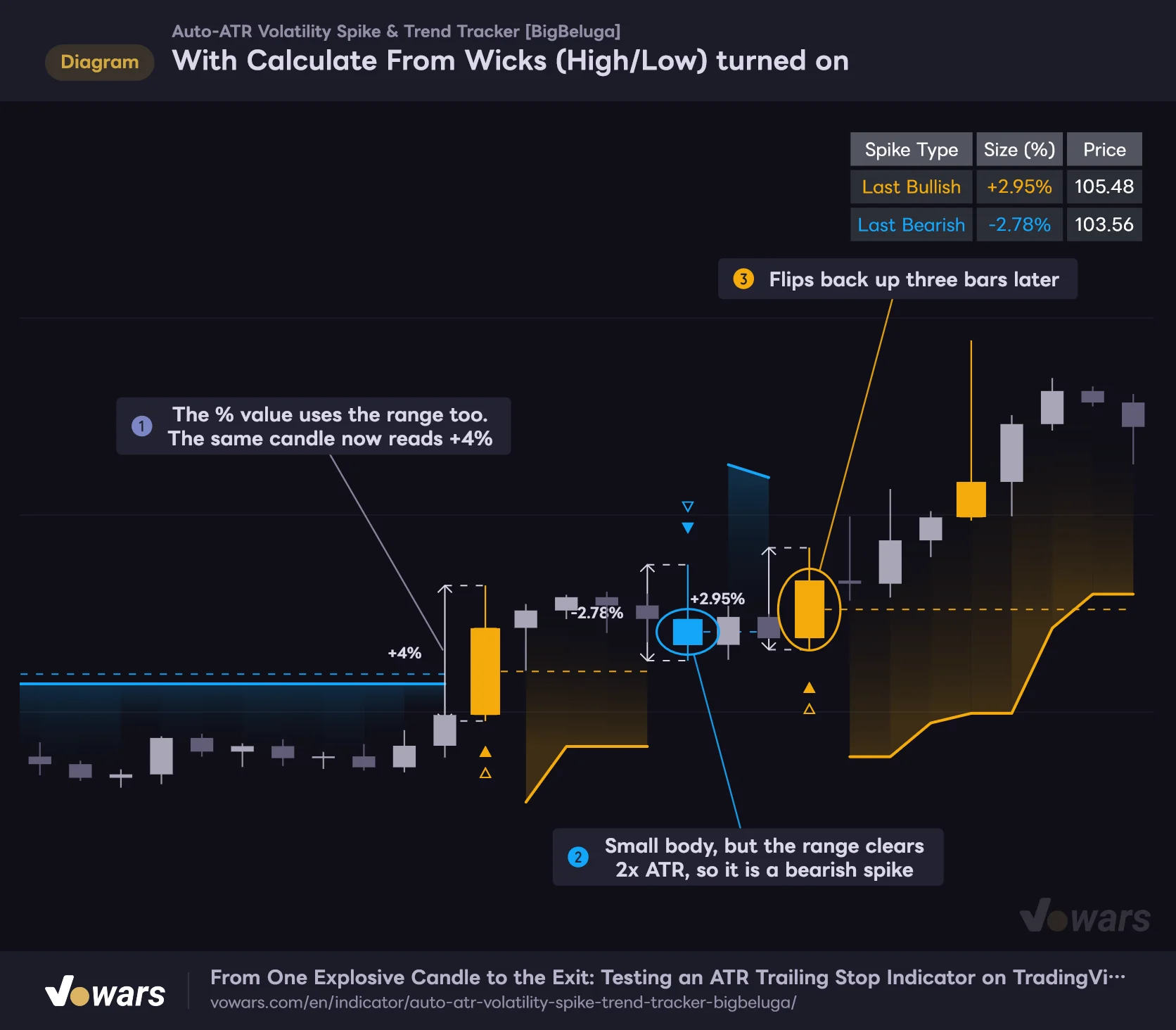
When you turn on Calculate From Wicks (High/Low), the length used for detection switches from the body to the full high-to-low range. The % value also switches to the range (high minus low, divided by the low), so the same candle shows a bigger number.
With Calculate From Wicks (High/Low) turned on
Both detection and the % value switch from the body to the full high-to-low range.
Vowars DE ver.3.12.35
Figure ② is a candle with a small body that became a bearish spike because its range exceeded 2x ATR. Right after that, at Figure ③, it flips back to bullish, so you can see the direction changes more often. It’s the setting to use if you want long-wick candles to trigger too, but keep in mind it gets noisier than the default.
How It Differs From Fixed % Mode
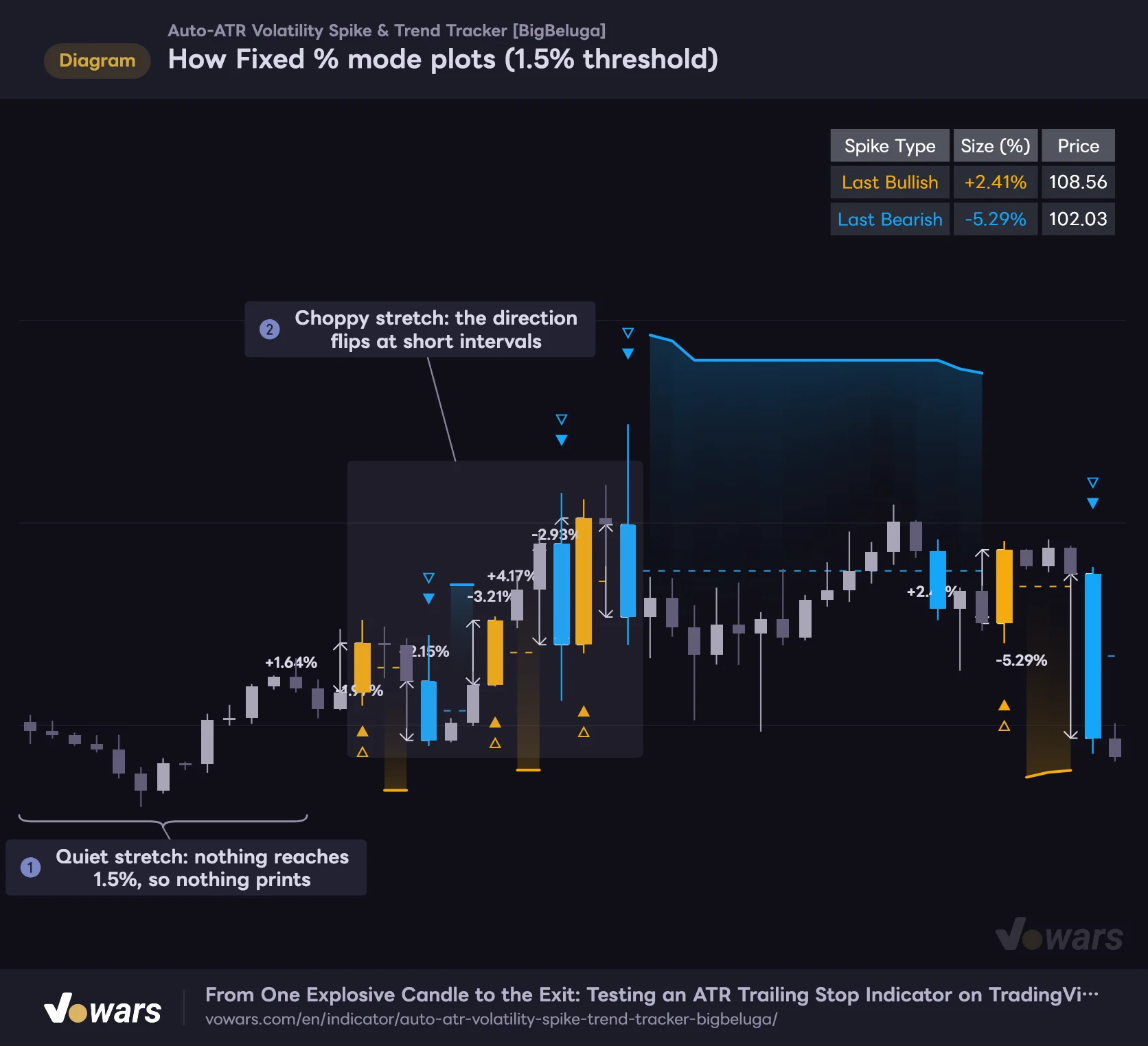
Set Detection Mode to “Fixed %” and ATR is no longer used; a candle qualifies if its % change is at least Fixed Spike Threshold (%) (default 1.0). Because the threshold doesn’t adapt to volatility, the same % barely triggers in quiet sessions and fires one after another in choppy, volatile ones.
How Fixed % mode plots (1.5% threshold)
Fixed % flags every candle above the set %, regardless of how volatile the market is.
Vowars DE ver.3.12.35
| Comparison | Auto ATR (default) | Fixed % |
|---|---|---|
| Threshold | ATR × ATR Multiplier | A fixed % |
| Adapts to volatility | Yes, automatically | No |
| Best for | Keeping the same feel across assets and timeframes | Hard-coding a threshold for one specific asset and timeframe |
| Watch out for | The threshold value changes bar by bar | You need to revisit the % whenever you change timeframe |
If you go with Fixed %, the quickest way is to first check the % of several candles that lit up in Auto ATR mode using the table or labels, then set your threshold a little below that. If you leave it at the default 1.0 on the Bitcoin 5-minute chart, you can easily go long stretches with nothing printing at all.
From Signal to Exit: How a Trend Is Tracked
The most important thing to understand about “Auto-ATR Volatility Spike & Trend Tracker” is how trend tracking starts and how it ends. Under the hood, it switches between three states: tracking an uptrend, tracking a downtrend, and neutral.
1 A spike candle starts the tracking
When an upside spike prints, the starting point of the trailing stop is placed 3x ATR below that candle’s low. The line itself only gets drawn from the next bar; the spike candle doesn’t get a line. From then on, it calculates “low − 3x ATR” on every bar and only moves the line up when the new value is higher than the previous one. It never moves down, so as long as the uptrend continues, the line ratchets higher in steps.
2 Same-direction spikes only change the candle color
Big candles mid-trend only change color
While an uptrend is being tracked, new big bullish candles do not add a ▲△ or a new dotted line.
Vowars DE ver.3.12.35
If another big bullish candle prints while an uptrend is being tracked, no new ▲△ is added. The candle in Figure ② has a body of roughly 3x ATR, but all that happens is the color change. The dotted line and the table values stay anchored to the first spike candle.
Thanks to this “don’t re-count the same direction” logic, you don’t get a flood of markers in the middle of a strong trend, and the chart stays clean. On the flip side, you can’t use the second big candle as a new anchor to redraw the midline. If you want to gauge how momentum is changing mid-trend, you’ll need to compare the spacing and size of the colored candles yourself.
3 An opposite spike flips the direction immediately
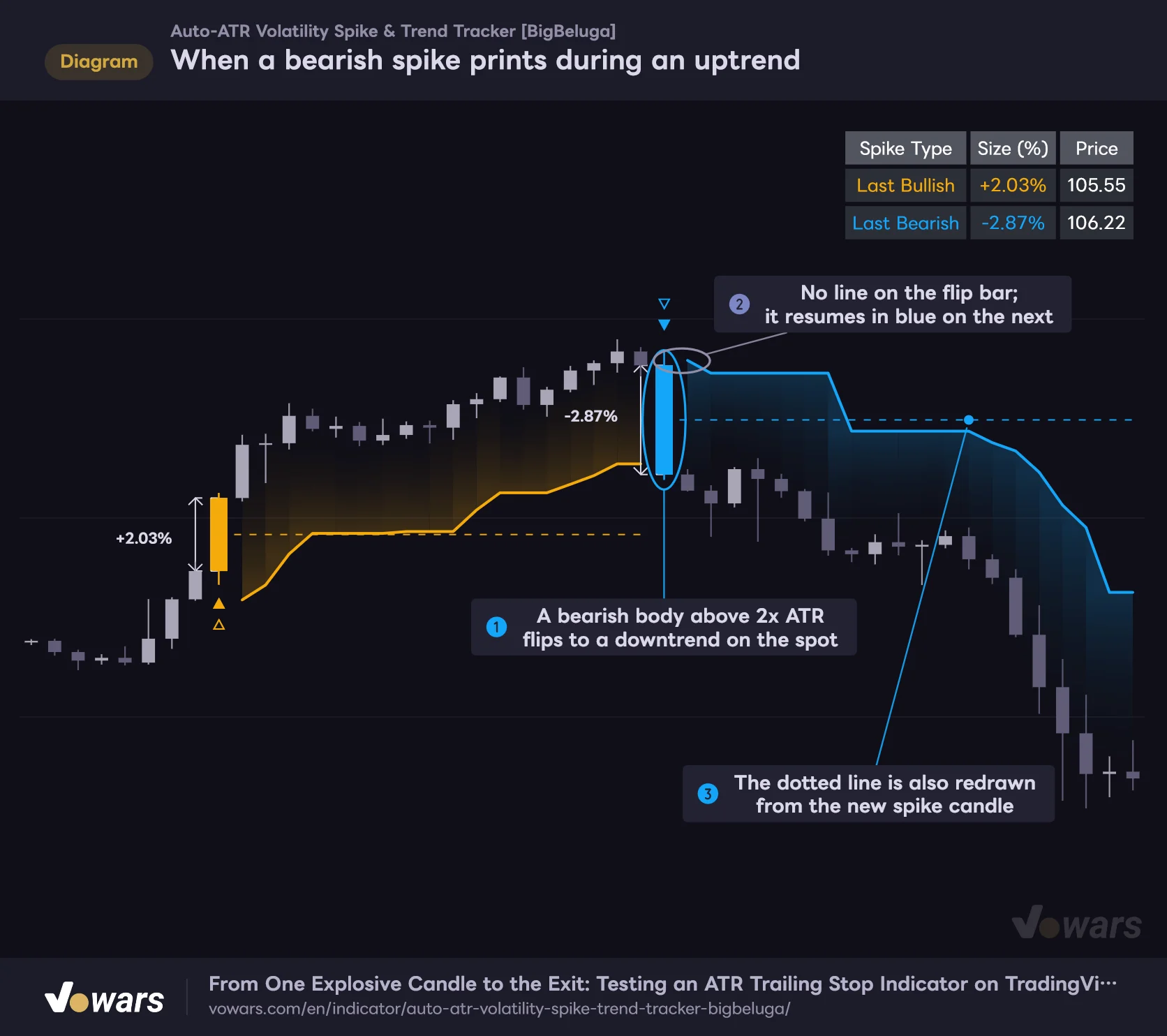
When a bearish spike prints during an uptrend
An opposite spike flips the direction on that bar, without waiting for the trailing stop to be hit.
Vowars DE ver.3.12.35
Even while tracking an uptrend, if a bearish candle with a body above 2x ATR prints, it switches to tracking a downtrend on that very bar. It doesn’t wait for the trailing stop to be broken. As shown in Figure ②, no line is drawn on the bar where it flips, and the line resumes in light blue from the next bar.
The description says the tracking logic “prevents counter-trend false entries or premature reversals.” In practice, the only thing it blocks is duplicate spikes in the same direction, and an opposite spike flips the direction in a single bar. Keep in mind that in a choppy market where big bullish and bearish candles alternate, the tracked direction will flip every time.
4 A close beyond the trailing stop ends the trend
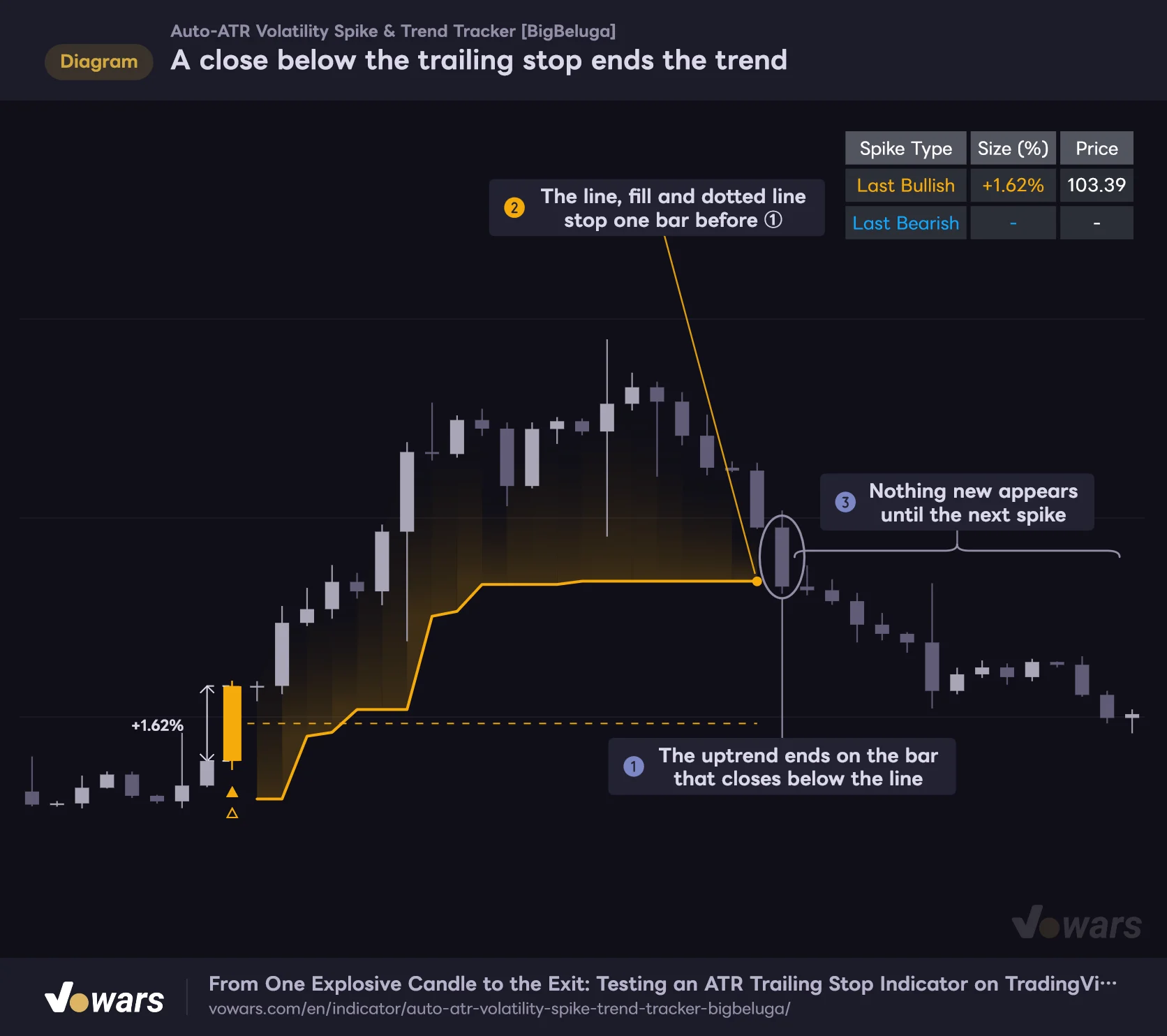
A close below the trailing stop ends the trend
A wick touching the line is not enough; the display stops on the bar that closes beyond the line.
Vowars DE ver.3.12.35
The other way a trend ends is when a bar closes beyond the trailing stop. A wick briefly tagging the line isn’t enough. Once tracking ends on the candle in Figure ①, the trailing stop, the fill and the midline extension all stop together, and nothing new appears until the next spike.
The check uses the close of whatever timeframe you’re viewing. On a daily chart it’s the daily close; on a 1H chart it’s the 1H close.
How Its Personality Changes Across 7 Timeframes
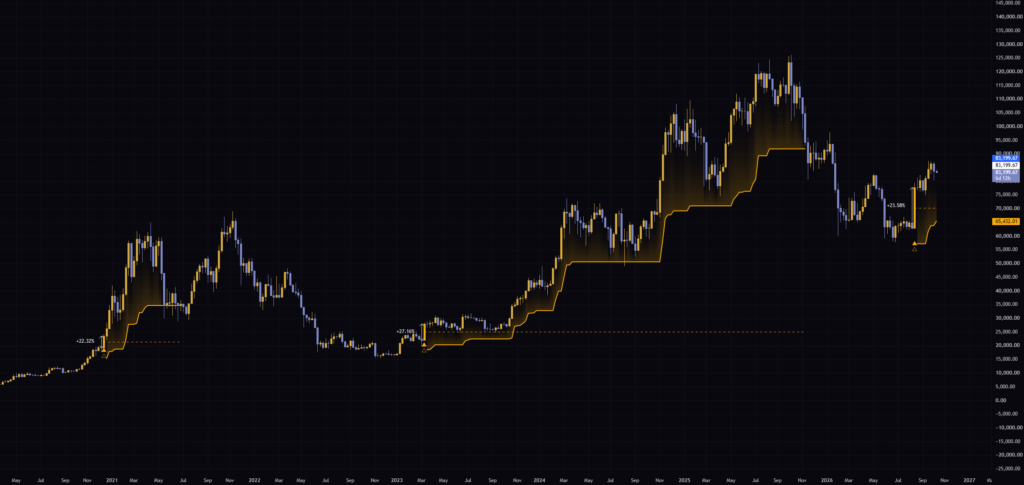
For testing, I loaded it with default settings on the BTCUSDT 5m, 15m, 30m, 1H, 4H, daily and weekly charts. Lining up the values left in the top-right table makes the difference in “spike size” by timeframe really clear.
| Timeframe | Last Bullish (% change) | Last Bearish (% change) |
|---|---|---|
| 5m | +0.27% | -0.22% |
| 15m | +0.49% | -0.15% |
| 30m | +0.78% | -1.03% |
| 1H | +0.94% | -1.01% |
| 4H | +3.41% | -1.89% |
| Daily | +7.12% | -6.51% |
| Weekly | +23.58% | -28.44% |
On the 5m and 15m charts, “spikes” were mostly candles in the 0.1–0.5% range. Since it’s based on ATR, even a move that small counts as “2x normal” during a quiet session. The % labels on the chart showed tiny numbers like “+0.05%” and “-0.08%”, and the tracked direction flipped every few hours.
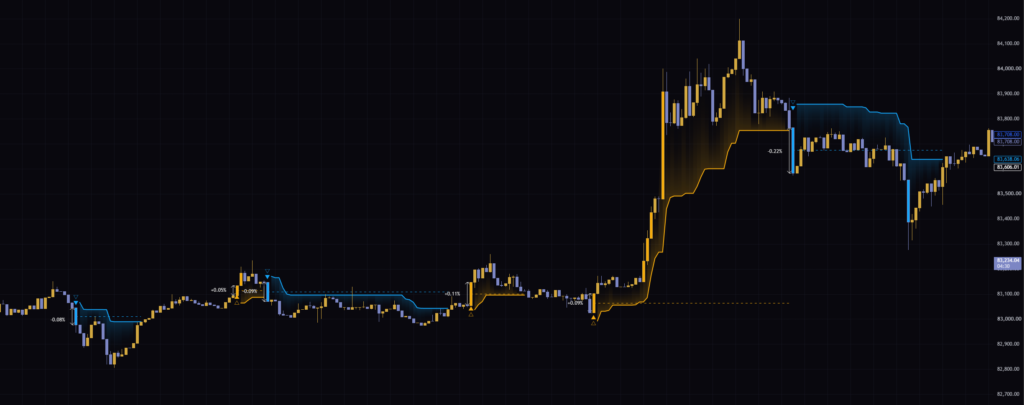
On the 4H and daily charts, by contrast, signals were far less frequent and each tracked trend lasted from several weeks to several months. On the daily chart, a downtrend started from a -14.02% bearish candle in February 2026, and you can clearly see the light blue trailing stop stepping down along with the series of lower highs.
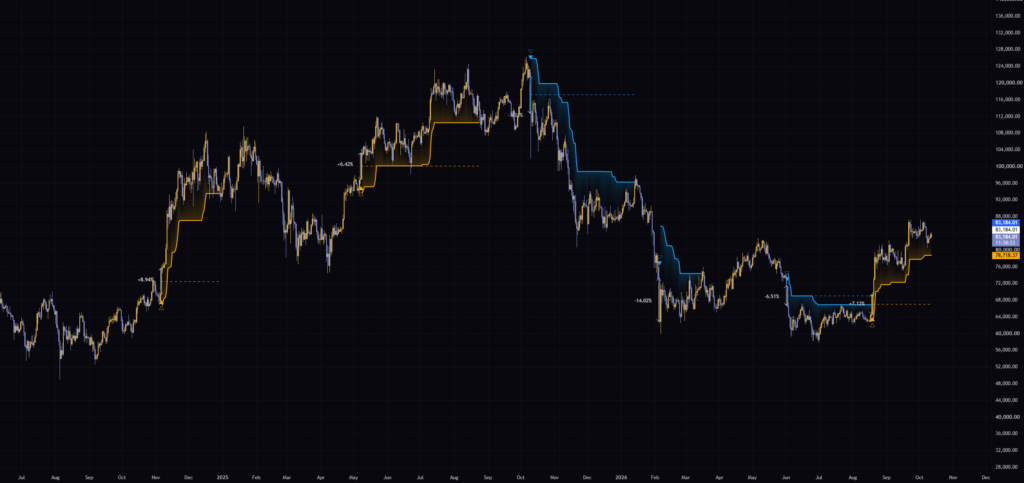
On the weekly chart, the uptrend that started with a +27.16% bullish candle in March 2023 stayed tracked until around November 2025, when price closed below the trailing stop. Following a long-term trend with a single line is satisfying to watch, but with the line sitting 3x ATR away, the exit comes quite late.
From my own use, the default 2x ATR works best on the 1H through daily charts. It does work on lower timeframes, but you get a lot more signals and the direction flips more often. If you’re using it on lower timeframes, it settles down if you raise ATR Multiplier, which I’ll cover later.
How to Use the Midline and the Trailing Stop
The midline is a gauge for how deep the pullback goes
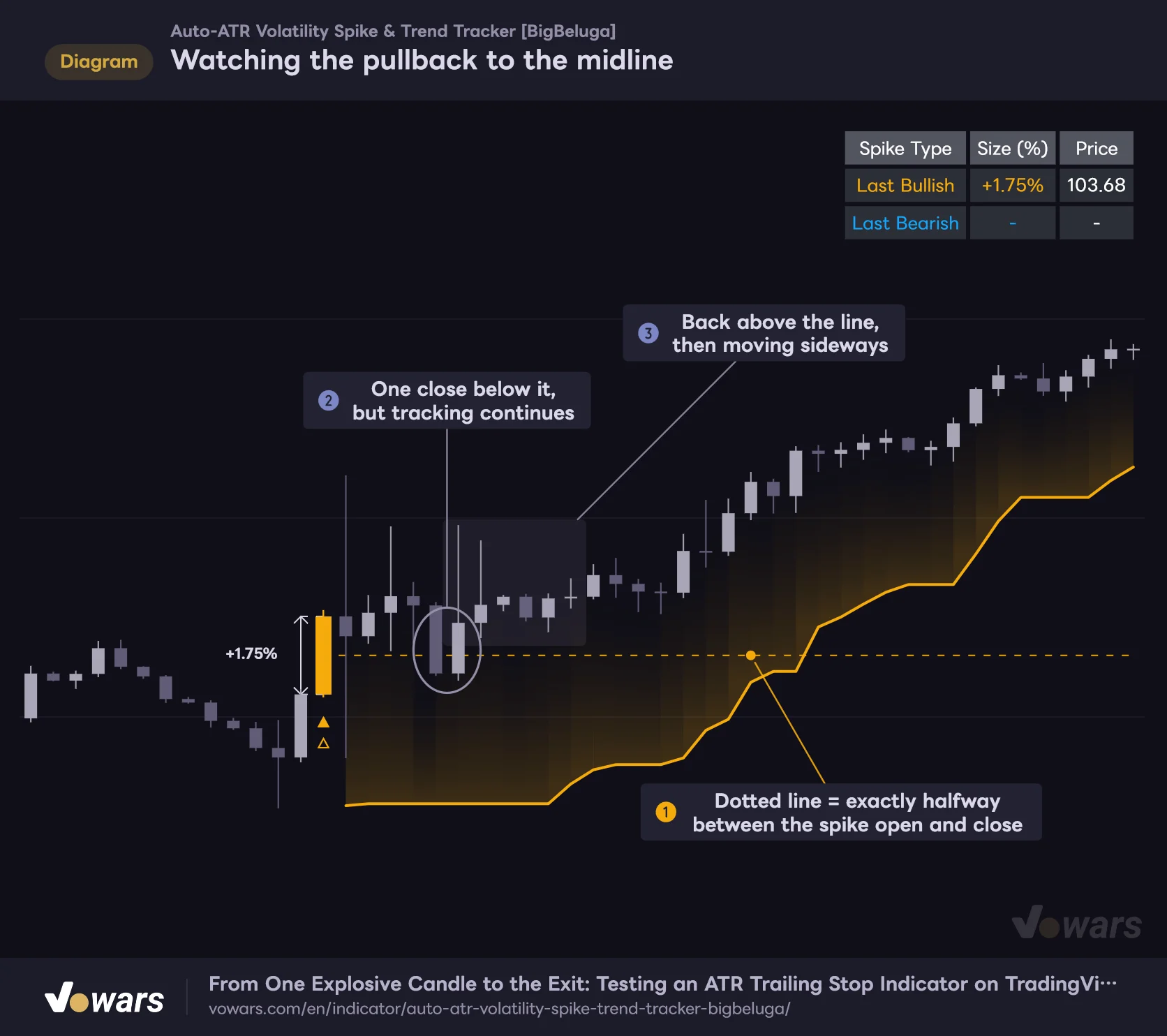
Watching the pullback to the midline
The dotted line marks the middle of the spike body. Whether a pullback holds here tells you how much momentum is left.
Vowars DE ver.3.12.35
The midline sits exactly halfway through the spike candle’s body. The description suggests waiting for a pullback to the midline, confirming a bounce there, and then getting in. The idea is that waiting for a 50% retracement lets you take on less risk than chasing the high of a big green candle.
That said, the midline is just a line on the chart; breaking it doesn’t end the trend. As in Figure ②, even if price closes below it once, the uptrend stays tracked as long as there’s no close beyond the trailing stop. I think it’s most natural to use the midline as a gauge for how deep the pullback goes rather than as a buy or sell signal. If the pullback holds above the midline, momentum is still there; if price slices well below the midline and doesn’t come back, the spike candle’s momentum has more or less been erased.
The trailing stop as your exit and stop-loss reference
You can use the trailing stop directly as a reference for where to put your stop. In an uptrend, the line doesn’t move down unless price drops below low − 3x ATR, so it’s classic trailing-stop logic: let profits run while ratcheting your exit higher.
When a ▲△ prints on an upside spike, first wait for a pullback to the midline. If the pullback holds above the midline and a bounce candle closes, treat that as a potential entry. Place your stop a little below the trailing stop and move it up each time the line steps higher. Exit on the candle that closes below the line.
Since the line is evaluated on the close, an intrabar wick through the line doesn’t end the trend. If you put your actual stop order right on the line, you can end up with your order filled while the indicator still shows the trend as alive. Decide ahead of time which one takes priority and you won’t second-guess yourself.
Settings and How to Tune Them for Your Use Case
There are 11 settings in total. Everything works on defaults, but the three ATR-related settings are the ones worth adjusting for your timeframe and trading style.
| Setting | Default | Suggested | Effect |
|---|---|---|---|
| Detection Mode | Auto ATR | Auto ATR | How spikes are detected. Auto ATR uses a multiple of ATR; Fixed % uses a set % change |
| Calculate From Wicks (High/Low) | Off | Off | When on, detection and the % value use the full high-to-low range instead of the body. Direction flips become more frequent |
| Fixed Spike Threshold (%) | 1.0 | Only when using Fixed %. Adjust per timeframe | The % change used for detection in Fixed % mode. Higher values mean fewer signals |
| ATR Multiplier | 2.0 | 2.0 for 1H to daily, 2.5 for 5m to 15m | How many times ATR the body must exceed to count as a spike. Lower it for more signals; raise it to keep only big candles |
| ATR Length (for Auto-Detection & Trailing) | 14 | 14 | ATR period used for both detection and the trailing stop. Shorter makes it more sensitive to recent price action |
| Trailing ATR Multiplier | 3.0 | 3.0 (2.0–2.5 for day trading) | How many ATRs the trailing stop sits from the low (high). Smaller values exit sooner |
| Display Mid Level Dash Line | On | On | Shows the dotted line extending from the middle of the spike candle’s body |
| Display Trailing Stop & Fill | On | On | Shows the trailing stop and fill. Trend tracking keeps running even when turned off |
| Display Size % Labels & Arrow Lines | On | Your preference | Shows the arrow line and % label drawn one bar to the left of the spike candle |
| Bullish Theme Color | Orange (RGB 245, 171, 12) | Match your chart theme | Color for bullish spike candles, ▲△, and the uptrend trailing stop and fill |
| Bearish Theme Color | Light blue (RGB 20, 166, 250) | Match your chart theme | Color for bearish spike candles, ▽▼, and the downtrend trailing stop and fill |
One visibility setting to be careful with is Display Trailing Stop & Fill. Turning it off hides the trailing stop and fill, but trend tracking keeps running in the background. Same-direction spikes still won’t get a ▲△, and tracking still ends when price closes beyond the line, exactly as when it’s on. If you hide the line and only watch the ▲△ markers, you’ll lose track of why signals aren’t showing up, so I’d leave it on until you’re used to it.
What Changes When You Lower ATR Multiplier
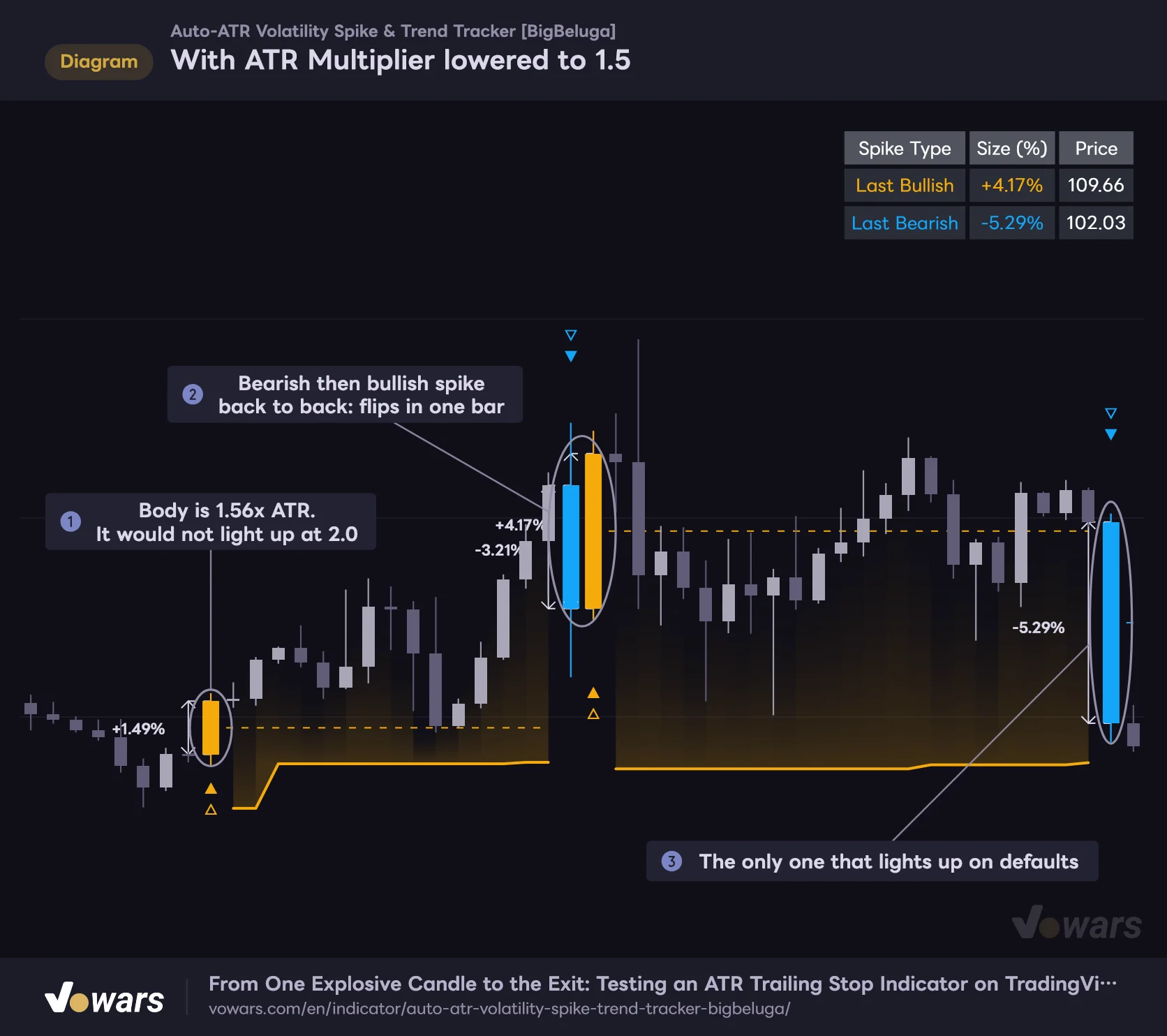
ATR Multiplier sets the body-length threshold for a spike. Drop it from the default 2.0 to 1.5 and the number of candles that light up jumps sharply.
With ATR Multiplier lowered to 1.5
Lowering the bar makes candles that were ignored on defaults start lighting up.
Vowars DE ver.3.12.35
As in Figure ②, you start seeing back-to-back bearish and bullish spikes that flip the direction in a single bar. Higher sensitivity means more entry opportunities, but also more flip-flopping in choppy markets. Raise it to 2.5–3.0 instead and only the truly large candles remain, with far fewer signals. If you feel there are too many signals on the 5m or 15m chart, try 2.5 first.
Trailing ATR Multiplier Is About How Much Heat You’re Willing to Take
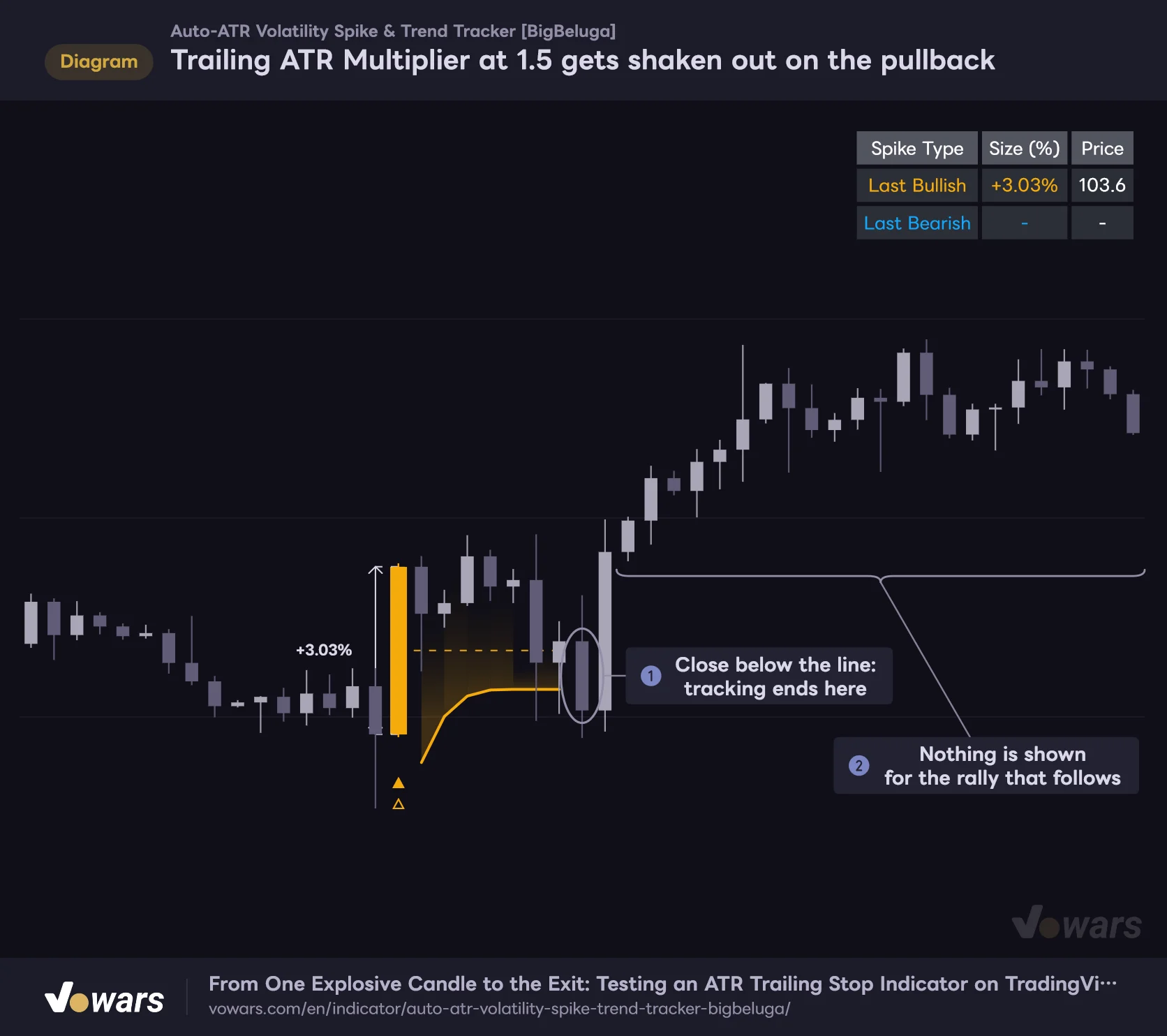
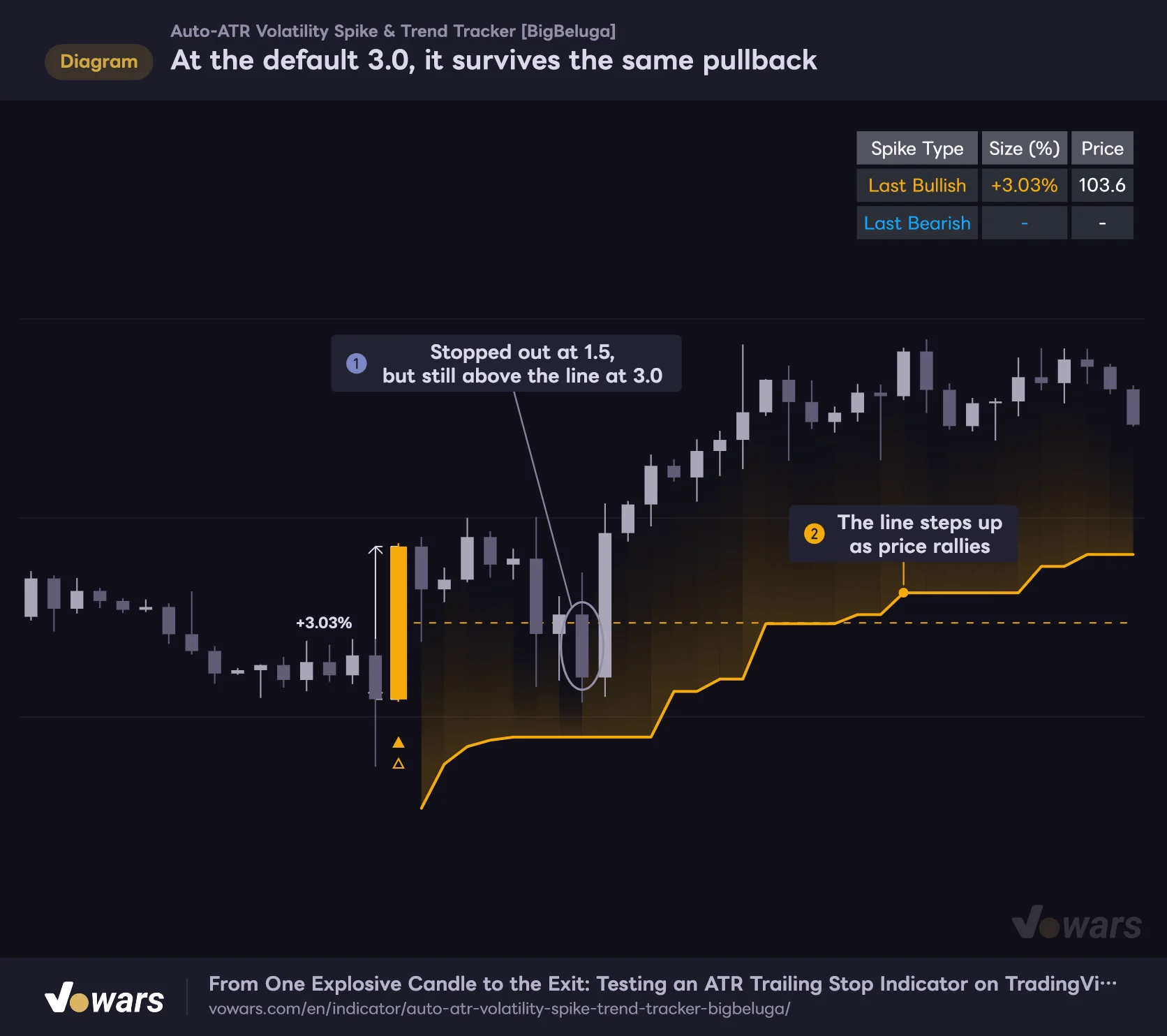
Trailing ATR Multiplier sets how many ATRs below the low the trailing stop is placed. Comparing 1.5 and 3.0 (the default) on the same price action showed a clear difference.
Trailing ATR Multiplier at 1.5 gets shaken out on the pullback
A tighter trailing stop is much easier to hit as soon as price pulls back.
Vowars DE ver.3.12.35
At the default 3.0, it survives the same pullback
On the same price action, the default 3.0 leaves enough room to the line, so tracking continues through the pullback.
Vowars DE ver.3.12.35
At 1.5, price closed below the line on a pullback eight bars after the spike, and the trend was no longer tracked. Price then rallied hard, but no candle reached 2x ATR in body size, so no new ▲△ appeared. At 3.0, the same pullback still had plenty of room above the line, and it rode the rally.
Tightening the line gets you out sooner and helps protect profits, but the catch is that once you’re out, nothing restarts until the next spike. “Auto-ATR Volatility Spike & Trend Tracker” doesn’t give a “re-entry” signal mid-trend, so if you set Trailing ATR Multiplier too tight, you can easily miss most of the trend.
Suggested Settings by Use Case
| Use case | ATR Multiplier | Trailing ATR Multiplier | Rationale |
|---|---|---|---|
| Swing trading on 1H to daily (baseline) | 2.0 | 3.0 | Defaults give a good balance between signal count and how long trends are tracked |
| Day trading on 5m to 15m | 2.5 | 2.0〜2.5 | Stricter detection for fewer signals, a tighter line for earlier exits |
| Following long-term trends on the weekly | 2.0 | 3.0〜4.0 | Harder to get shaken out on pullbacks, at the cost of later exits |
| Only catching the biggest candles | 2.5〜3.0 | 3.0 | Fewer signals, but bigger moves when they do appear |
The values in this table are rough guidelines based on comparing signal count and trend length on the BTCUSDT charts I tested. Every asset has its own price behavior, so if you use it on gold, stock indices or anything else, I recommend checking how it has behaved historically on default settings before changing anything.
Pair It With Volume Confirmation
Detection in “Auto-ATR Volatility Spike & Trend Tracker” is based purely on price range. The description uses wording that suggests it catches volume-backed expansions, but volume isn’t used anywhere in the calculation. Adding one volume-based indicator makes it much easier to judge the quality of a spike.
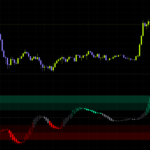
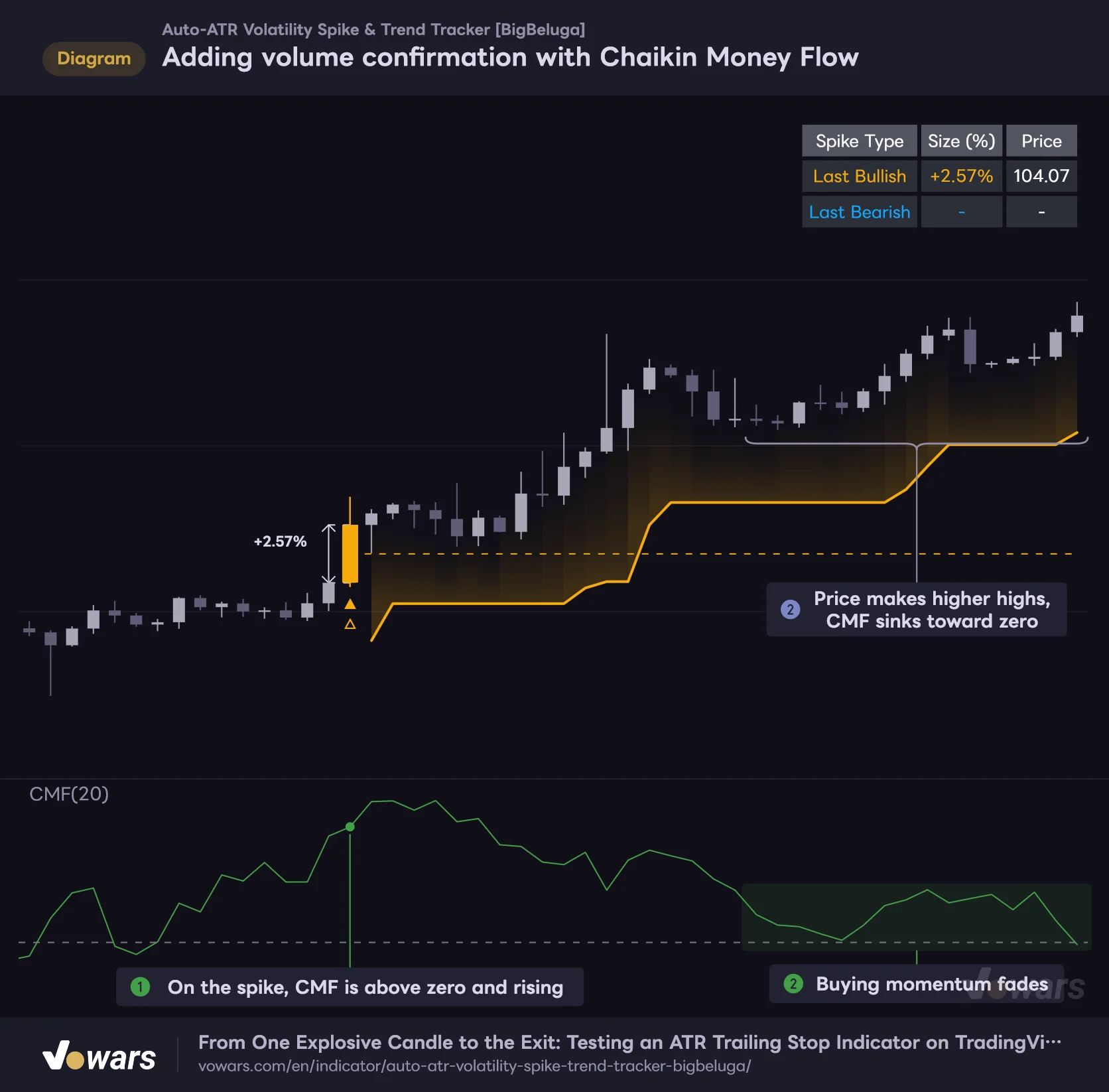
Adding volume confirmation with Chaikin Money Flow
Spike detection is range-only, so check money flow separately with CMF.
Vowars DE ver.3.12.35
As an example, I added TradingView’s built-in Chaikin Money Flow (CMF) in the lower pane. CMF is a volume-weighted average of where each candle closed within its range; above zero means buying pressure is in control, below zero means selling pressure is. As in Figure ①, if CMF is above zero and rising when an upside spike prints, it’s easier to read the move as a volume-backed rally. Later, at Figure ②, price keeps making higher highs while CMF sinks toward zero, so you can spot fading momentum before price even gets close to the trailing stop.
Here are a few others that look like a good match.
- Donchian Channels. Checking whether the spike candle also breaks the 20-bar high or low helps you separate a one-off big candle inside a range from a genuine breakout.
- ADX. Because it puts a number on trend strength, you can use it as a filter, for example by skipping spikes that occur in low-ADX chop.
- Volume Profile. Whether a spike has pushed through a high-volume price area gives you something to work with when judging whether a pullback is likely afterward.
What You Can Hand Off and What You Need to Cover Yourself
What you can hand off
- Spotting big candles, flagging trend starts and showing exit references all happen on one screen
- Because it’s ATR-based, detection feels consistent across assets and timeframes
- Same-direction spikes aren’t re-counted, so markers don’t pile up in strong trends
- The gradient fill lets you see the distance between price and the trailing stop at a glance
- Markers and lines on confirmed bars don’t change after the fact
What you need to cover yourself
- Once tracking ends, there’s no “re-entry” signal until the next spike
- In choppy markets with alternating big bullish and bearish candles, the direction flips bar by bar
- Detection is based on range only; volume and trend strength aren’t considered
- On lower timeframes, the defaults tend to produce a lot of signals
- No alert conditions are provided
Repainting, Alerts and Drawing Limits
Confirmed bars don’t change
“Auto-ATR Volatility Spike & Trend Tracker” does not repaint the colors, markers, lines or midlines on confirmed bars. Both spike detection and the trailing stop are calculated using only data up to the current bar, with no future data involved. The % arrow line is drawn one bar to the left of the spike candle, but that’s just where it gets placed when the spike is confirmed; it doesn’t mean any past signal changes.
That said, on the live bar that hasn’t closed yet, the display moves with price. If the body exceeds 2x ATR mid-bar, the color and ▲△ appear, and if the body shrinks before the close, they disappear. The same goes for whether the trailing stop has been broken; it’s only confirmed at the bar close. Rather than jumping in the moment a candle changes color intrabar, waiting for the bar to close keeps what you see in line with how the indicator looks on historical charts.
No alerts are provided
There’s no dedicated alert condition for “Auto-ATR Volatility Spike & Trend Tracker”, either in the settings or in the condition list of the alert dialog. Users in the comments have been asking for alerts to be added, too.
TradingView alerts let you pick a plot (line) drawn by an indicator as the condition and set something like a cross with price. For “Auto-ATR Volatility Spike & Trend Tracker”, the candidate would be the “Trailing Stop” plot. However, since the trailing stop’s value goes empty from the bar where tracking ends, I haven’t been able to confirm that a crossing alert will fire as intended. If you want a reliable notification, the safe approach is to draw a horizontal line at the trailing stop level and set an alert on that line. You’ll have to redraw it every time the trailing stop steps up, though.
Old markers and midlines disappear as they pile up
There’s a cap on how many arrow lines, midlines, % labels and ▲△ markers a single indicator can display at once, and “Auto-ATR Volatility Spike & Trend Tracker” sets both lines and labels to a maximum of 500. Each spike uses up to four lines and two labels, so if you scroll far back on a lower timeframe, the arrows and midlines from the oldest spikes disappear first. Candle colors and the trailing stop don’t disappear. If you want to inspect old spikes in detail, Bar Replay lets you go back to that point and step through the display bar by bar. How far back you can go depends on your TradingView plan and timeframe.
The table and candle colors
The settings have no option for the table’s position or visibility; it always shows in the top-right corner. When price action runs into the top-right area of the chart, it can get a bit in the way. Candle coloring is done in two ways, by repainting the candles and by changing the bar color, and both can be recolored with Bullish Theme Color and Bearish Theme Color. If your chart’s candle colors are close to orange or light blue, they’re hard to tell apart, so switching your chart to a more muted color scheme makes things easier to read.
For Traders Who Want to Catch the Move From One Big Candle
 Image
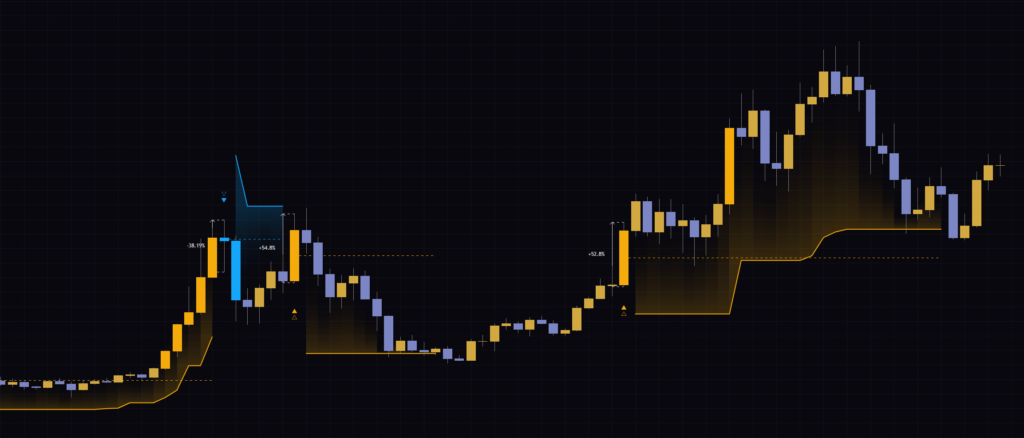
Image“Auto-ATR Volatility Spike & Trend Tracker” takes a single candle where the market suddenly moved and shows you everything from the start of the trend to your exit reference in one continuous flow. With ATR as its yardstick, it adapts to how volatile the market is, and the trailing stop’s fill shows you how much room you have left. Even on default settings, it held up well on the 1H through daily charts.
On the other hand, detection is based on range alone, with no regard for volume or trend strength. Once you’re out, there’s no re-entry signal, and it tends to flip direction in choppy markets. Put it next to a volume indicator like CMF to check whether a big candle is the real deal, and use the trailing stop as your exit reference. Splitting the work this way is where I felt it really shines.