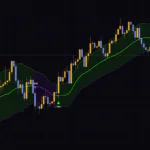


“Flow Expansion Trend” Is a Trend Line That Speeds Up or Slows Down Based on How Clean the Move Is
“Flow Expansion Trend” is a TradingView indicator that draws a single thick midline over your candles and tells you the trend direction through its color and a set of Up / Down labels. Once you add it to a chart, it shows up as “FET.”
Technically it’s a moving average, but it behaves very differently from a regular MA. When price is trending cleanly in one direction, the line chases it. When price is just chopping back and forth, the line goes almost flat and stalls. The speed of the line itself adapts to how clean (or messy) the market is, and that’s the single biggest thing that sets “Flow Expansion Trend” apart.
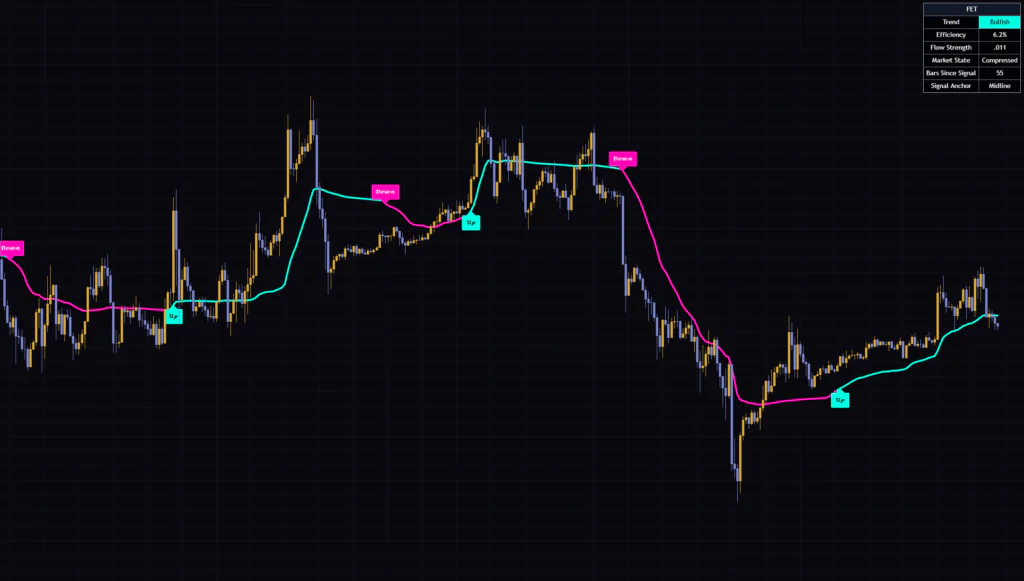
For this review, I ran it across seven timeframes, from the 5-minute up to the weekly, and looked at where the labels fire, where they lag, and where they get faked out. Spoiler: it’s a pretty quiet indicator signal-wise. The upside is that it’s built to ignore most of the small noise.
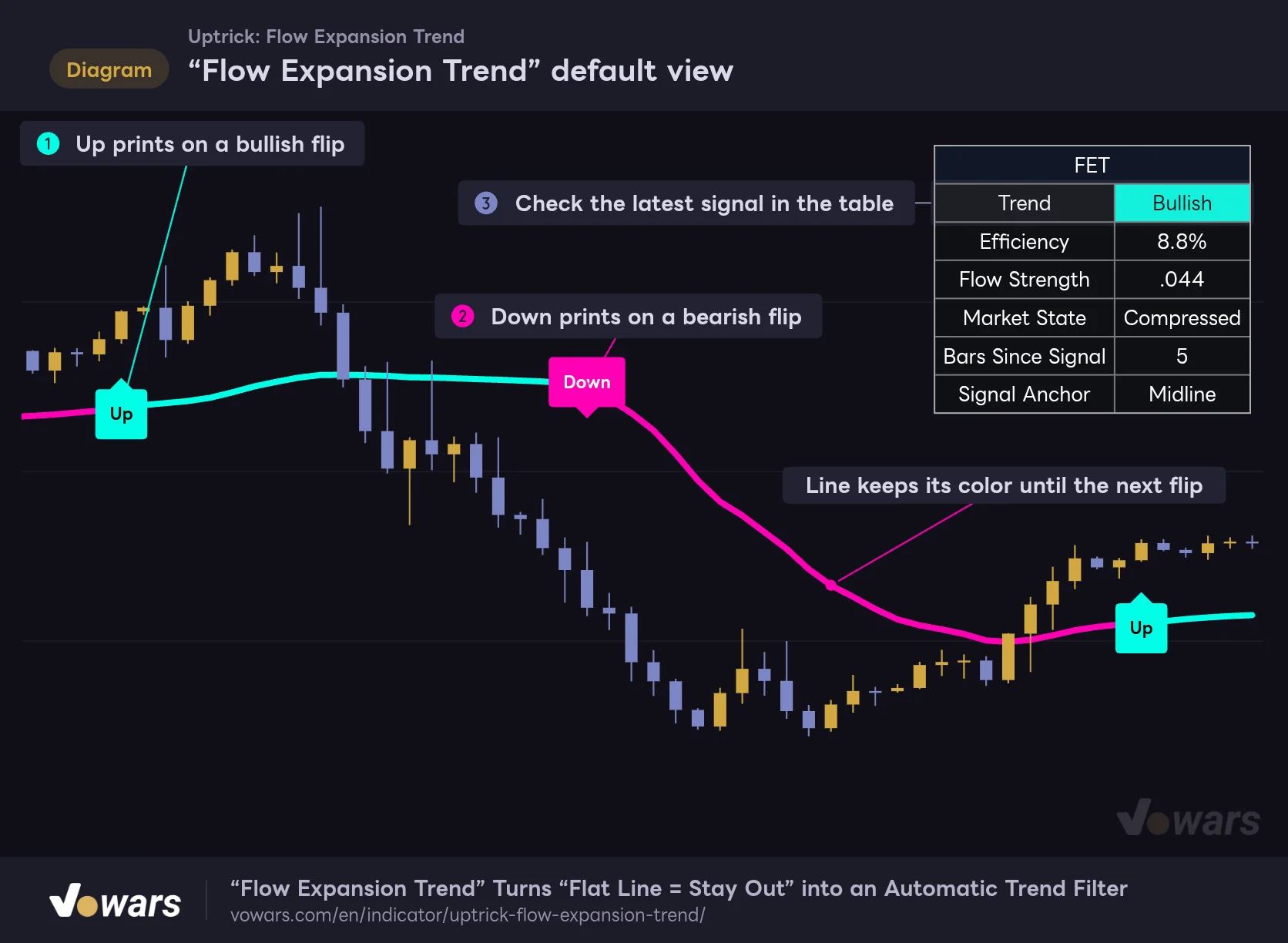
“Flow Expansion Trend” default view
The thick midline color and the Up / Down labels on flip bars are the core things to watch.
Vowars DE ver.3.12.34
There are only three things to watch: the Up label that prints on a bullish flip, as in Figure ①, the Down label that prints on a bearish flip, as in Figure ②, and the dashboard that sums up the current state, shown in Figure ③. Once you’re used to it, you can tell which way the market is leaning within a second of opening the chart.
What Shows Up on the Chart, and What Doesn’t
When you load “Flow Expansion Trend,” it draws the four elements below. One of them, though, is basically invisible with the default setup.
| Element | How it looks | What it means |
|---|---|---|
| Adaptive Flow Midline | A width-4 line, either cyan or magenta | Direction of the most recent signal |
| Up / Down labels | Cyan Up, magenta Down | The bar where the trend flipped |
| Dashboard | A 2-column × 7-row table in the top-right | State of the latest bar |
| Candle coloring | Drawn behind the chart’s candles | Direction of the most recent signal (hidden by default) |
The Line Takes the Color of the Last Label
The midline’s color does not change based on whether price is above or below it. After an Up it stays cyan, after a Down it stays magenta, and it keeps that color until the next label prints. You’ll often see price dip below a cyan line and the line stay cyan, which can be a little confusing at first.
There’s also a yellow (neutral) color defined in the settings. However, the color is locked to up or down on the very first bar of the loaded history, and after that it only switches on an Up or a Down. In normal use you’ll pretty much never see yellow. The color you see before the first signal is just based on whether the first bar’s close was above or below the line, so don’t read anything into it.
Labels Only Print on Bar Close
Up and Down are only evaluated on confirmed bars. Even if the conditions are briefly met on the live bar, no label prints and the line color doesn’t change. In my testing, I never saw a label disappear or jump to a different bar after the fact.
The midline itself, on the other hand, does move a bit with price action on the live bar. That’s the same as any moving average, and it settles in place once the bar closes.
Why the Candles Don’t Change Color Even with “Color Candles” On
There’s a Color Candles setting, and it’s on by default.
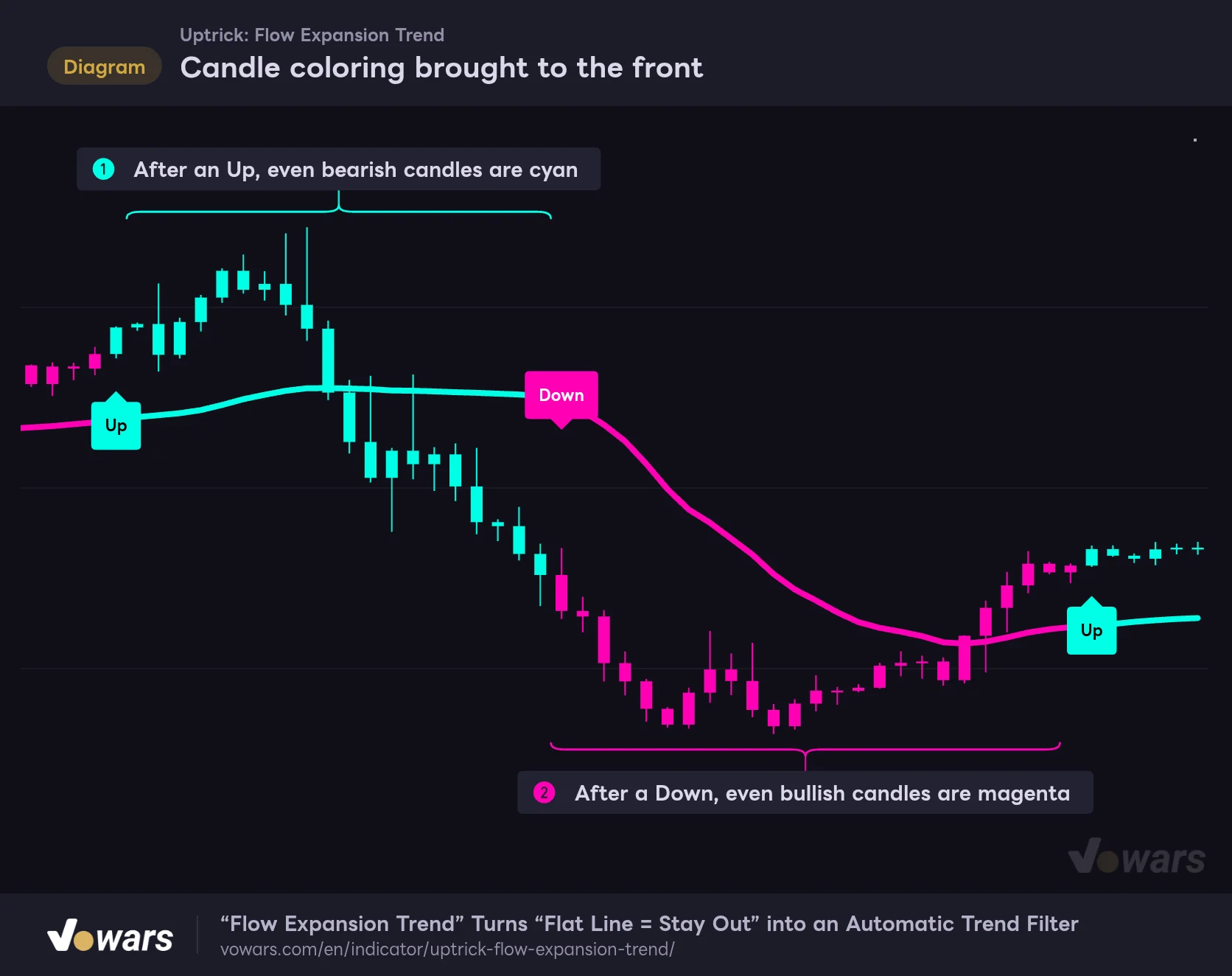
On TradingView, indicator visuals are drawn behind the chart’s bars by default. If you want to see the candle coloring, open the “…” (More) menu next to the indicator name in the status line and change its visual order to bring it to the front. The colored candles are actually being drawn; they’re just hidden behind the regular candles.
Candle coloring brought to the front
Color Candles is drawn behind the chart candles, so you can’t see it by default. Bring the indicator to the front and candles get painted in the color of the latest signal.
Vowars DE ver.3.12.34
Once it’s in front, even bearish candles turn cyan, as in Figure ①, and even bullish candles turn magenta, as in Figure ②. You lose the distinction between bullish and bearish candles, so it’s not for anyone who likes to read candle structure in detail. It works best when you just want a simple “we’re in long-bias mode right now” view.
Visual order applies to the whole indicator, so the midline and the Up / Down labels also get drawn in front of the candles. Conversely, with the default setup the labels sit behind the candles too, so when a label overlaps a candle, part of the label can get hidden by the bar.
Why Does the Line Stall, Then Suddenly Take Off?
“Flow Expansion Trend” is built on a concept called the Efficiency Ratio. On the dashboard it’s shown as a percentage labeled “Efficiency.”
The math is simple: take the net price change from Trend Length bars ago (34 by default) to now, and divide it by the total distance traveled, which is the sum of every bar-to-bar move over that same window. The price input is hlc3 (the average of high, low, and close).
- If price went straight up for all 34 bars, net change equals total distance, so you get 100%
- If price chopped up and down and ended up back where it started, net change is near zero, so the value approaches 0%
This efficiency value changes how fast the midline tracks price, bar by bar.
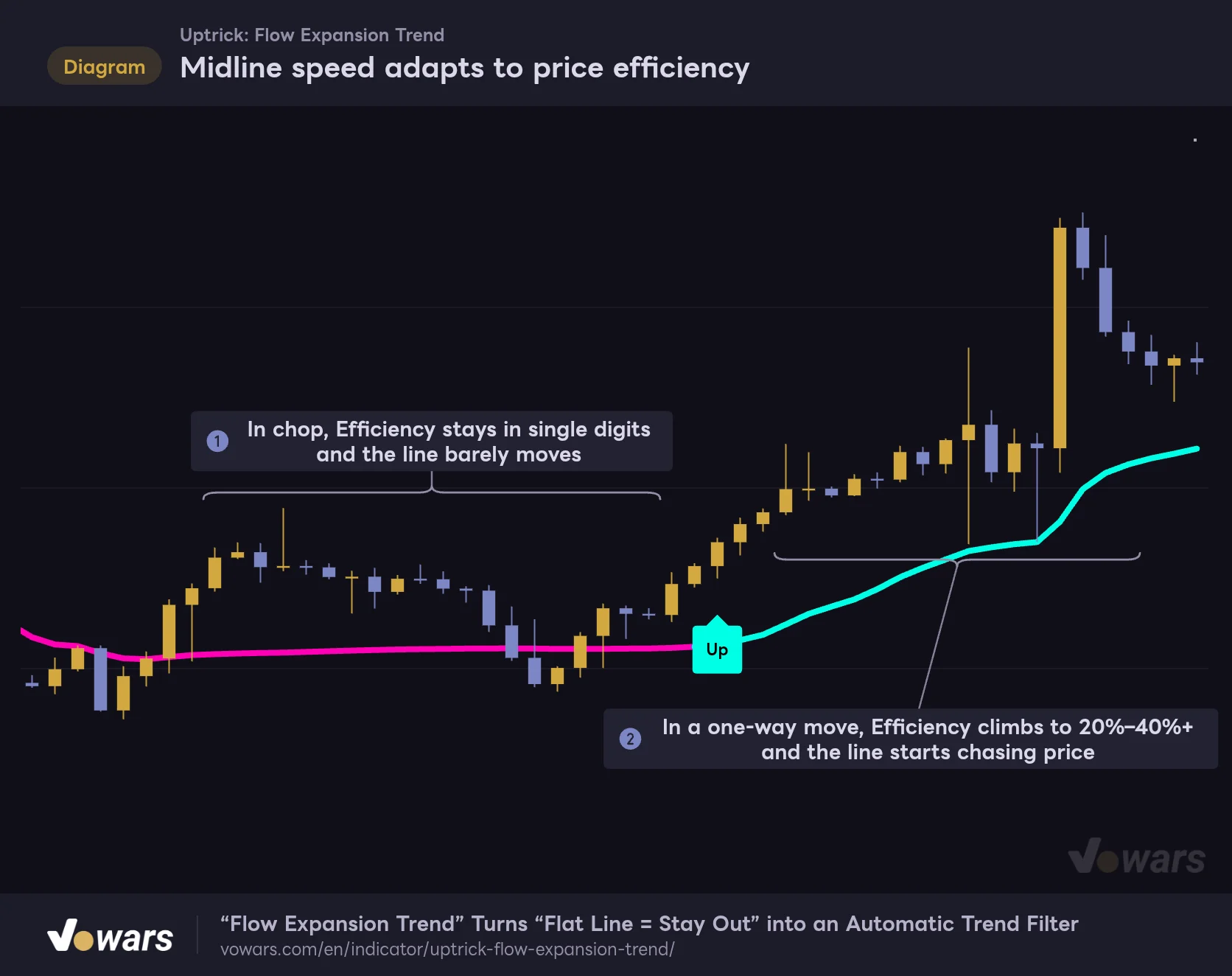
Midline speed adapts to price efficiency
Same settings throughout: the line stalls in choppy stretches and chases price when it moves in one direction.
Vowars DE ver.3.12.34
In the choppy stretch shown in Figure ①, efficiency drops into the single digits and the line barely moves. Once price starts pushing in one direction, as in Figure ②, efficiency climbs and the line tilts and starts chasing price.
Under the hood, it’s built the same way as Kaufman’s Adaptive Moving Average (KAMA). The fastest speed is equivalent to a 2-period exponential smoothing, the slowest to a Trend Length-period one, and the line slides between the two depending on efficiency. On top of that, the speed is squared, so when efficiency is low the line stalls out hard. If you’re looking at a chart and wondering “why is this line so flat?”, you’re almost always in a low-efficiency phase.
An EMA or SMA uses a fixed lookback, so it keeps drifting toward price at the same pace even in chop, and the line wiggles up and down. The midline in “Flow Expansion Trend” stalls during consolidation and only starts moving once a trend shows up, so the slope of the line itself tells you whether the market has any real direction right now.
The Two Gates Price Has to Clear Before Up / Down Fires
Price simply crossing the midline is not enough to print a label. A flip requires two conditions, and both have to line up on a confirmed bar. I’ll walk through a flip from bearish to Up (for Down, just reverse everything).
1 Close breaks above an invisible boundary
Above and below the midline there’s a boundary that is never drawn on the chart. Its distance is “ATR(14) × Signal Distance × (1.25 − Efficiency × 0.45).” In low-efficiency chop the boundary moves further away, and in a high-efficiency trend it moves closer. With the default 1.6, that works out to roughly 1.3x to 2x ATR.
2 The midline has real momentum behind it
The second condition is the “Flow Strength” value on the dashboard. It takes the midline’s bar-to-bar change, smooths it with a 5-period EMA, and divides it by ATR, giving you a read on how much momentum the line has. For an Up, this value needs to be above Signal Strength (0.03 by default).
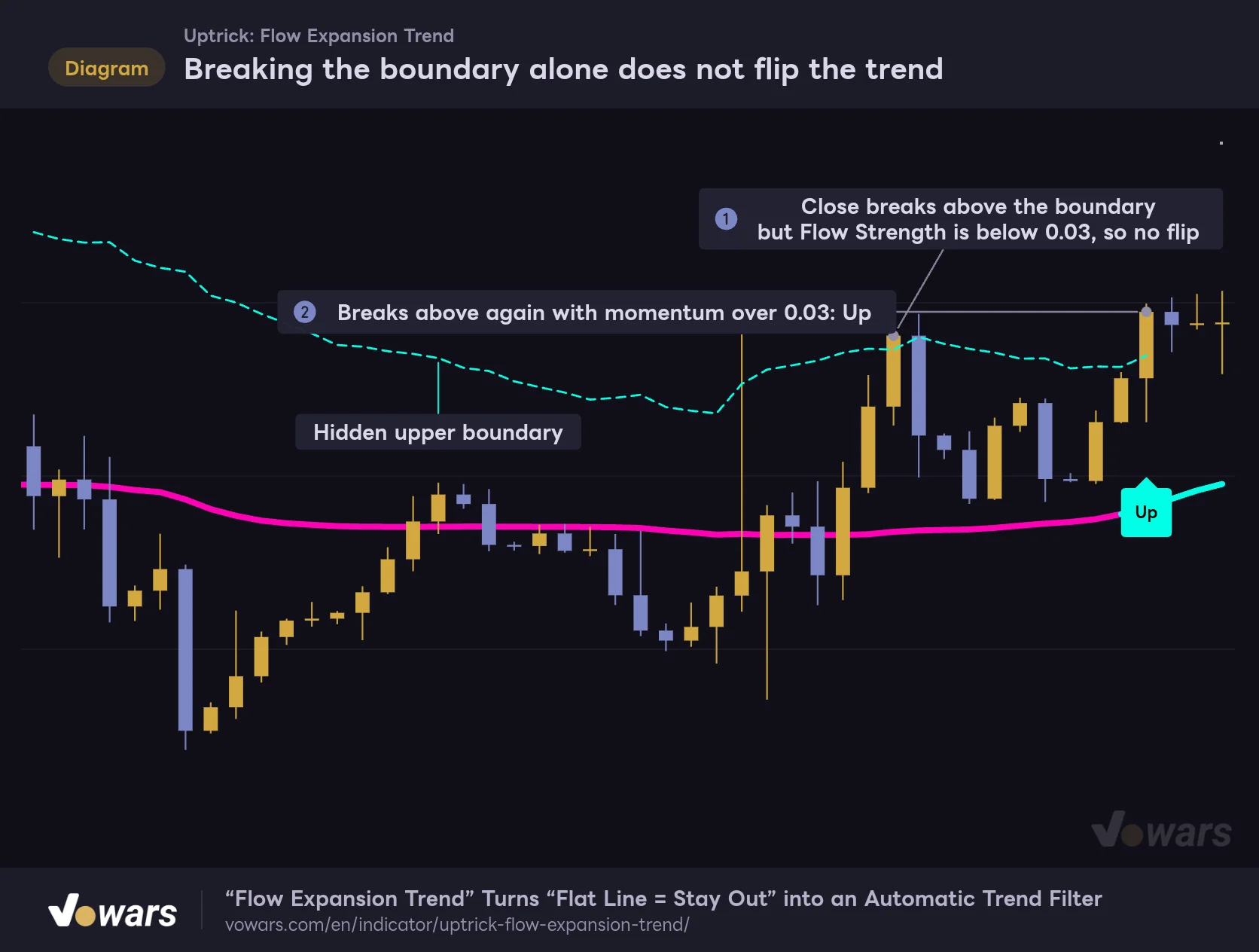
Breaking the boundary alone does not flip the trend
While bearish, there is a hidden boundary above the midline. Only a bar that closes above it while the line also has enough momentum becomes an Up.
Vowars DE ver.3.12.34
The bar in Figure ① closes above the boundary. But the midline is still flat, momentum doesn’t reach 0.03, and the flip gets skipped. After some more chop, the line starts to turn up, and in Figure ② both conditions finally line up and you get an Up.
Instead of jumping on a single big green candle, it waits for both “price has broken away” and “the line has started moving too.” Thanks to this double check, a random wick or a one-off spike almost never flips it. The trade-off is that the flip comes later than the first breakout candle.
The dotted line in the figure was added for explanation only, and the “Flow Expansion Trend” settings have no option to display the boundary. You can’t tell from the chart how close you are to the next Up, so you’ll be making decisions after the label prints, not before.
What Is the Dashboard in the Top-Right Telling You?
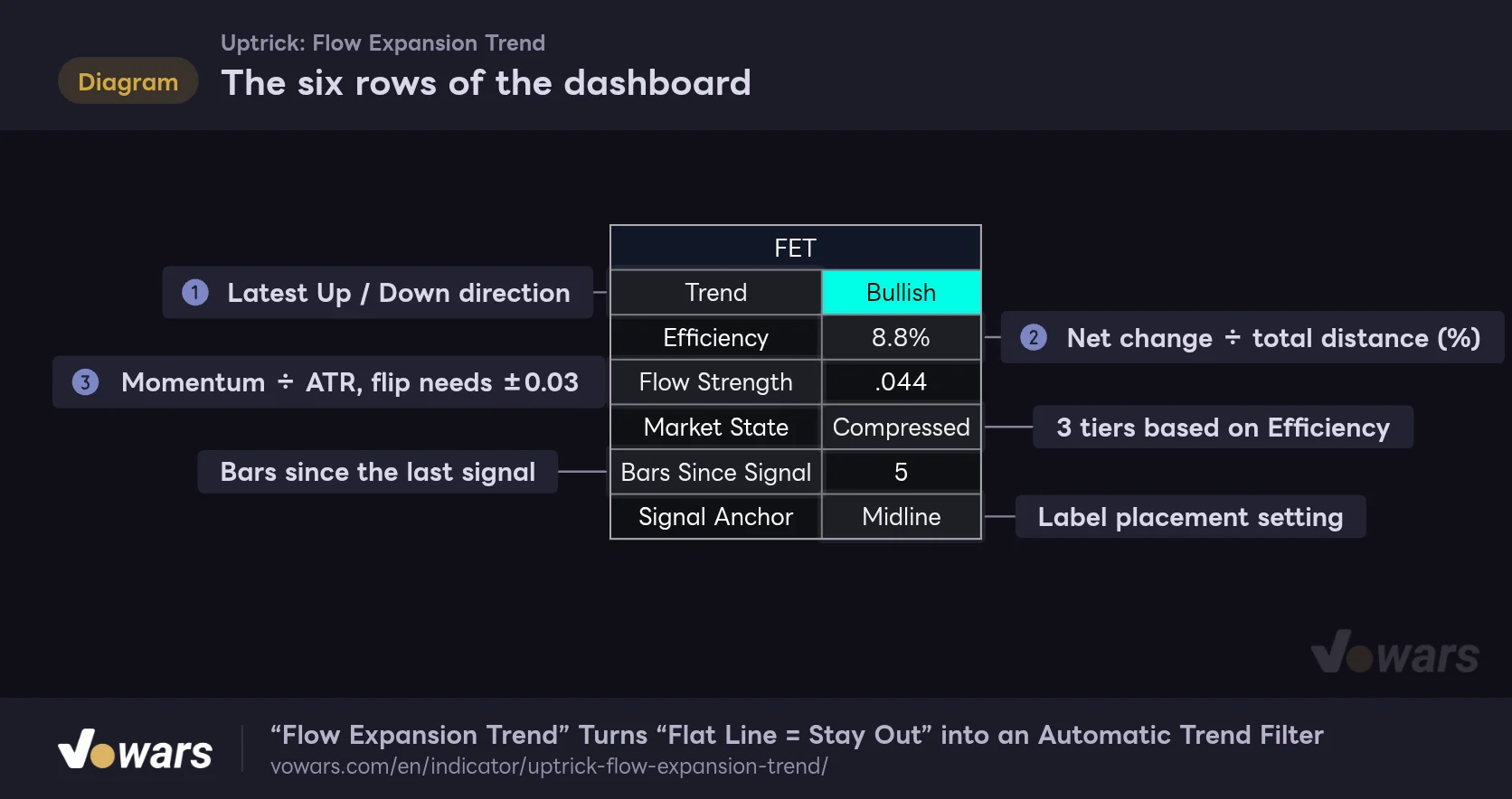
The six rows of the dashboard
The top-right table only shows values for the latest bar. From top to bottom: direction, efficiency, momentum, market state, bars since signal, and label placement.
Vowars DE ver.3.12.34
Trend, shown in Figure ①, matches the midline color and shows the direction of the latest label. Efficiency in Figure ② is the efficiency value covered above, and Flow Strength in Figure ③ is the momentum value used in the second gate.
Market State splits Efficiency into three tiers: 60% or higher is “Directional,” 30% or higher is “Developing,” and anything below that is “Compressed.”
One thing genuinely surprised me here. Across all seven charts, from the 5-minute to the weekly, Market State read “Compressed” every single time. Efficiency ranged from 6.2% to 23.6%. A market where net progress covers more than 60% of the path traveled over 34 bars just doesn’t come around often. I’d treat Directional as “an extremely one-sided move” and, day to day, pay more attention to whether the number is rising or falling.
The dashboard always shows the values for the most recent bar. Even if you scroll left to look at older price action, the table doesn’t change. When I was reviewing history on the 5-minute, the line on screen was cyan while the table said Bearish, and it threw me off for a second. When you’re backtesting past setups by eye, go by the line color and the labels, not the table.
Bars Since Signal is how many bars have passed since the last label, and Signal Anchor shows the label placement setting. If no label has printed yet within the loaded history, Bars Since Signal shows “N/A.”
What I Saw from the 5-Minute to the Weekly
I kept everything on default settings and switched timeframes on a Bitcoin chart. Here’s how much history fit on screen and how many labels showed up in that range.
| Timeframe | Range on screen | Labels | Efficiency at the time |
|---|---|---|---|
| 5m | About 1.5 days | 7 | 15.5% |
| 15m | About 4.5 days | 7 | 9.2% |
| 30m | About 2 weeks | 6 | 10.0% |
| 1H | About 2.5 weeks | 7 | 6.2% |
| 4H | About 3 months | 8 | 23.6% |
| Daily | About 1 year 5 months | 9 | 17.4% |
| Weekly | About 9 years | 9 | 20.6% |
On every timeframe, a full screen of history had only 6 to 9 labels. On the 1H that’s 7 signals in two and a half weeks, so roughly one every two days at most. For a trend-following signal, it’s on the very quiet end of the spectrum.
On the Daily and 4H, It Cleanly Splits the Big Swings
The daily chart is where it really shines. During big selloffs the Down fired partway through the move, and during the bottoming chop the midline held flat and stayed patient, only printing an Up once the bounce was clearly real. The Down at the end of January 2026 printed just before the sharp drop that followed.
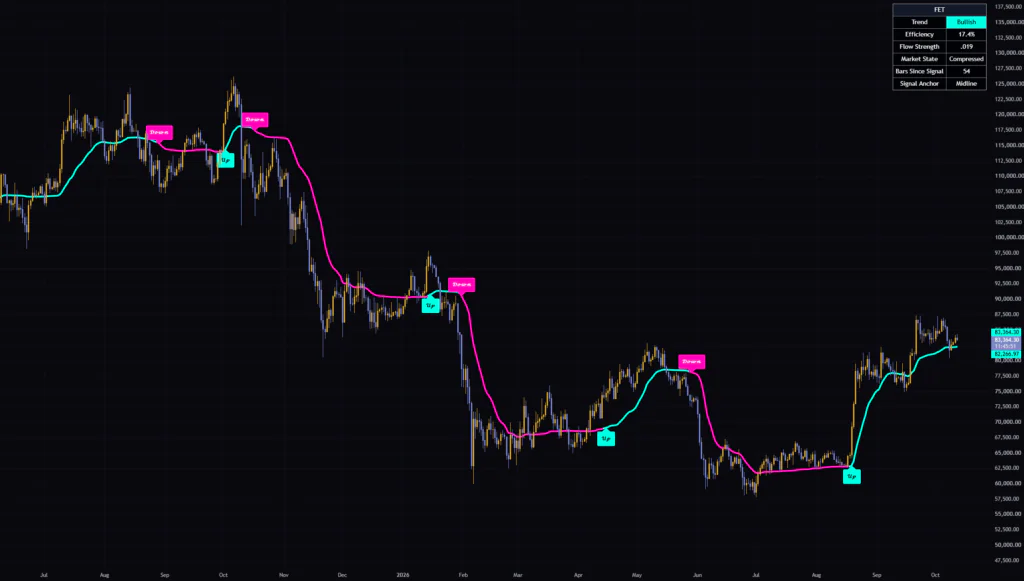
That said, this is not a top-picking indicator. On the weekly, the Down only showed up well after price had started rolling over from the 2025 high. It’s designed to wait for confirmation, so giving up some distance from the exact top or bottom is unavoidable. If you use it with the mindset of “catching the meat of the move,” you won’t be disappointed.
It Works on the 5-Minute, but the Labels Lag
On the 5-minute the display held up fine, and labels were just as sparse as on higher timeframes. There was a case where a Down printed before a sharp dump started, but on the sharp bounce the Up only came after price had already lifted off the low. It fits better as a way to confirm whether you should be leaning short or long right now than as a scalping entry trigger.
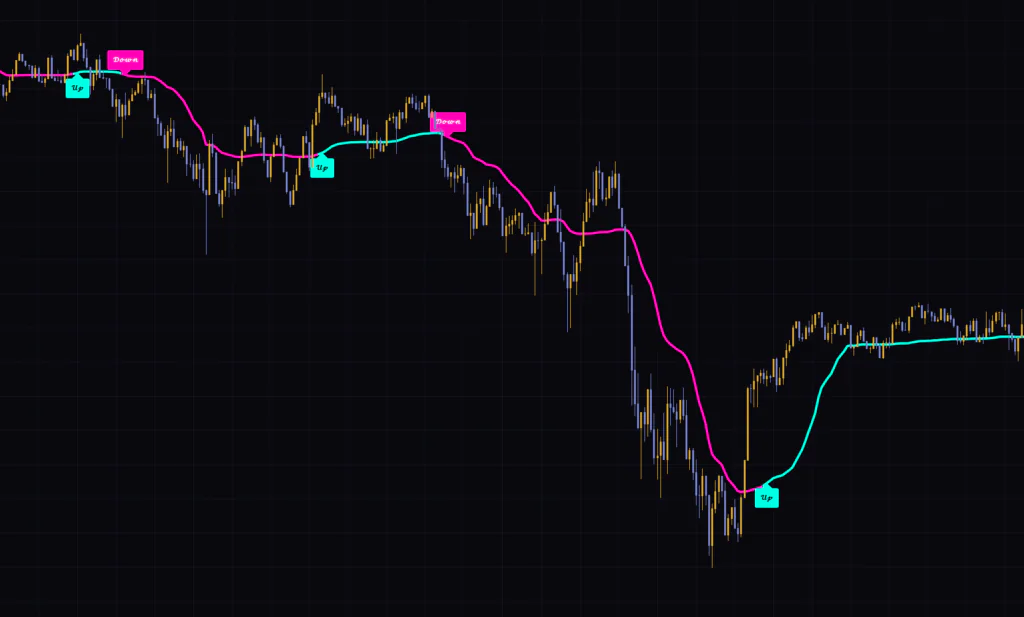
In the comments on the script page, one user mentioned running it on 5-minute gold alongside their own market structure read. Rather than using it alone to time trades, it suits its personality better to treat it as one half of a confluence setup like that.
Where Fakeouts Tend to Happen
Even with the double check, fakeouts don’t go to zero. The most painful case is when price dips during a consolidation.
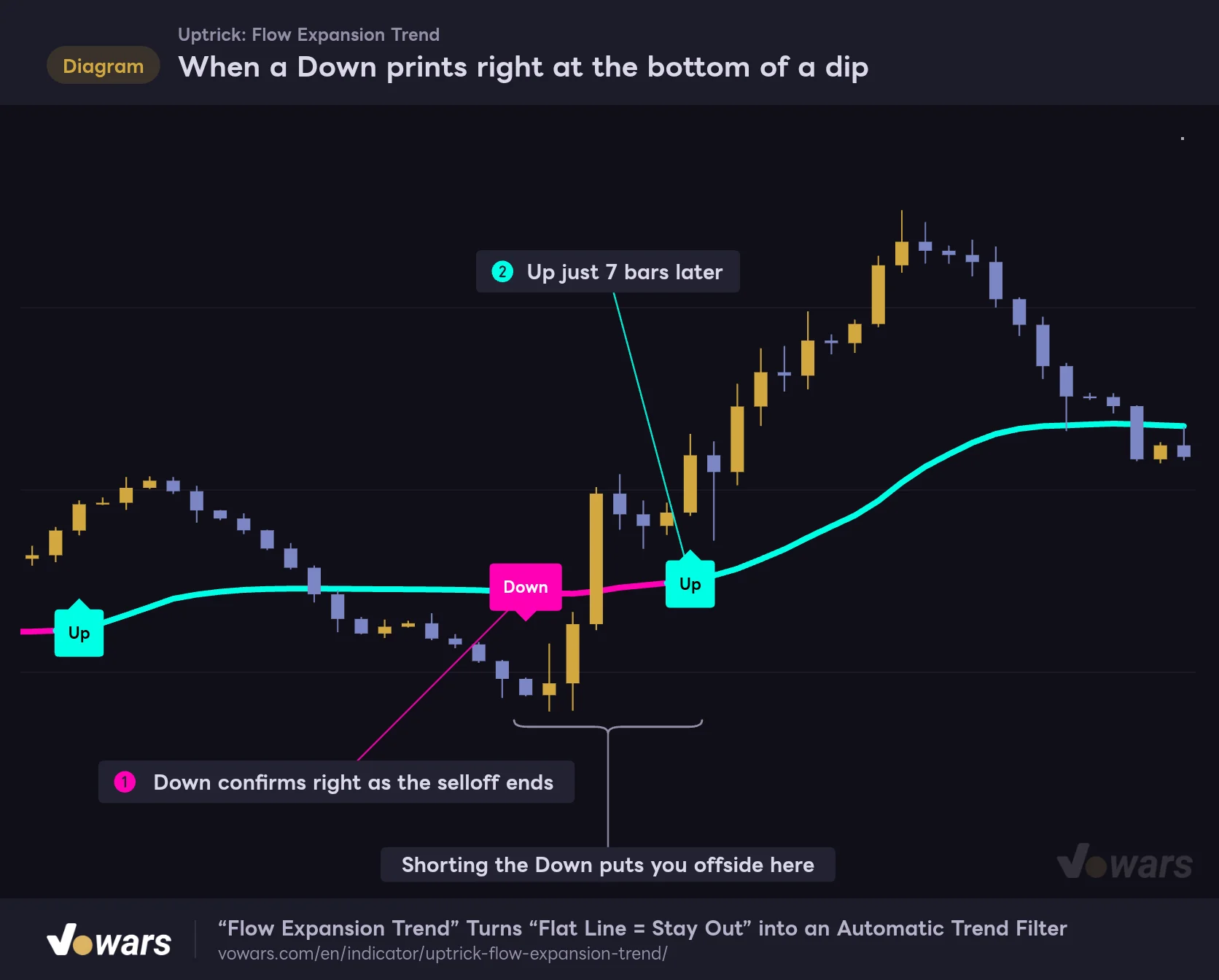
When a Down prints right at the bottom of a dip
When price dips inside a range, a Down can confirm near the low, only to get reversed by an Up a few bars later.
Vowars DE ver.3.12.34
The Down in Figure ① confirms right around where the selloff was basically done. Since it waits for the close to break the boundary and for the line to turn down, this kind of timing is hard to avoid. From there price rips back up, and just 7 bars later in Figure ② you get an Up. If you’d shorted the Down, you’d be buying back higher.
I saw the same thing on real charts too: around October 2025 on the daily and around October 4 on the 1H, Down and Up flipped back and forth in quick succession. What these spots have in common is a mostly flat midline and low Efficiency.
- Be skeptical of any label that prints while the midline is still flat
- When Efficiency is below 10%, check that the label agrees with the higher-timeframe trend
- If there’s a big candle right before the label, check whether the move has already played out
Just running through these three checks makes it a lot less likely you’ll get caught in a setup that immediately reverses on you.
If You Tweak Settings, Start with These Four
The settings are split into three groups: “01. Trend Engine,” “02. Signals,” and “03. Visuals.” Only the four inputs under “01. Trend Engine” change how signals fire. Everything else is cosmetic.
| Setting | Default | Suggested | Effect |
|---|---|---|---|
| Source | hlc3 | hlc3 | Price used to calculate efficiency and the line (default is the average of high, low, and close) |
| Trend Length | 34 | 20–34 | Bars used to measure efficiency, and the slowest speed of the line. Lower = earlier flips, but more fakeouts |
| Signal Distance | 1.6 | 1.4–2.0 | Distance of the invisible boundary (ATR multiple). Lower = flips more easily |
| Signal Strength | 0.03 | 0.03–0.05 | Line momentum required to flip. Higher = harder to flip while the line is flat |
| Show Up / Down Signals | On | On | Shows the Up / Down labels |
| Signal Anchor | Midline | Midline / High / Low | Where the labels are placed. Has no effect on flip logic |
| Signal ATR Distance | 0.50 | 0.50–1.00 | Distance from the bar to the label, only applied when Signal Anchor is ATR Distance |
| Color Candles | On | Personal preference | Colors candles by the latest signal (drawn behind the chart’s candles by default) |
| Midline Width | 4 | 2–4 | Thickness of the midline (1–8) |
| Show Dashboard | On | On | Shows the table in the top-right |
| Dashboard Position | Top Right | Personal preference | Table position (choose from the four corners) |
Trend Length Is the Main Dial for Flip Speed
Trend Length sets both the number of bars used to measure efficiency and how slow the line gets at its slowest. Lower it, and the line hugs price much more tightly.
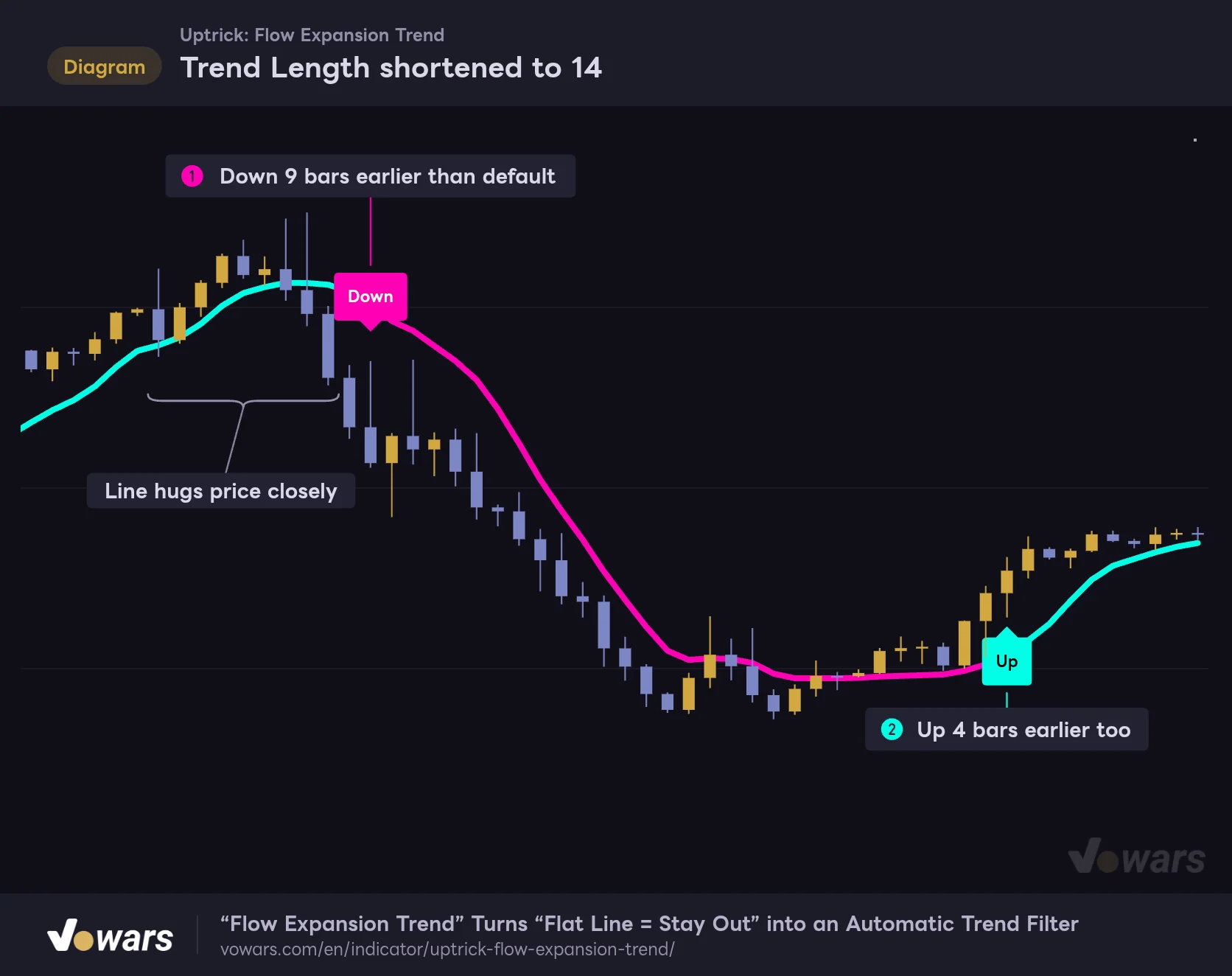
Trend Length shortened to 14
Same price action as the default view, with only Trend Length changed from 34 to 14. The line hugs price and flips come sooner.
Vowars DE ver.3.12.34
Using the exact same price action as the overview figure and changing it to 14, the Down in Figure ① came 9 bars earlier and the Up in Figure ② came 4 bars earlier. The trade-off for the faster reaction is that efficiency also swings more over the shorter window, so you get more flips in chop.
If you’re riding swings on the 1H to daily, the default 34 is plenty. On the 5m to 15m, if you want to catch moves a bit earlier, 20 to 26 is a safe place to start. Dropping it all the way to around 10 makes the efficiency reading itself jumpy, so personally I wouldn’t go below 20.
Signal Distance and Signal Strength: A Tug-of-War Between Fakeouts and Lag
Signal Distance controls how strict the first gate is, and Signal Strength controls the second. Raise either one and you get fewer, later flips. Lower them and you get more, earlier flips.
- To cut down on fakeouts, raise Signal Strength to around 0.05. Flips become less likely while the line is flat, and you’ll see fewer of those “Down at the bottom” cases from earlier
- To catch flips earlier, lower Signal Distance to around 1.4. The boundary moves closer, making it easier to catch the early leg of a trend
- On high-volatility assets, set Signal Distance to around 2.0 to keep big wicks from triggering flips
I’d recommend changing only one of them at a time and watching how the label count changes. If you tweak both at once, you won’t know which one made the difference.
Signal Anchor Only Changes Where the Labels Sit
Signal Anchor is purely visual and has zero effect on flip logic. The default, Midline, puts labels on the midline. High / Low puts them below the bar’s low (Up) and above the bar’s high (Down). ATR Distance pushes them out further from there by Signal ATR Distance × ATR.
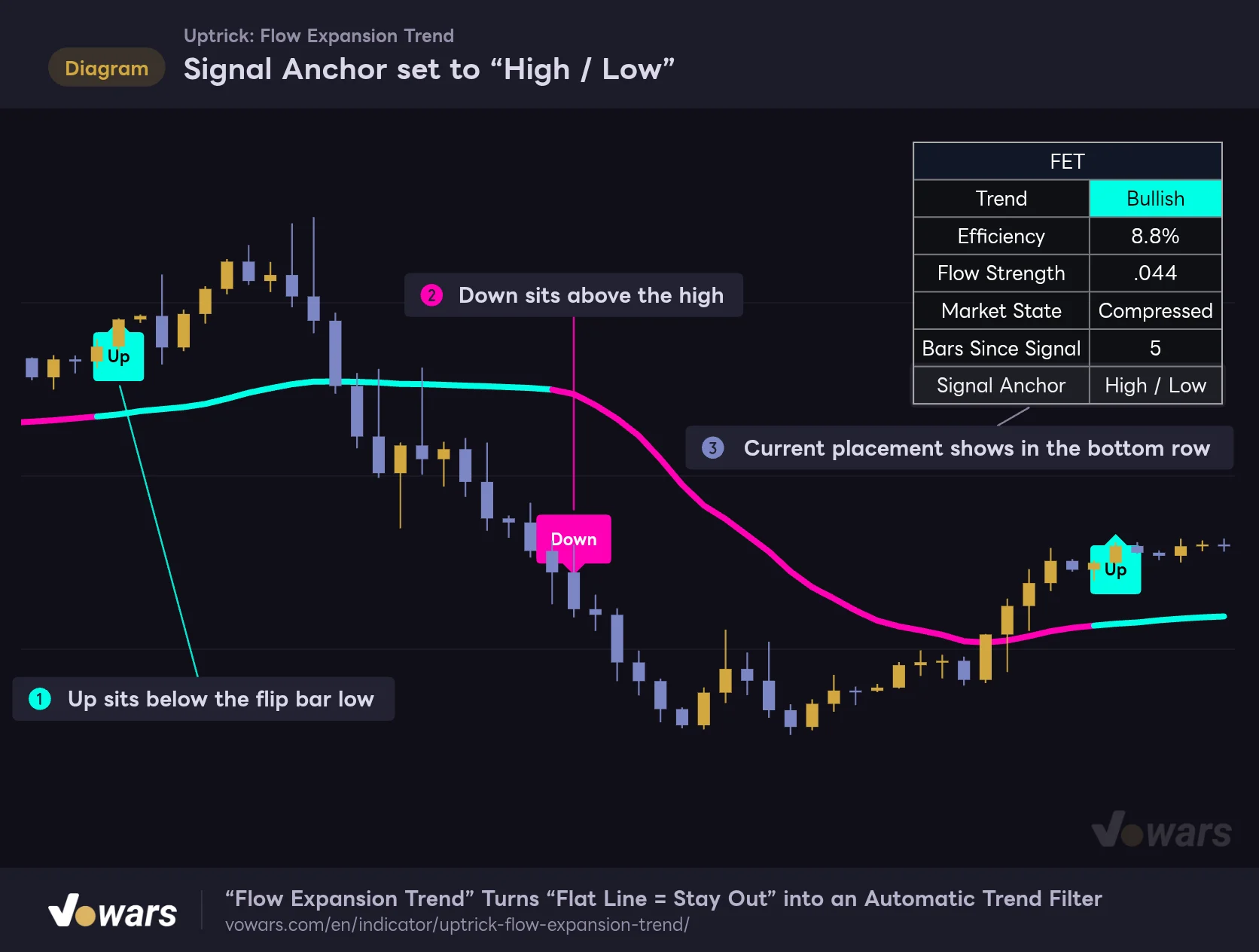
Signal Anchor set to “High / Low”
Only the label position changes. The flip bars are the same as with the default (Midline).
Vowars DE ver.3.12.34
With High / Low, you can see at a glance which bar the flip happened on, as in Figure ① and Figure ②. Since the labels are drawn behind the candles, though, part of a label gets hidden when it overlaps a neighboring bar. If that bugs you, switching to ATR Distance and nudging them out a bit makes them easier to read. You can also check the current placement in the bottom row of the table, as shown in Figure ③.
For a Volume Read, CMF Pairs Really Well
“Flow Expansion Trend” runs purely on price and ATR and doesn’t look at volume at all. So I added Chaikin Money Flow (CMF), which measures buying and selling pressure from volume, in a pane below. It’s a built-in TradingView indicator, so you can just add it and go.
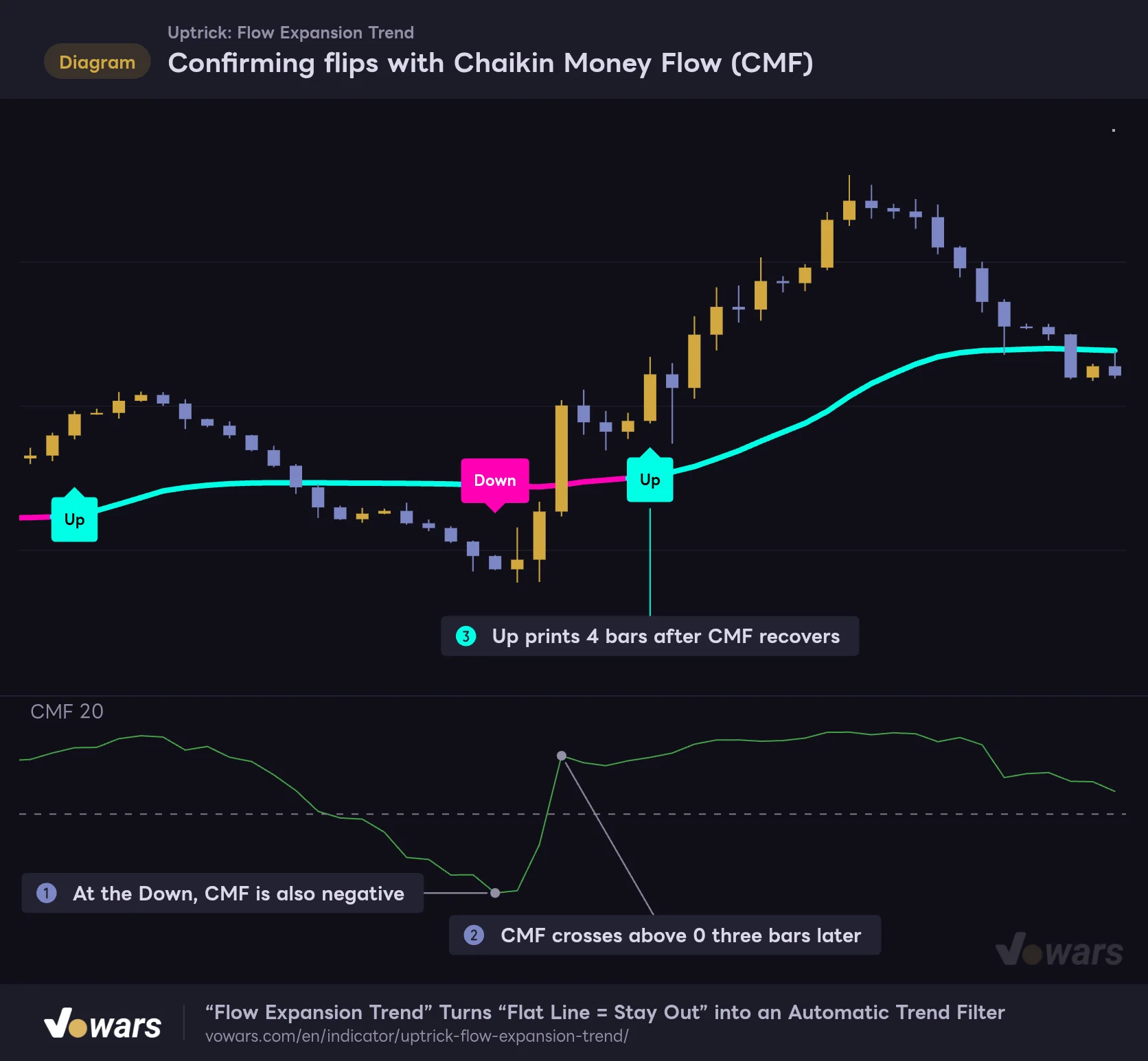
Confirming flips with Chaikin Money Flow (CMF)
With CMF, which tracks volume-based buying and selling pressure, in a lower pane, you can see buying volume returning after the Down before the label catches up.
Vowars DE ver.3.12.34
This is the same “Down at the bottom” setup from earlier. At the Down in Figure ①, CMF was also negative and sellers were in control. But in Figure ②, CMF crossed back above 0 just 3 bars later, and buying volume came back fast. The Up in Figure ③ printed 4 bars after that. If you’d been watching CMF, you could have closed that short early.
A simple rule is enough: when CMF is on the same side as the label, go with it, and when it’s on the opposite side or quickly crosses back over 0, sit on your hands. A few other combos also looked like a good fit.
- Use Donchian Channels to check whether a new recent high or low lines up with the Up / Down. It works as breakout confirmation
- With ADX, you get a second measure of trend strength separate from Efficiency. It makes it easy to set a rule like “skip labels when both are low”
- The “Flow Expansion Trend” on a higher timeframe works well too. Open the same indicator on a higher-timeframe chart and only take labels in the direction both agree on
What You Can Rely On, and What You Can’t
What you can rely on
- Whether the line stalls or runs tells you at a glance if there’s real direction
- With two gates, a one-off spike or dump rarely flips it
- Labels print on confirmed bars and never disappear or move afterward
- The display holds up on every timeframe, from the 5-minute to the weekly
- Four alerts available: Up, Down, any flip, and entering Directional
What you can’t fully rely on
- It’s built to wait for a flip, so it’ll always give up some distance from the top or bottom
- Dips or pops during consolidation can trigger a flip that quickly reverses
- The boundary isn’t shown, so you can’t tell how close the next flip is
- Market State reads Compressed most of the time, which makes it hard to use as a filter
- It ignores volume, so you need confirmation from somewhere else
Repainting and Alerts: What to Watch Out For
Up and Down are only evaluated on confirmed bars, so there is no repainting, meaning labels and line colors on closed bars never change after the fact. It doesn’t pull data from higher timeframes, and it doesn’t use any future values. The midline moving on the live bar is the same behavior you’d see from any normal moving average.
There are four alerts: “Up Signal,” “Down Signal,” “Any Trend Signal,” and “Directional Market.” The Up / Down ones can only trigger on a confirmed bar, so whichever frequency you choose, they’ll fire at bar close. “Directional Market,” on the other hand, triggers when Efficiency crosses above 60%, and it isn’t limited to confirmed bars. If you don’t want it firing when Efficiency pokes above 60% intrabar and then drops back, set the alert frequency to “Once Per Bar Close” in the alert dialog.
Looking back at historical charts, it seems to slice up the big swings perfectly. But mixed in there are losing trades like that “Down at the bottom.” Since it doesn’t repaint, it’s easy to review honestly, so I’d recommend stepping through bar by bar in Bar Replay and asking yourself what you’d actually do the moment each label prints before trading it live.
“Flow Expansion Trend” Is a Trend Filter for Traders Who Can Wait
“Flow Expansion Trend” stays quiet during chop and only calls a flip once price starts moving with conviction. Thanks to the efficiency-adaptive midline and the two gates of boundary and momentum, you get few labels, and the ones you get don’t disappear.
On the flip side, it won’t nail tops and bottoms for you, and labels that come off a flat line deserve some caution. Use it on the 1H to daily as your anchor for “am I leaning long or short right now,” then fine-tune your entries with dips, rallies, or something like CMF. That’s the setup that felt most natural to me.
If you’re worn out on indicators that throw signals at you all day, you’ll probably find its calm, patient style a welcome change.