
Smart Swing VWAP: Stop Guessing Where to Anchor Your VWAP
An anchored VWAP (AVWAP) plots the volume-weighted average price from a bar you choose up to the current bar. It is one of the more reliable tools for spotting where a pullback or a rally might stall, but the annoying part has always been deciding which high or low to anchor it to, every single time. Price moves on, you redraw, delete the old line, draw again. Do that enough and you end up spending more time drawing than actually analyzing the chart.
“Smart Swing VWAP” is a TradingView indicator that takes that anchoring job off your hands. It scans for swing highs and lows across five lookback lengths, automatically anchors to the one with the highest score, and draws an AVWAP from there. Bullish structure gets a green line, bearish structure gets a red one. When a new swing gets accepted, the next line takes over.
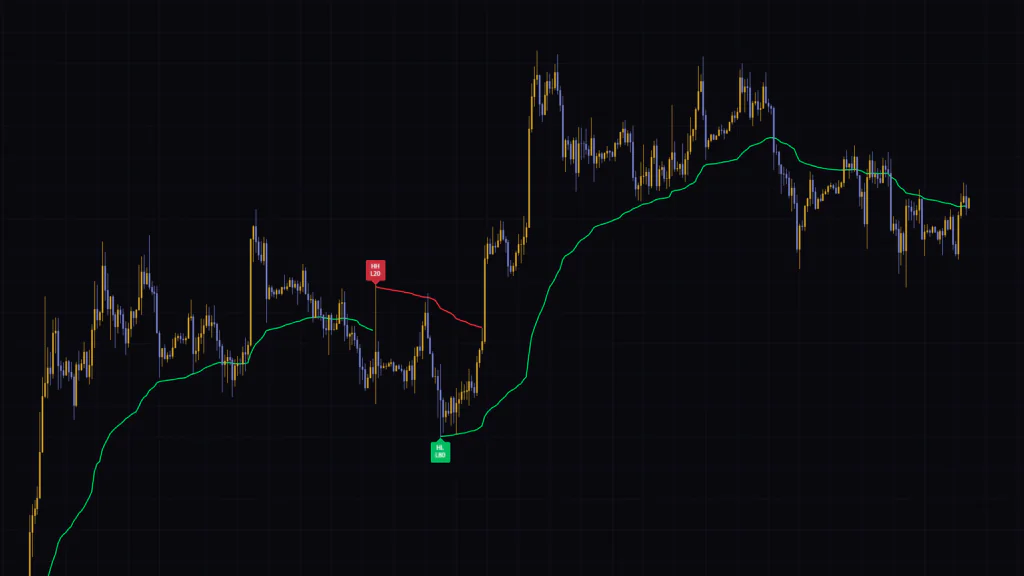
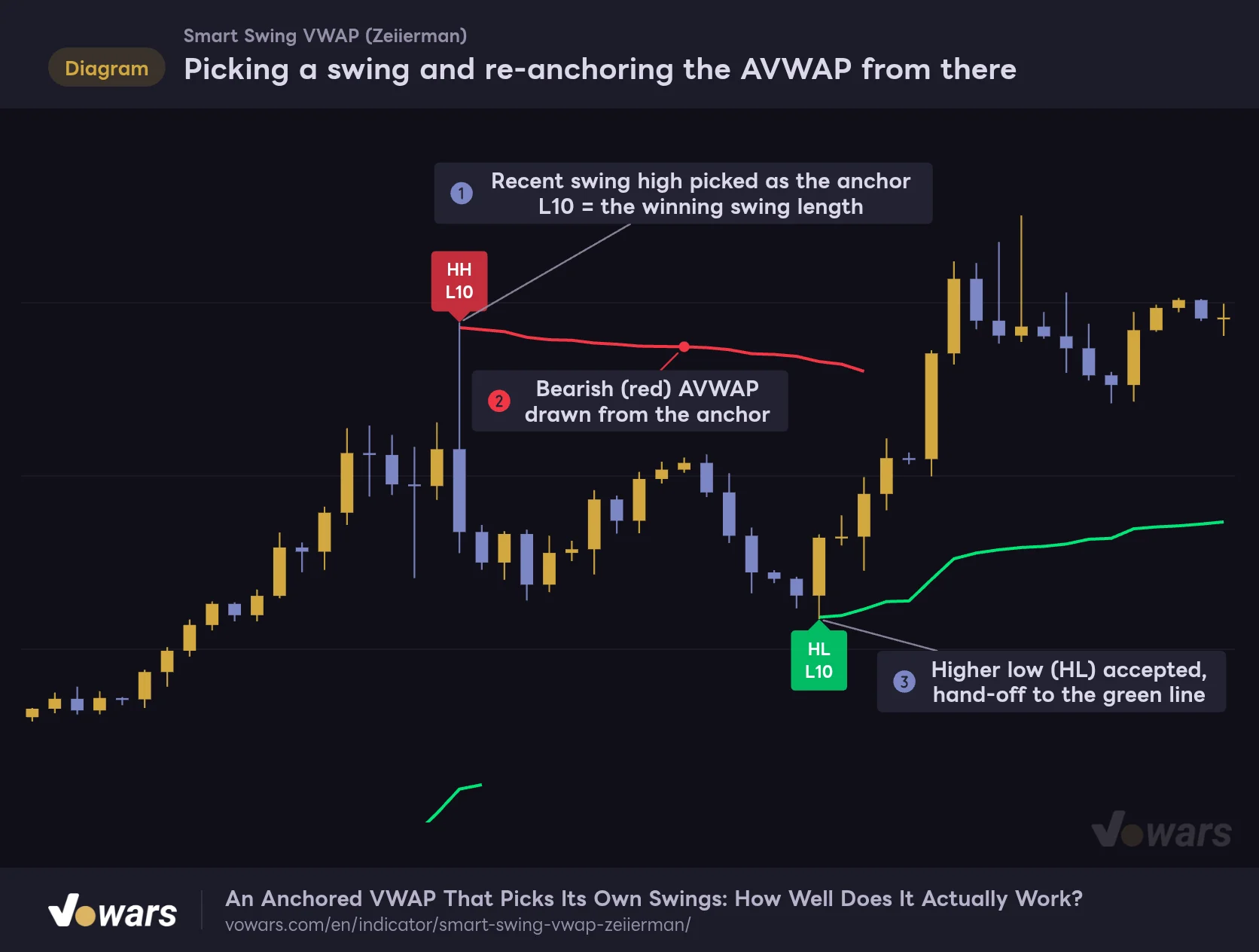
Picking a swing and re-anchoring the AVWAP from there
The labeled highs and lows are the anchors. Each line starts there and hands off to the next one as soon as a new anchor is locked in.
Vowars DE ver.3.12.33
I loaded it on the BTC 1H chart, and all you get is lines and labels. It is surprisingly clean. When a swing high is accepted as the anchor, it gets an HH or LH tag as in Figure ①, and a red line extends from there. Once a higher low is accepted later on, the chart hands over to a green line, as shown in Figure ③.
That said, this line behaves quite differently from a regular AVWAP. First, it remembers the anchor price for a long time. Second, the anchor is accepted a bit after the swing actually prints, and at that point the line is drawn backward in time. If you use it without knowing these two things, it is easy to misread the chart. This review goes through how to read the display, how it works, the settings, and how repainting is handled, so you can decide whether it belongs on your chart.
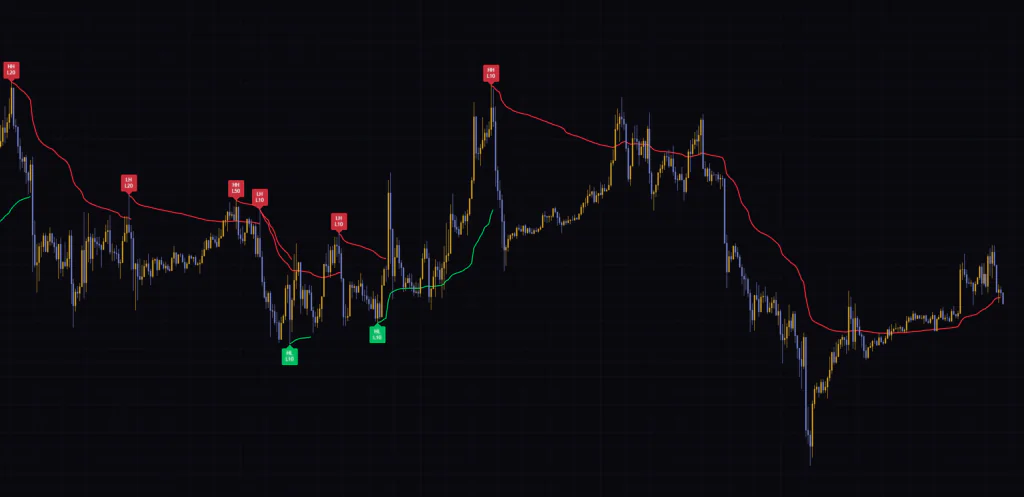
Only Two Things on the Chart: Lines and Labels
The Green and Red AVWAP
The line color tells you which side the current anchor is on. If the anchor is a swing low, such as a higher low, the line is green (bullish structure). If it is a swing high, the line is red (bearish structure). Only one line is “active” at a time. When a new anchor is set, the previous line stops on that bar and stays on the chart, and a new line is drawn.
The key thing to remember is that the color is not based on whether price is above or below the line. Price can slice through the green line and it will not turn red right away. The color only changes when a candle closes beyond the anchor price (the anchor low for green, the anchor high for red), or when a new anchor on the opposite side is accepted.
Read the line color as the direction of swing structure and the position of price relative to the line as current momentum, and you will not get confused. Price trading below a green line means the bullish structure is still intact, but sellers are in control for now.
How to Read the Labels
When an anchor is accepted, a label appears at that swing. The top row compares it with the previous anchor, and the bottom row shows the swing length that won.
| Label | Meaning |
|---|---|
| HH | High-side anchor above the previous high-side anchor (Higher High) |
| LH | High-side anchor at or below the previous high-side anchor (Lower High) |
| HL | Low-side anchor at or above the previous low-side anchor (Higher Low) |
| LL | Low-side anchor below the previous low-side anchor (Lower Low) |
| L10 to L80 | The lookback length that found the accepted swing (10, 20, 35, 50 or 80 bars by default) |
| Blank top row | The very first label, with no previous anchor to compare against. You will see it at the far left of the chart |
The comparison is not against the most recent swing, but against the previously accepted anchor on the same side. Minor highs and lows in between that never got a label are ignored. You can hide the bottom row with Show Winning Pivot Length.
Whether you mostly see L10 or get L50 and L80 mixed in also gives you a rough idea of how big the swings driving the market are. On the daily chart, the sequence went from “HH L80” to “LH L50”, which made it easy to spot exactly where the bigger trend turned.
How the Anchor Gets Picked
Five Swing Lengths Each Nominate a Candidate
“Smart Swing VWAP” tracks the latest high and low on five lookback lengths: 10, 20, 35, 50 and 80 bars. Each length decides its current direction based on whether its latest high or latest low is more recent, then nominates the extreme on the opposite side as an anchor candidate. For example, if a length just printed a new high, the low before it becomes a bullish anchor candidate.
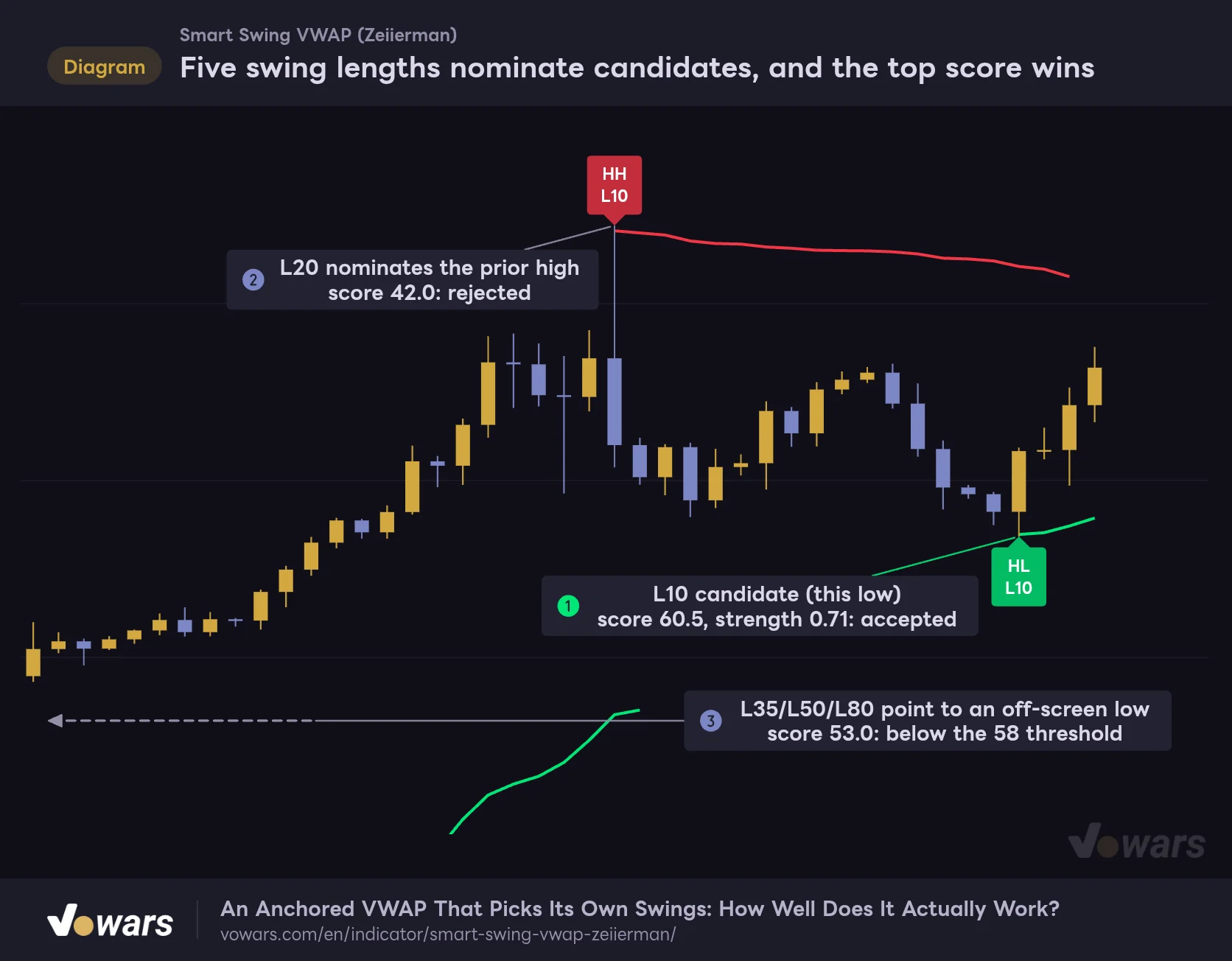
Five swing lengths nominate candidates, and the top score wins
The anchor is never hard-wired to a single length. Every confirmed bar, all five candidates get scored, and only the highest one that clears the filters is accepted.
Vowars DE ver.3.12.33
All five candidates are scored on every confirmed bar. The low in Figure ① was nominated by L10 and accepted with a score of 60.5. Meanwhile, L20 was pointing to the prior high in Figure ②, and L35, L50 and L80 were pointing to an older low off the left edge of the chart in Figure ③.
What Goes Into the Score
| Component | Weight | What it measures |
|---|---|---|
| Cross-length agreement | 25% | Higher when candidates on the same side sit close together in price (0.5 ATR scale) or in time (3-bar scale) |
| Swing size | 20% | Maxes out when the distance between the latest high and low reaches 4x ATR |
| Move strength | 55% | Built from directional progress, volatility expansion and volume participation |
Move strength carries the most weight. How far has price traveled in one direction since the swing? Was the range during that move larger than average? Was volume above average? These three are multiplied together and then discounted by the weakest of them, so if even one of the three is weak, the score will not get far. Swings where volume is heavy but price goes nowhere are unlikely to be accepted.
To be accepted, a candidate needs a score of at least Minimum Anchor Score (default 58) and a move strength of at least Minimum Move Strength (default 0.35). On top of that, the indicator will not switch anchors until Bars Between New Anchors (default 8 bars) have passed since the previous one.
To switch to a candidate on the same side as the current anchor, it has to beat the current anchor’s score by at least 4 points. Also, a candidate that is nearly identical to the current anchor in both price (within 0.2 ATR) and time (within 3 bars) is treated as the same swing and ignored. That is why the green line does not keep getting redrawn in the middle of an uptrend.
The Anchor Is Locked In After the Swing
This is the most important thing to understand about “Smart Swing VWAP”. Scores are calculated on every bar, but the anchor decision only happens on a bar where at least one of the five lengths flips direction (or until the very first anchor is set). In other words, nothing happens at the moment the low prints. Only after price rallies and makes a new high does that low finally get scored as a candidate.
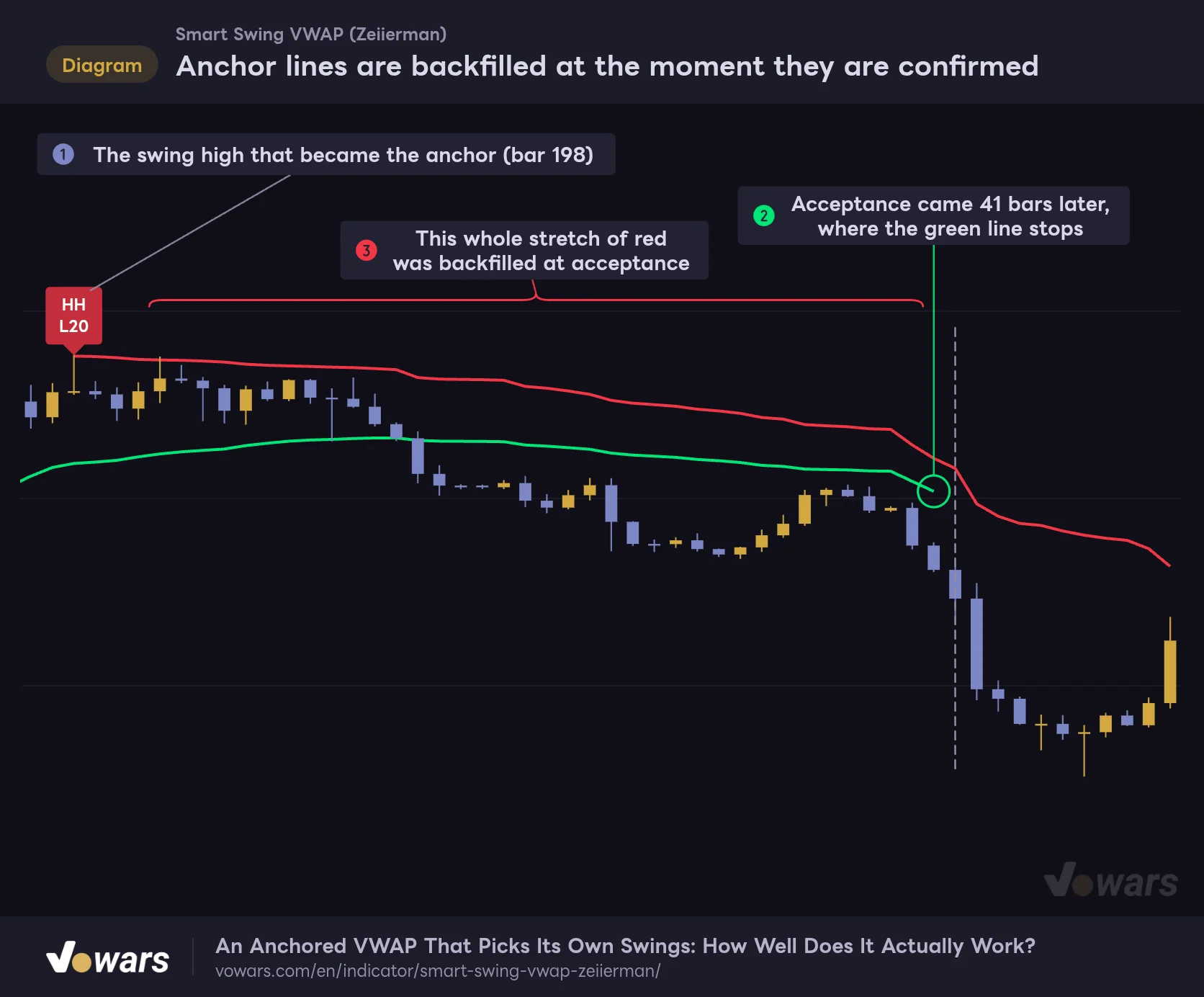
Anchor lines are backfilled at the moment they are confirmed
The red line starts at bar 198, but on bar 198 itself the only line on the chart was the green one.
Vowars DE ver.3.12.33
In this chart, the high on bar 198 in Figure ① was not accepted until bar 239, 41 bars later. On the acceptance bar, the AVWAP from bar 198 to the current bar is calculated in one go, and the red line is backfilled all at once, as shown in Figure ③. The green line that was on the chart until then stops right before acceptance, as in Figure ②, and stays there.
In my testing, short-length swings (L10 or L20) were usually accepted within a few bars, while bigger swings tended to lag more. Even on the BTC 5m chart, a delay of a few bars to a dozen or so was common, and on the daily chart an LH L50 anchor was only accepted more than a month after the swing.
Scroll back through history and every swing has a perfectly placed line, as if the indicator nailed the highs and lows. In real time, that line did not exist until the anchor was accepted. Even if the line starts right at the swing, you could only have used it from the acceptance bar onward. Step through bar by bar with TradingView’s Bar Replay and you can see exactly which bar the line was backfilled on (how far back you can go depends on the timeframe and your plan).
A VWAP That Remembers the Anchor Price for a Long Time
The Anchor Price Is the Starting Point
A regular AVWAP starts from a typical price of the anchor bar (such as the average of high, low and close) and then volume-weights every bar after it. “Smart Swing VWAP” starts somewhere else. It seeds the calculation with the anchor high or low itself (the tip of the wick), weighted by the anchor bar’s volume, and then blends in each new bar little by little. It works a lot like exponential smoothing.
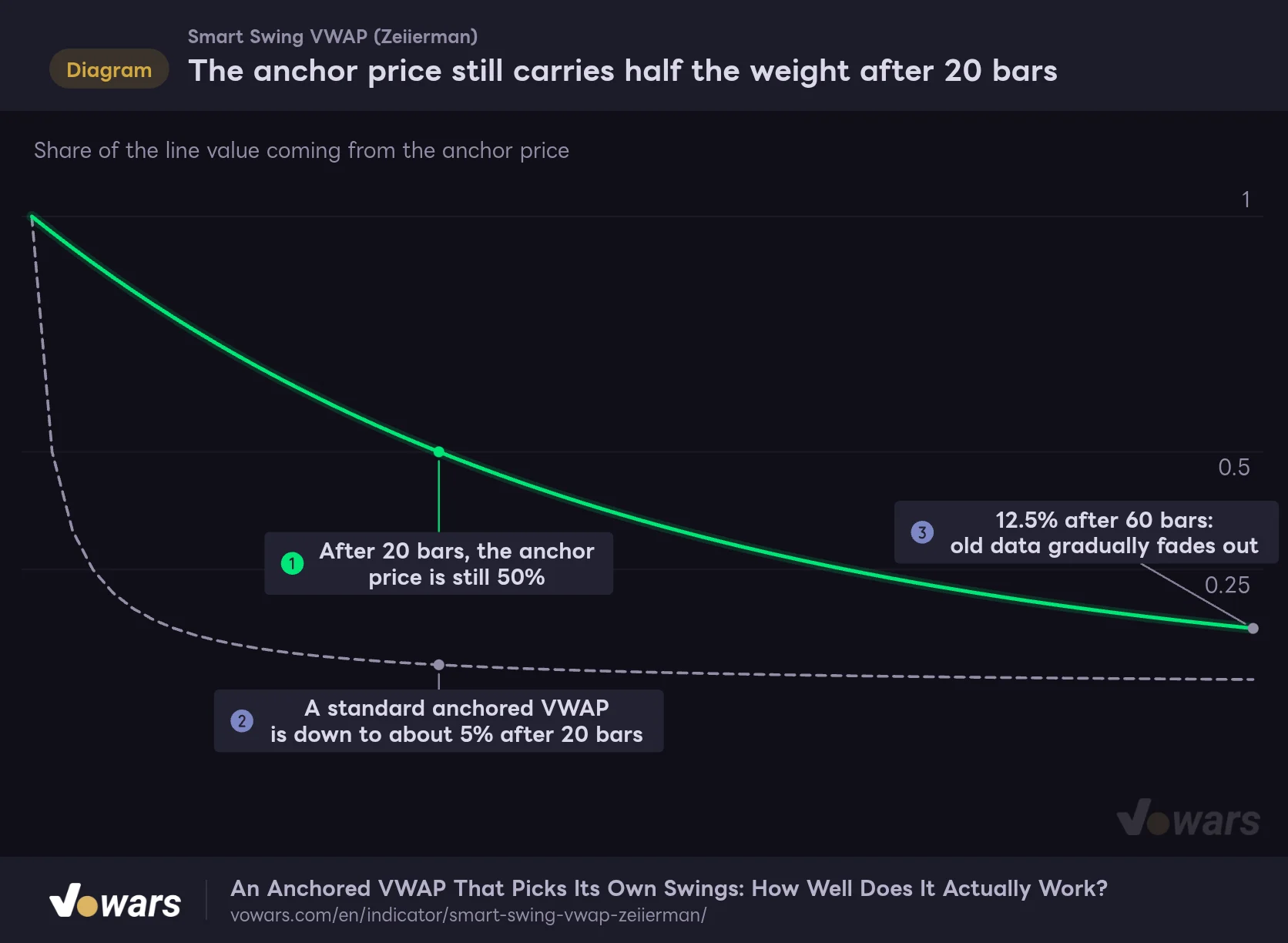
The anchor price still carries half the weight after 20 bars
Smart Swing VWAP seeds its calculation with the anchor high or low itself. This compares how long that influence sticks around.
- Smart Swing VWAP (Price Tracking Speed 20)
- Standard anchored VWAP
Vowars DE ver.3.12.33
Assuming equal volume on every bar, with Price Tracking Speed at its default of 20, the anchor price still makes up half of the line value after 20 bars, as shown in Figure ①. With a regular AVWAP, the anchor bar’s influence is already down to about 5% after 20 bars, as in Figure ②. The trade-off is that older data does fade out properly as you get to 60 or 100 bars, as in Figure ③, so the line does not get left behind in a long trend the way a regular AVWAP does when it carries every bar with equal weight.
Overlaying It on a Regular Anchored VWAP
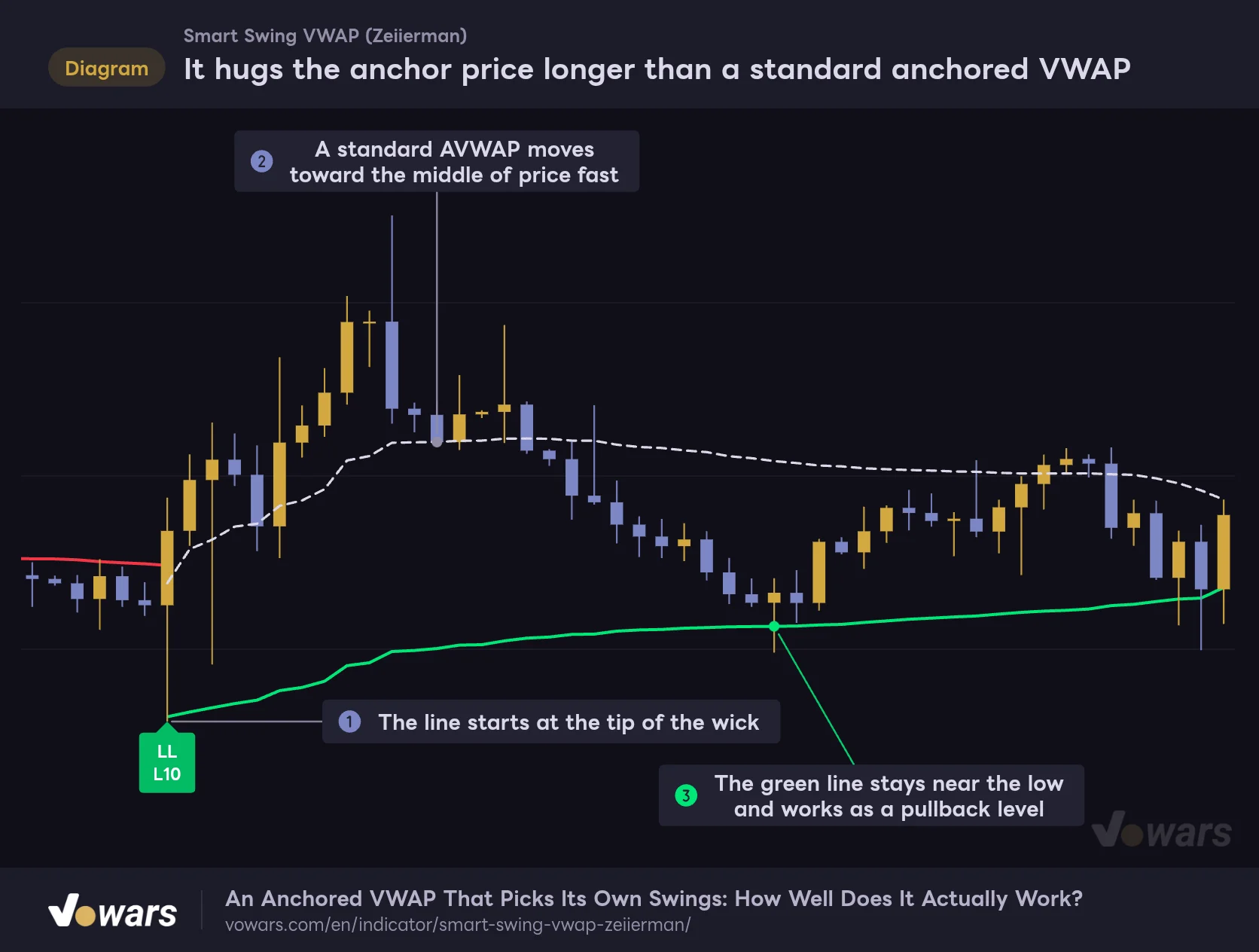
It hugs the anchor price longer than a standard anchored VWAP
Both lines are anchored to the same low on bar 202. The dotted line is a standard anchored VWAP added for comparison.
- Smart Swing VWAP
- Standard anchored VWAP (for comparison)
Vowars DE ver.3.12.33
Anchor both to the same low and the difference is obvious. The green line starts at the tip of the wick, as in Figure ①, and lifts off very slowly. A regular AVWAP moves toward the middle of price within a few bars, as in Figure ②.
From the description I expected a line that hugs price closely, but at least for the first few dozen bars after the anchor it is the opposite: a line that lingers around the swing price. That is less a flaw than a different personality. It tends to act as support not too far from the low on a pullback, and as Figure ③ shows, there were times when a mid-trend dip stalled right around the green line.
Adjusting How Fast It Follows Price with Price Tracking Speed
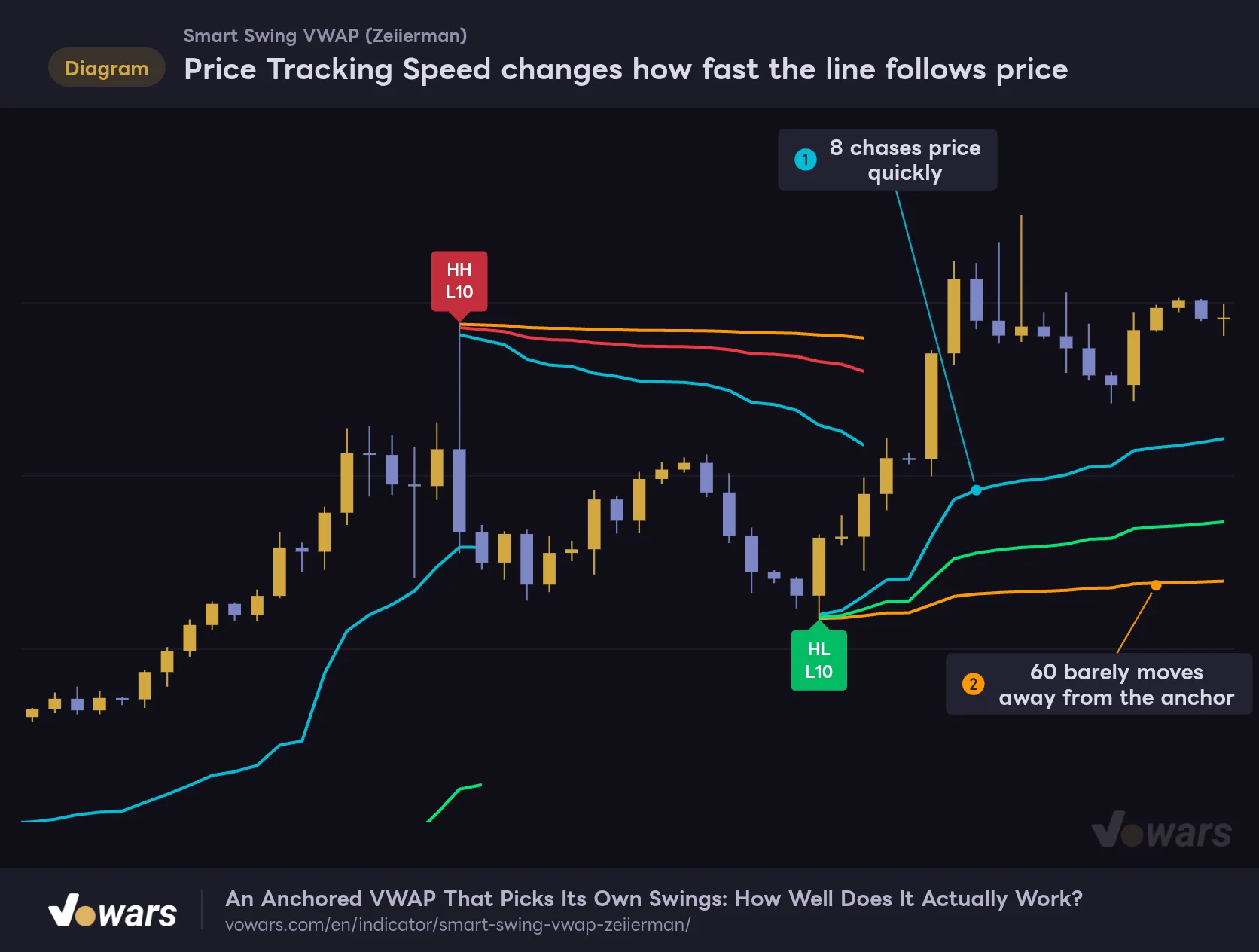
Price Tracking Speed changes how fast the line follows price
All three lines share the same anchor. The only difference is how quickly each one absorbs new price action.
- Price Tracking Speed 8
- 20 (default)
- 60
Vowars DE ver.3.12.33
Price Tracking Speed works as the number of bars it takes for the weight of the anchor price and older bars to halve. Drop it to 8 and the line chases price quickly, as in Figure ①. Raise it to 60 and it barely moves away from the anchor, as in Figure ②. The anchor location stays the same regardless of this setting; only the way the line moves changes.
The minimum input is 1, but internally it is clamped to a range of 5 to 300 bars. Anything below 5 behaves exactly like 5, which is worth knowing so you do not waste time testing lower values.
Adjust Speed With Volatility Hits Harder Than You Might Expect
Turn on Adjust Speed With Volatility and the indicator compares ATR (length 50) with its own average, speeding up the line when volatility is high and slowing it down when volatility is low. It is off by default.
Volatility Adjustment Strength, which controls how strong the effect is, defaults to 10. At that value, ATR just 1.1x its average is enough to make a Price Tracking Speed of 20 behave like roughly 8, while 0.9x slows it down to the 50s. The swing is bigger than you would expect, so if you want to try it, I found it easier to start around 1 to 3 and work your way up while watching how the line moves.
Two Ways to Display a Structure Break
When a candle closes through the anchor against the direction of the active line, it is treated as a structure flip. For a green line, that means a bar closing at or below the anchor low. You can choose how the flip is drawn with After Structure Break.
Recolor Entire Active Line (Default)
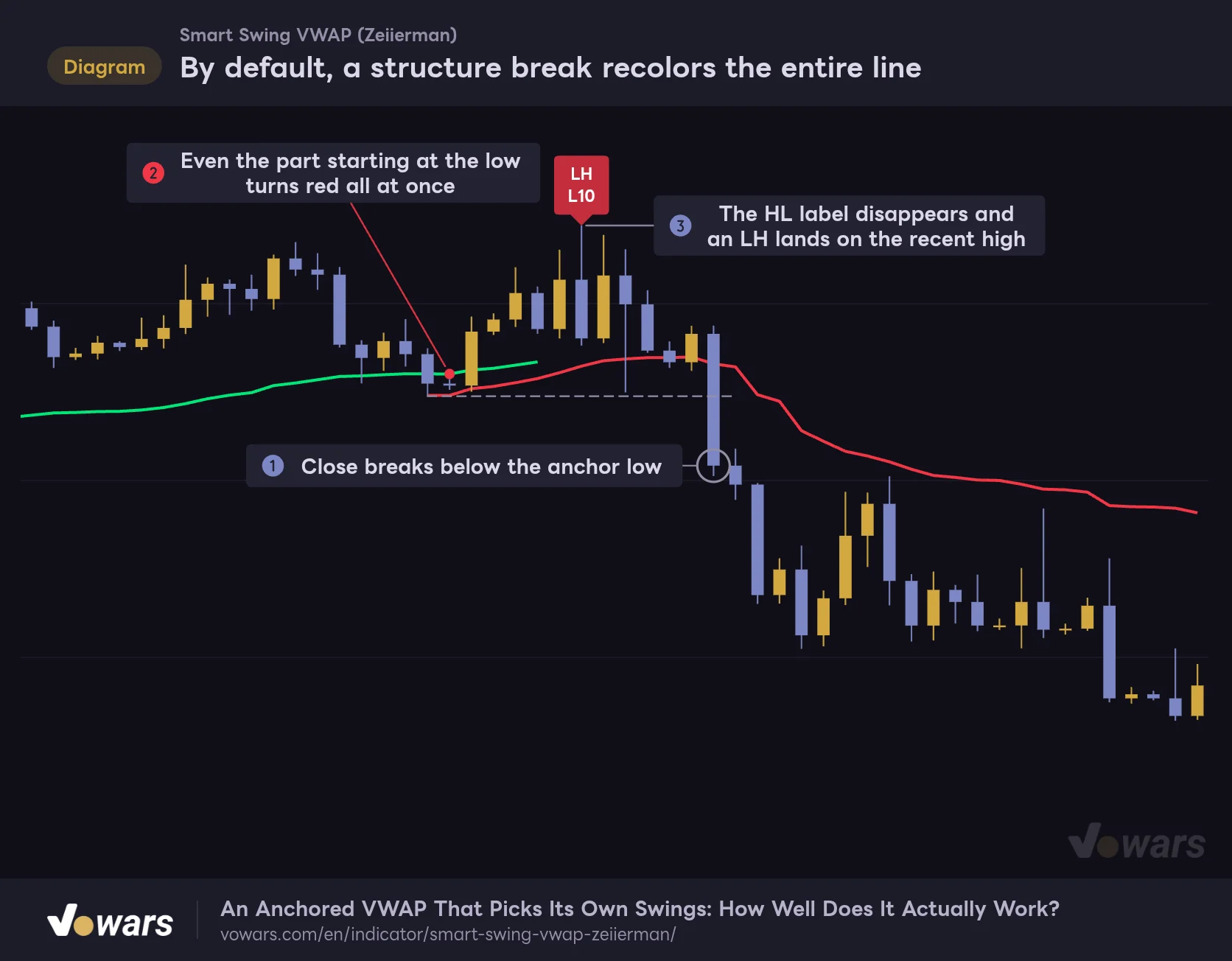
By default, a structure break recolors the entire line
With Recolor Entire Active Line (the default), the moment structure flips, even the historical part of the line gets repainted in the new color.
Vowars DE ver.3.12.33
With the default setting, on the bar where the flip happens (Figure ①), the entire active line, including its historical part, is repainted in the new color, as in Figure ②. The line values do not change; only the color does.
At the same time, the label on the anchor (HL in this example) is deleted, and an LH label (or HH if it is above the previous high-side anchor) is placed on the highest high between the anchor and the flip, as in Figure ③. If you only look at the chart after the flip, you get a slightly odd picture: a red line starting from a low, with an LH tag on the high above it. Easy to misread if you do not know how it works.
Preserve Old Color And Start New Segment
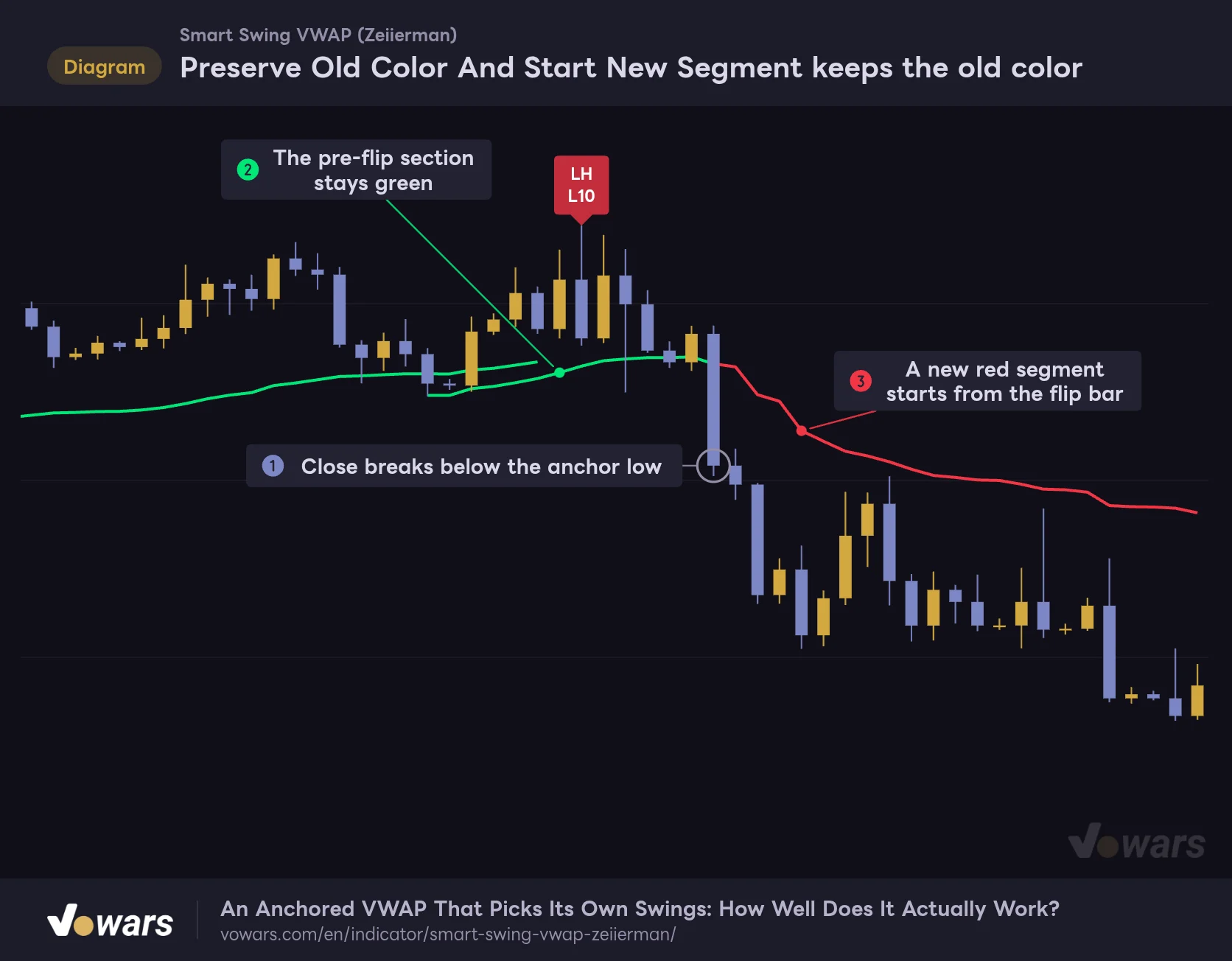
Preserve Old Color And Start New Segment keeps the old color
Same price action, different setting: the pre-flip color is kept, so the chart shows exactly where structure broke.
Vowars DE ver.3.12.33
Switch to this option and the pre-flip section stays green, as in Figure ②, while a new red segment continues from the flip bar, as in Figure ③. Because the chart keeps a record of where structure broke, I found this easier to read when reviewing past price action. The label swap still happens with this setting too.
When structure flips, the most recent label is deleted and placed somewhere else. An HL or LH label you saw earlier may have moved by the time you look again, so be careful if you log labels as-is for backtesting.
Eight Alerts, and Why the Retest Logic Is Worth Knowing
“Smart Swing VWAP” does not plot any buy or sell signals on the chart. Instead, it offers eight conditions you can pick in TradingView’s Create Alert dialog. All of them are evaluated on bar close.
| Alert name | What it means |
|---|---|
| New ranked anchor | A new anchor has been accepted |
| Bullish polarity flip | A candle closed above the red line’s anchor (high), flipping structure bullish |
| Bearish polarity flip | A candle closed below the green line’s anchor (low), flipping structure bearish |
| Cross above AVWAP | A candle closed above the active line |
| Cross below AVWAP | A candle closed below the active line |
| Bullish AVWAP retest | A retest of the green line was confirmed |
| Bearish AVWAP retest | A retest of the red line was confirmed |
| Any ranked AVWAP event | Any of the seven events above |
Cross and retest conditions are not evaluated on bars where an anchor is accepted or structure flips. Since the line itself is being swapped on those bars, this keeps you from getting a cross alert stacked on top of it.
The Three Conditions for a Retest
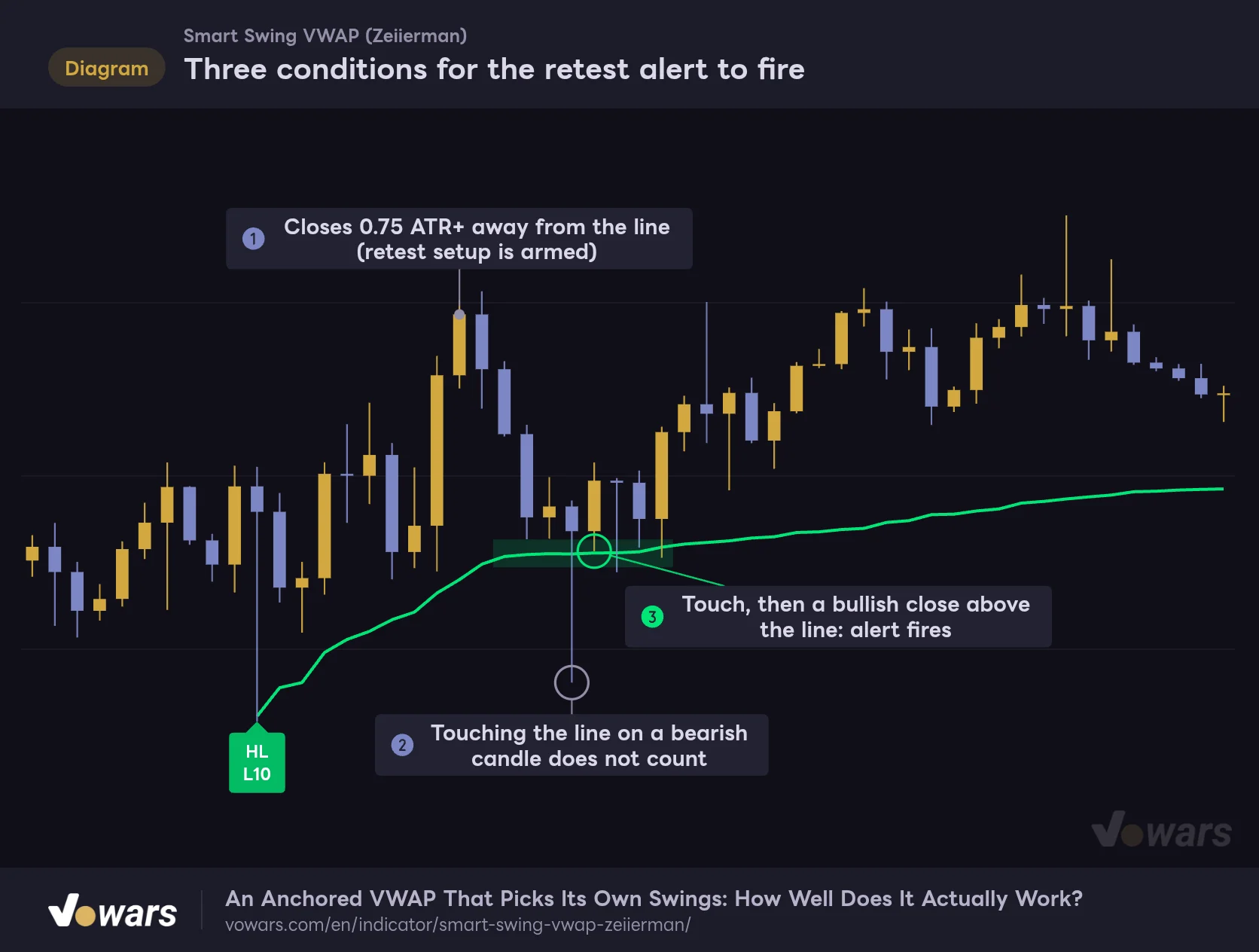
Three conditions for the retest alert to fire
Retests are alert-only and leave no marker on the chart. Here is how the conditions line up bar by bar on actual price action.
Vowars DE ver.3.12.33
The retest logic is stricter than I expected. For the green line (Bullish AVWAP retest), price first has to close at least Retest Setup Distance (ATR) (default 0.75 ATR) away from the line, which arms the setup, as in Figure ①. After that, the retest is confirmed on a bar whose range reaches into the zone of Retest Touch Zone (ATR) (default 0.15 ATR) above and below the line, closes bullish (close at or above open), and closes above the line.
Bar 220 tagged the line with its lower wick, but it was a bearish candle, so it was skipped, as in Figure ②. The next bar, 221, reached into the zone and closed bullish above the line, so the retest was confirmed, as in Figure ③. Once a retest fires, the setup resets, and no new retest is checked until price moves away from the line again. For the red line, the up/down and bullish/bearish conditions are simply reversed.
It does not fire on a simple touch. It waits for the bounce candle (bullish, closing above the line) before firing. That means the first bounce candle is already done by the time you get the alert. It is late if you want to catch the exact touch with a limit order, but a good fit if you prefer to see confirmation before entering.
How to Use Smart Swing VWAP
Here is a practical workflow for using it on a live chart. Go through it in order and the lines and labels turn into usable inputs without much effort.
1 Check structure with the line color
First, check whether the active line is green or red. Green means you are looking to buy the dip; red means you are looking to sell the rally. The bigger the L number on the bottom row (L50, L80), the bigger the swing the line is based on. For day trading, confirming the direction on the 1H or 4H before dropping to a lower timeframe cuts down on second-guessing.
2 Wait for a pullback to the line
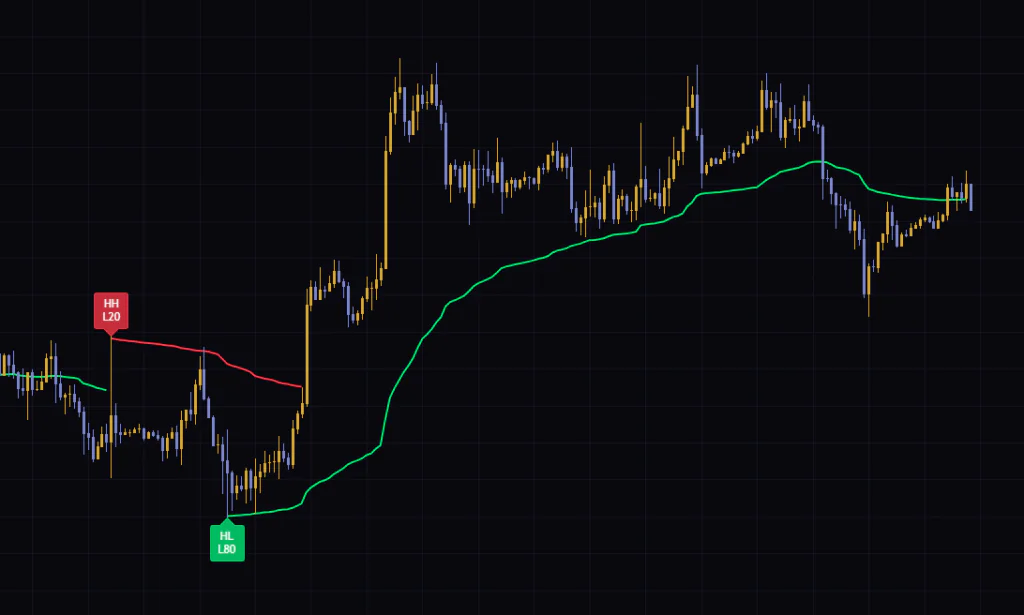
When price is extended from the line, do not chase it; wait for it to come back. A line that was anchored recently tends to stay near the swing price, so dips early in a trend can turn out deeper than you might think. If the line feels too far away, lowering Price Tracking Speed a bit pulls it into a more realistic spot.
3 Decide on the retest alert or the closing reaction
Once price gets near the line, either wait for the Bullish AVWAP retest alert (Bearish AVWAP retest for a rally into resistance) or confirm the bounce candle yourself. If a candle closes clearly through the line, consider the dip-buy thesis weakened.
4 Use the anchor price as your stop reference
The green line’s structure breaks when a candle closes below the anchor low. Placing your stop just beyond that low keeps your invalidation in line with the indicator’s own structure logic. If you use the line itself as your stop, keep in mind that right after the anchor it sits very close to the low and then drifts away from it over time.
How It Looks Across Timeframes
I ran it on BTC from the 5m all the way up to the weekly, and its personality changes quite a bit with the timeframe.
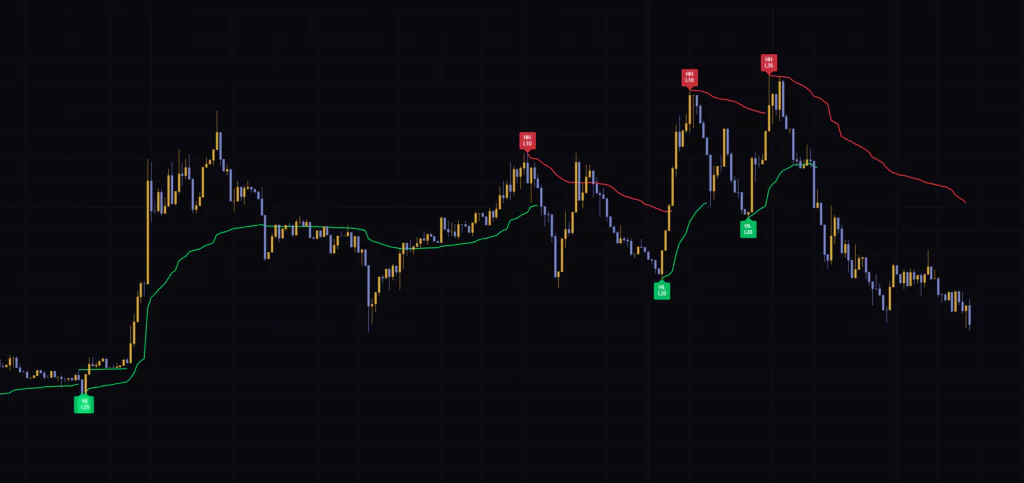
On the 5m and 15m, L10 and L20 anchors switch every few hours and the colors flip back and forth a lot. There is plenty of information in the lines, but also a lot of acceptance lag and anchor switching, so I found it calmer to only take dips aligned with the higher-timeframe direction rather than chasing every line.
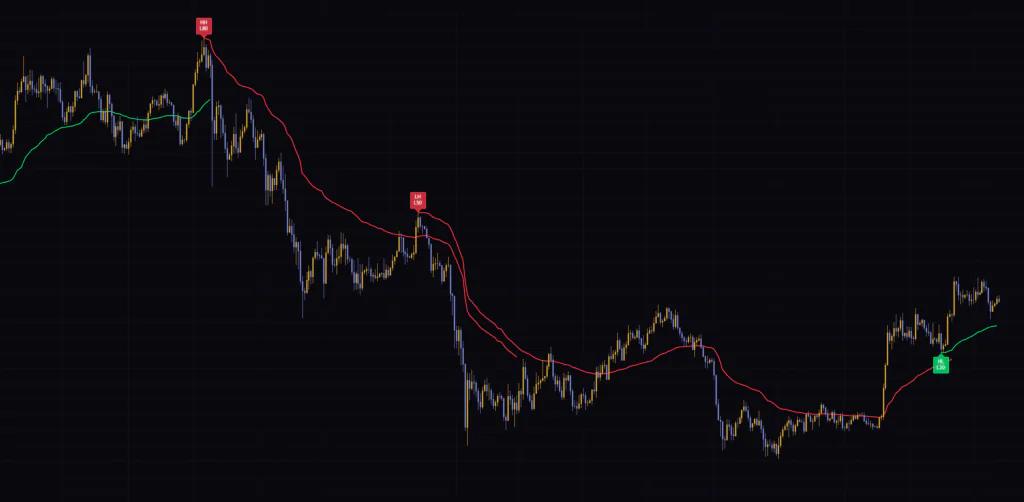
On the 1H and 4H, you get a healthy mix from L10 to L80, and a single line can run for several days. For marking pullback and rally levels, this felt like the sweet spot. On the daily, the sequence went from HH L80 to LH L50, and during the November to January decline the red line worked as a ceiling for relief rallies. On the weekly, there are only a handful of labels and the line reflects multi-year trends.
Settings Explained and Suggested Tweaks
| Setting | Default | Suggested | Effect |
|---|---|---|---|
| Scale 1 to Scale 5 | All on | All on | Whether each swing length is used for scoring. A disabled length nominates no candidates and is excluded from the agreement calculation |
| Length | 10 / 20 / 35 / 50 / 80 | Default | Lookback for each length. Smaller values catch nearby minor swings; larger values catch bigger structure |
| After Structure Break | Recolor Entire Active Line | Preserve Old Color And Start New Segment if you review past charts a lot | On a structure flip, either recolor the whole line or continue from the flip bar in the new color |
| Price Tracking Speed | 20 | 12 to 16 on lower timeframes / 20 to 30 on mid to higher timeframes | Number of bars for the weight to halve. Smaller hugs price; larger stays near the anchor |
| Adjust Speed With Volatility | Off | Off (if you try it, lower the strength first) | Automatically changes tracking speed based on ATR versus its average |
| Volatility Adjustment Strength | 10 | Start at 1 to 3 | How strongly volatility changes the speed. Higher values make the difference more extreme |
| Minimum Anchor Score | 58 | 55 to 65 | Score required for acceptance. Raise it for fewer anchors, lower it for more |
| Minimum Move Strength | 0.35 | 0.3 to 0.45 | Move strength required for acceptance. Raise it to keep only swings with real momentum |
| Bars Between New Anchors | 8 | 10 to 15 on lower timeframes | Bars that must pass before switching to the next anchor |
| Retest Touch Zone (ATR) | 0.15 | 0.1 to 0.25 | Distance from the line that counts as a retest touch (in ATR) |
| Retest Setup Distance (ATR) | 0.75 | 0.5 to 1.0 | Distance price must move away from the line to arm a retest (in ATR) |
| Bullish Label Color / Bearish Label Color | lime / red | Personal preference | Label colors |
| Bullish VWAP Color / Bearish VWAP Color | lime / red | Personal preference | Line colors |
| VWAP Line Width | 2 | 2 | Line thickness (1 to 6) |
| Show Winning Pivot Length | On | On | Shows L10 to L80 on the bottom row of each label |
When Anchors Switch Too Often on Lower Timeframes
If the lines feel too jumpy on the 5m or similar, start by raising Bars Between New Anchors to 10 to 15. It directly stretches the gap between switches, so the effect is easy to see. If that is still too much, raising Minimum Anchor Score to 60 to 65 filters out swings without much momentum. You can also turn off Scale 1 (L10), but on the 15m there were stretches where almost every anchor was L10, so turning it off cuts the number of lines drastically. I would treat that as a last resort.
When You Only Want the Big Structure for Swing Trading
If you only want to follow the bigger picture on the 4H or daily, you can turn off Scale 1 and Scale 2 so that only L35 and above get scored. Disabled lengths are also excluded from the agreement calculation, so far fewer anchors get accepted and each line lasts longer. Keeping Price Tracking Speed at 20 to 30 helps those long-running lines avoid getting left behind by price.
When You Want More or Fewer Retest Alerts
If you are getting too few alerts, lower Retest Setup Distance (ATR) to around 0.5 and widen Retest Touch Zone (ATR) to around 0.2. If it keeps firing in choppy consolidation, raise Retest Setup Distance (ATR) to 1.0 so only clean moves away from the line followed by a return are left. Both are ATR-based, so they feel the same across symbols and timeframes.
The calculation uses volume, but bars with no volume (or zero volume) are treated as 1. On symbols without volume data, every bar gets equal weight, and the volume participation part of the score effectively does nothing. In markets like gold or stock indices, where volume data varies by symbol and data feed, it is worth checking that the symbol on your chart actually has volume first.
Pairing It with Chaikin Money Flow to Judge Retest Quality
The retest alert confirms the shape of a pullback and bounce at the line, but it does not check whether real money is behind that bounce. That is where TradingView’s built-in Chaikin Money Flow (CMF) fits nicely. It is an oscillator that uses where each bar closed within its range plus volume to show whether buying or selling pressure dominates, on a scale of −1 to +1. Above zero reads as buyers in control.
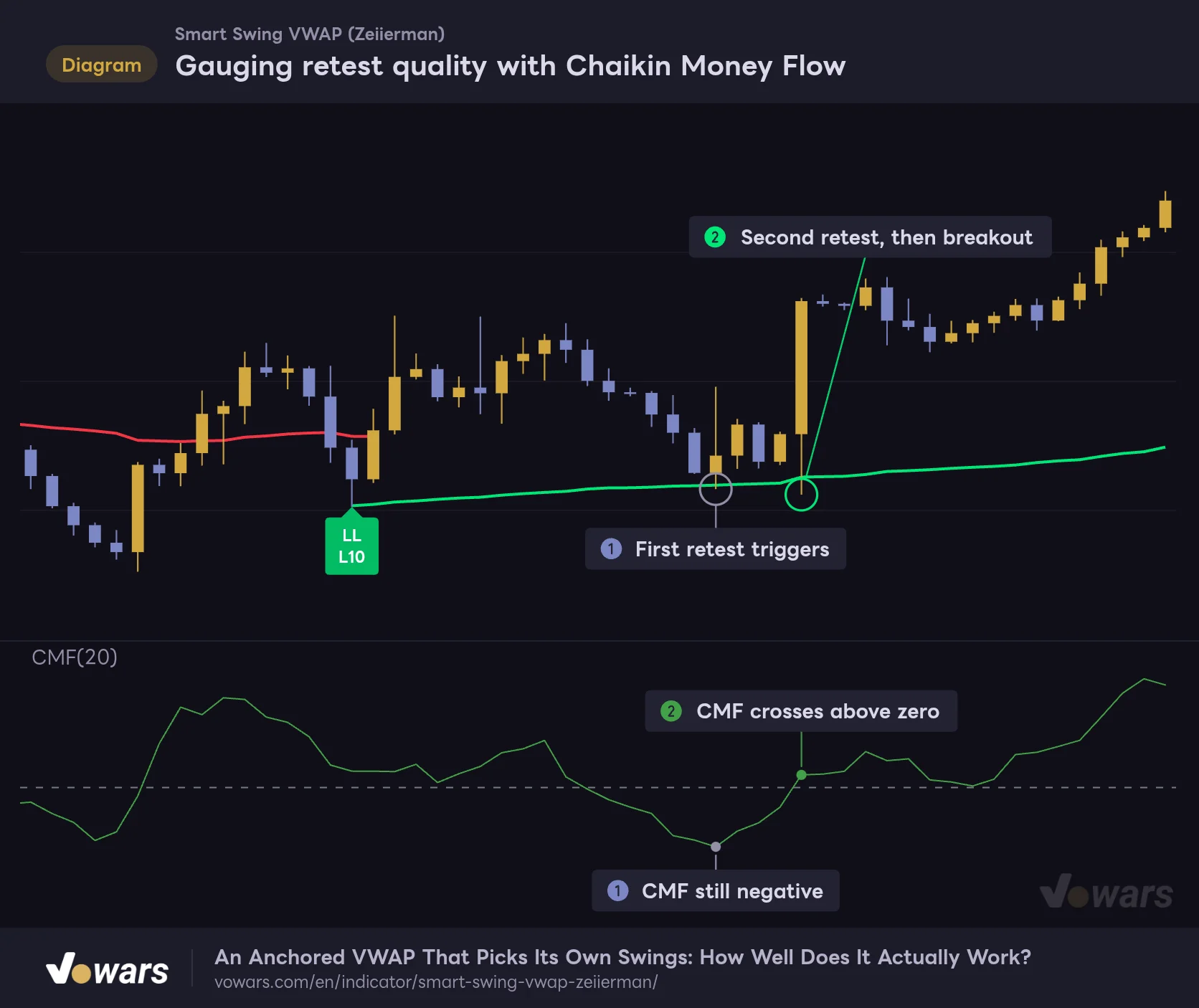
Gauging retest quality with Chaikin Money Flow
Two identical retest alerts can play out very differently depending on whether money flow is behind the bounce.
Vowars DE ver.3.12.33
In this example, CMF was still sitting in negative territory when the first retest triggered, as in Figure ①. It looked like a bounce, but selling pressure had not gone away. The second retest lined up with CMF crossing above zero, and price broke out right after, as in Figure ②.
The rule is simple: for a green-line retest, check that CMF is above zero, or at least rising toward it. “Smart Swing VWAP” uses volume to pick its anchors, while CMF looks at money flow bar by bar, so the two do not overlap too much. That is another reason they pair well.
Another good match is Volume Profile (Fixed Range or Visible Range). When the anchored swing’s price area overlaps a high-volume node, reactions around the green or red line tend to be stronger, which helps you gauge how much to trust the line. And if you want to avoid ranging markets where the line keeps flipping, checking trend strength with ADX before using it works well too.
What You Can Hand Off, and What You Should Not
What it takes off your plate
- Anchor selection and redrawing are automatic, so the manual work of drawing AVWAPs nearly disappears
- Five lengths are scored at once, so the selected swing tends to match the size of the waves the market is actually making
- Candidates are filtered by volume and move strength, so minor highs and lows without momentum rarely get picked
- Because the line keeps weighting the anchor price for a long time, it works well as a pullback or rally level early in a trend
- The retest alert waits for the bounce candle before firing
- Just lines and labels, so it stays out of the way when stacked with other indicators
What still needs your attention
- Anchors are accepted with a delay after the swing, and the line is backfilled at that moment
- When structure flips, the latest label moves to a different spot, and with default settings the line’s past color changes too
- Old lines remain when anchors switch, so you get stretches where the old and new lines run side by side
- Right after a new anchor, the line is slow to leave the swing price, so the gap to price can get wide
- In ranging markets, anchors and line colors tend to flip back and forth a lot
How to Think About Repainting and Backfilled Lines
All of “Smart Swing VWAP”’s calculations run on confirmed bars. The line does not wiggle with the live, still-forming bar, and line values calculated on a confirmed bar never change afterward. It does not pull higher-timeframe data or use any future bars either.
That said, what you see on the chart does change after the fact. There are three cases:
- On the bar where a new anchor is accepted, the line and label are backfilled from the anchor up to the current bar
- When structure flips, the latest label is deleted and placed somewhere else
- With After Structure Break at its default (Recolor Entire Active Line), the historical part of the active line is recolored on the flip bar
The first one is documented on the script page, and the second and third will not trip you up once you understand the mechanics. What is dangerous is looking at a historical chart and thinking, “If I had entered at that label…”. In real time, that label location was not known yet. If you are backtesting, step through with Bar Replay bar by bar and use the bar where the line was backfilled as your starting point.
Instead of the anchor location, measure P&L from the bar where the line was backfilled (the bar where the New ranked anchor alert fires). That gets you much closer to what live trading would have felt like.
Let It Pick the Anchor, Keep the Decision for Yourself
 Image
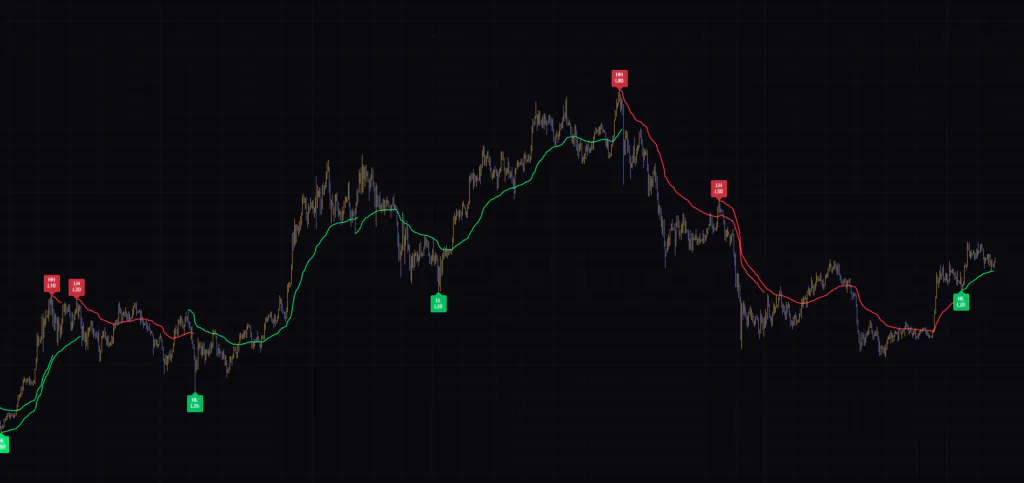
Image“Smart Swing VWAP” answers the question every AVWAP user keeps asking, “where do I anchor this?”, by using volume and move strength. The line itself has a distinctive character, weighting the anchor price for a long time, and I found it easy to use as a pullback or rally level early in a trend.
On the other hand, the anchor is decided after the fact and the line is drawn after the fact. Do not get carried away by how good the historical chart looks; use the color of the currently active line and the distance between price and the line as your inputs. With that mindset, you get rid of the chore of redrawing AVWAPs by hand while keeping the actual decision-making in your own hands. A good first step is to add it to a 1H or 4H chart and watch when the labels appear a few times.