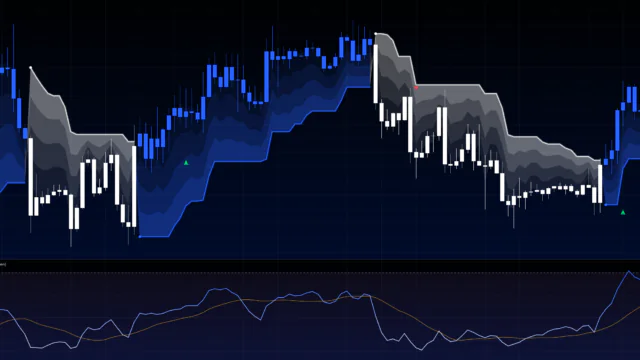

“Zeiierman Trend Pressure” Reads How Hard the Market Is Being Pushed Using Three Lines
When price keeps grinding higher, it’s tempting to think “this has to be the top.” But whether momentum is really fading or the market is just catching its breath is hard to tell from candles alone. “Zeiierman Trend Pressure” is a TradingView indicator that frames exactly that question as “is the buying (or selling) pressure still on, or has it already been released?”
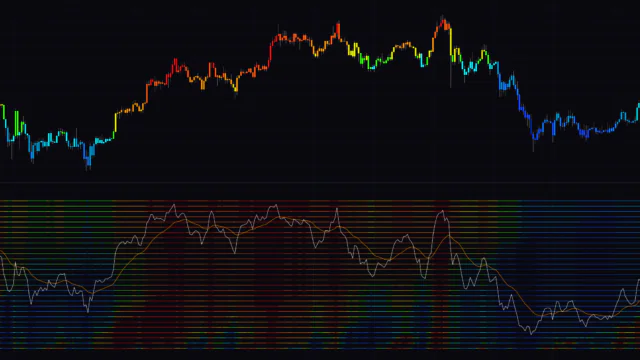
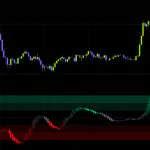
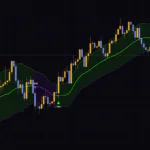
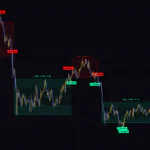
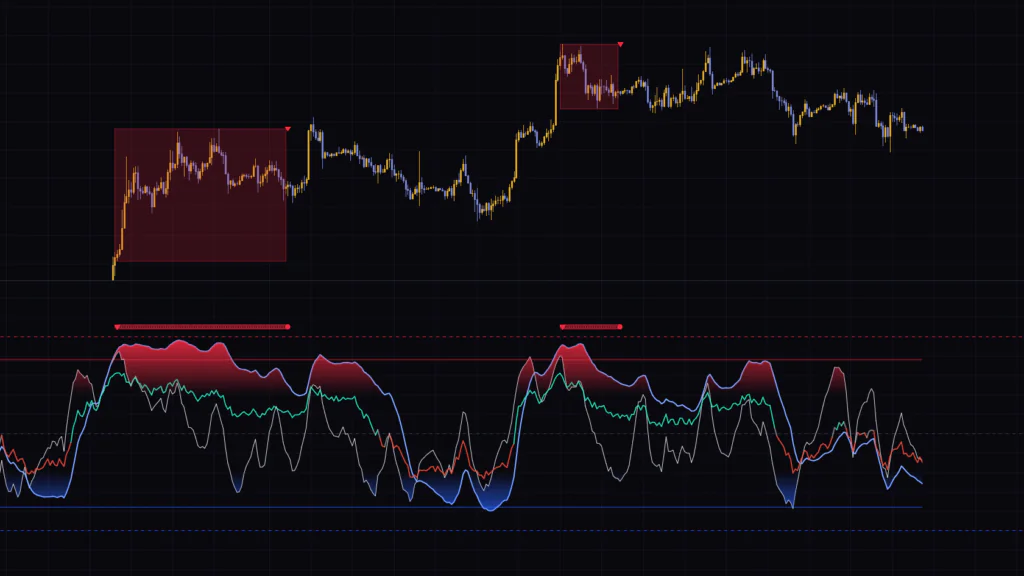
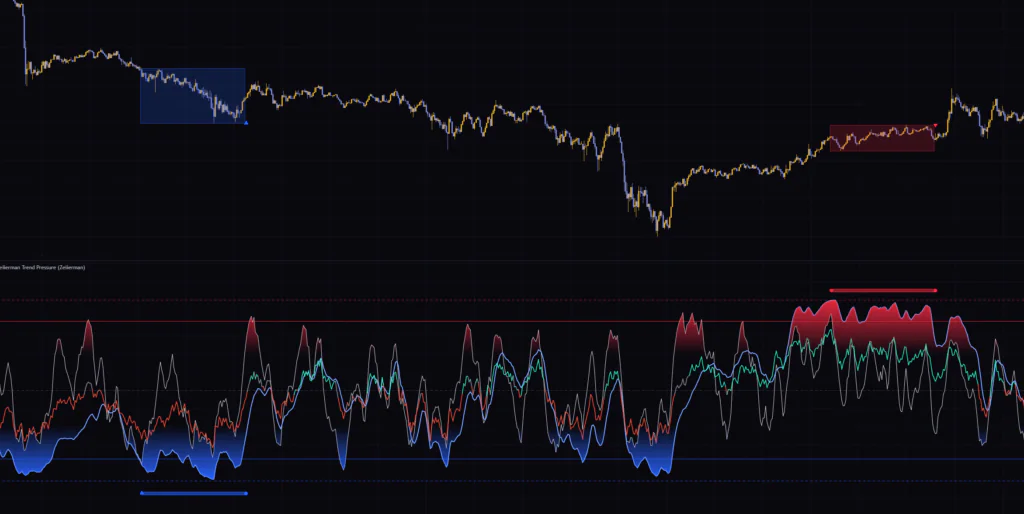
The lower pane shows three lines that move between 0 and -100: Z-Pulse, which reacts instantly to price, Z-Trend, which moves slowly, and Pressure Core, which uses color to show the directional backdrop. When Z-Pulse and Z-Trend both pin to the top or bottom of the range together, a “pressure state” turns on, and a box framing that price range appears on the main chart. Once the pressure is released, a ▲ or ▼ prints at the edge of the box.
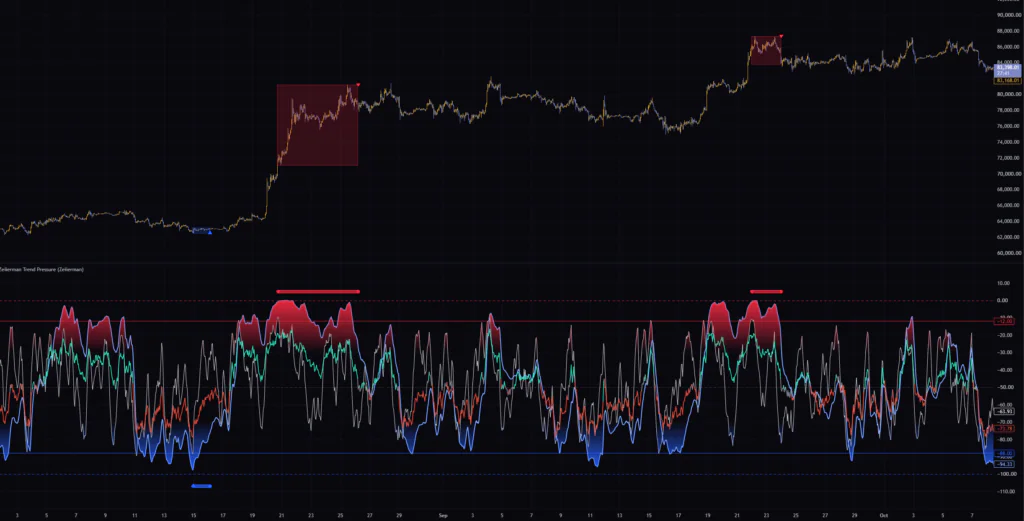
I ran it on seven timeframes, from the 5-minute up to the weekly. After using it for a while, it’s clear this isn’t a signal tool that tells you when to buy or sell. It’s an analysis tool for reading whether the current move is just a pullback or whether the trend itself is starting to turn. In this article I’ll walk through how to tell the three lines apart, when the boxes and triangles appear, how to tweak the settings, and the situations where it actually tripped me up.
Get a Feel for the Three Lines First
With three different lines in one pane, it can look a bit cluttered at first. But each one reacts at a clearly different speed, so once you get used to it you’ll instantly recognize them as “the fast line, the slow line, and the color line.”
| Line | Default look | Speed | What it tracks |
|---|---|---|---|
| Z-Pulse | Thin white line | Fast | Whether the current close sits near the top or bottom of the last 21 bars |
| Z-Trend | Thick light-blue line | Slow | Where price sits in the bigger picture, combining the 21-, 55- and 120-bar lookbacks |
| Pressure Core | Line that turns green, red or gray | Medium | The tug-of-war between buyers and sellers, read from candle structure (body, wicks, close location) |
What Each of the Three Lines Does
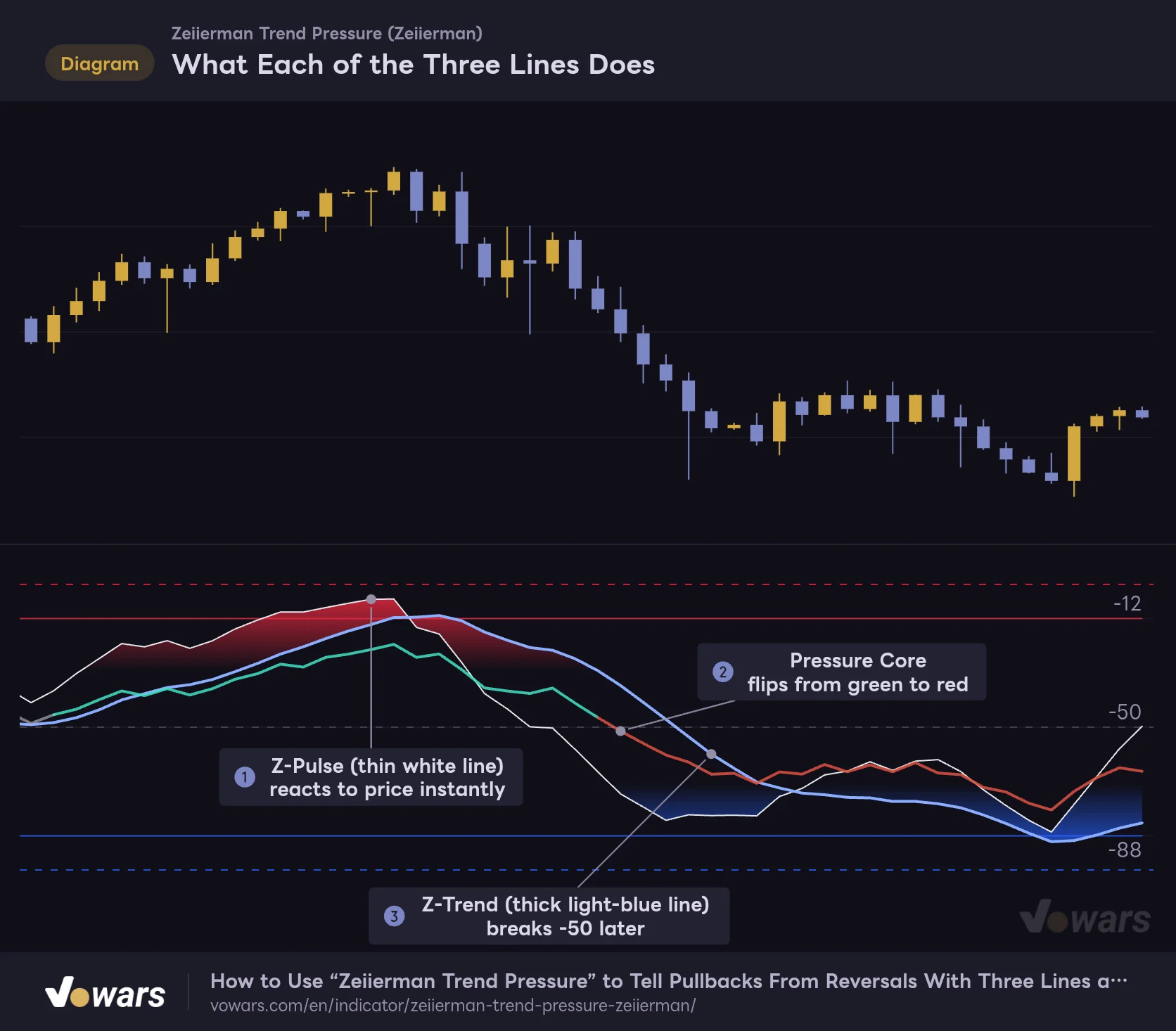
The "Zeiierman Trend Pressure" lower pane shows three lines that react at different speeds.
Vowars DE ver.3.12.33
Plot a market rolling over from an uptrend into a downtrend and the order in which the three lines move becomes obvious. The white Z-Pulse breaks down from the highs first. In Figure ② Pressure Core flips from green to red, and as Figure ③ shows, Z-Trend only drops below -50 a little later. This sequence (the fast line moves first, the slow line follows) is the foundation for reading “Zeiierman Trend Pressure.”
The 0 to -100 Scale Tells You Where Price Sits in Its Range
On “Zeiierman Trend Pressure,” 0 is the top of the scale and -100 is the bottom. The negative numbers may look odd, but the idea is the same as Williams %R. The closer to 0, the closer the close is to the high of the lookback (overbought side), and the closer to -100, the closer it is to the low (oversold side). A faint dotted Equilibrium line sits at -50 in the middle.
There are four other horizontal lines. The dotted lines at 0 and -100 are the outer bounds, and the solid red and blue lines just inside them are the trigger levels for the pressure state. By default they sit at -12 (red) and -88 (blue). Their position shifts up or down when you change Sensitivity, which I’ll cover later.
Z-Pulse: The Fast Line That Adds Short-Term Swing to Range Position
Z-Pulse starts from where the current close sits between the high and low of the last 21 bars. It then blends in a stochastic-style swing component (whether that value itself is near the top or bottom of its last 9 bars) at a 28% weight, and finally smooths the result with a 7-period EMA. Because raw range position makes up 72%, it reacts quickly to sharp rallies and drops, yet it’s not as jagged as a standalone Stochastic.
Z-Trend: The Slow Line Anchored to the 120-Bar Trend
Z-Trend calculates “position within the range” over three lookbacks (21, 55 and 120 bars) and blends them at 10%, 18% and 72%. With the 120-bar component carrying over 70% of the weight, a shallow pullback barely moves it.
On top of that, two mechanisms make it sticky. The first is an adjustment that gradually nudges the line further in the same direction when the blended position stays above -30 or below -70. Its strength is set by Trend Persistence. The second slows the line’s response to counter-moves when all three lookbacks agree and price is moving efficiently in one direction. The cleaner the trend, the harder it is for Z-Trend to break, and that is exactly where the “release lag” I’ll explain later comes from.
Pressure Core: Reading the Tug-of-War From Candle Structure
Pressure Core is built from different inputs than Z-Pulse and Z-Trend. For each candle it scores close location (42%), the position of the average of high, low and close (23%), whether the bar is bullish or bearish (13%), whether the upper or lower wick is longer (12%), and the move from 5 bars ago (10%), then adds them up. That score is split into a “fast component” measured against a 21-bar range and a “slow component” measured against a 112-bar range, and the plotted line is the mix of the two based on Regime Weight.
The color logic is simple: green (Core Bull) when both the blended value and the slow component are above the midpoint, red (Core Bear) when both are below, and gray (Core Neutral) when they disagree. Gray signals a mismatch like “short-term is turning up, but the bigger trend is still down,” so I read it as a cue to hold off on picking a direction.
The 21-bar and 112-bar ranges Pressure Core uses aren’t exposed in the settings, so you can’t change them. The only two things you can adjust are the smoothing, Reactive Smoothing, and the mix ratio, Regime Weight. It helps to remember that the same “112 bars” covers a different span of time depending on the timeframe: about four months on the daily, and just under five days on the 1H.
Dots and Boxes Only Appear When Both Lines Hit the Same Extreme
The highlight of “Zeiierman Trend Pressure” is how it detects what it calls Pressure Exhaustion, an overextended pressure state. It runs in three stages: it activates, it persists, and it releases. Let’s follow the upper side using the default settings (Sensitivity 7).
1 Activates When Both Lines Stay Above -12 for Two Bars
When Z-Pulse and Z-Trend are both at or above -12 for two consecutive bars, an upper pressure state begins. A red ▼ marks the starting bar at the top of the lower pane, followed by a row of faint red dots for as long as the state lasts. At the same time, a red box appears on the main chart.
2 While Active, the Box Expands to Capture Highs and Lows
The box starts from the high and low of the starting bar and extends one bar to the right each bar. If price makes a new high, the top expands; if it breaks the low, the bottom expands. In other words, the box is simply “the range price covered during the pressure state.” The key point is that Z-Pulse rolling over first is not enough to end the state.
3 Releases When Both Lines Drop Below -23.5
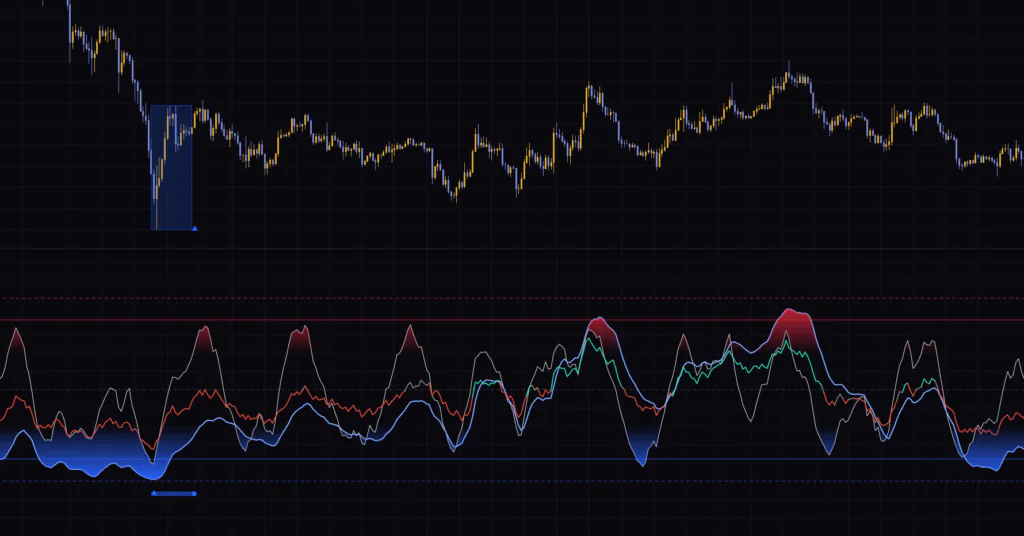
The release level sits at -23.5, 11.5 points below the -12 trigger. The state releases on the bar where both Z-Pulse and Z-Trend are below it. The row of dots at the top of the lower pane ends with a solid red circle, the box on the main chart closes one bar earlier, and a red ▼ prints at the height of the box’s top edge. The lower side works the same way: it activates when both lines stay at or below -88 for two bars, releases when both climb back above -76.5, and a blue ▲ prints at the height of the box’s bottom edge.
From Upper Pressure Activation to Release
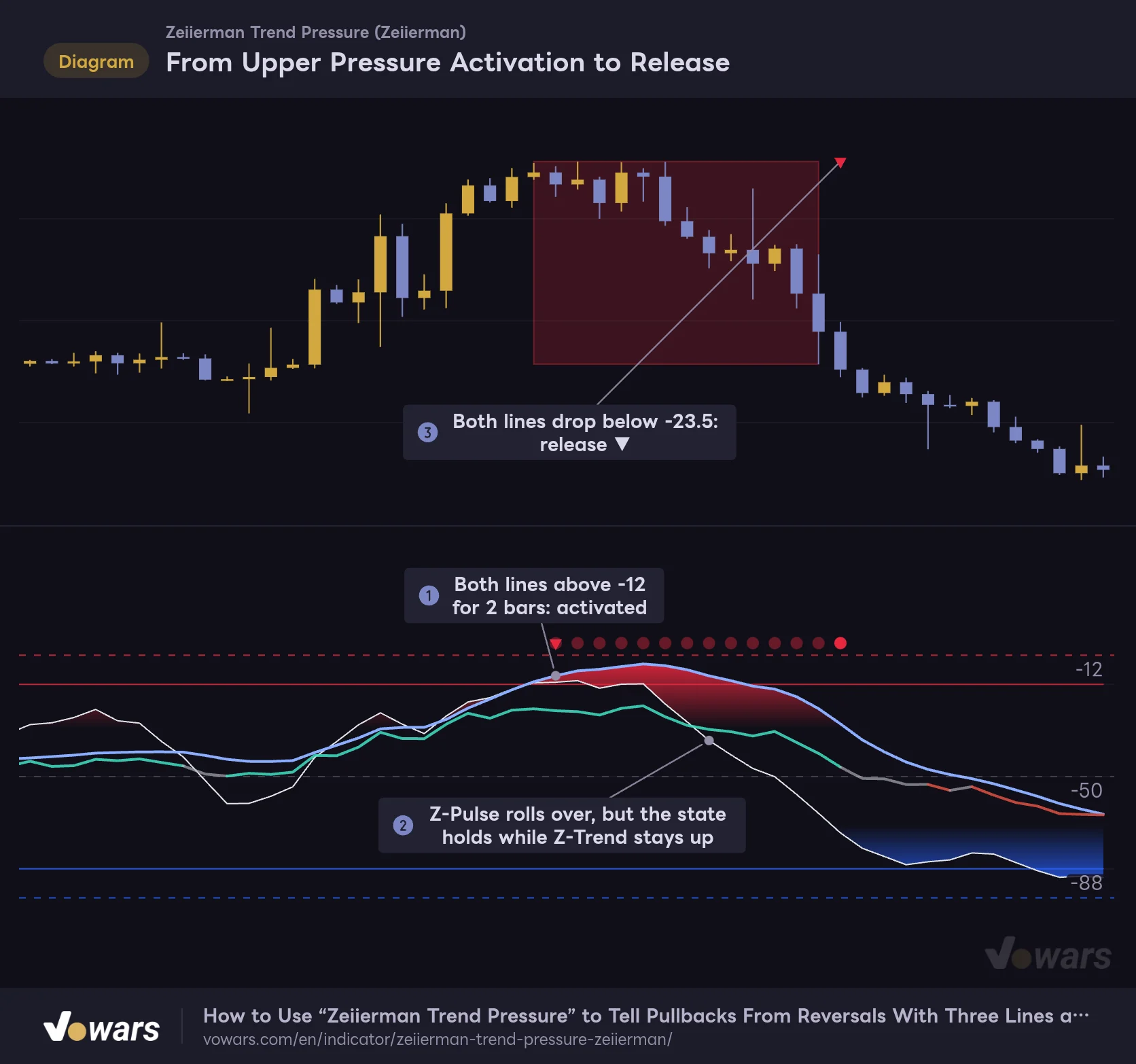
An upper pressure state only begins when Z-Pulse and Z-Trend are both above -12 at the same time.
Vowars DE ver.3.12.33
The figure above shows this whole sequence. After the state activates in Figure ①, Z-Pulse has already dropped to -35 by Figure ②, but the state stays on because Z-Trend is still up high. By the time the release ▼ prints in Figure ③, price has already fallen a good way from the top of the box.
The trigger and release levels differ so the state doesn’t flicker on and off every time the lines wobble around a level (what’s known as hysteresis). The trade-off is that the release triangle prints a bit after momentum has already faded. Keep that in mind and you’re less likely to misread it.
The Lower Box and the Release ▲
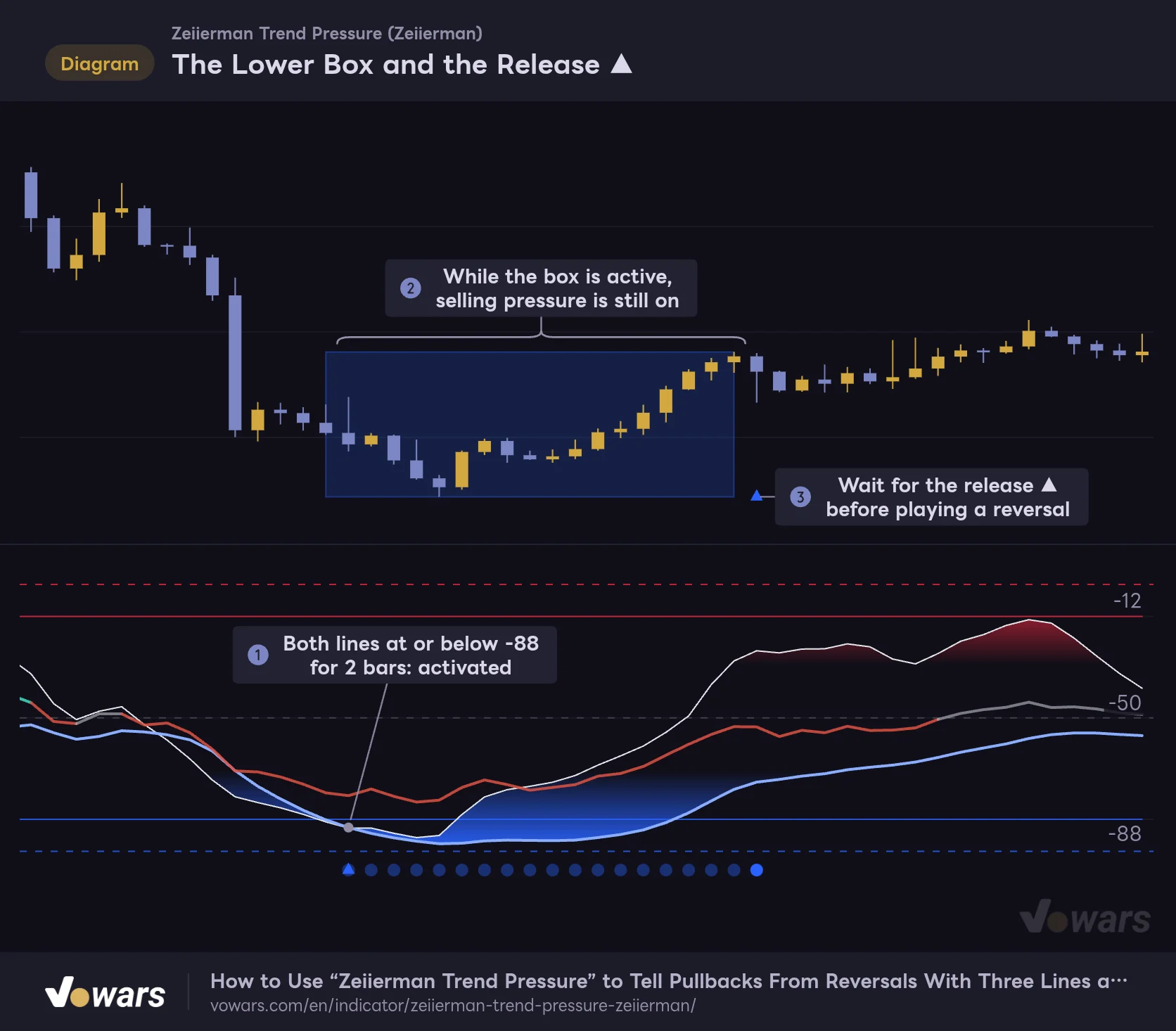
When a selloff overextends, a blue box frames the price range where selling pressure persisted.
Vowars DE ver.3.12.33
In a selloff, a blue box frames the price range where selling pressure persisted. Even if price has put in a low inside the box and started to bounce, as in Figure ②, it’s still treated as “under selling pressure” while the state is active. Only when the ▲ prints in Figure ③ has the downside pressure actually been released.
Nothing Prints When Only Z-Pulse Hits the Extreme
Right after I started using it, I ran into a case where “the white line is below -88, but there are no dots and no box.” It’s not a bug. The condition requires both lines to line up.
One Line Alone Doesn't Trigger a State
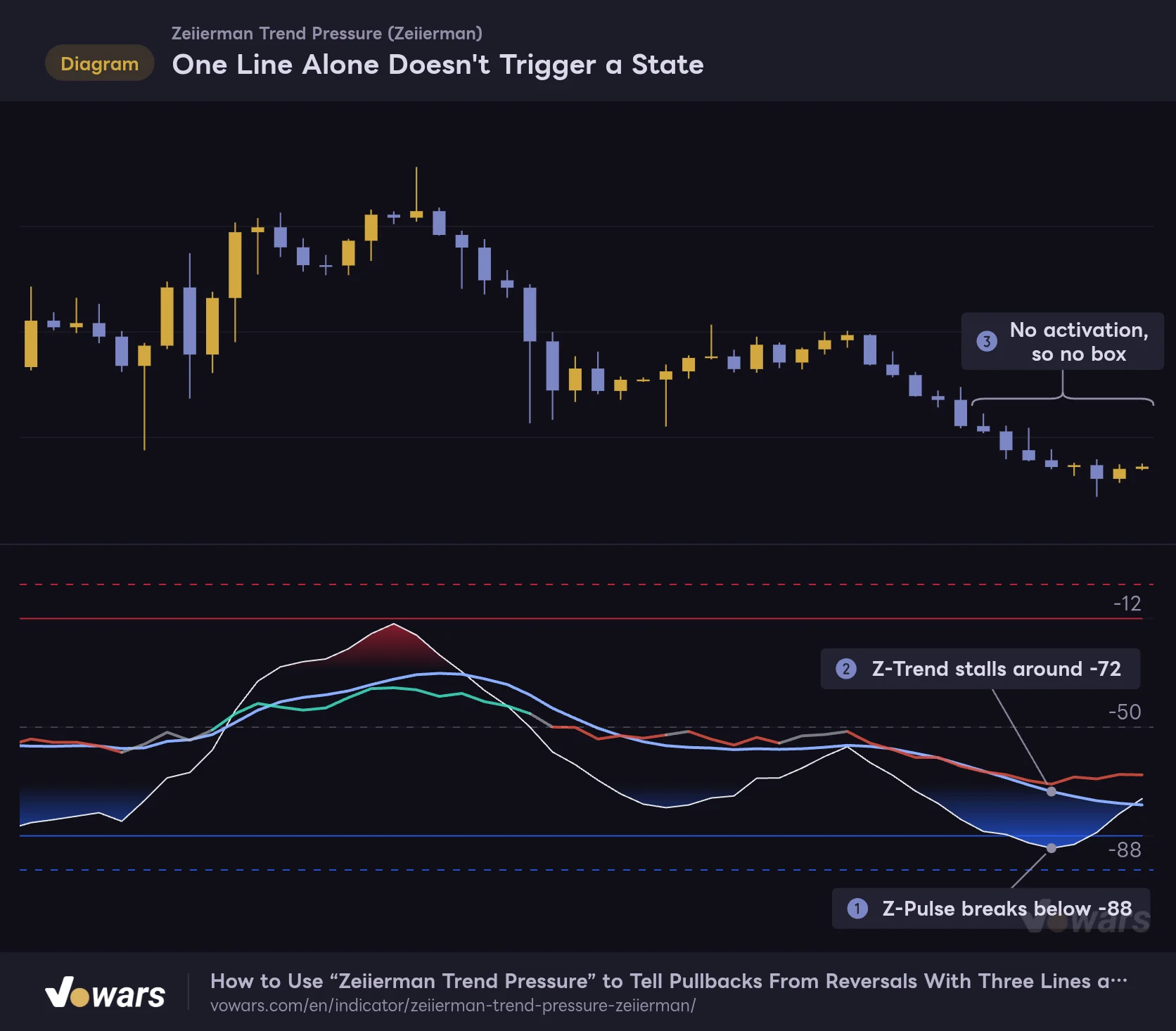
A pressure state requires both Z-Pulse and Z-Trend to reach the same extreme.
Vowars DE ver.3.12.33
In Figure ① Z-Pulse sinks to -92, but in Figure ② Z-Trend stays around -72. From the bigger-picture view, that’s not stretched enough to count as “overextended,” so no state begins. I saw the same thing on the weekly. During the 2022 decline, Z-Trend dropped into the -90s, yet it never lined up with Z-Pulse at or below -88 for two bars, so no blue box ever appeared. Because it ignores short-term flushes on their own, a state carries more weight when it does fire.
Every Marker on the Lower Pane and Price Chart
| Location | Marker | Meaning |
|---|---|---|
| Top of lower pane | Red ▼ | Bar where an upper pressure state began |
| Top of lower pane | Row of faint red dots | Bars where the upper pressure state is still active |
| Top of lower pane | Solid red circle | Bar where the upper pressure state was released |
| Bottom of lower pane | Blue ▲, faint blue dots, solid blue circle | Start, active and release of the lower side (same meaning as the upper side) |
| Price chart | Red box / blue box | The high-to-low range covered during the pressure state |
| Price chart | Red ▼ (at the box’s top edge) | Upper release. Prints on the bar right after the box |
| Price chart | Blue ▲ (at the box’s bottom edge) | Lower release. Prints on the bar right after the box |
| Lower pane | Red/blue gradient | Fill between Z-Pulse and Z-Trend. Red from 0 to -30, blue from -70 to -100, getting deeper toward the extremes |
One Sensitivity Setting Controls How Strict the Detection Is
When you want to tune how often pressure states appear, Sensitivity (1 to 10) has by far the biggest effect. This single value switches four things at once: the trigger level, the distance to the release level, the number of bars needed to activate, and the release condition. Here’s what each value does with Exhaustion Zone left at its default of 20.
| Sensitivity | Trigger level (upper / lower) | Release level (upper / lower) | Bars to activate | Release condition |
|---|---|---|---|---|
| 1 | -36 / -64 | -37 / -63 | 1 bar | Releases when either line returns |
| 2 | -32 / -68 | -34.75 / -65.25 | 1 bar | Releases when either line returns |
| 3 | -28 / -72 | -32.5 / -67.5 | 1 bar | Releases when both lines return |
| 4 | -24 / -76 | -30.25 / -69.75 | 1 bar | Releases when both lines return |
| 5 | -20 / -80 | -28 / -72 | 1 bar | Releases when both lines return |
| 6 | -16 / -84 | -25.75 / -74.25 | 2 bars | Releases when both lines return |
| 7 (default) | -12 / -88 | -23.5 / -76.5 | 2 bars | Releases when both lines return |
| 8 | -8 / -92 | -21.25 / -78.75 | 3 bars | Releases when both lines return |
| 9 | -8 / -92 | -23 / -77 | 3 bars | Releases when both lines return |
| 10 | -8 / -92 | -24.75 / -75.25 | 4 bars | Releases when both lines return |
As the table shows, settings 8 through 10 share the same -8 / -92 trigger levels (they’re capped so they can’t move any closer to the edge). What separates those three is the number of bars needed to activate and the distance to the release level. At 10, a state needs four bars in a row to activate, and once active it won’t release until price gets back to -24.75. So states rarely start, but when they do, they last a long time.
Sensitivity 3 vs 7
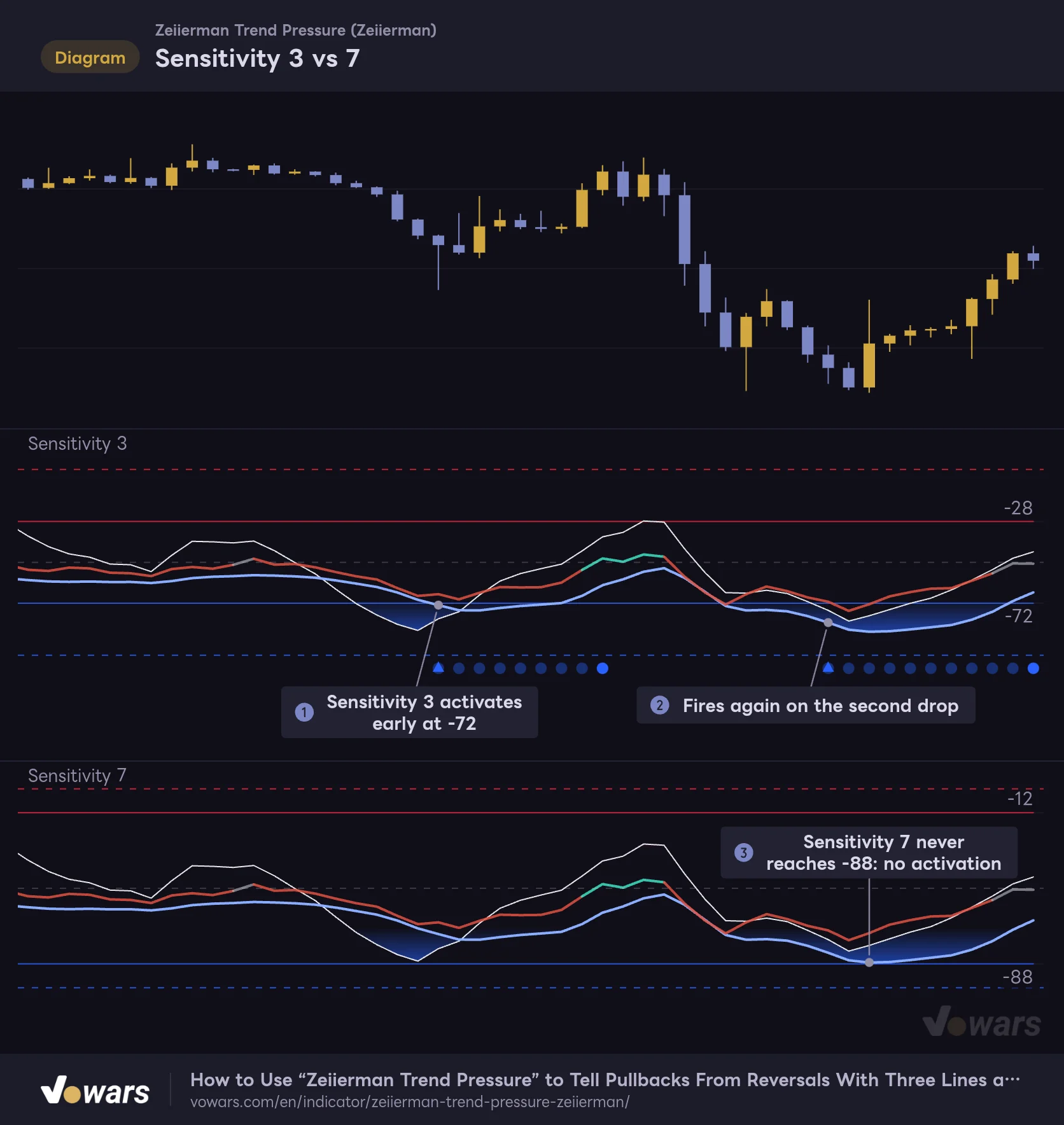
Two copies of "Zeiierman Trend Pressure" on the same price action, with only Sensitivity changed.
Vowars DE ver.3.12.33
Put Sensitivity 3 and 7 side by side on the same price action and the difference is obvious. At 3 the trigger level moves up to -72, so the state fired twice, in Figure ① and Figure ②. At 7, Z-Trend stalled at -87.3 and, as Figure ③ shows, fell just short of -88, so it never fired once.
At a Sensitivity of 1 or 2, the state ends as soon as either one of the two lines gets back to the release level. On top of that, the trigger and release levels are only 1 to 3 points apart, so states tend to flip on and off in quick succession. The setting’s own description calls it “loose, fast and inconsistent,” and in my experience it’s hard to use for anything beyond a quick look. Also note that the red and blue fills in the lower pane are fixed to the 0 to -30 and -70 to -100 zones. They don’t move when you change Sensitivity, so if the trigger levels and the edge of the fill don’t line up, that’s just how it’s drawn.
Three Ways to Read It, From Actually Using It
“Zeiierman Trend Pressure” is built around three use cases: trend following, pullbacks and rallies, and reversals. After testing it on charts, here’s what to watch in each case.
Set Your Bias With Z-Trend’s Position and Pressure Core’s Color
Z-Trend above -50 with a green Pressure Core means buyers are in control; Z-Trend below -50 with a red Pressure Core means sellers are. I make a point of not deciding on just one of the two. Pressure Core is sensitive to candle shape, so a single sharp red candle can turn it gray. Z-Trend, on the other hand, is so slow that it often still points the old way during the first leg of a reversal. Only treating the bias as “confirmed” when both agree cut down my second-guessing a lot.
For Pullbacks and Rallies, Look for the Moment Only Z-Pulse Dips
Only Z-Pulse Dips During a Pullback
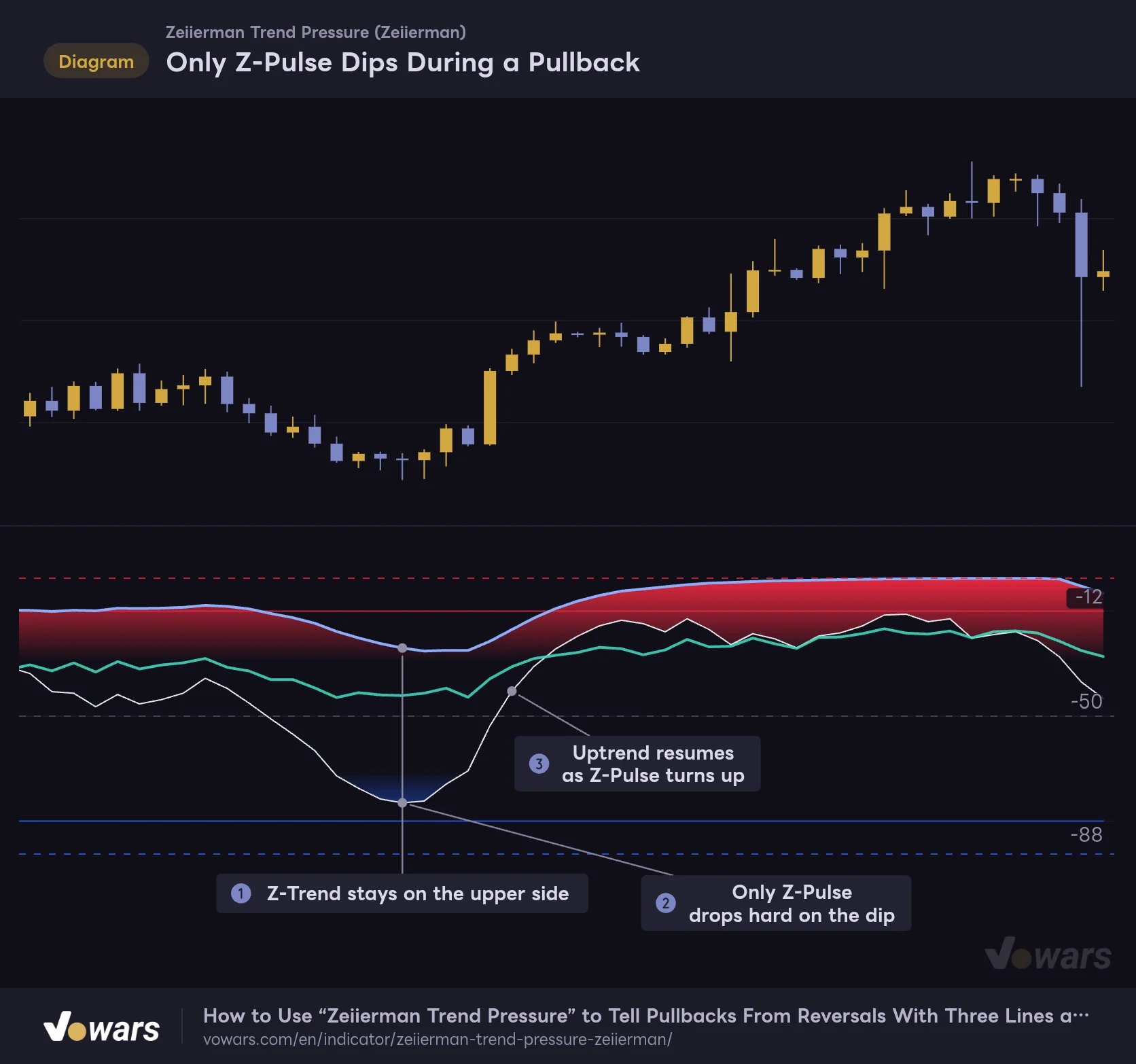
During a pullback in an uptrend, only Z-Pulse swings down while Z-Trend and Pressure Core stay on the upper side.
Vowars DE ver.3.12.33
This was the reading I found most useful. When price pulls back in an uptrend, Z-Pulse drops hard to around -80. Yet Z-Trend stays up high, as in Figure ①, and Pressure Core holds green. That state, where “only the fast line has swung the other way,” is your dip. I only start thinking about an entry after the bottom in Figure ②, once Z-Pulse has turned back up in Figure ③. For selling the rally in a downtrend, just flip this upside down.
If you turn on Pulse / Trend Crosses in the settings, a blue circle appears at Z-Trend’s level on bars where Z-Pulse crosses above Z-Trend, and a red circle where it crosses below. That said, during dips Z-Pulse tends to spend a long time below Z-Trend, so the cross usually comes a bit after the bottom. It works as confirmation of the turn, but I look at “has Z-Pulse turned?” first.
For Reversals, Wait for the Release Triangle
A box on the chart means the pressure is still on. Thinking about shorts while a red box is still building means fighting upside momentum that hasn’t faded yet. If you’re playing a reversal, the baseline rule is to wait until the release triangle prints.
That said, comparing all seven timeframes, price did something different after each release. On the 15-minute, price dipped once after the red box that followed a sharp rally was released. On the 1H and 4H, on the other hand, what stood out was sideways chop after the release rather than a selloff. On the 30-minute, price kept bleeding lower even after the blue box’s release ▲. A release tells you that “the pressure has come off,” not that “price will now move the other way.” That’s something to keep in mind every time you use it.
When the Release ▼ Didn’t Mark the Top
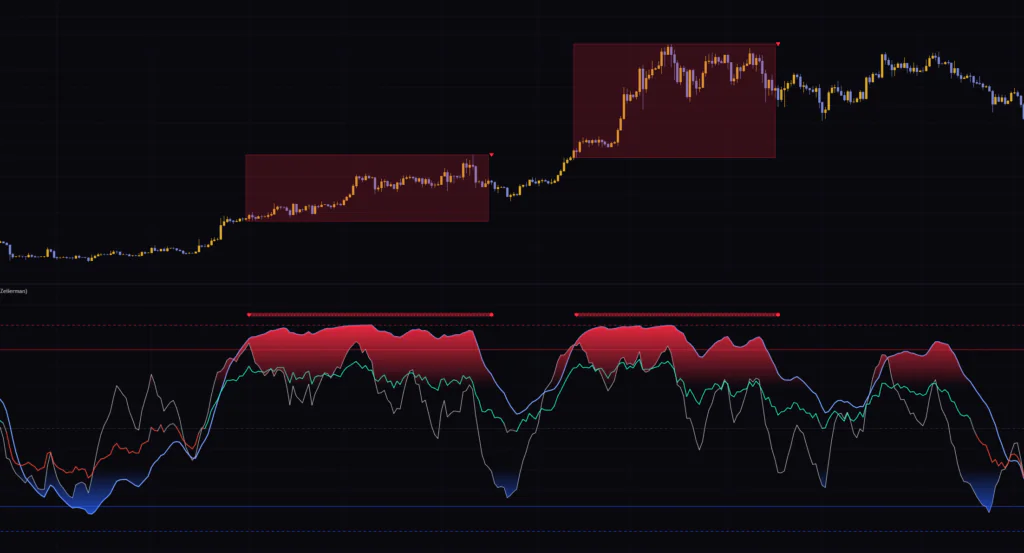
When the Release ▼ Didn't Mark the Top
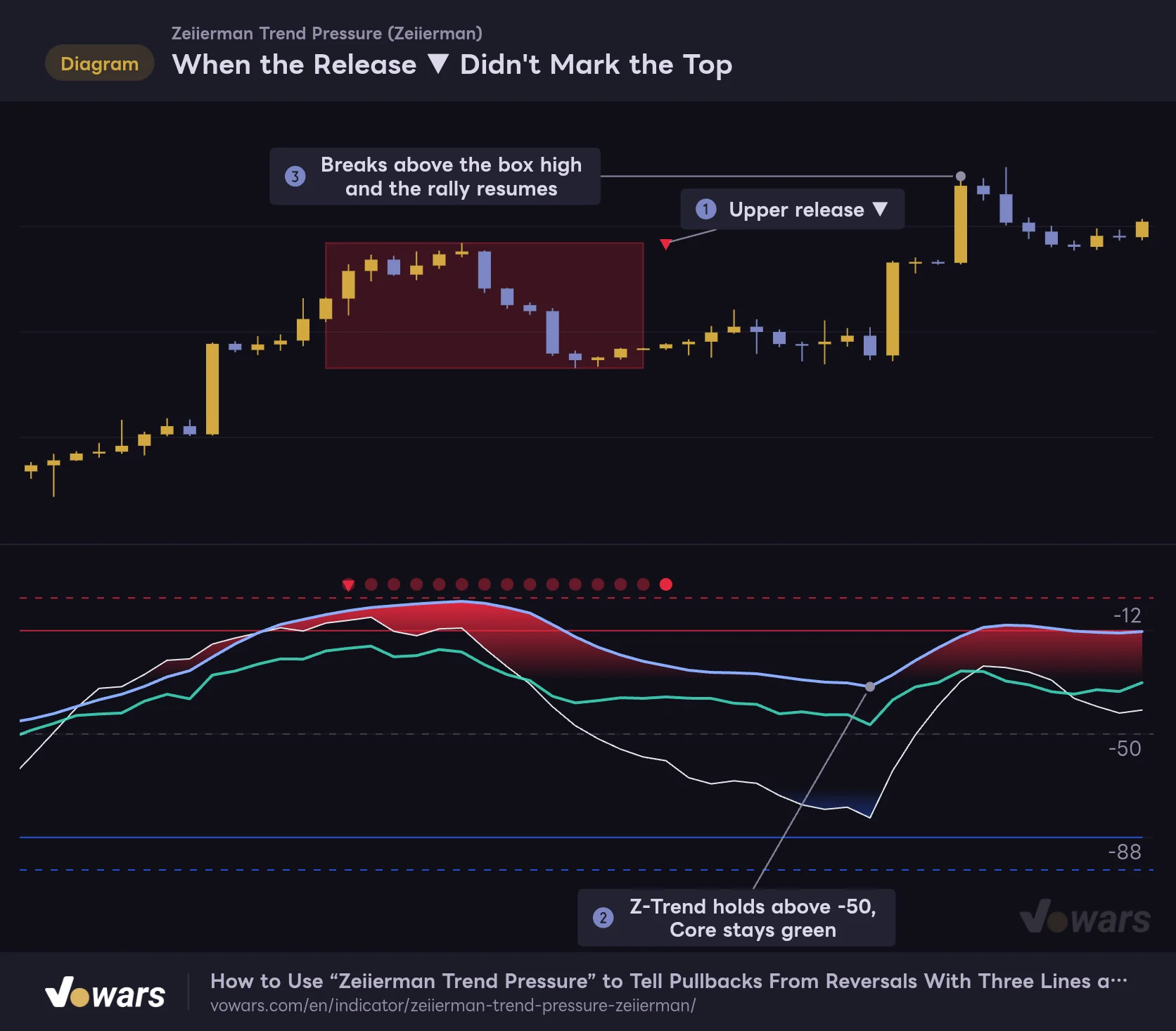
In a strong uptrend, price can keep climbing even after the upper release prints.
Vowars DE ver.3.12.33
In a strong uptrend, it’s common for price to dip only slightly after the upper release ▼ in Figure ① and then head right back up. The clue for spotting this was Figure ②. Z-Pulse fell to -80, but Z-Trend held above -50 and Pressure Core stayed green. That’s exactly the same pattern as the dip we just looked at. Price then broke above the top of the box in Figure ③.
Even after a release triangle prints, if Z-Trend is still on the far side of -50 and Pressure Core hasn’t changed color, it’s more likely a pullback (or a bounce) than a reversal. That’s how I read it. On the daily and weekly, where boxes can last for months, price has often moved a long way by the time the release prints, so always decide where your stop goes before you get in.
Timeframe Quirks From the 5-Minute to the Weekly
I compared it on default settings across the 5-minute, 15-minute, 30-minute, 1H, 4H, daily and weekly charts. How the boxes show up varies quite a bit by timeframe.
| Timeframe | Boxes on one screen | What I noticed |
|---|---|---|
| 5m | 1 blue, 1 red | Boxes last about half a day. After one upper release, price pushed one leg higher |
| 15m | 1 red, 1 blue | Red box right after a sharp rally. Price dipped once after the release, then recovered |
| 30m | 2 red, 1 blue | Several small boxes. Price kept grinding lower after the blue box released |
| 1H | 2 red, 1 blue (small) | Red boxes after big rallies. Sideways chop after the releases |
| 4H | 3 red | Mostly red boxes during uptrends. The lower side never fired |
| 1D | 2 red | Boxes last 2 to 3 months. Feels more like a gauge of how “hot” the trend is |
| 1W | 2 red | Only major bull runs turn into boxes. No blue box even during the bear phase |
Since this asset has spent a long time trending up, the 4H and above showed almost nothing but red boxes. Z-Trend measures position against a 120-bar range, so on an asset that has rallied for a long stretch, even a selloff tends to read as “still around the middle of the last 120 bars.” If you want to see the lower side fire, a shorter timeframe, or a market that swings both ways more, like gold or major FX pairs, should give you a more balanced mix of boxes.
In my experience, the sweet spot was the 30-minute to the 4H. Across day trading and swing trading, both the pullback read and the box releases behaved cleanly. It works on the 5-minute too, but the range between a box appearing and its release is small, and once you factor in fees and spread, it felt hard to use for reversal trades.
Settings and What to Tweak
The settings are split into five groups: “1. Z-Pulse,” “2. Z-Trend,” “3. Pressure Exhaustion,” “4. Pressure Core” and “5. Colors & Style.” Here are the inputs that affect the calculation.
| Setting | Default | Suggested | Effect |
|---|---|---|---|
| Pulse Range | 21 | 21 | Lookback Z-Pulse uses to measure the range. Lower reacts faster, higher is calmer. Also feeds Z-Trend at a 10% weight |
| Pulse Stochastic | 9 | 9 | Lookback for the stochastic swing blended into Z-Pulse. Lower makes Z-Pulse more sensitive |
| Pulse Smoothing | 7 | 7–10 | EMA length that smooths Z-Pulse. 1 means no smoothing. Higher is smoother but slower |
| Trend Range | 55 | 55 | Lookback for Z-Trend’s mid-term component (18%) |
| Macro Trend | 120 | 120 | Lookback for the long-term component that drives over 70% of Z-Trend. Higher makes it harder for Z-Trend to reach the extremes |
| Trend Smoothing | 5 | 5 | Final smoothing for Z-Trend. Higher makes the line steadier |
| Trend Persistence | 9.0 | 9.0 | Strength of the push in the same direction while the line stays at an extreme (0–20). 0 disables it |
| Exhaustion Zone | 20 | 20 | Base position of the trigger levels. The upper trigger level is −(this value − (Sensitivity − 5) × 4), kept within 8–42 |
| Sensitivity | 7 | 5–8 (depends on use) | Changes the trigger levels, release levels, bars to activate and release condition all at once. Higher is stricter |
| Pulse / Trend Crosses | Off | Your call | Shows a circle on bars where Z-Pulse and Z-Trend cross |
| Reactive Smoothing | 16 | 16 | EMA length that smooths Pressure Core’s fast component |
| Regime Weight | 0.65 | 0.5–0.65 | Share of the slow component blended into Pressure Core. Higher makes the line steadier |
The visual settings include Cold / Hot for the fill and triangle colors, Upper Level / Lower Level for the trigger level colors, and Level Transparency (default 20) for their transparency. You’ll also find the line colors Z-Pulse / Z-Trend, the Pressure Core colors Core Bull / Core Bear / Core Neutral and its thickness Core Width (default 2), the fill toggle Gradient Fill, the box toggle Price Boxes, and # (default 60) for how many boxes to keep.
If the lower pane feels too busy, turning off Gradient Fill first cleans it up a lot. If the overlapping lines are still hard to read, changing Core Neutral to a dark gray that blends into the background makes Pressure Core stand out only when it’s colored. Those two changes made a big difference for me.
Tuning Examples by Trading Style
The defaults are well balanced, and on the 30-minute to 4H I rarely felt the need to change anything. For other use cases, here are the combinations I tried. Treat the numbers as starting points and fine-tune them while watching how often boxes show up on your own market.
- If you want a few more boxes on lower timeframes, drop Sensitivity to 5. The trigger levels move in to -20 / -80 and a single bar is enough to activate, so you’ll see more boxes even on the 5-minute to 15-minute. Going down to 3 or lower makes boxes fire constantly, so I found 5 to 6 to be the sweet spot.
- If you want to calm down a choppy Z-Pulse, raise Pulse Smoothing to around 10. The dip bottom shows up a little later, but you’ll see fewer cases where a single wick seems to flip the direction.
- If you only want the big moves on the daily and above, raise Sensitivity to 8 or 9. The trigger levels move out to -8 / -92 and activation needs three bars, so only truly strong phases turn into boxes.
- If you want the Pressure Core line to track short-term price action more closely, lower Regime Weight to 0.4 to 0.5. The 21-bar component gets more weight, so the line moves up and down faster. The color, however, also depends on the 112-bar side, so color changes don’t become dramatically faster.
Macro Trend drives over 70% of Z-Trend, so changing it reshapes Z-Trend’s character a lot. At 200, for example, Z-Trend has an even harder time reaching the extremes, and pressure states fire less often. If you want to adjust the number of boxes, start with Sensitivity.
Parabolic SAR Can Make Up for the Slow Release
The release triangle lagging is unavoidable as long as the entry and exit levels are offset. So I tried pairing it with an indicator that picks up early signs of a reversal. The one that clicked was Parabolic SAR, which comes built into TradingView.
Pairing It With Parabolic SAR
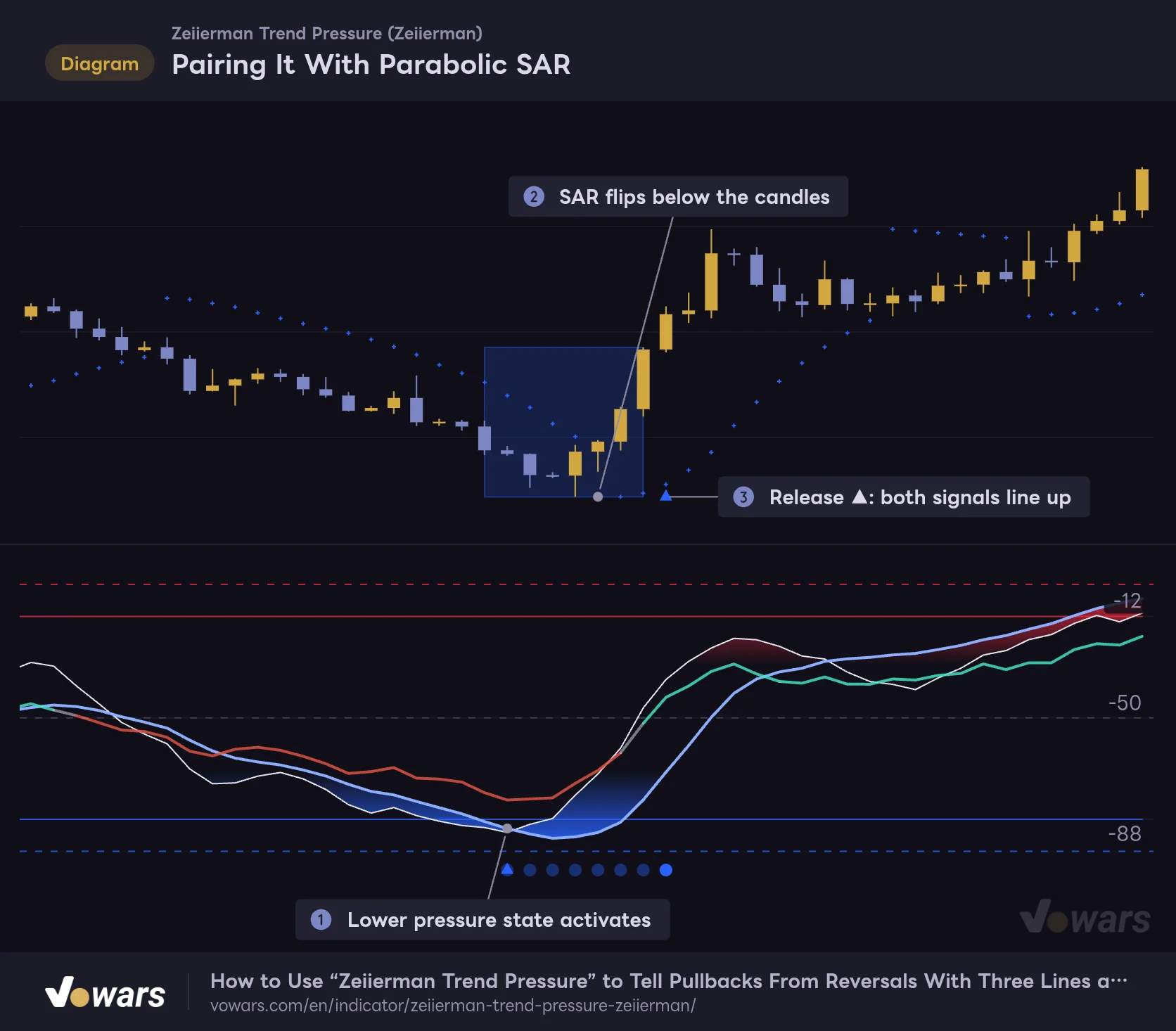
The release signal lags, so use Parabolic SAR to catch early signs of a reversal and confirm with the release ▲.
- Parabolic SAR
Vowars DE ver.3.12.33
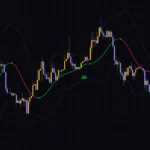
The read is simple. A lower pressure state activates in Figure ①, and while the blue box is still building, the SAR dots flip from above the candles to below them in Figure ②. That’s your “reversal candidate.” When the release ▲ then prints in Figure ③, I treat both signals as lined up. SAR flips on their own whipsaw back and forth inside ranges and produce plenty of fakeouts. Only taking SAR flips that happen while a “Zeiierman Trend Pressure” box is active filtered out a lot of that noise.
One note: Parabolic SAR’s default color is the same blue as Cold on “Zeiierman Trend Pressure.” If you run them together, switching SAR to yellow or orange makes them much easier to tell apart.
A few other pairings also look like a good fit.
- Donchian Channels can help confirm whether a reversal is real by checking if price clears the channel midline after the box releases.
- Pressure Core only looks at candle structure, so backing it up with volume flow from Chaikin Money Flow gives you more to work with.
- Comparing the box’s range to ATR shows how many times the average move that pressure state covered, which is handy for sizing your stop.
Alert Types and Repainting
When you pick “Zeiierman Trend Pressure” as the condition in TradingView’s alert dialog, you get these four options.
| Alert name | When it fires |
|---|---|
| Upper Pressure Release | Bar where the upper pressure state is released |
| Lower Pressure Release | Bar where the lower pressure state is released |
| Bullish Z-Pulse / Z-Trend Cross | Bar where Z-Pulse crosses above Z-Trend |
| Bearish Z-Pulse / Z-Trend Cross | Bar where Z-Pulse crosses below Z-Trend |
The cross alerts work even with Pulse / Trend Crosses turned off and no circles on the chart. There’s no alert for the “start” of a pressure state itself. If you want to know when one activates, you’ll need to build your own condition in the alert dialog, such as selecting the Z-Pulse or Z-Trend plot and setting “crossing up -12.” Keep in mind that a single alert can’t check that both lines have lined up, so treat it as a heads-up.
As for repainting, the lines, dots, triangles and boxes on confirmed bars don’t change after the fact. It only uses the high, low, open and close of past and current bars, with no lookahead and no data pulled from other timeframes. On the live, still-forming bar, though, values move, so activation and release markers can appear and disappear. If your alert frequency is set to “Once Per Bar,” it can fire mid-bar only for the condition to be gone once the bar closes. Choose “Once Per Bar Close” for your alerts and the timing will match the markers that stay on the chart.
One small detail: the left edge of a box is drawn starting one bar before the activation bar. However, the box’s height starts from the activation bar’s high and low, so no past price range gets rewritten. If you want to step through a past activation-to-release sequence bar by bar, TradingView’s Bar Replay lets you see it in the same order it would unfold in real time.
Where It Shines and Where You Have to Accept Trade-Offs
Where it shines
- Fast and slow lines share one pane, making it easy to tell a pullback from a trend change
- It only fires when both lines line up, so short-term spikes alone don’t spam boxes
- Boxes record “the range covered under pressure,” so overextended price zones are easy to spot when you look back
- A single Sensitivity setting adjusts how strict detection is across the board
- No repainting on confirmed bars
Trade-offs to accept
- The release triangle lags behind fading momentum, so price may have already moved a lot by the time it prints
- In strong trends, price often keeps going the same way after a release
- When all three lines bunch up around -30 to -60, it takes a moment to tell which is which
- On higher timeframes of assets in long uptrends, the lower-side box rarely appears
- Pressure Core’s lookbacks (21 and 112 bars) can’t be changed in the settings
A Companion for Checking Whether the Pressure Is Still On
 Image
ImageWhat helped me most with “Zeiierman Trend Pressure” wasn’t calling tops or bottoms. It was being able to confirm from how the lines are stacked whether “this dip is still part of the uptrend” or “this bounce is still part of the downtrend”. If only Z-Pulse has swung the other way while Z-Trend and Pressure Core hold their direction, it’s a dip. If all three turn and the box releases, the trend is starting to change. Once that read becomes second nature, you’ll catch yourself panic-fading trends mid-move far less often.
On the flip side, if you trade the release triangle as a straight buy/sell signal, the stronger the trend, the more often it will burn you. The triangle simply tells you “the pressure has come off.” Combine it with a faster reversal indicator like Parabolic SAR, or with price taking out recent highs or lows, before making a call. Parking it next to the trend indicator you already use on the 30-minute to 4H felt like the best fit to me.