
MAD Adaptive Trend Score counts where price sits relative to its own recent past
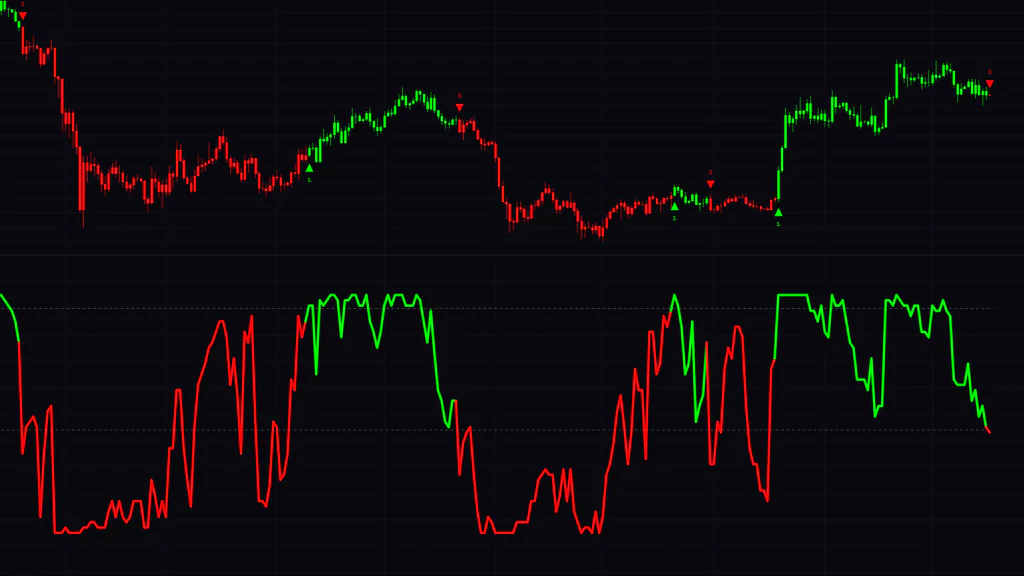
MAD Adaptive Trend Score is a TradingView indicator that splits trend direction into just two colors, green and red, using a score line in a separate pane and recolored candles on the main chart. At first glance it looks like a plain two-color trend filter, but what decides the color under the hood is a little unusual.
At its core is a simple count: “How many of the last 45 bars is the current price above?” The more bars it beats, the higher the score; the fewer, the lower. With default settings the score moves between −45 and +45. Instead of smoothing price the way a moving average does, it tracks something closer to price “rank”, so the line looks blocky and tends to pin against its ceiling and floor for long stretches.
The other defining trait is that the level that turns it green and the level that turns it red are set separately. By default, the score turns green above +40 and red on a break below −6. Thanks to these asymmetric thresholds, once a color is set it rarely flips. After running it on live charts, I’d say this “sticky color” behavior is the heart of MAD Adaptive Trend Score.
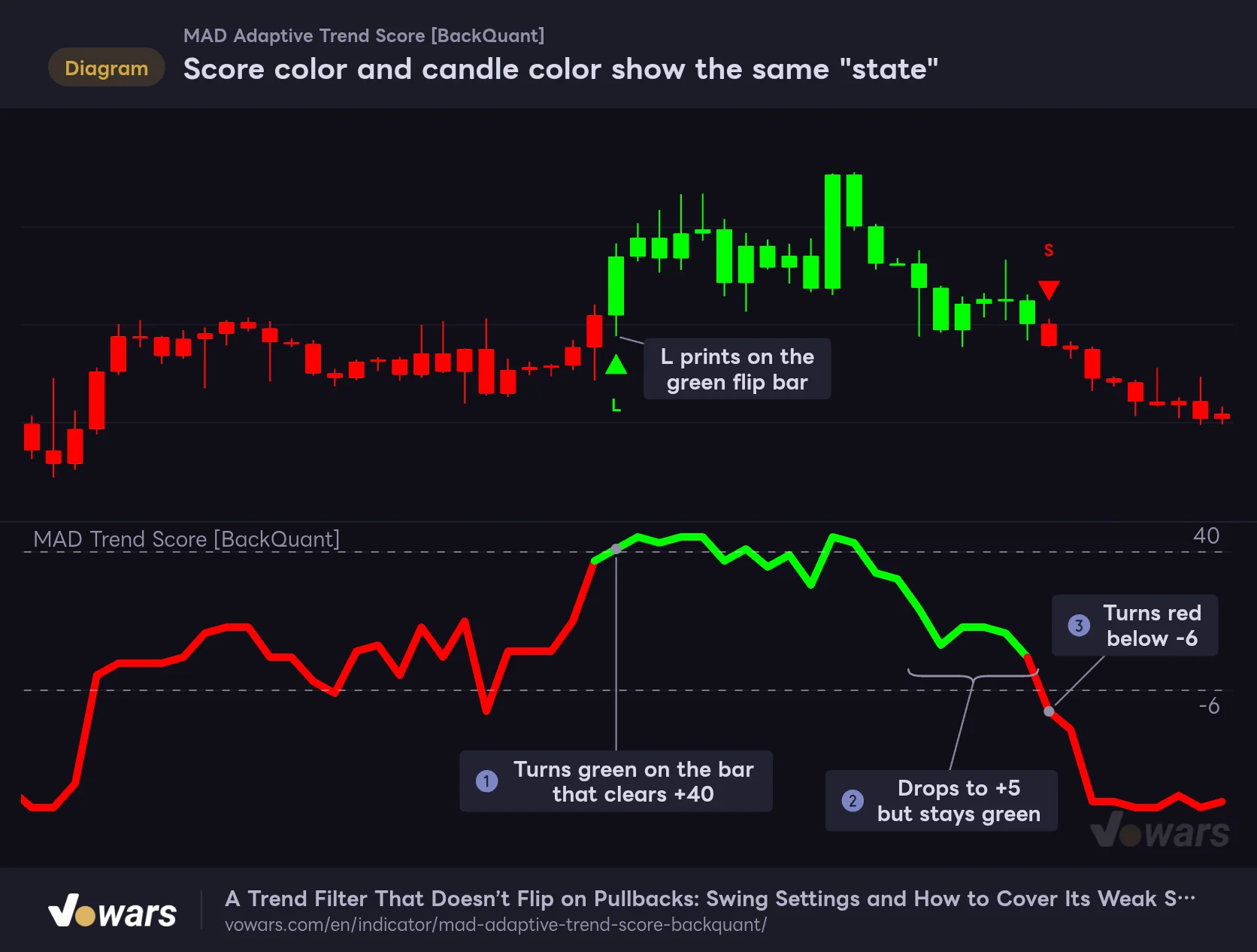
Score color and candle color show the same "state"
MAD Adaptive Trend Score turns green when the lower-pane score rises above +40 and red when it breaks below -6, and repaints the candles in the same color.
Vowars DE ver.3.12.33
In Figure ①, the score was red, then pushes above +40, and on that bar both the line and the candles turn green, with an “L” triangle printed below the bar. Across the stretch in Figure ②, the score drops all the way to +5, but because it is still above −6, the green holds. Then at Figure ③, the score breaks below −6, the color switches to red from that bar on, and an “S” marker prints above the high.
Here is everything it puts on your screen.
| Element | Where | Default | What it means |
|---|---|---|---|
| Trend Score line (width 5) | Lower pane | On | The score value. Green = bullish state, red = bearish state |
| Threshold dashed lines (2) | Lower pane | On | Where the Long Threshold and Short Threshold sit |
| Candle color | Main chart | On | Repaints the candles in the same state color as the score line |
| L / S triangle markers | Main chart | On | Printed only on bars where the state flips red→green or green→red |
| MAD Adaptive Filter | Main chart | Off | The “overshoot-trimmed price” line the score is built from |
| Background color | Main chart | Off | Shades the chart background with a light version of the state color |
| Rolling Median / Raw MAD / Scaled MAD | Data Window | Values only | Median and MAD values. Not drawn on the chart |
Candle coloring is on by default, so the moment you add the indicator your chart looks completely different. If you would rather read price action in your usual candle colors, turn off Paint Candles to Trend? and the original colors come back.
Step 1: a median-and-MAD filter that trims overextended moves
MAD Adaptive Trend Score does not compare raw closes. Before any comparison, it runs a prep step that trims sudden price spikes. That step is the MAD Adaptive Filter.
It works in three stages.
- Take the median of the last MAD Length closes (15 by default)
- Over the same 15 bars, take the median of each close’s absolute distance from that median, i.e. the MAD (Median Absolute Deviation), then multiply it by 1.4826 to put it on a scale close to standard deviation
- If the close is farther from the median than “MAD × MAD Multiplier (5.2 by default)”, clip the excess and cap the value at the edge of the allowed band
As long as price stays inside the band, the filter value is exactly the close. Only bars that shoot outside get caught on the edge of the band.
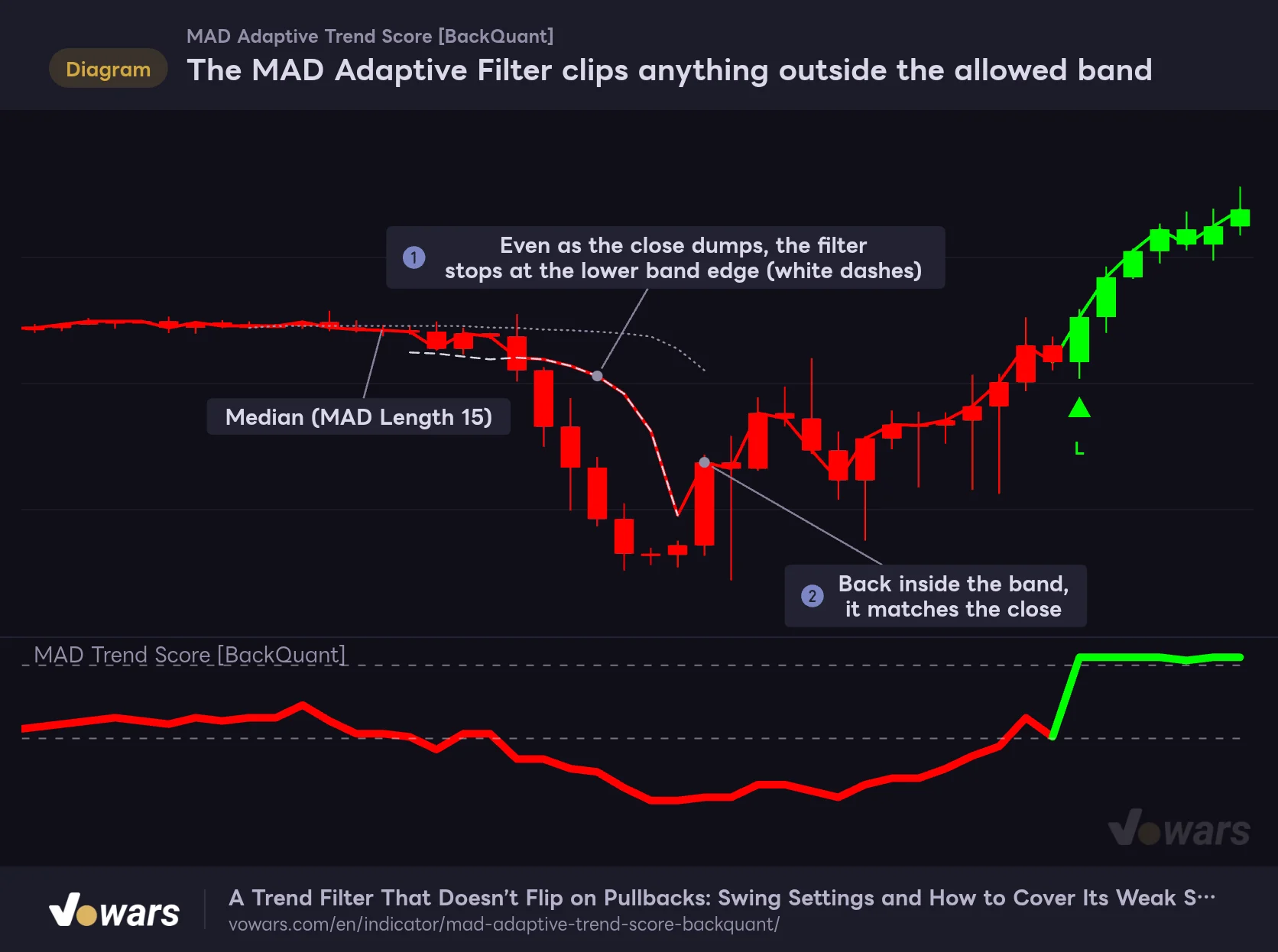
The MAD Adaptive Filter clips anything outside the allowed band
The MAD Adaptive Filter, which you can plot on the chart via the settings, caps closes that stray too far from the median at the edge of the MAD band.
Vowars DE ver.3.12.33
This is a sudden selloff after a long, tight sideways stretch. During the sideways phase the MAD is tiny, so the allowed band is narrow as well. When a big red candle hits, the filter stops at the lower edge of the band as shown in Figure ①, and does not drop as far as the close. Later, as the MAD widens and the close is back inside the band, the filter lines up with the close again from Figure ② onward.
The key point: what gets trimmed is a sudden breakout from a quiet market. When the market is already volatile, the MAD is large too, so the same-sized candle is less likely to be clipped. The default of 5.2 is quite wide; normal price action passes through almost untouched, and the filter only kicks in during moments like the one in the figure.
The mean and standard deviation get yanked around by a single extreme bar. The median and MAD use the middle value of the sorted data, so one long-wick candle or one violent bar barely moves them. The idea behind this filter is to set the allowed band with a yardstick that doesn’t get thrown off by one outlier. The 1.4826 factor is a standard statistical constant that brings the MAD to roughly the same size as the standard deviation when returns are close to normally distributed.
The filter is hidden by default. If you want to see with your own eyes where the clipping happens, turn on Show MAD Filter on Chart? and it appears over the candles as a thin line in the state color.
Step 2: the score is just 45 wins and losses added up
Once the filter is built, the current bar’s filter value is compared one by one with the filter value 1 bar ago, 2 bars ago, and so on up to 45 bars ago. If the current value is higher, +1; otherwise, −1. Add up all 45 results and you get the Trend Score.
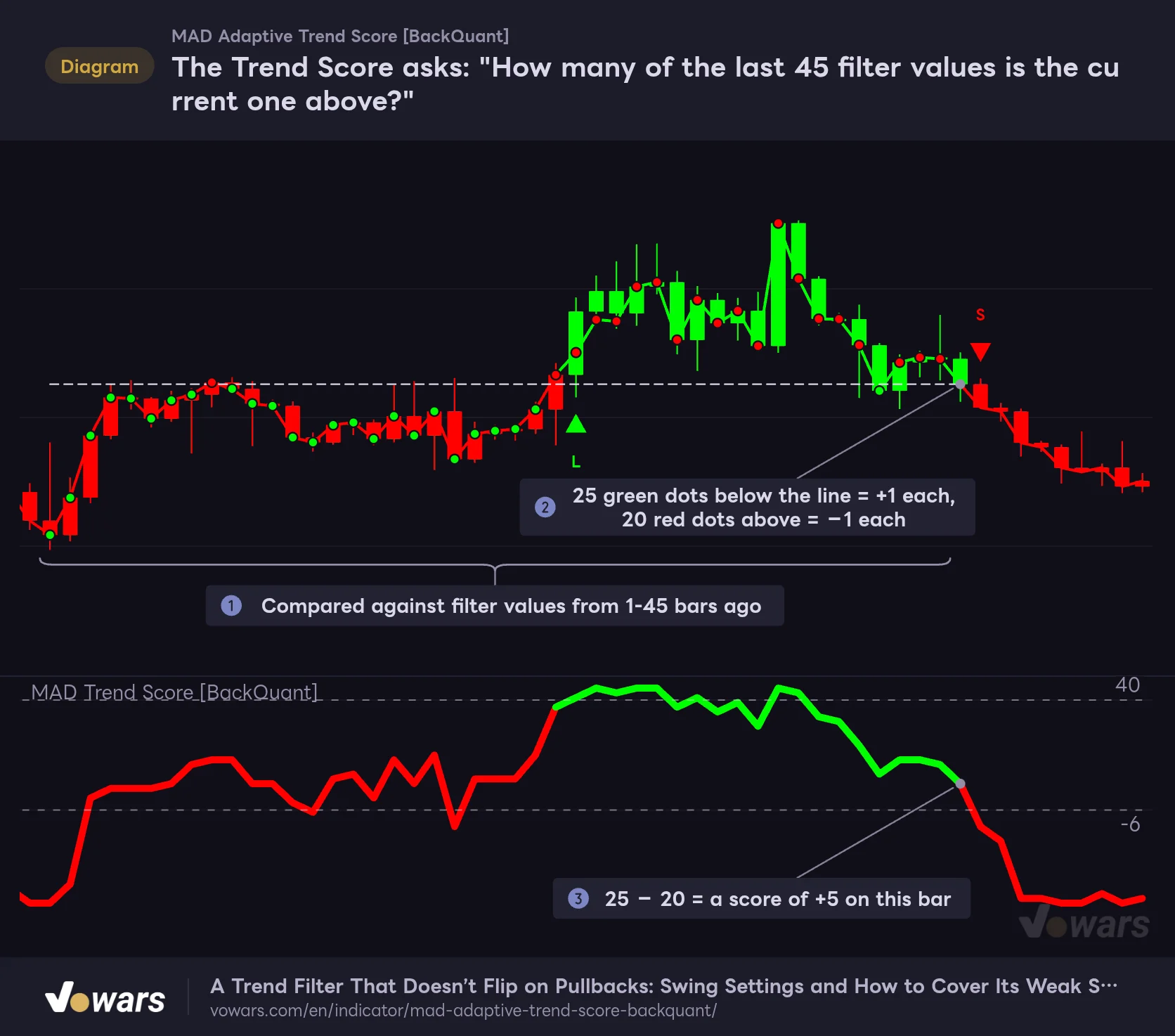
The Trend Score asks: "How many of the last 45 filter values is the current one above?"
The MAD Adaptive Trend Score compares the current filter value with each value from 1 to 45 bars ago, scoring +1 if higher and −1 otherwise, then adds them up.
Vowars DE ver.3.12.33
The range marked in Figure ① is what the current bar is compared against. In Figure ②, I drew a dashed line at the level of the current bar’s filter value. Green dots below the line are “wins” worth +1, and red dots above it are “losses” worth −1. This bar has 25 wins and 20 losses, so the score is +5, as shown in Figure ③.
Seen this way, reading the score becomes straightforward.
- Near +45: the current value is above almost all of the last 45 (price keeps printing new highs)
- Around 0: price is sitting in the middle of the last 45 bars (half above, half below)
- Near −45: the current value is below almost all of the last 45 (price keeps printing new lows)
In other words, the MAD Adaptive Trend Score does not measure the momentum or slope of a move; it measures position within the last 45 bars. If price goes sideways near the highs, the score stays high as long as it is above the cheaper prices from the past. On the flip side, one deep pullback in the middle of an uptrend makes it lose to one recent high after another, and the score drops fast.
With 45 comparisons, each worth +1 or −1, the total is always an odd number (41, 43, 45, −7, and so on). So with default settings, “above +40” really means reaching +41 or higher, and “breaking below −6” means falling from −5 or above to −7 or below. If you set an even number of comparisons, the score only takes even values, so keep this in mind when you fine-tune the thresholds.
One more small detail: when the current value is exactly equal to a past value, it counts as “not above” and scores −1. If price is completely flat for a while, the score drifts negative, but on crypto or FX, where price keeps ticking around, this is almost never an issue.
Green above +40, red below −6: why the color sticks, and what it costs you
The trade direction of MAD Adaptive Trend Score switches on just two rules.
- It turns green on any bar where the score is above the Long Threshold (40 by default)
- It turns red on the bar where the score crosses down through the Short Threshold (−6 by default)
On any bar where neither rule applies, the previous color simply carries over.
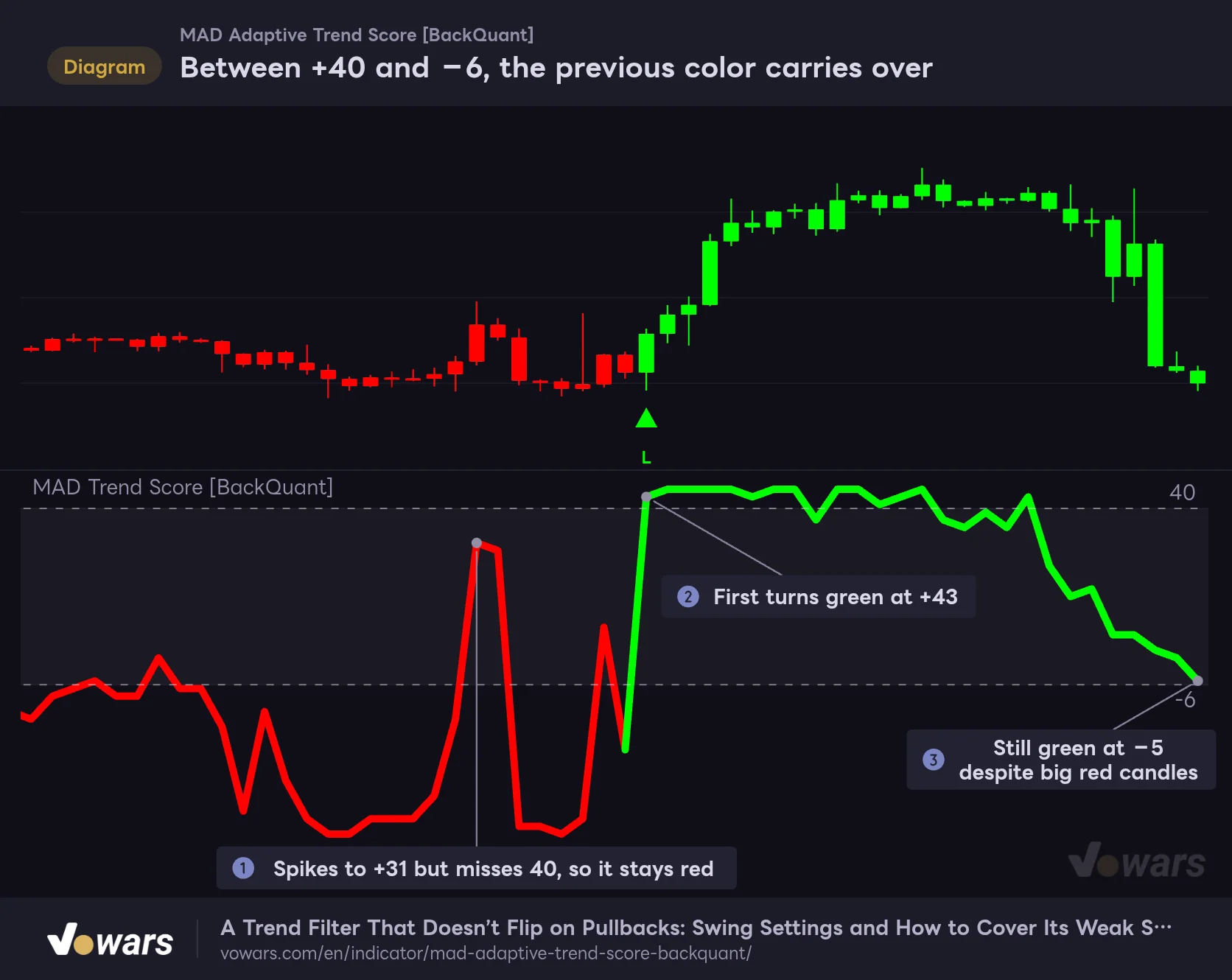
Between +40 and −6, the previous color carries over
MAD Adaptive Trend Score uses separate levels for turning green and turning red. Inside the band between the two dashed lines, the color stays whatever it was before.
Vowars DE ver.3.12.33
In Figure ①, the score spikes all the way to +31 while the state is red. A typical zero-cross indicator would already have flipped bullish here, but since the score never reaches 40, it stays red. Only on the bar in Figure ②, where it climbs to +43, does it finally switch to green.
Once it turns green, it holds on. In Figure ③, two big red candles in a row knock price down hard, yet the score is −5 and hasn’t broken −6, so the candles stay green. This “sticky color” is the source of both the strengths and the weaknesses of MAD Adaptive Trend Score.
What sticky colors give you
- The color doesn’t flip on every small pullback or bounce
- You can hold the view “we’re still in an uptrend” for longer
- Fewer signals spammed out by chop around zero
What sticky colors cost you
- On the first leg of a sharp drop, green hangs around for a while
- Getting from red back to green requires a push above +40, so reversal confirmation comes late
- If you only watch the color, it’s easy to miss momentum fading
Even with the same color, the score level tells you a lot. A green state pinned at +45 and a green state that has slid down to +5 are completely different in trend strength. Read the color as “direction” and the score level as “fuel left in the tank”, and you won’t miss anything MAD Adaptive Trend Score is telling you.
Internally, the state starts out “neutral”, neither bullish nor bearish. But the color of the line and candles is decided by “green if bullish, red otherwise”, so it shows red during the neutral phase too. Near the start of the loaded history, any red before the score first exceeds +40 is not a bearish state confirmed by a break below −6. Also, the very first switch out of neutral prints no L/S marker; markers only appear on flips between green and red. As long as you load a normal few months of history, this has virtually no effect on the right side of your chart.
From the 5-minute to the weekly chart: what changed across timeframes
Keeping the default settings, I stepped through 5m, 15m, 30m, 1H, 4H, daily and weekly charts of Bitcoin to see how MAD Adaptive Trend Score behaves. How usable it feels changes a lot depending on the timeframe.
5m to 30m: lots of signals, best for reading direction
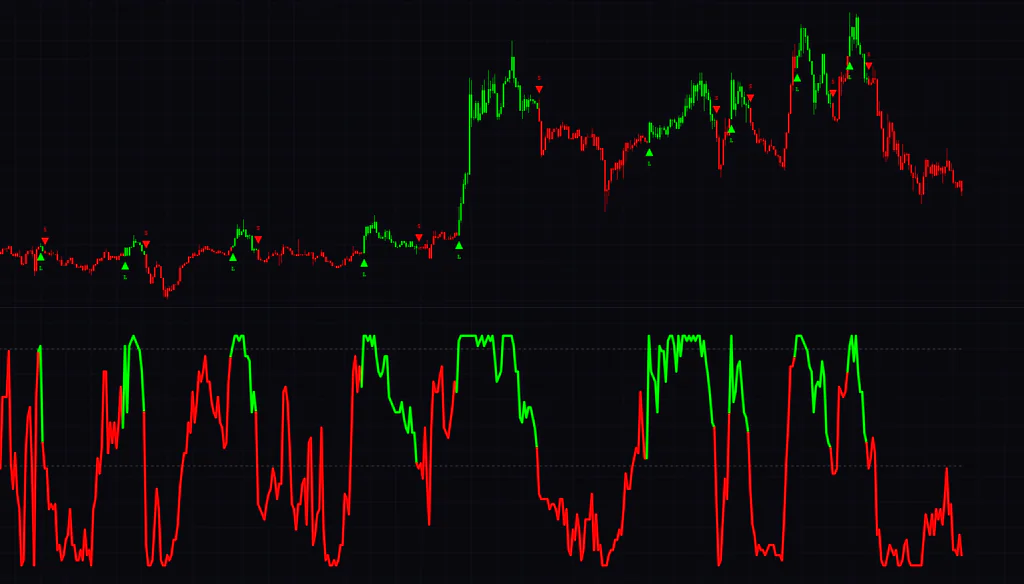
On the 5-minute chart, about 17 hours of visible data produced 9 L signals and 10 S signals. In sideways stretches the score bounced between +40 and −45 again and again, and an S printing just a few bars after an L was nothing unusual. On the other hand, when price ripped right after midnight, green held for about three hours and the whole move showed up cleanly as a single green band.
On the 15m and 30m charts, the back-and-forth during sideways action calms down a bit, and multi-day rallies and selloffs start to come together as single blocks of color. Still, on days with tight, choppy ranges, L and S signals stack up, so on lower timeframes it makes sense to treat the color as “a rough guide to direction for this session” and leave it at that.
1H to 4H: easy to see which way the swing is running
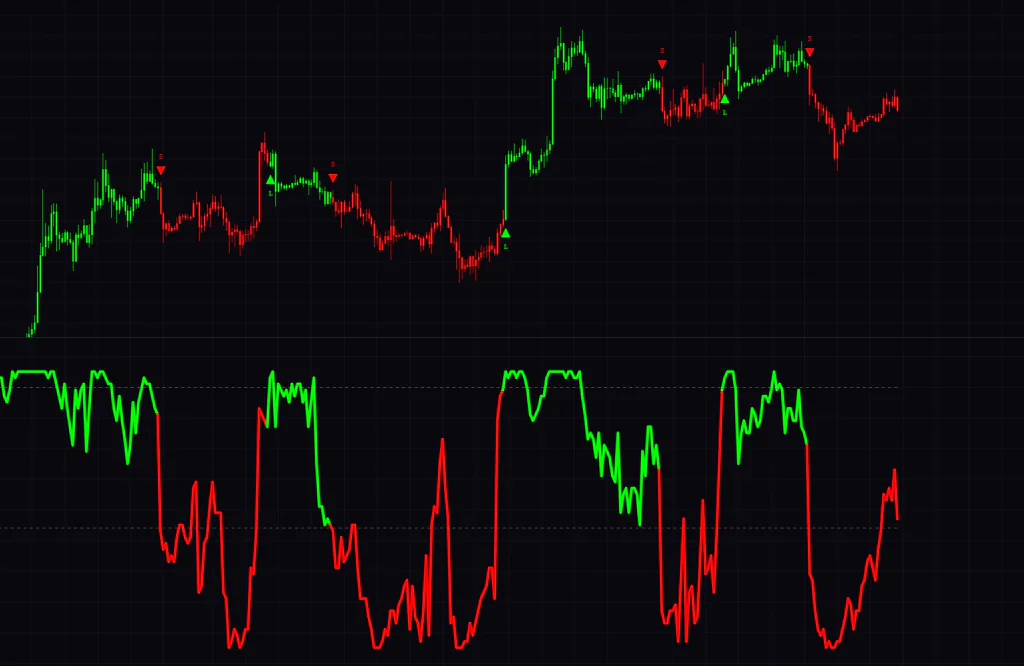
Personally, the 4H chart felt the most comfortable. From late August to mid-October 2026, roughly two months, it printed 3 L signals and 4 S signals. On the rally from around $77,000 in mid-September, the L printed on the bar where the move started, and green held all the way into the $87,000s. In the early-October selloff, too, red stayed in one solid block after the S printed.
The 1H chart sits somewhere in between. Signals flipped a few times during the late-September to early-October chop, but after October 7 the selloff stayed red for several days following the S, and green held from the October 11 L onward.
Daily to weekly: confirming the big picture and watching the color stick
On the daily chart, an S printed at the lower high around $96,000 in January 2026, and the indicator stayed red through the entire drop into the $60,000s that followed. The mid-August pump triggered an L, and green held right up to the time of the screenshot.
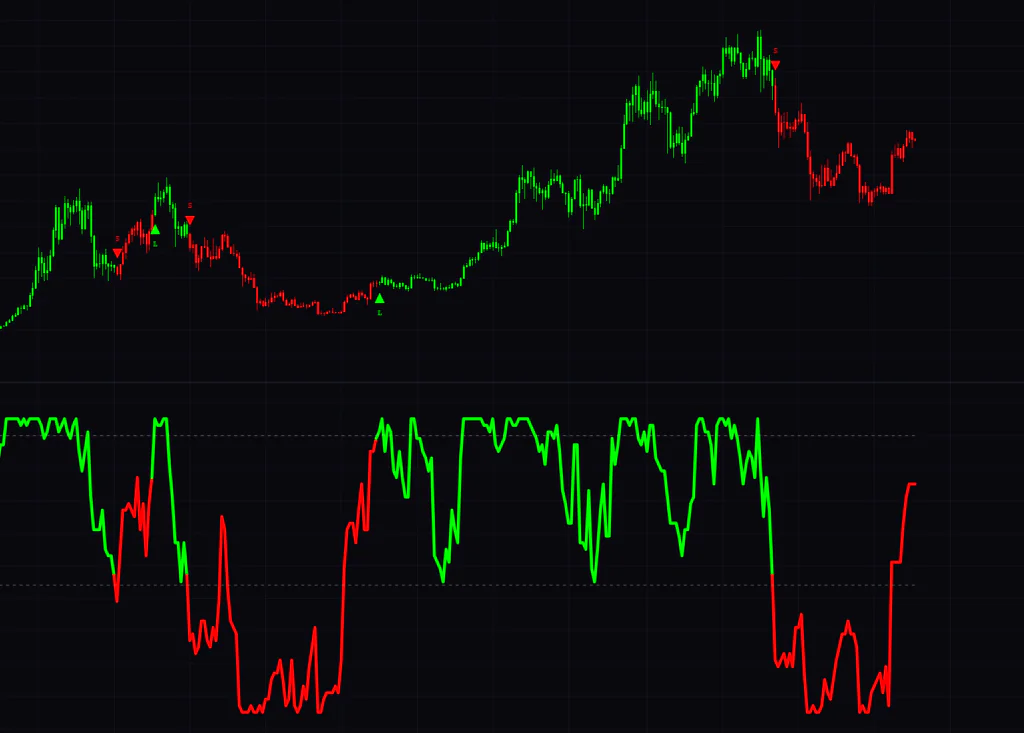
The interesting part on the weekly was this: after an S printed on the drop from the $110,000s in late 2025, price bounced and the score recovered to +25, yet the color stayed red. The rule that it only goes back to green above +40 is crystal clear on the weekly. If you use it on the daily or weekly, it’s worth treating “still red, but the score is climbing” as a sign that the tide may be turning.
| Timeframe | Signals in view | How it felt in use |
|---|---|---|
| 5m | L / S flip at short intervals | Easy to use if you limit it to reading direction during pumps and dumps |
| 15m / 30m | Multi-day moves come together, but signals cluster in chop | A rough directional guide for day trading |
| 1H | A few flips in chop, steady during trends | Halfway between day trading and swing trading |
| 4H | 3 L and 4 S in about two months | Just right for swing direction calls |
| Daily / Weekly | A few times a year | Confirming the big picture, watching the score rise while still red |
Its weak spot is tight chop: the score can jump from one extreme to the other in a single bar
As the timeframe comparison already showed, what throws MAD Adaptive Trend Score around the most is a tight, choppy range. The reason lies in how the score is counted.
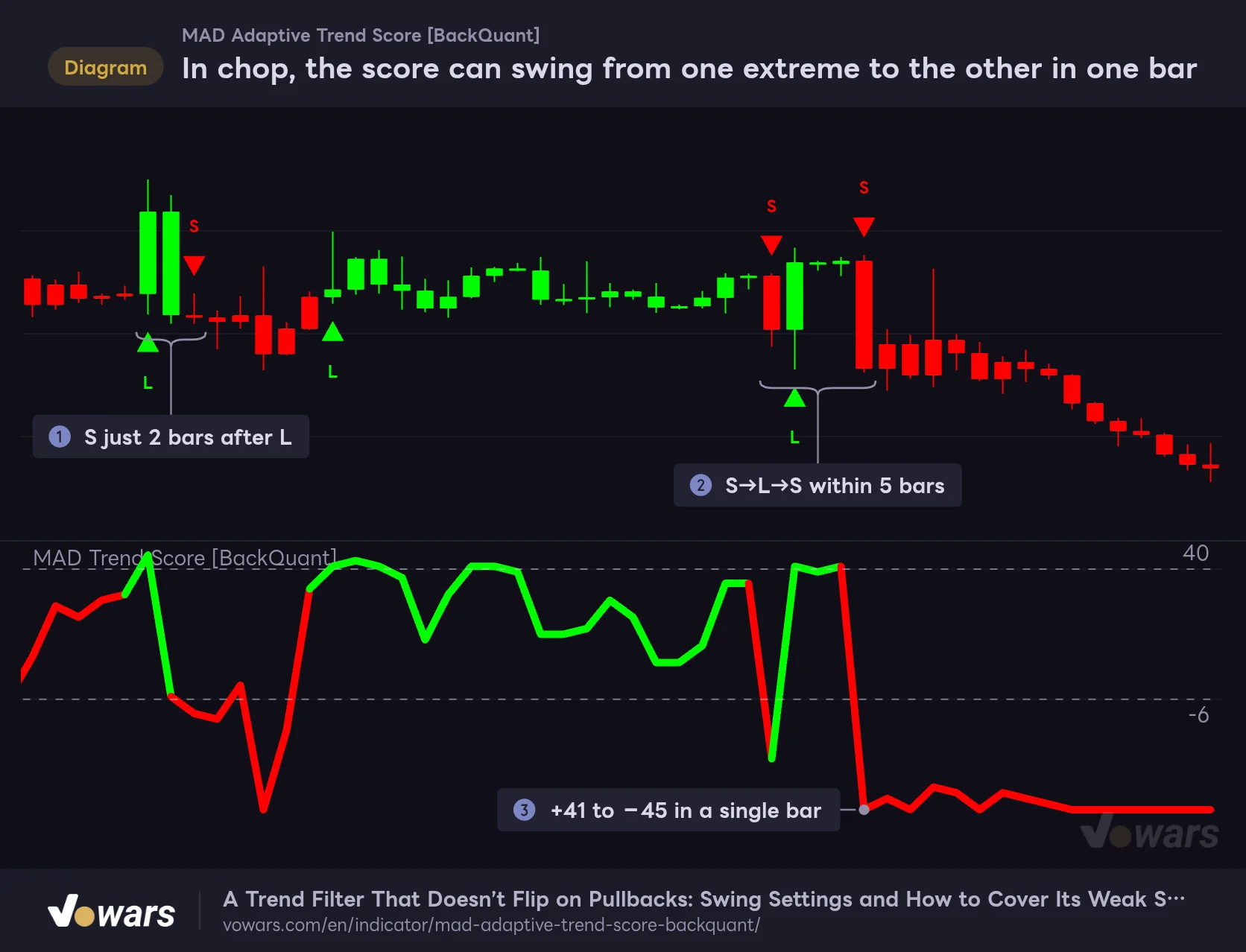
In chop, the score can swing from one extreme to the other in one bar
In a range where past filter values bunch up in a narrow band, even a small move flips the comparisons all at once. That is why MAD Adaptive Trend Score signals tend to come back to back.
Vowars DE ver.3.12.33
When price chops sideways, the filter values of the last 45 bars bunch up in a narrow price band. Then a single slightly larger candle is enough to flip all 45 comparisons into “wins” or “losses” at once. In Figure ③, the score went from +41 to −45 in a single bar.
When that happens, no matter how wide the gap between +40 and −6 is, the score just leaps right over it. In Figure ①, an S came just two bars after an L, and in Figure ② it flipped S→L→S within five bars. In situations like this, the asymmetric thresholds do nothing for you.
Once the score starts swinging between around +40 and around −40 every few bars, assume that timeframe has gone into chop and it is safer to stop trading off the L/S signals. Checking the color on a higher timeframe, or pairing it with an indicator that tracks the price range, like the Donchian Channels covered later, makes it easier to dodge fakeouts.
Settings, and the order in which to tweak them
The settings of MAD Adaptive Trend Score fall into three groups: calculation (Core Calculation Settings), signals (Signal Settings), and display (Plotting and Coloring).
| Setting | Default | Suggested | Effect |
|---|---|---|---|
| Source | close | close | Price used in the calculation. Stick with the close as a rule |
| MAD Length | 15 | 15–30 | Bars used for the median and MAD. Higher values steady the band, and the filter’s baseline moves more slowly |
| MAD Multiplier | 5.2 | 5.2 (1.5–2 to cut fakeouts) | Width of the allowed band. Lower values clip spikes harder and cut fakeouts in chop, but make the indicator react later |
| Score Lookback Start | 1 | 1 | Start of the comparison window (how many bars back it begins) |
| End | 45 | 30–45 (max 50) | End of the comparison window. The number of comparisons sets the score’s upper and lower limits |
| Show Reference Lines | On | On | Shows the threshold dashed lines in the lower pane |
| Show Signals on Chart? | On | Personal preference | Shows the L / S triangle markers |
| Long Threshold | 40 | About 0.89 × End | The state turns green (bullish) when the score is above this value |
| Short Threshold | -6 | About −0.13 × End | The state turns red (bearish) when the score crosses down through this value |
| Long Color | #00ff00 | Personal preference | Color of the bullish state |
| Short Color | #ff0000 | Personal preference | Color of the bearish state (also used during the neutral phase) |
| Line Width | 5 | 2–5 | Thickness of the score line |
| Show MAD Filter on Chart? | Off | On only when checking | Plots the MAD Adaptive Filter on the main chart |
| Paint Candles to Trend? | On | Personal preference | Colors the candles in the state color |
| Background Color? | Off | Personal preference | Shades the chart background with a light version of the state color |
The suggested values are starting points based on the tests in this article. What works best varies a lot by symbol and timeframe, so I recommend watching a few days to a few weeks of charts on the defaults first, then changing one setting at a time to address whatever bugs you.
If you change Score Lookback (Start / End), retune the thresholds with it
This is the setting to be most careful with. The number of comparisons is “End − Score Lookback Start + 1″, so the score’s upper and lower limits are set by that number too. The thresholds, however, do not adjust automatically.
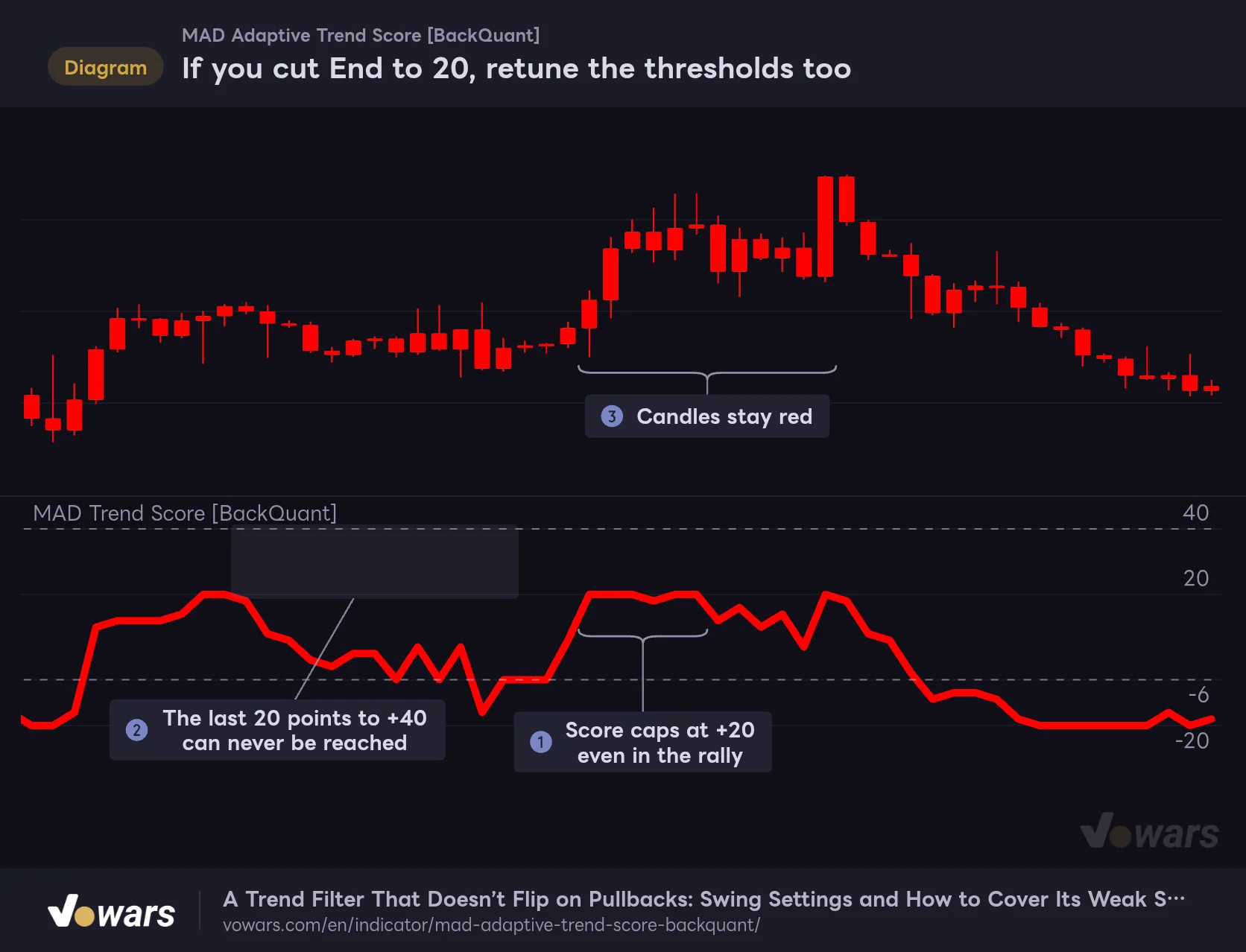
If you cut End to 20, retune the thresholds too
With 1 to 20 bars compared, the score maxes out at +20. Leave the Long Threshold at its default of 40 and it never turns green, even in a rally.
Vowars DE ver.3.12.33
Set End to 20 and the score caps out at +20, as in Figure ①. If you leave the Long Threshold at 40, the 20-point gap in Figure ② can never be closed by design, and as Figure ③ shows, the candles stay red even during a rally. It never turns green and never prints an L, which makes this an easy trap to fall into, where you end up thinking the indicator is broken.
If you simply apply the default ratios (40 ÷ 45 ≈ 0.89, −6 ÷ 45 ≈ −0.13), the threshold guidelines look like this.
| Number of comparisons (End, with Start at 1) | Score range | Long Threshold guideline | Short Threshold guideline |
|---|---|---|---|
| 45 (default) | −45–+45 | 40 | −6 |
| 30 | −30–+30 | 26 | −4 |
| 20 | −20–+20 | 17 | −3 |
Fewer comparisons means the indicator only looks at more recent bars, so color flips come sooner. An easy way to split it: around 30 if you want a slightly faster response for day trading, and leave it at 45 if you want to keep the default’s calm behavior for swing trading. Note that End maxes out at 50 and cannot go higher.
Set Score Lookback Start to 0 and the current bar gets compared with itself, which just adds a constant −1 every time (“not above”). Set it to 2 or more and the most recent bars drop out of the comparison, making the response slightly duller. Unless you have a specific reason, leaving it at 1 is the easiest choice.
MAD Multiplier is a tug-of-war between fakeouts and lag
Lower the MAD Multiplier and the allowed band narrows, so the filter clips price harder. The values that feed the score get smoother, which also tames sudden swings in chop.
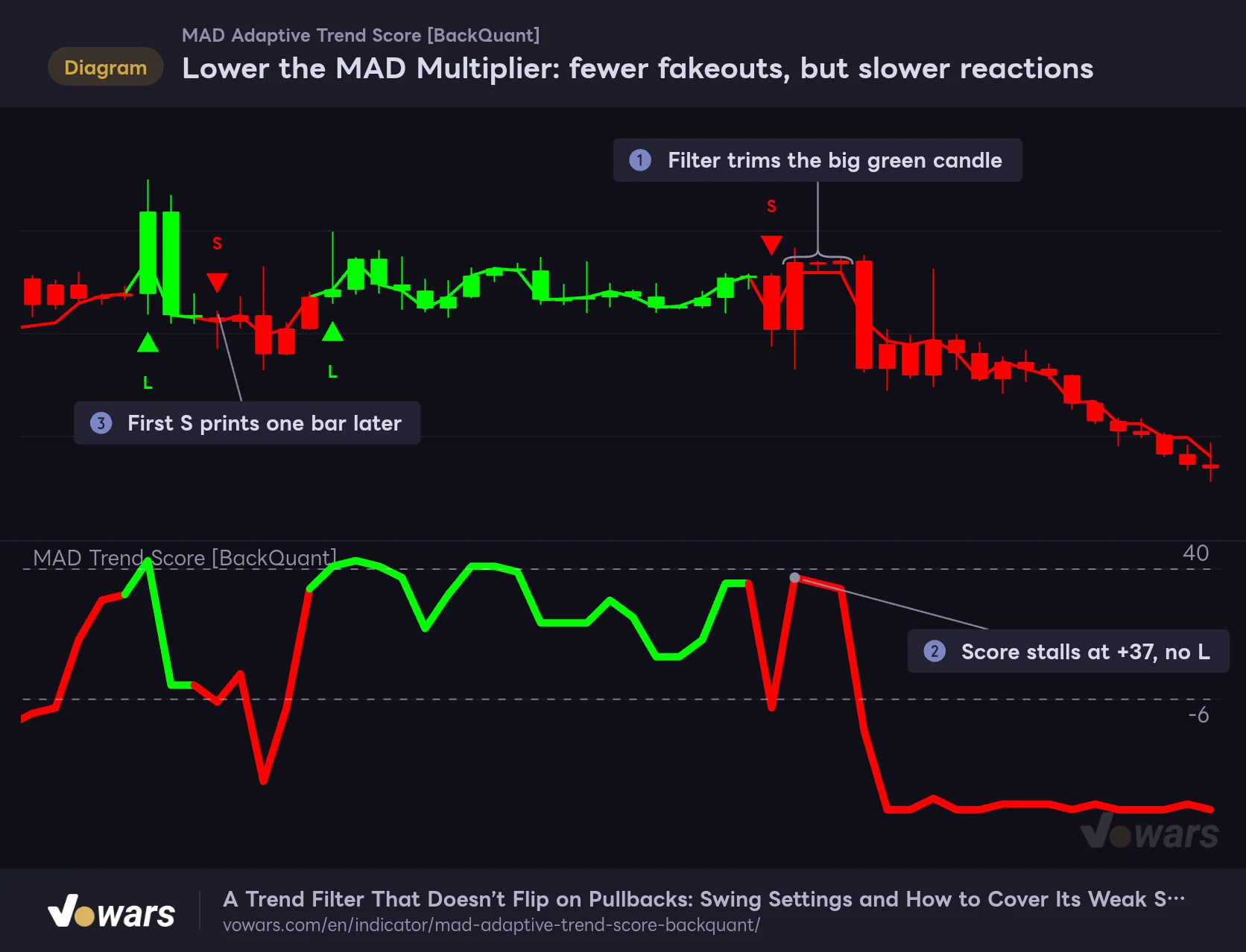
Lower the MAD Multiplier: fewer fakeouts, but slower reactions
Drop the MAD Multiplier from its default of 5.2 to 1.5 and the filter clips price harder, which also tames sudden swings in the score.
Vowars DE ver.3.12.33
This is the same price action as the chop figure, with only the MAD Multiplier lowered to 1.5. In Figure ①, the filter trims the push of a big green candle, and as Figure ② shows, the score stalls at +37, so no L prints. The stretch that flipped S→L→S three times on the default settings now gets away with a single S.
It does come at a price, though: as Figure ③ shows, the first S printed one bar later than on the default. When I also tested it on clearly trending price action, a setting of 1.5 delayed the switch to green by 3 to 4 bars compared with the default. Meanwhile, middle-of-the-road values around 3 to 4 only added about one bar of lag, but barely reduced the back-to-back signals in chop. The results are easier to interpret if you pick a side: drop it all the way to 1.5–2 and accept the lag if you want fewer fakeouts, or keep the default 5.2 if you care more about responsiveness.
Conversely, crank the MAD Multiplier up to something like 10 and almost nothing gets clipped, so the filter becomes nearly identical to the close. It helps to think of it as moving toward “a score that compares the raw close against the last 45 bars.”
MAD Length is how long the band “remembers”
MAD Length is the number of bars used to calculate the median and MAD. Shorten it and the band widens and narrows quickly with recent price action. Lengthen it and the band settles down, but the median itself moves more slowly, so more bars get clipped in fast markets. It doesn’t move the results as much as the number of score comparisons does, so in my experience it’s easier to see the effect if you leave it at the default 15 and tune the MAD Multiplier and the comparison count first.
Example settings by use case
| Use case | Example settings | Goal |
|---|---|---|
| Direction calls for swing trading (4H to daily) | All defaults | Use the sticky colors to ride trends longer |
| Faster response for day trading (15m to 1H) | End 30 / Long Threshold 26 / Short Threshold -4 | Compare only against recent bars so flips come sooner |
| Fewer fakeouts on symbols that chop a lot | MAD Multiplier 1.5–2 | Clip spikes harder and tame score swings (flips come a few bars later) |
| Keep your usual candle colors | Paint Candles to Trend? Off / Background Color? On | Keep the candle colors and show the state in the background |
In every case, results will vary with the symbol and the price action at the time. After changing a setting, check how the L/S signals change on past charts before you use it live.
Using alerts, and does it repaint?
MAD Adaptive Trend Score comes with two alert conditions.
- “MAD Trend Score Long”: fires when the state flips from red to green (same condition as the L marker)
- “MAD Trend Score Short”: fires when the state flips from green to red (same condition as the S marker)
In TradingView’s Create Alert dialog, choose this indicator as the condition, then pick one of the two above.
The score is recalculated on the live, still-forming bar as the price moves. It is entirely possible for it to poke above +40 before the bar closes and then fall back to 40 or below by the close. With the frequency set to “Once Per Bar”, you may get alerts on these intrabar states, so choosing “Once Per Bar Close”, which only fires after the bar is confirmed, keeps your alerts in sync with the markers that stay on the chart.
As far as I could verify, it does not repaint (repainting means the display on confirmed bars changes after the fact). The score, colors and L/S markers are calculated only from closes up to that bar, with no higher-timeframe data and no future values. Once a bar is confirmed, past colors and markers are never rewritten; only the live, forming bar moves.
The only exception is the two threshold dashed lines, which are redrawn on the latest bar every time. They are just visual guides for the threshold levels and have nothing to do with how confirmed bars are judged.
If you want to check how signals played out on past charts one bar at a time, TradingView’s Bar Replay lets you step forward bar by bar and watch how the colors and markers change. On daily and higher timeframes you can go back through all available history, while on intraday charts how far back you can go depends on your plan (for example, about six months on the 1-minute chart with the Essential plan) (as of October 17, 2026).
Add Donchian Channels to get ahead of the “still green” selloff
The weakness of MAD Adaptive Trend Score was that, once green, it holds on so stubbornly that exits tend to come late on the first leg of a sharp drop. That’s where TradingView’s built-in Donchian Channels felt like a great match. It plots an upper and lower band from the highest high and lowest low of the last 20 bars, with a middle line (Basis) halfway between them.
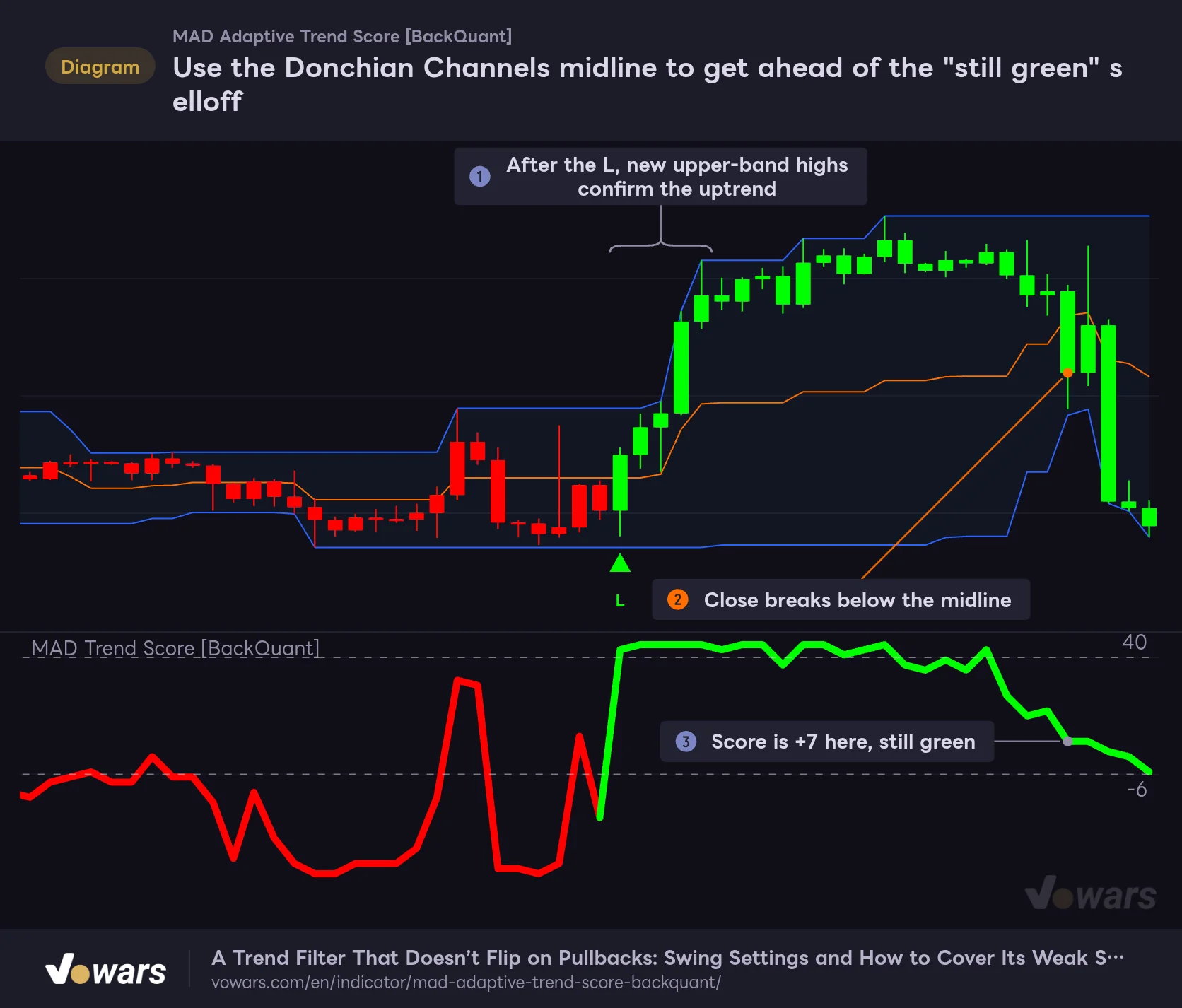
Use the Donchian Channels midline to get ahead of the "still green" selloff
MAD Adaptive Trend Score is slow to switch to red. Adding a close below the Donchian Channels (20) midline as an exit cue covers that lag.
Vowars DE ver.3.12.33
In Figure ①, after the L prints, price keeps pushing to new highs at the top of the Donchian Channels. The green score and fresh upper-band highs lining up gives you two separate reasons to be riding the rally.
The difference shows up on the first leg down. In Figure ②, the close breaks below the orange middle line, but as Figure ③ shows, the score is still +7 and green at that point. Split the roles (“get in on MAD Adaptive Trend Score’s green, get out on a close below the Donchian midline”) and you keep the benefit of the sticky colors while cutting down on the times a sharp drop eats a big chunk of your profits.
A few other combinations are worth considering.
- ADX: a gauge of trend strength. Add a rule to skip L/S signals while ADX is low, and you can filter out the chop signals that MAD Adaptive Trend Score struggles with.
- MAD Adaptive Trend Score on a higher timeframe: if you trade the 1H, check the color on the 4H; if you trade the 4H, check the daily, and only take signals that point the same way. Placing them side by side in a TradingView multi-chart layout makes this easy to check (the number of charts per layout depends on your plan).
- Volume Profile: knowing which price levels have traded the most volume gives you a better feel for how far a green phase might run and where it might get rejected.
After using it: what you can count on, and what to watch out for
What you can count on
- Two-color state plus score level shows direction and remaining fuel at a glance
- Asymmetric thresholds keep the color from flipping mid-trend
- The median-and-MAD filter keeps one sudden bar out of a quiet market from dragging it around
- Candle coloring lets you read the state from the main chart alone
- Confirmed bars never change after the fact, and there are two alert conditions
- Comparison count, band width and thresholds can each be tuned independently
What to watch out for
- In tight chop, the score can jump from one extreme to the other in one bar, triggering back-to-back signals
- Once green, it holds on stubbornly, so exits tend to lag on the first leg of a sharp drop
- Going from red back to green requires a push above +40, so bottom confirmation comes late
- Changing the comparison count does not update the thresholds; you have to retune them by hand
- The neutral state right after loading is also shown in red
A trend “location” meter for traders who can make sticky colors work for them
![MAD Adaptive Trend Score [BackQuant]](https://vowars.com/wp-content/webp-express/webp-images/uploads/2026/10/MAD-Adaptive-Trend-Score5-1024x468.png.webp) Image
ImageUnlike moving-average-style indicators that smooth price, MAD Adaptive Trend Score counts “where the current value sits within the last 45 bars” and splits the result into two colors with asymmetric thresholds. Because it trims sudden bars with a median-and-MAD filter before counting, it is less likely to get thrown around by breakouts from quiet markets.
In actual use, its strengths shine on 4H to daily swing trades: once green or red is set, it stays put for as long as the trend lasts. On the other hand, in tight chop the score jumps from one extreme to the other and signals pile up, and in a selloff that stays green, exits tend to come late. Both come from how it is built, so you should plan on having a separate way to spot chop and a separate exit rule.
Read the color as “which way the current flow is going” and the score level as “how much fuel that flow has left.” Look at it in these two layers and MAD Adaptive Trend Score tells you a lot more than its simple look suggests. If you are a swing trader who wants to ride trends longer, start by adding it to a 4H chart on the default settings and see whether the way the color sticks fits your trading rhythm.
MAD Adaptive Trend Score is one input for judging market direction. Whatever the settings, signals can fail in chop or sudden market shifts. Don’t make trading decisions on signals alone; use it together with clear stop-loss levels and sound risk management.