
A Structure-Break Indicator That Shows Where Price Is Likely to Pull Back To
You just got a CHoCH (Change of Character). Now what? Where are you supposed to wait for an entry? If you trade Smart Money Concepts, you have probably frozen at this exact moment more than once.
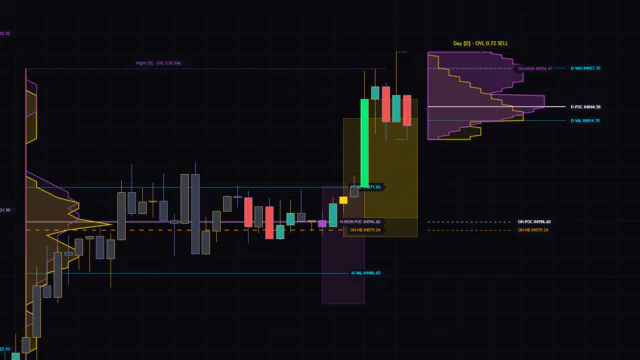
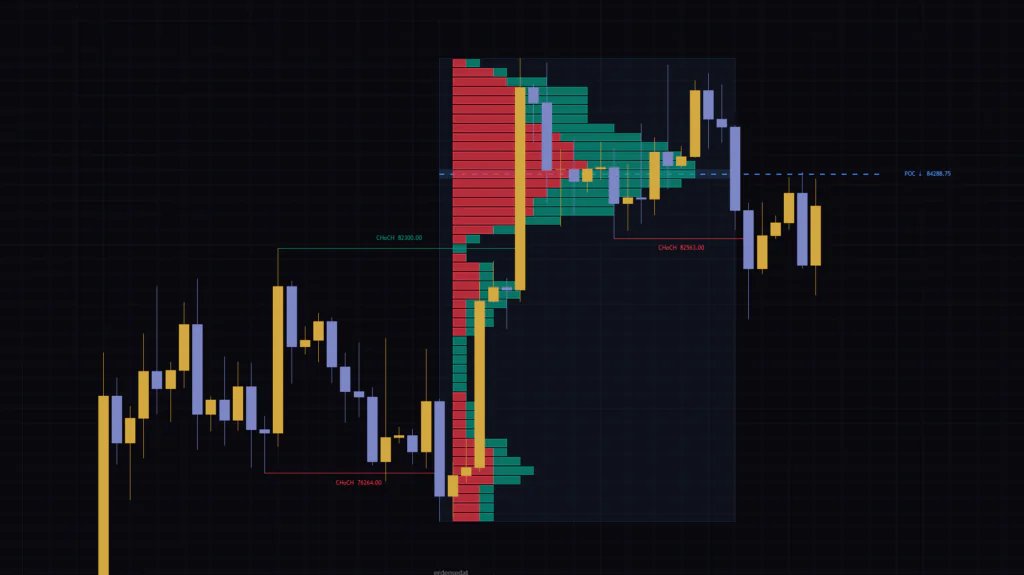
“Structure Break Volume Profile” tries to answer that question with volume. It plots BOS and CHoCH levels on the chart, and the moment a CHoCH prints, it draws a volume profile showing where volume built up inside the structure that was in play until then. The highest-volume price level (POC) and the volume peaks (HVNs) are projected past the latest bar, so you can see at a glance where to wait for the pullback after a reversal.
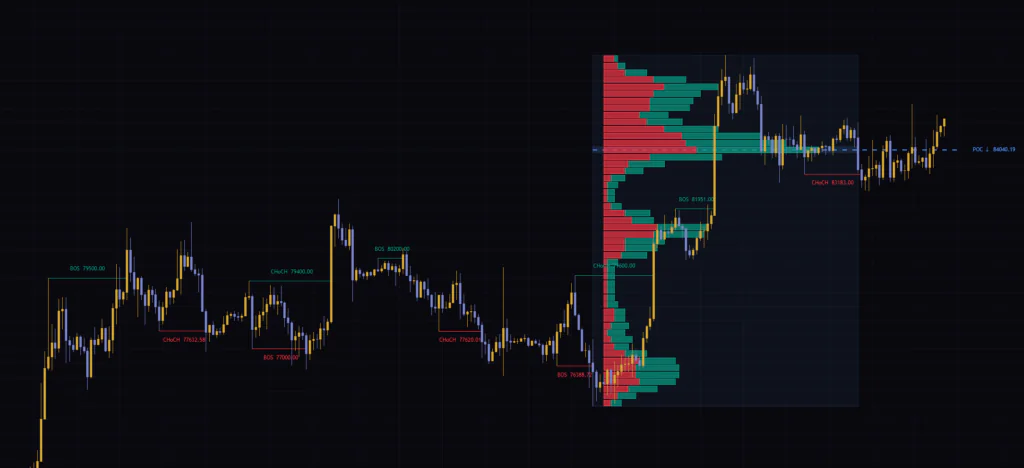
I spent a good amount of time running it mainly on BTCUSDT across the 5m, 4H and weekly charts. The structure detection itself is clean and has fewer quirks than most. That said, if you use it without knowing when the labels actually print and what the red and green in the profile really mean, it is easy to misread it. Those are the two things this review focuses on, walking through the chart as we go.
What You See on the Chart
The first time you load it, lines, boxes and colors all show up at once, which can feel a bit overwhelming if you are not used to it. Let’s start by sorting out what is what.
| Element | How it looks | What it means |
|---|---|---|
| BOS / CHoCH lines | Thin solid lines with labels, green (break up) and red (break down) | A record of a confirmed swing high or low being broken. The label shows the price of the level that was broken |
| Profile area | A box with a faint blue fill and a dotted border | The time span and price range of the structure that ran right up to the latest CHoCH |
| Volume profile | Horizontal bars split into red and green (default) | How much volume traded at each price level inside that structure |
| POC | A dashed blue line with a “POC ↑ / ↓ price” label | The price level with the most volume. The arrow shows the direction of the latest CHoCH |
| HVN | Purple bands with “HVN number price” labels | Price levels other than the POC where volume clustered (up to 3 by default) |
| LVN | Bands with dotted borders (off by default) | Price levels with thin volume. Green after a bullish CHoCH, red after a bearish one |
Only one profile is ever shown at a time. It always belongs to the latest CHoCH, and when the next CHoCH prints, the old profile is deleted and redrawn. No matter how many BOS events occur, the profile stays put.
You will also see the author’s watermark at the bottom center of the chart. If it bothers you, just turn off Show erdensedat Watermark.
BOS vs. CHoCH: How Is the Label Decided?
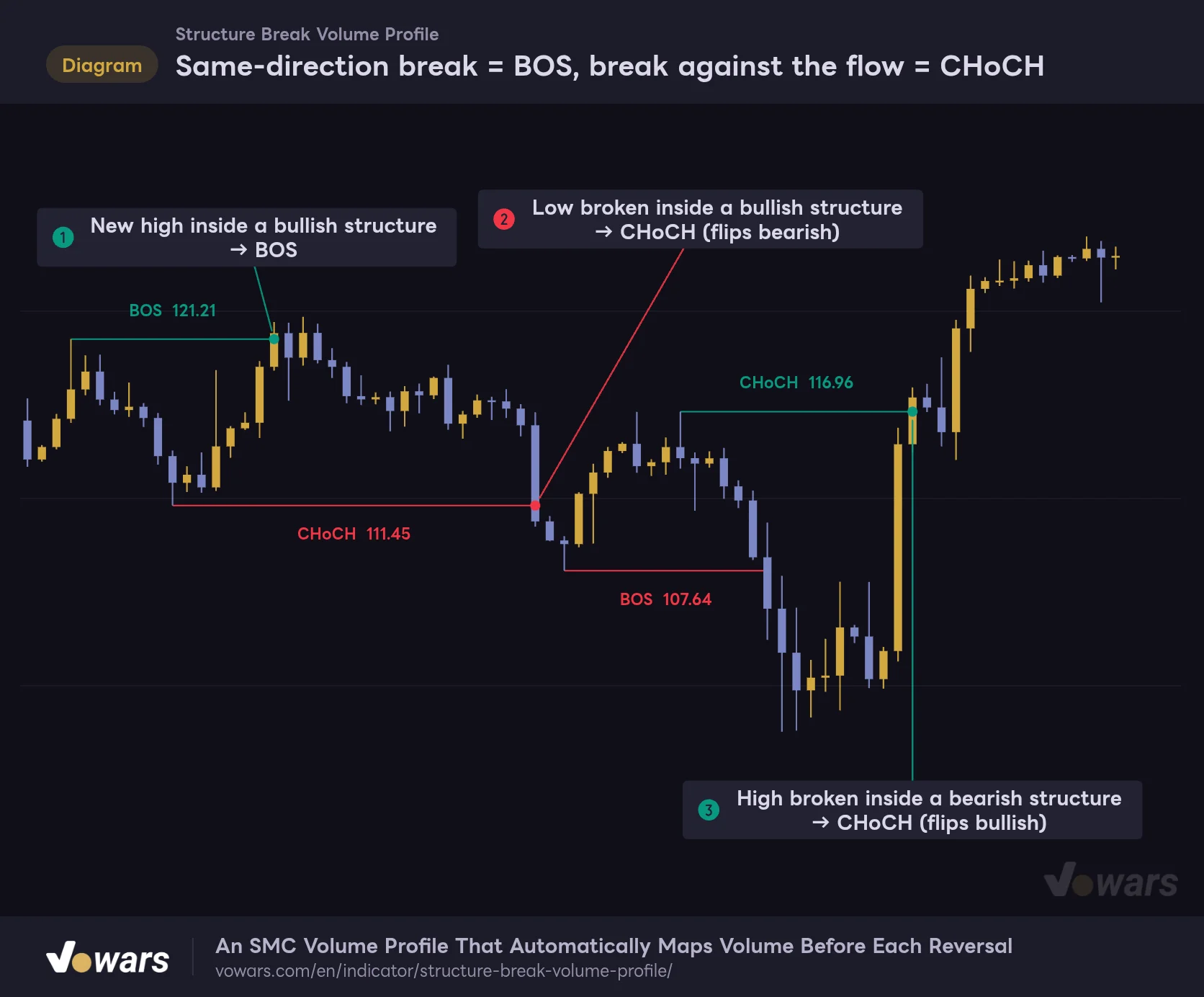
“Structure Break Volume Profile” keeps track of the most recent confirmed swing high and swing low, and flags a break on the bar where price takes one of them out. The only thing that decides which label you get is whether the break goes in the same direction as the existing structure.
Same-direction break = BOS, break against the flow = CHoCH
The label depends on whether the break goes in the same direction as the existing structure.
Vowars DE ver.3.12.30
If price makes a new high while the bullish structure is still intact, that is a trend-continuation BOS, as in Figure ①. If price breaks the most recent low inside that same bullish structure, the break goes against the flow, so it becomes a CHoCH and the structure flips to bearish. Figure ② shows exactly that. The next lower low is a bearish BOS, and when price takes out a high inside the bearish structure at Figure ③, the direction flips back to bullish.
Each line is a horizontal line running from the originating swing high (or low) to the bar that broke it, with the label placed roughly in the middle. The number on the label is not the price of the breakout bar but the level that got broken. That number marks the exact line in the sand where structure changed, which comes in handy when you review the chart later.
Also note that once a high (or low) has been broken, no further breaks in that direction are flagged until the next swing is confirmed. You never get repeated labels at the same level, so the chart stays fairly clean.
Labels Print After Confirmation, Not the Moment Price Breaks
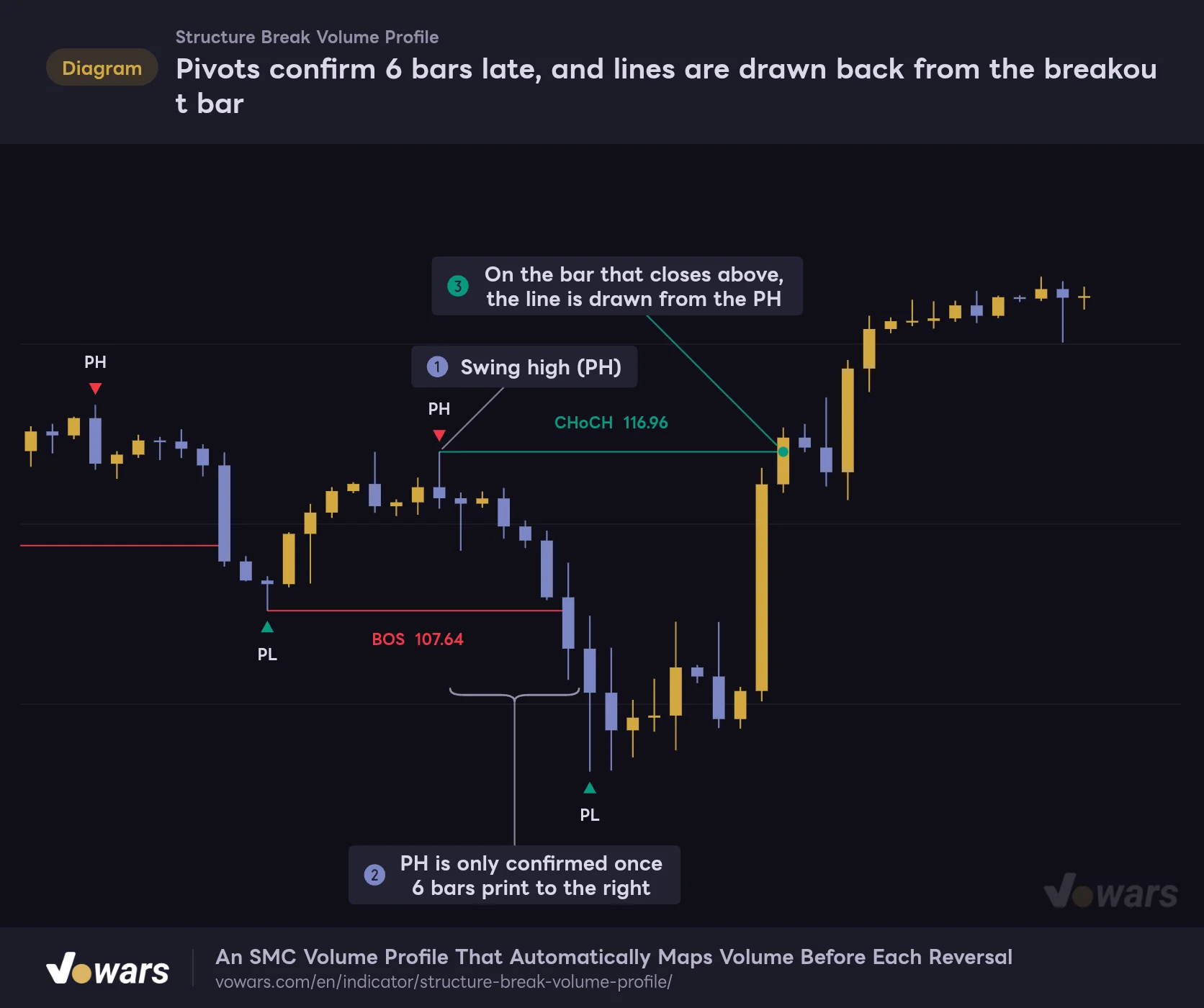
This is what trips most people up at first. The swing highs and lows that anchor the structure are confirmed by comparing them with a set number of bars on each side. With the default Fractal Length (odd) of 12, the window is 13 bars internally, with 6 bars checked on each side. In other words, a high is not treated as a structure point until 6 bars have printed to its right.
Pivots confirm 6 bars late, and lines are drawn back from the breakout bar
Turning on “Show Pivot Marks” reveals the swing highs and lows (PH / PL) that anchor the structure.
Vowars DE ver.3.12.30
If you turn on Show Pivot Marks in the Debug group of the settings, the swings used for detection are marked with “PH” and “PL”. The high at Figure ① is only confirmed once the 6 bars at Figure ② have printed. Then, on the bar at Figure ③ where price closes above that high, the line is drawn from the PH and the CHoCH label appears.
When you scroll back through history, the lines extend neatly from the swing points, so it looks as if you knew at the high. In reality, each line was drawn backward from the bar where the break happened. If you want to check which bar a label actually printed on, look at the right end of the line. That bar is the one where the signal fired.
The Show Pivot Marks markers are plotted back on the bar 6 bars earlier once the pivot is confirmed. In real time, the mark shows up on the high bar only 6 bars later. It is easy to say “that was the top” in hindsight, but the mark was not there when it happened. Keep this lag in mind whenever you backtest on historical charts.
How It Slices Out the Volume of the Prior Structure at the CHoCH
This is the core of “Structure Break Volume Profile”. A typical volume profile aggregates volume by time, such as the visible range or a session. This indicator slices it differently, treating the structure that ran right up to the CHoCH as one aggregation range.
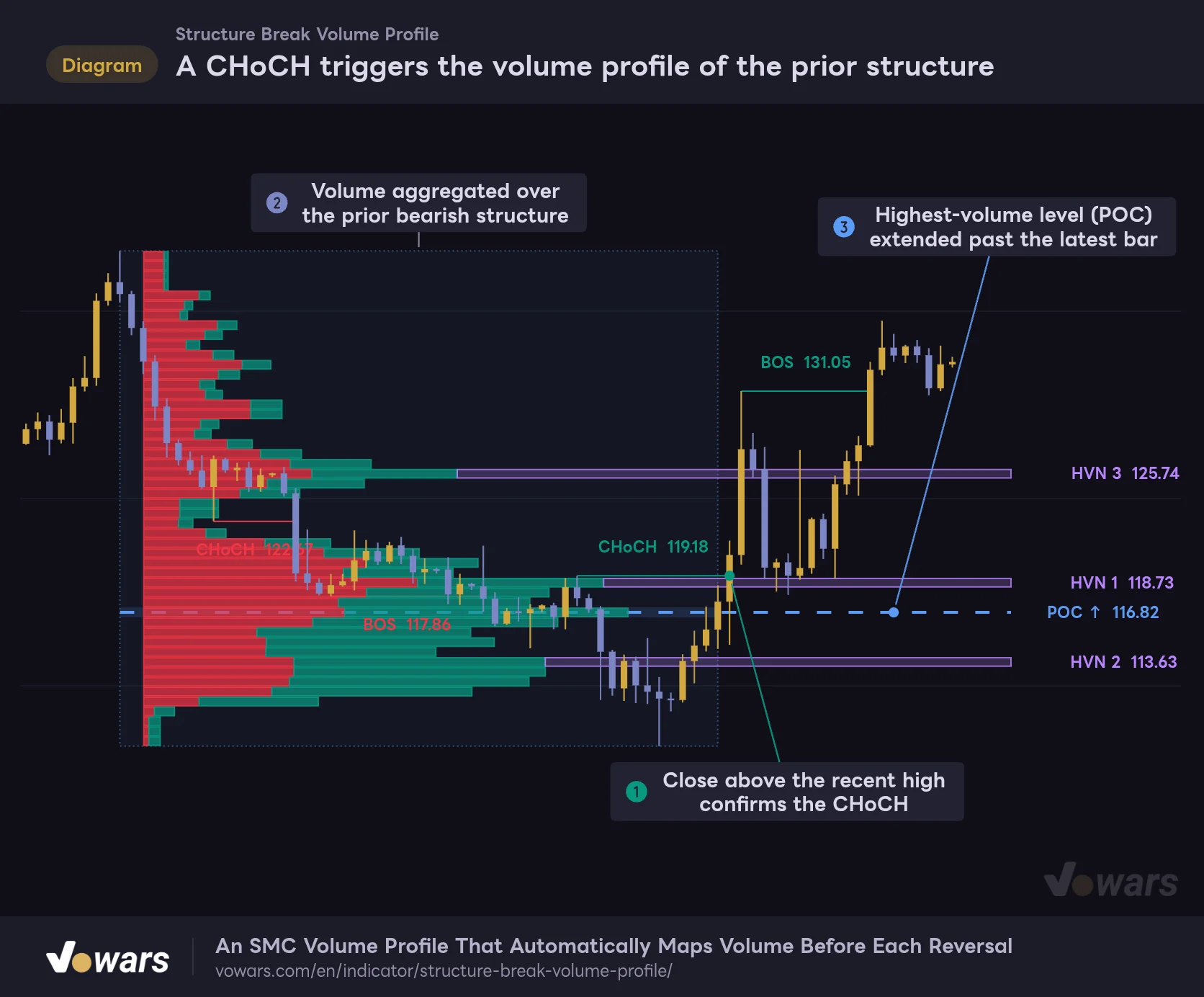
A CHoCH triggers the volume profile of the prior structure
A bullish CHoCH kicks off a volume profile built over the price range of the preceding downtrend structure.
Vowars DE ver.3.12.30
Here is how it plays out. While a bearish structure is in progress, the indicator keeps recording the highest confirmed swing high and the lowest confirmed swing low inside it. Then, on the bar at Figure ① where price closes above the most recent high and a bullish CHoCH is confirmed, it builds the profile using the recorded high-to-low range as the vertical span, and the period from whichever of those two swings came first up to the bar before the CHoCH as the horizontal span (Figure ②).
The price range is split evenly into Profile Rows rows (50 by default), and each bar’s volume is distributed across the rows its high-to-low range overlaps, in proportion to the overlap. Any wick that pokes outside the box is not counted. The middle of the row with the most volume becomes the POC, and as in Figure ③, it is extended as a dashed line Bars to Right bars past the latest bar (5 by default).
The “↑” or “↓” on the POC label does not describe where the POC sits relative to price. It shows the direction of the latest CHoCH. I initially misread it as “POC is above, so ↑?” It is ↑ after a bullish CHoCH and ↓ after a bearish one.
When a downtrend flips to an uptrend, the price levels that saw heavy trading during the decline are often full of trapped longs who never cut their losses and sellers waiting to sell the rally. The idea here is that pullbacks after a reversal tend to stall at these high-activity zones from the previous structure. Getting the CHoCH signal and the levels to wait at in one go is what makes this indicator stand out.
One thing to watch is how many bars feed the profile. Only the most recent Profile Source Bars bars (3,000 by default) are kept for the calculation. On a 1-minute chart, 3,000 bars is only about two days, so if you look at a large structure that lasted several days on the 1m, the older part of its volume will be missing from the profile. When you work with long structures on low timeframes, raise this value (max 10,000).
The Red and Green Bars Are Estimated Buying and Selling
By default, Visual Architecture is set to “Ask/Bid”, which splits each profile row into red on the left (Bid / sellers) and green on the right (Ask / buyers). It looks like a footprint chart, but under the hood it is something completely different.
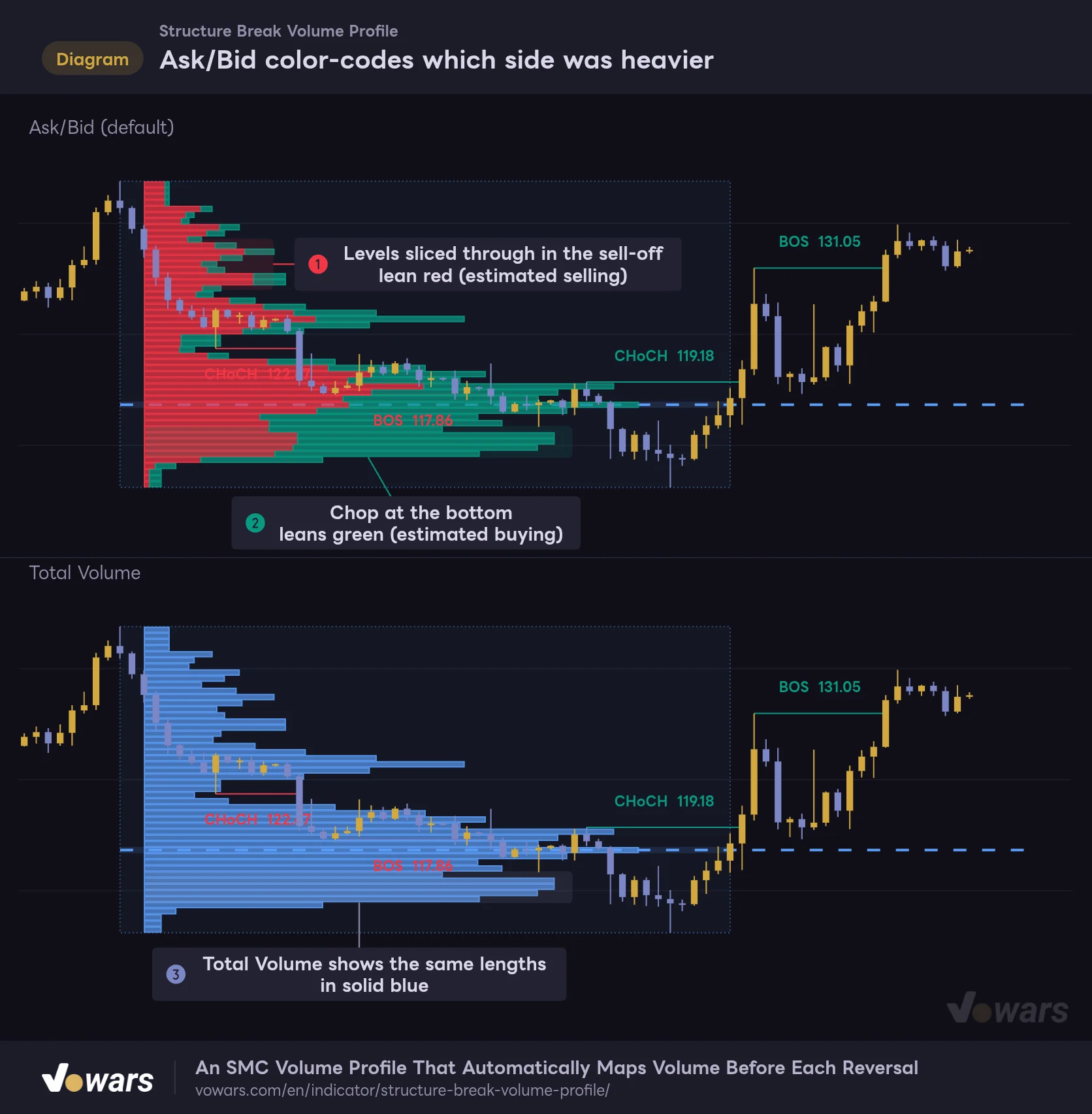
Ask/Bid color-codes which side was heavier
The same profile shown in both Visual Architecture modes.
Vowars DE ver.3.12.30
The split is based on one thing only: where each bar closed within its high-low range. A bar that closed at its high puts all of its volume on the green side, one that closed at its low puts it all on the red side, and a close right in the middle splits it 50/50. For bars with no range, a bullish candle counts as green, a bearish candle as red, and an unchanged bar as half and half. That is why, as in Figure ①, levels that price sliced through during a sell-off tend to lean red, while levels where price chopped around at the bottom with long lower wicks, as in Figure ②, tend to lean green.
Switch to “Total Volume” and the row lengths stay the same while everything turns solid blue (Figure ③). The POC and HVN levels are calculated from the same total volume in both modes, so they do not move. I usually run it on Total Volume and only switch back to Ask/Bid when I want to see which side was heavier. With the rows split into red and green, the POC band and the candles get a little harder to read.
TradingView’s chart data does not tell you whether each trade was a market buy or a market sell. The red and green in Ask/Bid are only an approximation inferred from candle shape. It is safer not to treat “more green means buyers are winning” as hard evidence. Also, on symbols without volume data, each bar counts as 1 instead of its volume, so the profile ends up closer to “how many bars touched each price level”.
POC, HVN and LVN Each Call for a Different Way to Wait
Three kinds of levels are pulled out of the profile. All of them extend past the latest bar, so you can line them up with price action after the reversal.
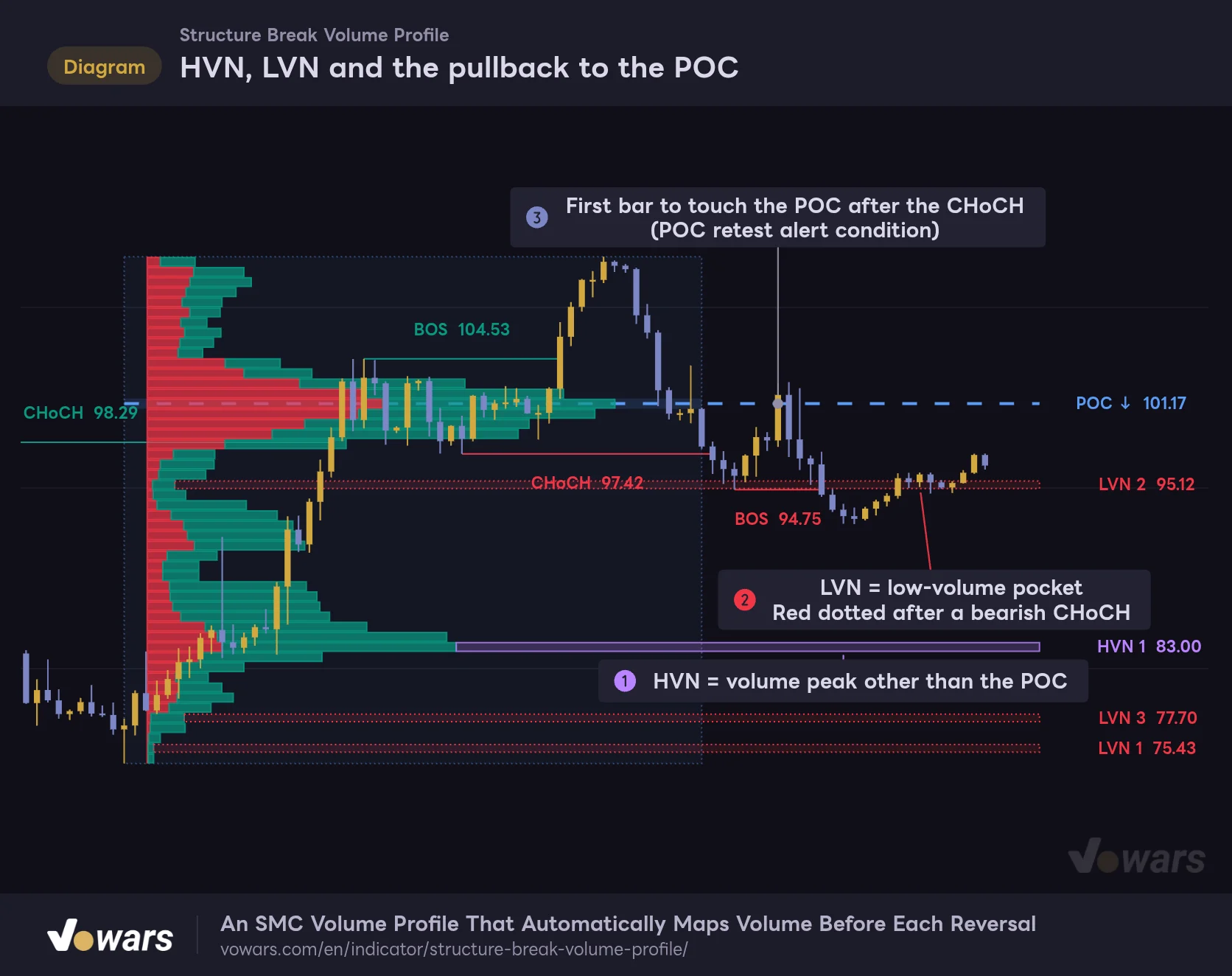
HVN, LVN and the pullback to the POC
After a bearish CHoCH, the volume peaks (HVN) and pockets (LVN) taken from the prior bullish structure extend past the latest bar.
Vowars DE ver.3.12.30
POC (the price level where the most trading happened)
This is the row with the highest total volume. The row itself gets a faint blue band, and a dashed line runs through its middle. When price pulls back after a reversal, this is the first place to expect a reaction. Figure ③ is the first bar to tag the POC after a bearish CHoCH. In this case price got rejected at the POC and went on to print a bearish BOS. Of course it does not play out like this every time, and price slicing straight through the POC is perfectly common too.
HVN (volume peaks other than the POC)
Candidates are rows that form a “peak” with more volume than the rows above and below, and that reach at least Minimum Volume (% of POC) of the POC (55% by default). From those, it picks up to 3 in order of volume, as long as they are at least Minimum Row Spacing rows (3 by default) away from the POC and from other HVNs. With the default left-aligned profile, each purple band starts at the tip of its row’s bar and extends to the right (Figure ①). The numbers rank them by volume, so HVN 1 is the heaviest peak.
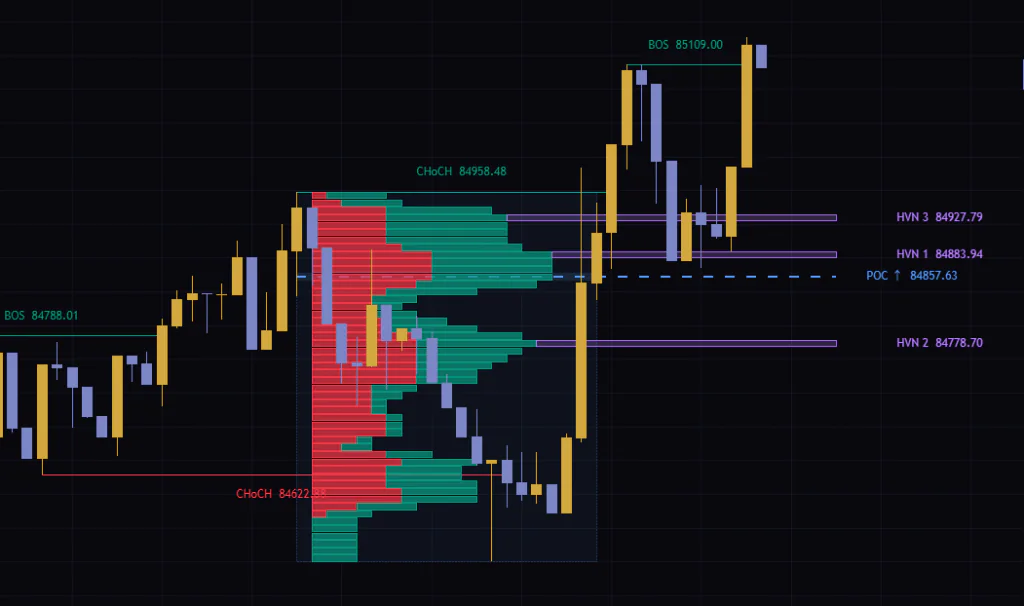
When I tested it on the 5m chart, there were times when three HVNs stacked right above and below the POC, with the levels packed tightly together. When price chops between them, it gets hard to tell which line it actually reacted to. In those cases, I found it more practical to treat the bands as one thick zone.
LVN (low-volume pockets)
LVNs are off by default and appear once you enable Show LVN Columns. They are the opposite of HVNs: “valleys” with less volume than the rows above and below, and at or below 45% of the POC (Maximum Volume (% of POC)). The bands have dotted borders, and their color depends on the CHoCH direction. After a bearish CHoCH they are red, as in Figure ②, and after a bullish one they are green.
Low-volume levels are where price moved through quickly in the previous structure. If there is an LVN along the path of the pullback, you can read it as “not much resistance here, price can slip through easily” on the way to the POC or an HVN. Rather than using LVNs as levels to wait at, I use them to check whether the path to my take-profit target is fairly clear.
Only Two Alerts, Both for a POC Retest
There are two alert conditions available. There is no alert for the BOS or CHoCH itself.
- Bullish CHoCH POC Retest Price touches the POC after a bullish CHoCH
- Bearish CHoCH POC Retest Price touches the POC after a bearish CHoCH
A “touch” means that on a bar after the CHoCH bar, the POC falls between that bar’s high and low. If the previous bar was also touching the POC, the condition is not met, so it will not keep firing while price hugs the POC. However, every time price leaves the POC and comes back to touch it again, the condition is met again. Keep in mind that it is not limited to the first touch after the CHoCH.
If you want to be notified of BOS or CHoCH events, one way is to draw a horizontal line with TradingView’s drawing tools and set a price alert on it. For where to put the line, just use the level price shown on the label.
TradingView alerts offer frequency options such as “Only Once”, “Once Per Bar”, “Once Per Bar Close” and “Once Per Minute” (as of Oct 12, 2026). On a bar that is still forming, a close-based CHoCH can appear and disappear. If you want alerts based on confirmed structure, go with “Once Per Bar Close”. On the other hand, if you want to know about a POC touch as early as possible, “Once Per Bar” is the better fit.
Settings, and Which Ones Are Worth Touching
The settings are split into a lot of fine-grained options, but only a handful really change what you see. Leaving out purely cosmetic items like colors and line widths, here are the ones that affect your read.
| Setting | Default | Suggested | Effect |
|---|---|---|---|
| Fractal Length (odd) | 12 | 4H: 12–16 / 5m: 8–10 | Window length for swing detection. Even values are bumped to the next odd number, and half of it is the number of bars checked on each side (6 for 12). Higher values catch only bigger swings but confirm later |
| Bars to Right | 5 | 5 | How many bars past the latest bar the POC, HVN and LVN bands extend. Increase only if the labels sit too close to the price scale |
| Break = Close Beyond Level | On | On | On: a close beyond the level counts as a break. Off: a wick through the level is enough, which reacts faster but produces more fakeouts |
| Calc Only Last N Bars (0 = all) | 20000 | 20000 | Limits structure calculation to the most recent bars. 0 calculates all bars |
| Max Stored Broken | 250 | 250 | Maximum number of BOS / CHoCH lines and labels kept on the chart (100–450) |
| Show Last N Broken (0 = all) | 0 | 10–20 | Keeps only the latest N BOS / CHoCH and deletes older ones. 0 keeps up to Max Stored Broken |
| Profile Source Bars | 3000 | 3000 (raise it for long structures on low timeframes) | Number of bars kept for building the profile. If the structure is longer than this, the older part of its volume is left out |
| Show BOS/CHoCH Labels | On | On | Shows the BOS / CHoCH labels (with the level price). Lines remain even when off |
| Show Volume Profile | On | On | Shows the profile for the latest CHoCH. POC, HVN and LVN are still calculated and shown when off |
| Visual Architecture | Ask/Bid | Personal preference (Total Volume for readability) | Ask/Bid splits each row into estimated selling (red) and buying (green). Total Volume uses solid blue |
| Profile Rows | 50 | 20–30 for short structures, 50–80 for long ones | How many rows the structure range is split into. More rows add detail, but structures with few bars end up with sparse rows |
| Profile Width (% of structure span) | 88 | 50–88 | Maximum bar length as a percentage of the structure width. Lower values make the candles easier to see |
| Volume Profile Position | Left | Left | Whether the bars are anchored to the left or right edge of the structure |
| Show POC | On | On | Shows the dashed POC line and the “POC ↑ / ↓ price” label |
| Show HVN Columns | On | On | Shows the purple HVN bands |
| Maximum HVN Count | 3 | 1–3 | Maximum number of HVNs displayed |
| Minimum Volume (% of POC) | 55 | 55–70 | Minimum volume to qualify as an HVN (as a percentage of the POC). Raising it leaves only clear peaks |
| Minimum Row Spacing (HVN / LVN) | 3 | 3 | Minimum number of rows away from the POC and other nodes. Exists separately in the HVN and LVN groups |
| Show LVN Columns | Off | On as needed | Shows the dotted LVN bands. Green after a bullish CHoCH, red after a bearish one |
| Maximum Volume (% of POC) | 45 | 30–45 | Maximum volume to qualify as an LVN (as a percentage of the POC). Lowering it leaves only the thinnest pockets |
| Show Pivot Marks | Off | On only when reviewing | Marks the swing highs and lows used for detection with PH / PL |
Break = Close Beyond Level: Close or Wick?
It is on by default, which means a break only counts when price closes beyond the swing level. Turn it off and a break is flagged as soon as the high (or low) pokes past the level, even by a hair.
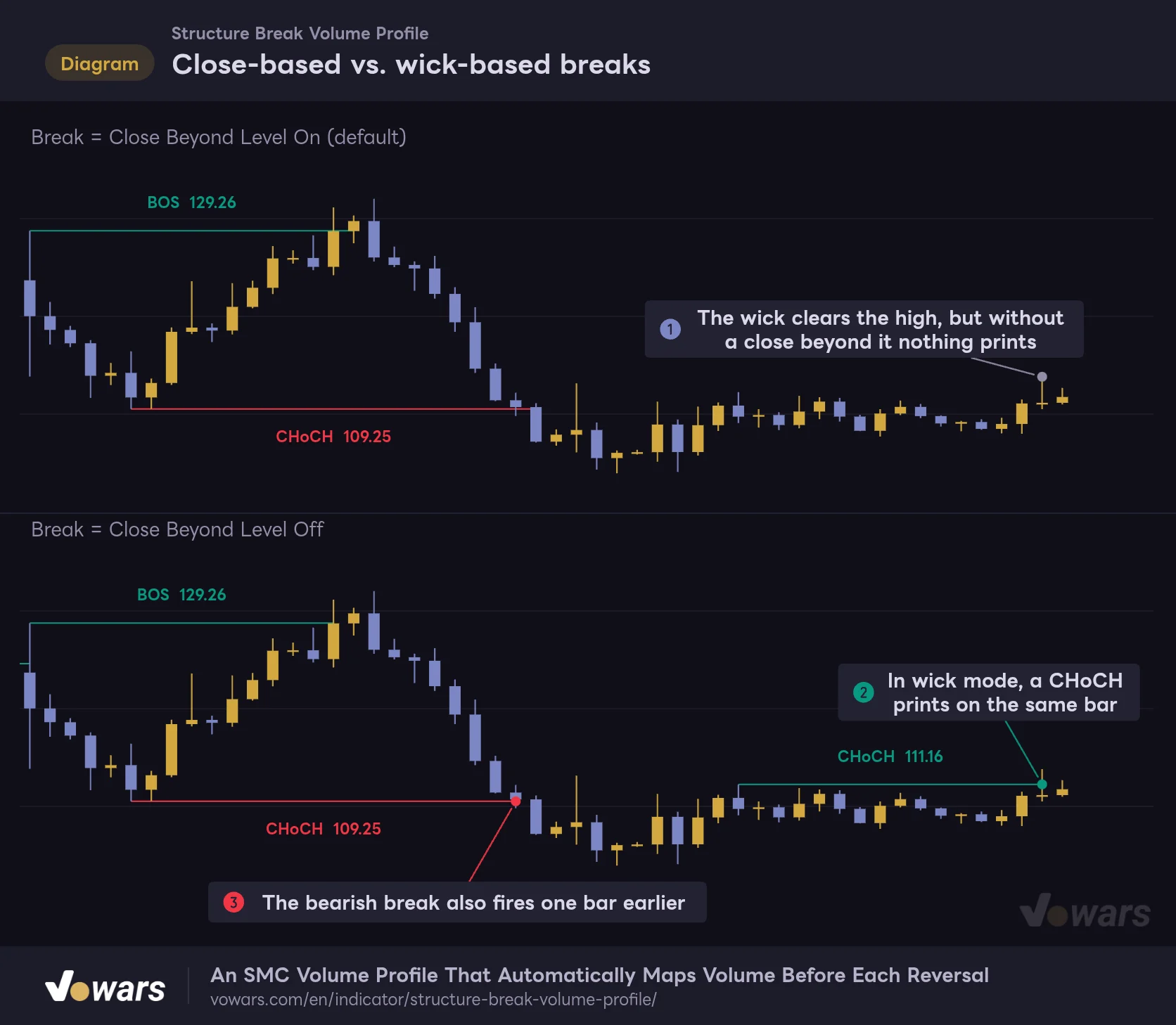
Close-based vs. wick-based breaks
Same price action, but switching the break mode changes where labels print.
Vowars DE ver.3.12.30
Comparing them on the same price action makes the difference obvious. The bar at Figure ① wicks above the recent high, but the close does not make it, so nothing appears with the default setting. In wick mode, a CHoCH prints on that same bar, as shown in Figure ②. As Figure ③ shows, even a genuine break can be flagged one bar earlier.
Wick mode is faster, but it also reacts to quick pokes like stop hunts. On top of that, a CHoCH redraws the profile, so a single fakeout CHoCH wipes out the POC you were watching. I would leave it on, as it is by default, and only use wick mode on low-volatility symbols when speed matters more than anything else.
Fractal Length (odd): Which Swings Count as Structure
This is the window length used to detect swings. If you enter an even number, it is bumped up to the next odd number internally, and half of that (rounded down) becomes the number of bars checked on each side. 12 means 6 bars per side, 6 means 3, and 20 means 10.
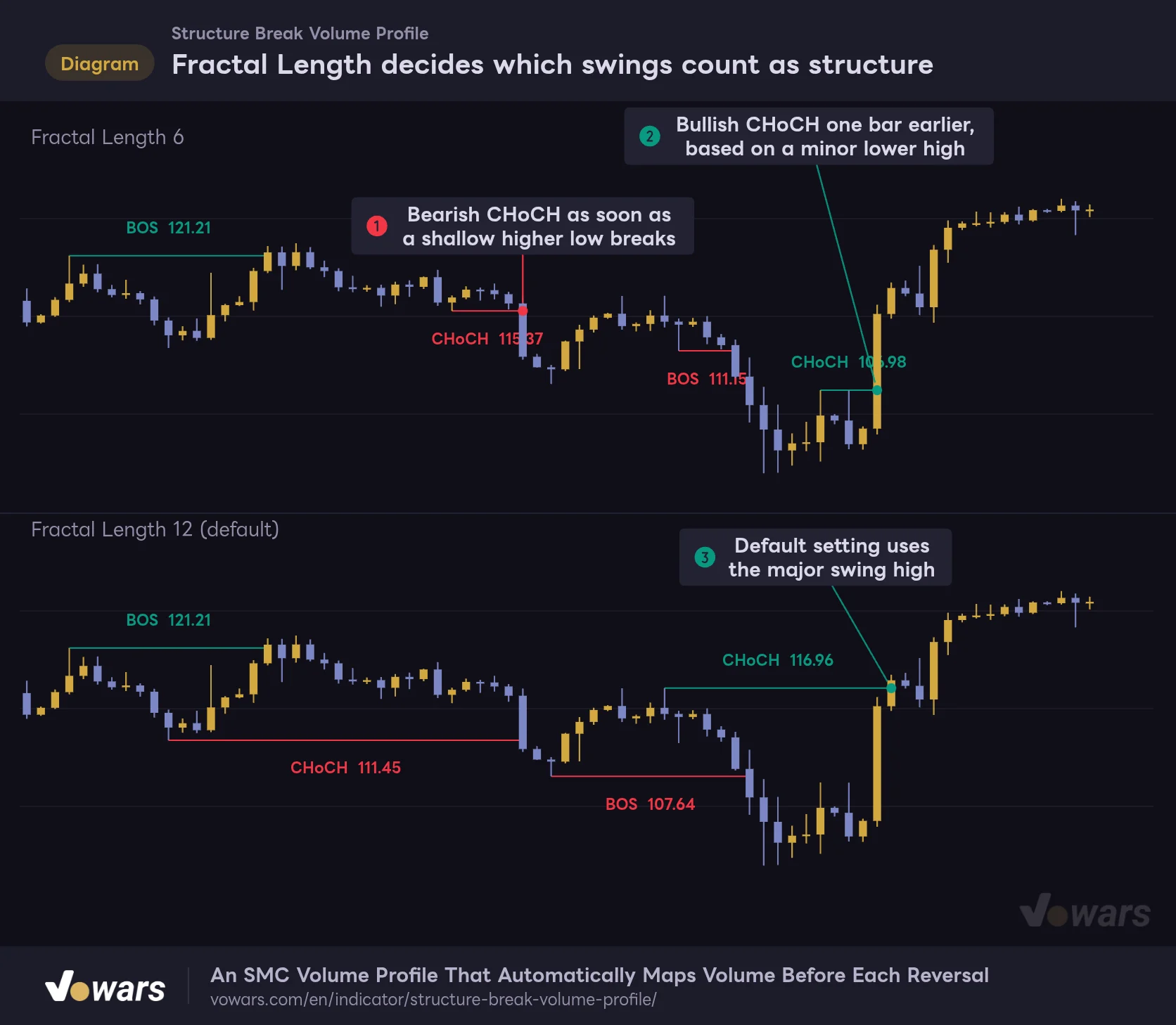
Fractal Length decides which swings count as structure
The same price action compared with Fractal Length 6 and the default 12.
Vowars DE ver.3.12.30
Drop it to 6 and even minor higher lows and lower highs become structure points. At Figure ① a CHoCH fires as soon as a shallow higher low is broken, and at Figure ② a bullish CHoCH prints off a minor lower high, one bar earlier than with the default. With the default 12, as in Figure ③, a reversal is not recognized until price takes out a major swing high.
A smaller value catches reversals earlier, but in choppy markets CHoCHs fire back to back and the profile keeps getting redrawn on small ranges. If the profile spans only a few bars, splitting it into 50 rows leaves most rows nearly empty and the POC loses its meaning. If you lower the value, the trick is to also cut Profile Rows to around 20–30 to keep things balanced.
Suggested Settings by Use Case
These are only starting points based on my own testing. The right values depend on the volatility of the symbol and timeframe, so tweak from here.
| Goal | Settings to change | Why |
|---|---|---|
| Faster reactions on low timeframes (5m, etc.) | Fractal Length (odd) 8–10, Profile Rows around 30 | The confirmation lag shrinks to 4–5 bars per side. Since structures get shorter, fewer rows keep the POC clear |
| Only major reversals on 4H or daily | Fractal Length (odd) 16–20 | Minor pullbacks are less likely to trigger a CHoCH, and the profile is drawn over larger structures |
| Long structures on very low timeframes like 1m | Raise Profile Source Bars | With the default 3,000 bars, the older part of the volume drops out of the calculation |
| Too many old lines cluttering the chart | Show Last N Broken (0 = all) 10–20 | Only the newest BOS / CHoCH remain, so you can focus on the current structure |
| The profile hides the candles | Profile Width (% of structure span) around 50, or set Visual Architecture to Total Volume | Shorter bars make price action inside the structure easier to read |
| Too many HVNs blurring the levels | Minimum Volume (% of POC) around 70, Maximum HVN Count 1–2 | Only clear peaks remain |
How It Feels on Different Timeframes
On the 5m with default settings, CHoCHs flip back and forth several times a day and the profile gets redrawn each time. It works fine for day trading when you are looking for the pullback level of the current reversal, but the POC does not last long, so I had to accept that once the profile is redrawn, the old level is no longer relevant.
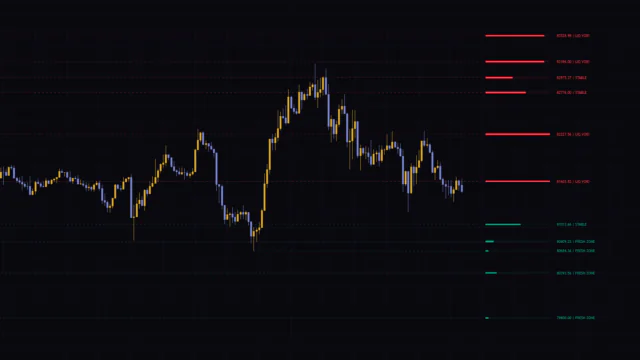
The 4H is where it clicked for me. A single structure lasts from a few days to a few weeks, so the profile gets enough bars and the POC and HVN levels actually carry weight. In the image at the top, after the bearish CHoCH in late September, price kept rotating around the POC near 84,000.
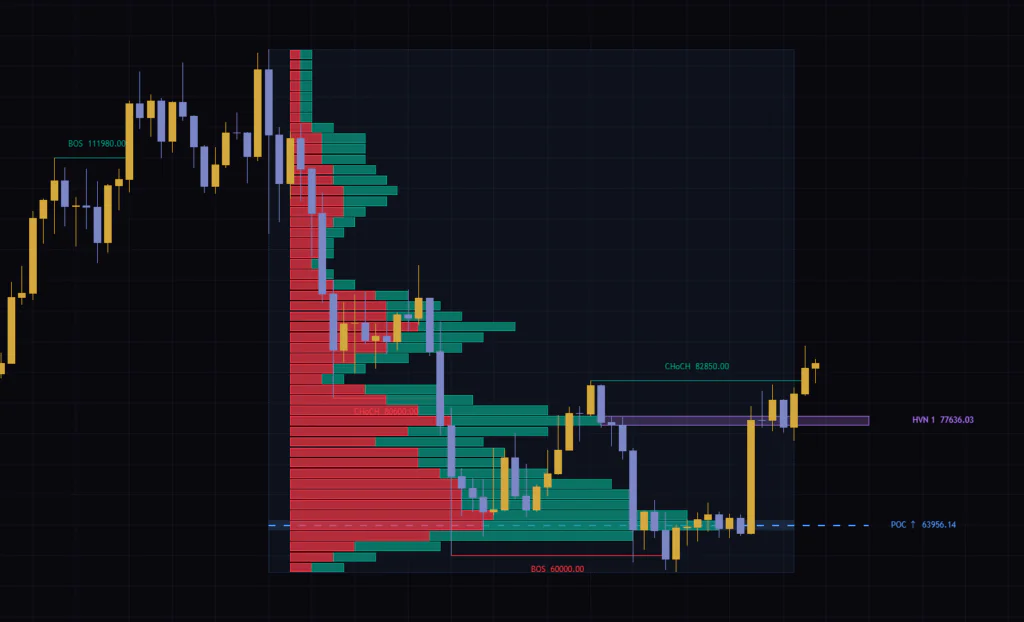
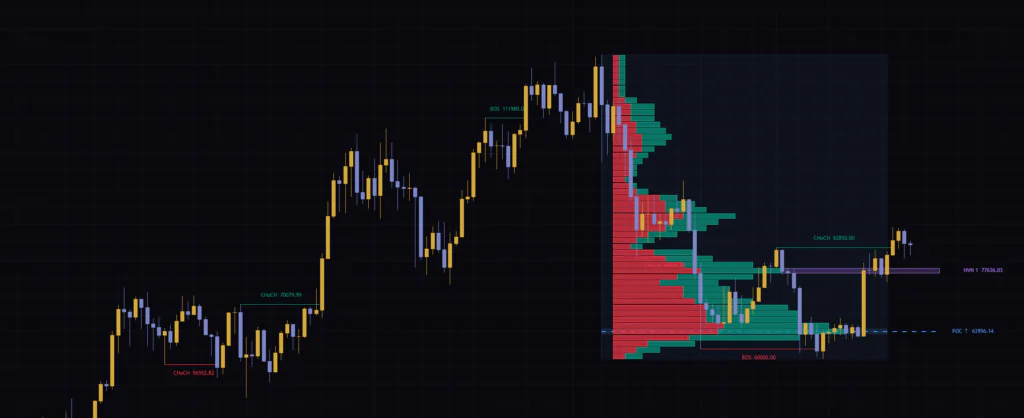
Move up to the weekly and almost a full year of downtrend becomes a single profile. At that point it is less about short-term trade decisions and more of a long-term supply-and-demand map. It also looks like a good fit for the weekly and daily charts of markets with long-running trends, such as gold or stock indices.
The Order I Read the Chart In
After using it for a while, this is roughly the order I settled on. It is not a set of trading rules, just a routine for building directional bias.
1 Check the direction of the latest CHoCH and the bar it printed on
The arrow on the POC label tells you the direction. The right end of the CHoCH line is the bar where it fired. How many bars have passed since then tells you whether the profile is fresh or has already been largely played out.
2 See whether the POC is above or below current price
After a bullish CHoCH, a POC below current price is a candidate for buying the dip. After a bearish CHoCH, a POC above price is a candidate for selling the rally. When the direction and the POC location do not line up (a bullish CHoCH with the POC overhead, for example), consider that the POC may act as resistance instead.
3 Check the HVNs and LVNs between price and the POC
If there is an HVN between current price and the POC, price may stall before reaching the POC. If there are only LVNs, you can expect price to run back to the POC more easily.
4 Once price reaches a level, confirm the reaction with something else
A POC touch alone does not tell you whether price will bounce or break through. Before making a call, I check whether the move really stalled at that level using a shift in lower-timeframe structure or a volume-based oscillator like the one covered next.
Confirming the CHoCH with Chaikin Money Flow
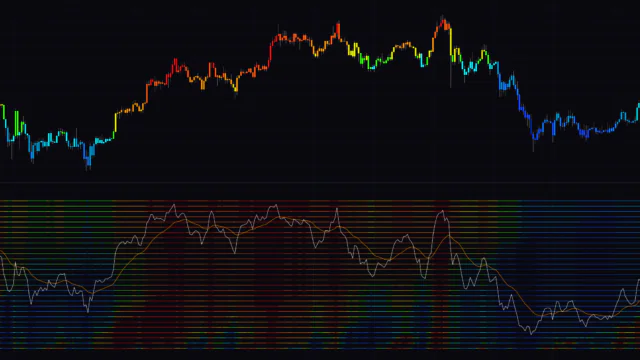
What “Structure Break Volume Profile” shows you is the structure shift and where past volume piled up. What it does not tell you is which way money is flowing right now. The indicator I found pairs well with it for that is TradingView’s built-in Chaikin Money Flow (CMF).
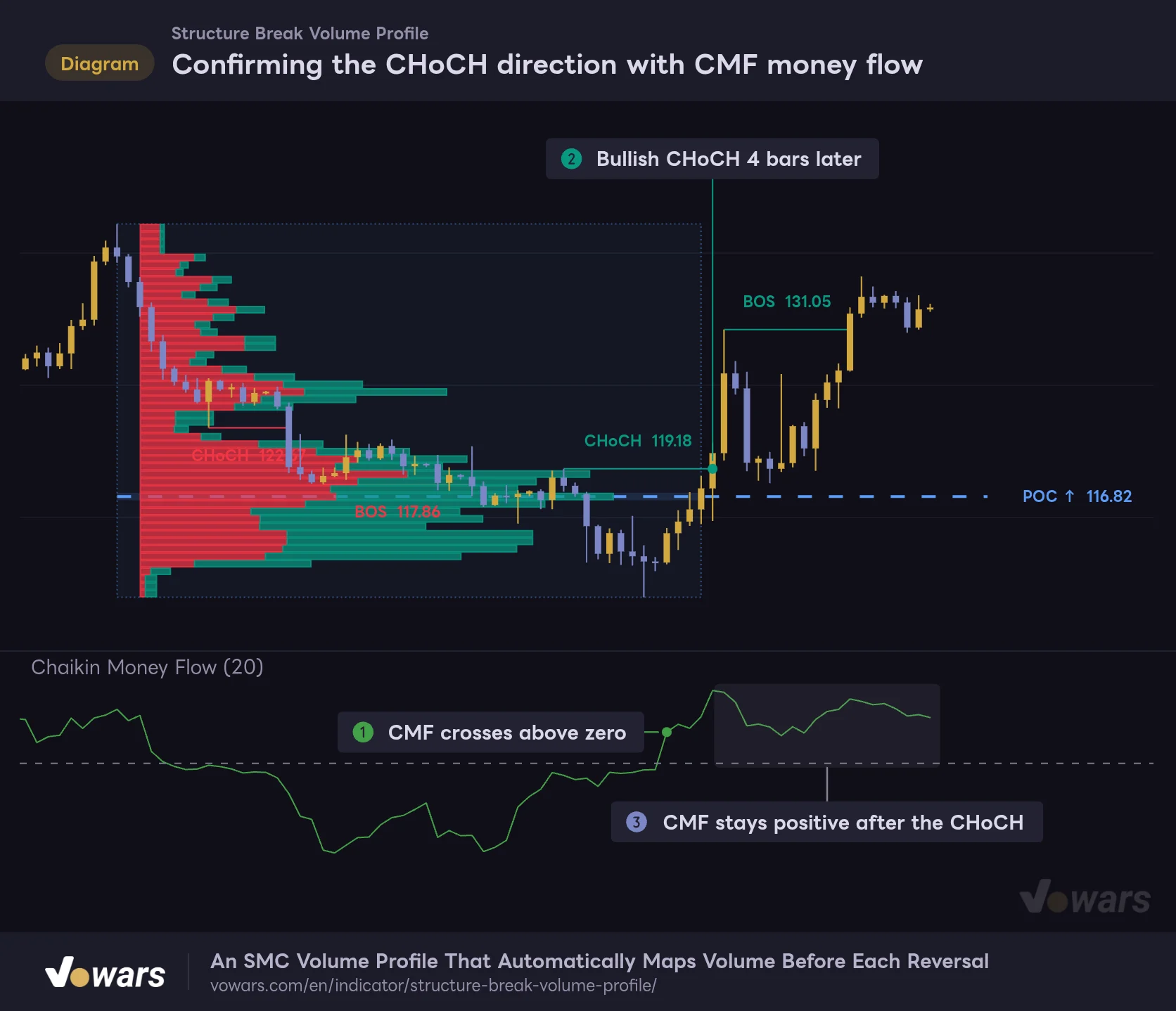
Confirming the CHoCH direction with CMF money flow
TradingView's built-in Chaikin Money Flow (length 20) is added below to see which way money was flowing around the CHoCH.
Vowars DE ver.3.12.30
CMF multiplies volume by where each bar closed within its range and averages it over a set period. Above zero reads as money flowing in, below zero as money flowing out. In this figure, a bullish CHoCH prints 4 bars after CMF crosses above zero at Figure ① (Figure ②), and CMF stays positive afterward (Figure ③). With the structure shift and the money flow in agreement, you have one more reason to wait for a dip into the POC as a potential long.
On the flip side, if a bullish CHoCH prints while CMF is still stuck below zero, I treat that CHoCH with some suspicion. The idea is similar to the red and green in Ask/Bid, but CMF’s strength is that it tracks the current flow over time. It fills in nicely for the static information in the profile.
Here are a few other indicators that could work well alongside it.
- Anchored VWAP Anchor it to the CHoCH bar to see the average cost of traders who entered after the reversal, and compare it with the POC
- ADX/DMI Helps confirm whether the trend after a CHoCH has momentum, and helps filter out CHoCHs that happen inside a range
- ATR Useful for sizing your stop to current volatility when entering off the POC or an HVN
What I Learned from Using It: Strengths and Things to Watch
Strengths
- Draws the volume distribution of the prior structure automatically, right as the CHoCH prints
- POC, HVN and LVN extend past the latest bar, so you can pick your pullback levels right away
- Built on confirmed swings and close-based breaks, so the structure labels are steady
- Fine control over the profile look, including rows, width, position and display mode
- Works with the same logic from the 5m all the way up to the weekly
Things to watch
- Swing confirmation lags by the number of bars used to confirm it
- Only the profile for the latest CHoCH is shown; older ones are not kept
- The Ask/Bid colors are estimated from candle shape, not the real buy/sell breakdown
- Profile bars can overlap candles and labels, making some areas hard to read
- In choppy markets, CHoCHs pile up and the POC keeps changing
The overlap issue was what bugged me most when I actually used it on the 4H. When a CHoCH label falls inside the profile area, the text can get hidden behind the bars. Lowering Profile Width (% of structure span) or giving Label Background a fill color makes it much easier to read.
Repainting and How Historical Charts Look
Once a BOS or CHoCH has printed on a confirmed bar, it never disappears or changes into something else later. That said, the way things are drawn has two “drawn after the fact” behaviors.
- BOS and CHoCH lines and labels are drawn on the breakout bar, starting from a swing point several to dozens of bars back
- The profile is drawn on the CHoCH bar over the entire prior structure. When the next CHoCH prints, it is deleted and replaced by the profile for the new structure
Both behaviors are covered in the author’s description, so nothing is hidden. Still, looking at a historical chart and thinking “price bounced off the POC after the CHoCH, so this must be a winner” is jumping the gun. What you could see in real time back then was only the profile for the latest CHoCH at that moment. The profile you see on the chart now belongs to the last CHoCH.
If you want to check a past setup the way it looked at the time, you can use TradingView’s Bar Replay. The indicator recalculates using only the bars up to the replay point, so you see the profile for the latest CHoCH as of that moment. Which timeframes are available in replay and how far back you can go depend on your subscription plan (per the official help center as of Oct 12, 2026).
On a bar that has not closed yet, lines and labels appear and disappear as price closes above or back below the level. Treat both the CHoCH and the profile as provisional until the bar closes. Also, if more bars are loaded than Calc Only Last N Bars (0 = all) (20,000 by default), the calculation start point shifts depending on how much history the chart has loaded, so the oldest part of the structure may look slightly different each time.
For Traders Who Want a Place to Wait After the CHoCH
 Image
Image“Structure Break Volume Profile” does more than flag structure shifts. It leaves behind the POC, HVN and LVN from the prior structure, showing where trading activity piled up before the reversal. If you are a day trader or swing trader who would rather wait for a pullback than chase the CHoCH, it should save you a lot of guesswork.
On the other hand, the labels lag by the swing confirmation period, and the red/green split is an estimate. As long as you understand those two points and pair it with something that reads the current flow, like CMF, it can serve as a volume map you will keep coming back to. Start by adding it to a 4H chart with the default settings, and watch how price reacts a few times when it comes back to the POC after a CHoCH.