
Does “more confluence = better odds” actually hold up? This indicator counts it on your own chart
Price prints a higher high, but RSI makes a lower high. That setup, a divergence, is one of the best-known early warnings of a reversal. And right behind it comes the other piece of trading folklore: “If MACD is diverging too, the signal is even stronger.”
But how many traders have actually gone back and counted whether stacking oscillators makes reversals more likely on their own charts? Not many, I’d guess. I certainly hadn’t. It just feels obvious that more confluence means a stronger signal.
The indicator “Divergence Scanner – Multi-Oscillator Confirmation” does that counting for you. It checks for divergence on three oscillators, RSI, the MACD histogram and Williams %R, then labels how many of them agreed and tallies the subsequent reversal rate for each confirmation count in a table.
Let me say this up front: “Divergence Scanner – Multi-Oscillator Confirmation” is not built to give you buy and sell calls. It is an analysis tool that answers one question with hard numbers: “On this chart, does the reversal rate actually go up as more oscillators confirm?” When I ran it on Bitcoin, some timeframes gave the exact opposite of what I expected. More on that later.
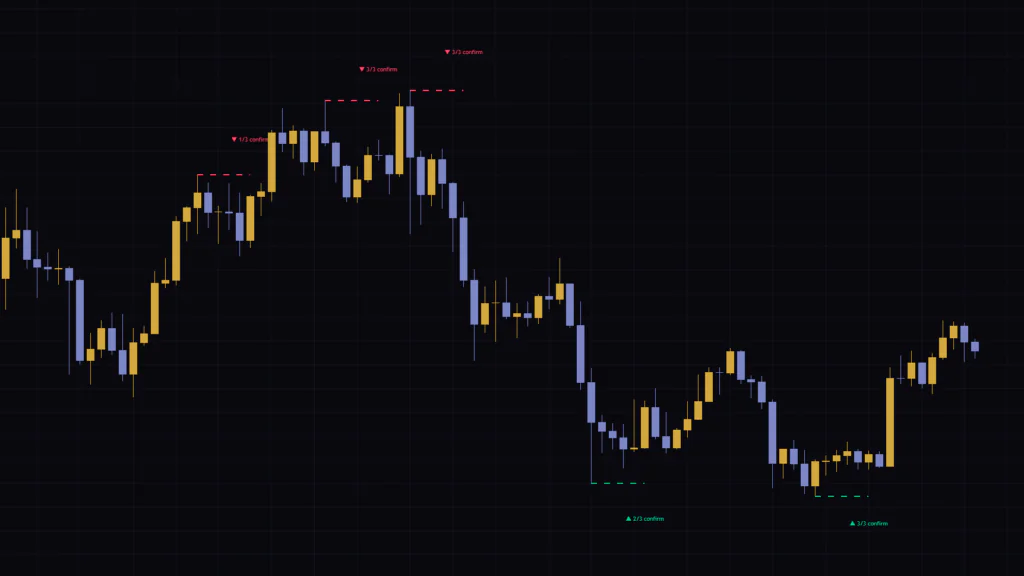
All it draws is dashed lines, labels and a small table
Adding “Divergence Scanner – Multi-Oscillator Confirmation” barely clutters your chart. It only draws three things:
- Horizontal dashed lines (green or red)
- Labels next to the lines, such as “▲ 2/3 confirm”
- A dashboard in the top-right corner
Reading the dashed lines and labels
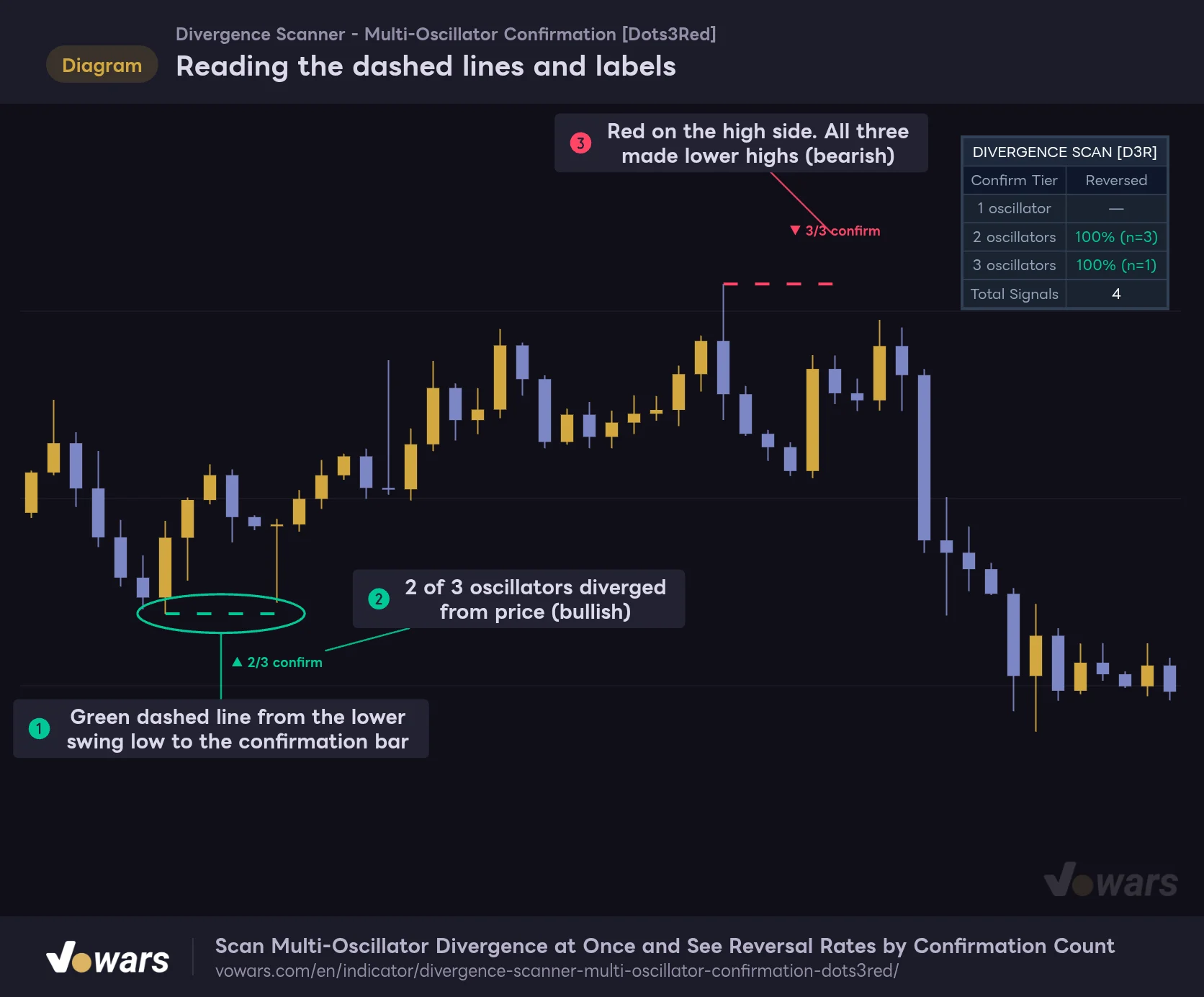
The horizontal dashed line marks the swing, and the label next to it shows how many of the three oscillators agreed.
Vowars DE ver.3.12.30
A green dashed line marks the low side, meaning a bullish divergence. As Figure ① shows, it is drawn at the low of a swing that undercut the previous swing low, and its right end extends to the bar where the signal was confirmed. Note that it is not a diagonal line connecting two lows. It is a horizontal line at the price of the newer swing, which is where it differs from most divergence indicators.
The number on the label tells you how many of the three oscillators diverged from price. “2/3” in Figure ② means two of them diverged, and “3/3” in Figure ③ means all three did. Red marks a bearish divergence on the high side, and the ▲ and ▼ arrows flip accordingly.
Adding “Divergence Scanner – Multi-Oscillator Confirmation” does not plot RSI or MACD anywhere. The calculation happens under the hood, and only the result shows up on the chart. If you want to see the internals for yourself, add the built-in RSI, MACD and Williams %R separately with the same lengths. Keep in mind that each plan caps the number of indicators per chart, and the Basic plan allows only 2 (as of Oct 6, 2026).
How is the “2/3 confirm” count decided?
The counting is simple. For a bearish setup, the first requirement is that the new swing high is above the previous swing high. Then the oscillator values at the two swing bars are compared, and if the newer one is lower, that oscillator scores 1 point. This is done once each for RSI, the MACD histogram and Williams %R, and a signal fires when the total is 1 or more.
Checking against the three oscillators
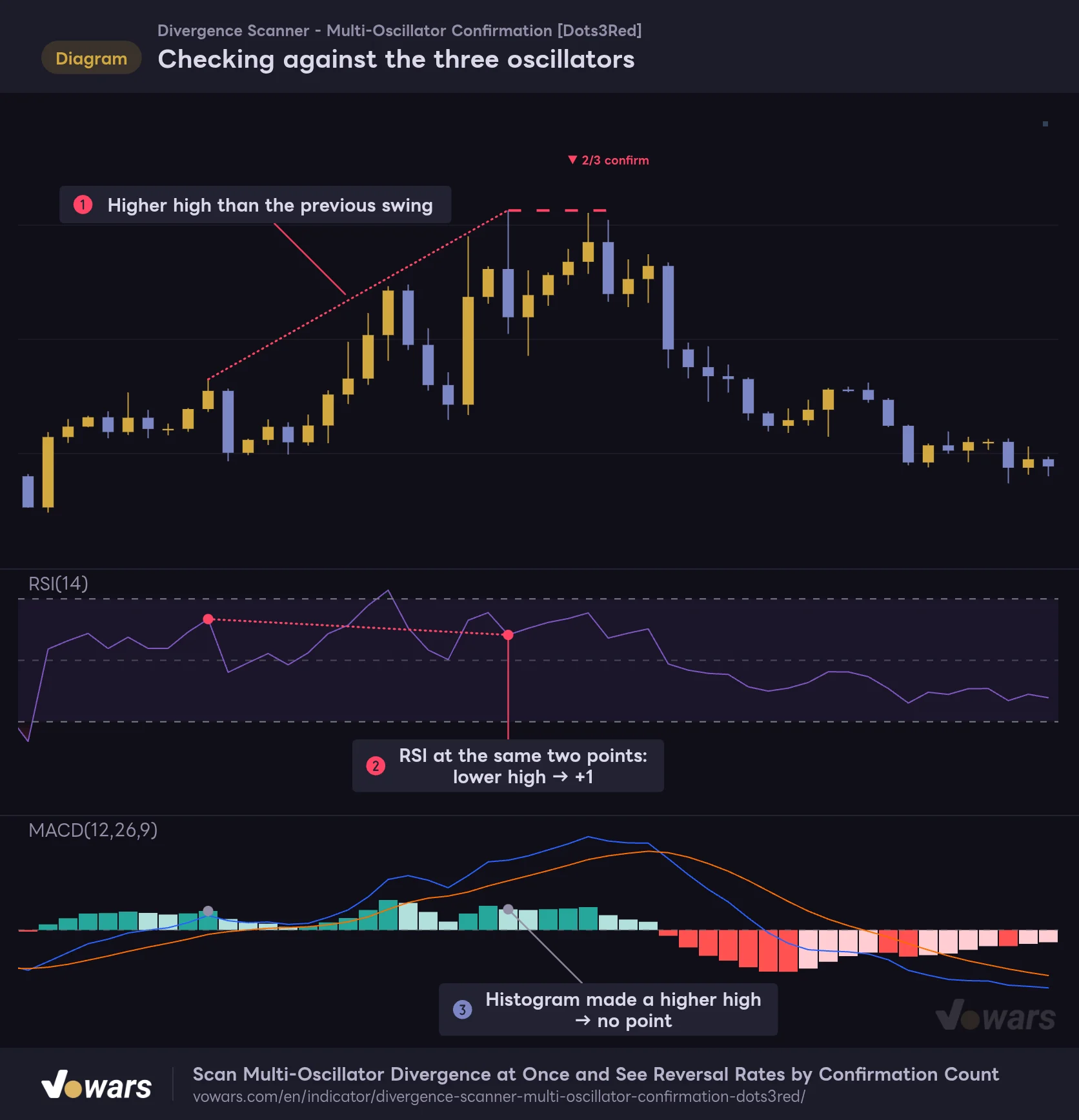
At two swing highs where price made a higher high, each oscillator that made a lower reading scores 1 point.
Vowars DE ver.3.12.30
In Figure ①, price makes a higher high. Looking at RSI at the same two points, Figure ② shows a lower high, so that is 1 point. The MACD histogram in Figure ③, on the other hand, ticks slightly higher and scores nothing. Williams %R, which isn’t shown in the figure, made a lower high, so the total came to 2/3.
For bullish setups it is simply flipped: price makes a lower low, and each oscillator that makes a higher low scores 1 point.
This was the part that made things click for me once I started using it, so here are the finer details:
- For MACD, it compares the histogram value, not the MACD line
- It compares the oscillator values at the price swing bars. It does not look for the oscillator’s own peaks and troughs and connect them
- If an oscillator value is exactly equal to the previous one, it scores nothing
- It only detects regular divergence. Hidden divergence is not included
- No agreement means no signal, so every label on the chart reads 1/3 or higher
It only compares against the previous swing
The only comparison point is the most recently confirmed swing on the same side. It never looks two or three swings back. There is also no limit on how far apart the two swings can be. After a long consolidation, you can get a signal that compares against a swing dozens of bars earlier.
Because the line is only drawn at the newer swing, the chart doesn’t show you which swing it was compared against. If a signal catches your eye, you have to scroll left and find the previous swing yourself. It is a bit of extra work, but it is worth it to filter out signals that compare two points too far apart.
Signals land 5 bars after the swing, and that lag is by design
A swing high or low is only confirmed once a set number of bars has formed on both sides of it. In “Divergence Scanner – Multi-Oscillator Confirmation”, that number is Pivot Leg (bars each side), with a default of 5. In other words, the signal appears 5 bars after the actual high or low.
The lag from waiting for swing confirmation
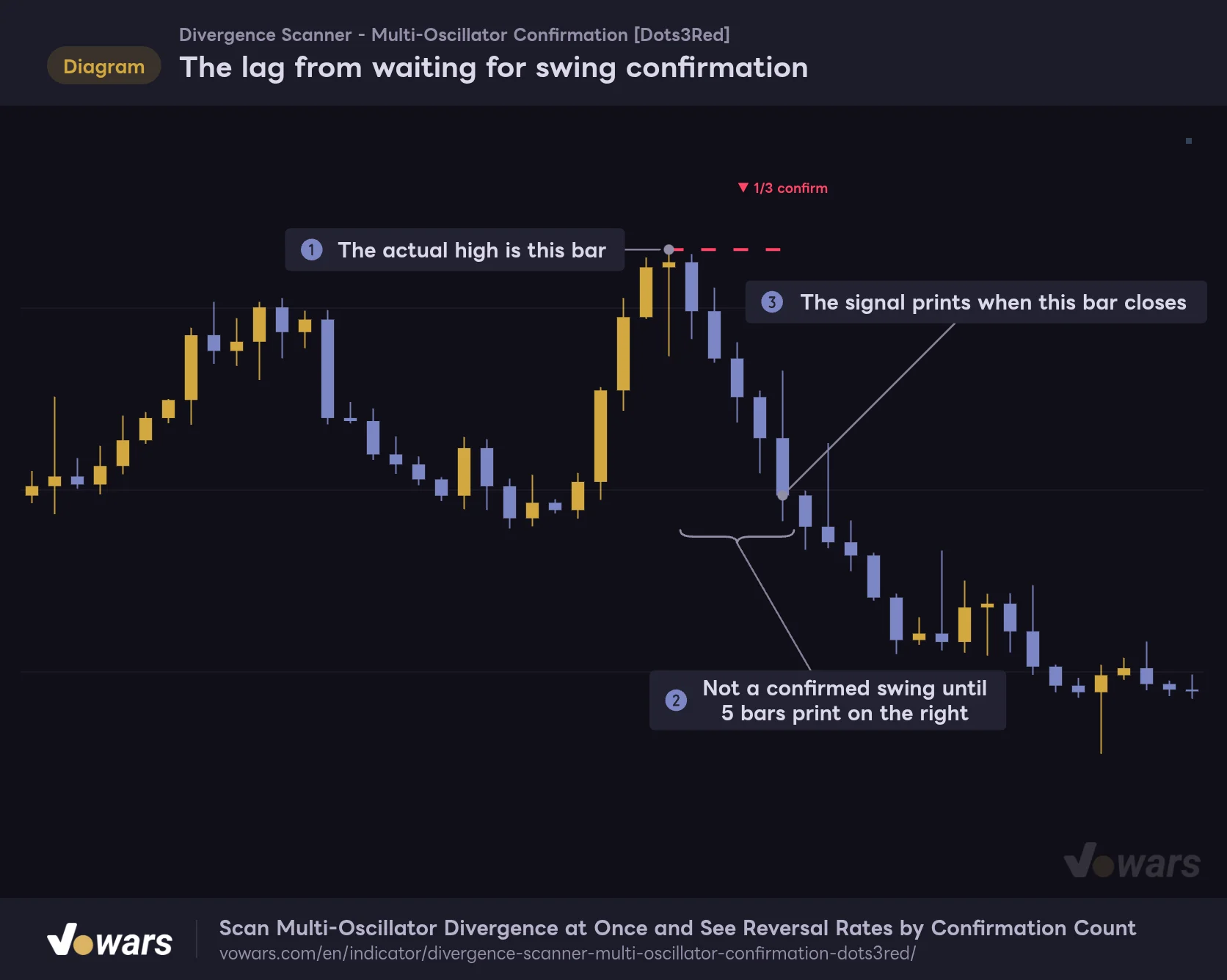
The left end of the line is the actual high and the right end is the signal bar. By default there are 5 bars in between.
Vowars DE ver.3.12.30
Figure ① is the actual high. After the 5 bars in Figure ② print, the dashed line and label are drawn when the bar in Figure ③ closes. In this example, price had already dropped a fair bit by the time the signal showed up. If you jump in after seeing the label, it is not unusual to find most of the move already done.
Some traders read this lag as signals “appearing after the fact,” but it is not repainting, which means rewriting past bars. The dashed lines and labels are drawn once when the bar is confirmed, and they never move or disappear afterward. Signals also don’t flicker on and off on the bar that is still forming.
The chart shows up to 500 dashed lines and 500 labels. Once that limit is exceeded, the oldest ones drop off first, but they only disappear from the chart. They still count in the dashboard stats.
Two alerts: bullish and bearish
There are two alert conditions, “Bearish Divergence” and “Bullish Divergence,” and both trigger on the close of the bar where the signal is confirmed. The alert message is fixed and doesn’t include the confirmation count. A 1/3 and a 3/3 send the same message, so when an alert fires, open the chart and check the number on the label.
The top-right dashboard is the real highlight
If you only want dashed lines and labels, plenty of other divergence indicators do that. What sets “Divergence Scanner – Multi-Oscillator Confirmation” apart is this table, which tracks whether past signals actually led to reversals, broken down by confirmation count.
Reading the dashboard
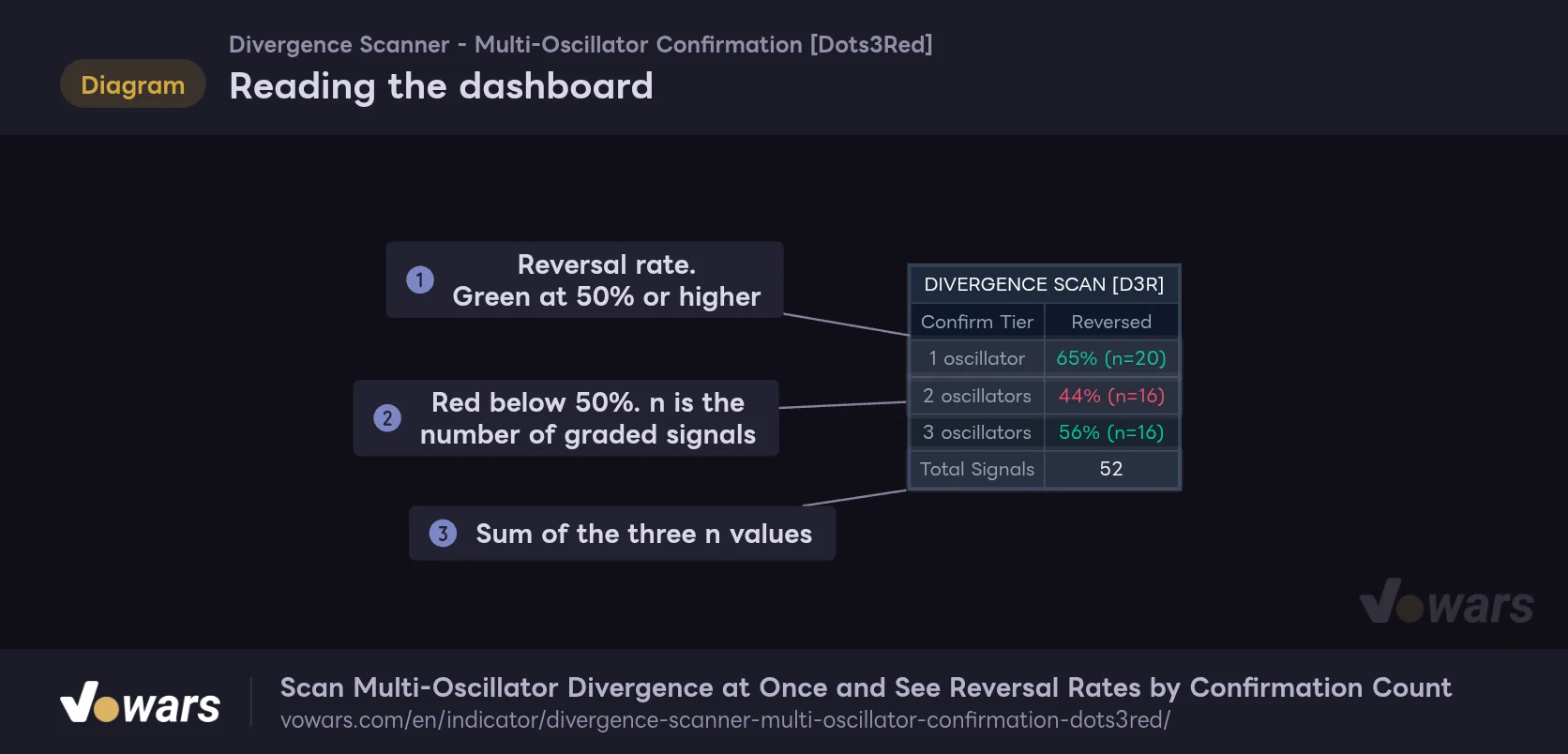
For each confirmation count, it lists the share of signals that actually reversed and the sample size.
Vowars DE ver.3.12.30
The “1 oscillator” row covers 1/3 signals, “2 oscillators” covers 2/3, and “3 oscillators” covers 3/3. The right column shows the reversal rate and sample size, as in Figure ①. Rates of 50% or higher are shown in green, and anything below 50% in red, as in Figure ②. “Total Signals” in Figure ③ is the sum of the three rows.
Read the three rows from top to bottom and check whether the reversal rate climbs from 1 to 2 to 3. If it does, waiting for more confirmations pays off on this chart. If there is no difference, a 1/3 signal carries just as much weight as a 3/3.
Bullish and bearish signals aren’t separated; they are combined in the same rows. So the table can’t tell you something like “on this chart, only bullish divergences tend to lead to reversals.”
What counts as a “reversal”
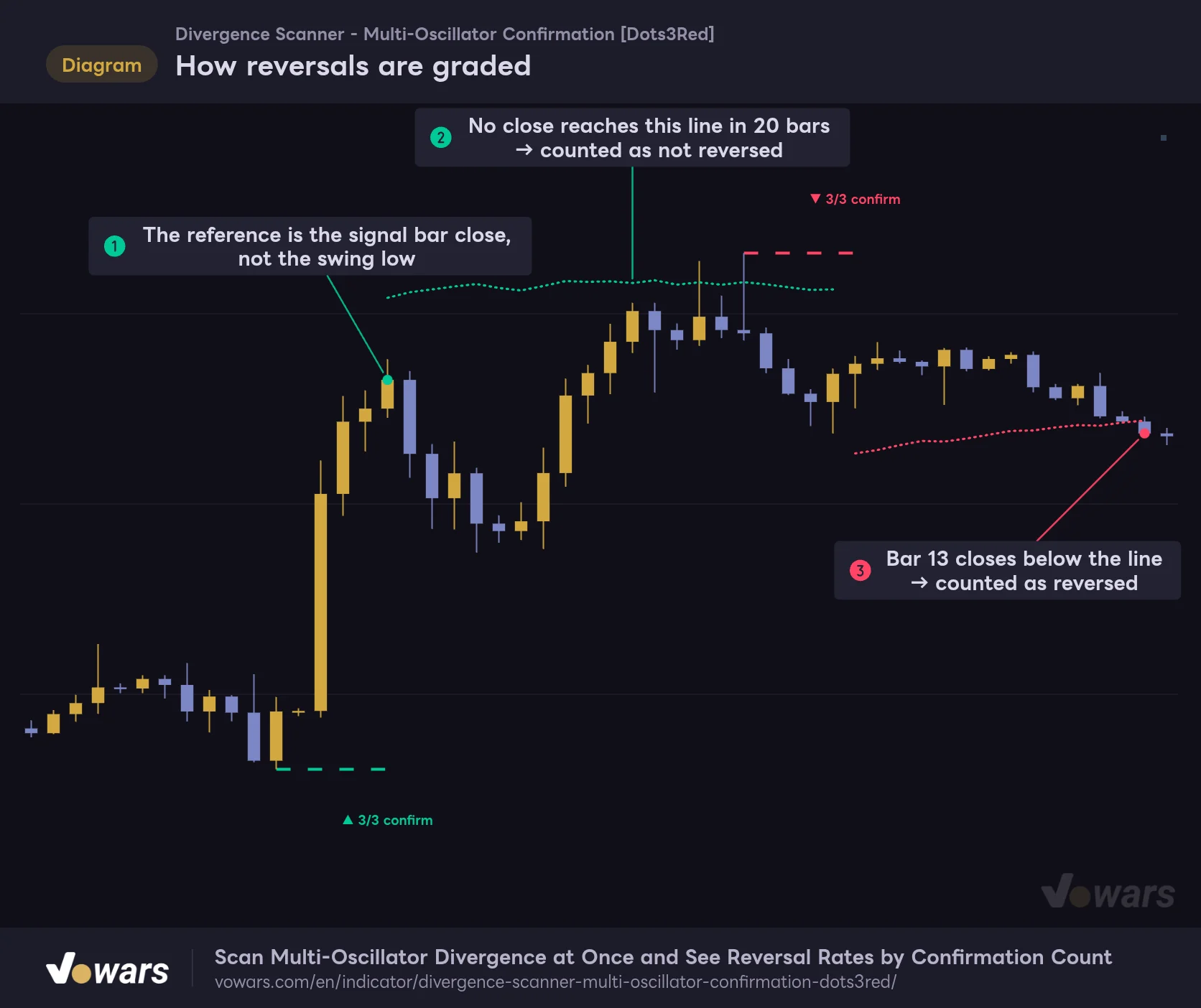
Grading is controlled by two settings: Reversal Confirmation (×ATR) (default 1.5) and Outcome Window (bars) (default 20). If the close moves 1.5× ATR in the reversal direction within 20 bars of the signal, it is counted as “reversed.” If 20 bars pass without that, it is counted as “not reversed.” The ATR length is fixed at 14.
How reversals are graded
Measured from the close of the signal bar, it counts as reversed if a close moves 1.5× ATR within 20 bars.
Vowars DE ver.3.12.30
Figure ① is the most important point in this grading. The reference is not the swing price but the close of the bar where the signal fired. The bullish signal in the figure was confirmed after price had already rallied hard off the low. It then needed another 1.5× ATR move on top of that, so as Figure ② shows, it fell short for 20 bars and was graded “not reversed.” It visually nailed the bottom, yet the stats count it as a miss.
At first I thought the grading was too strict. But since you can only see a signal once the bar is confirmed, this reference makes sense if you want to measure “was there still room to run for someone who entered after seeing the signal?” The bearish signal, on the other hand, closed below its line at Figure ③ and was counted as a reversal.
Only the close is used for grading. Even if a wick tags the line, it isn’t a reversal unless the close gets there. ATR is also recalculated on every bar, so the threshold line drifts slightly after the signal.
Some signals never make it into the stats
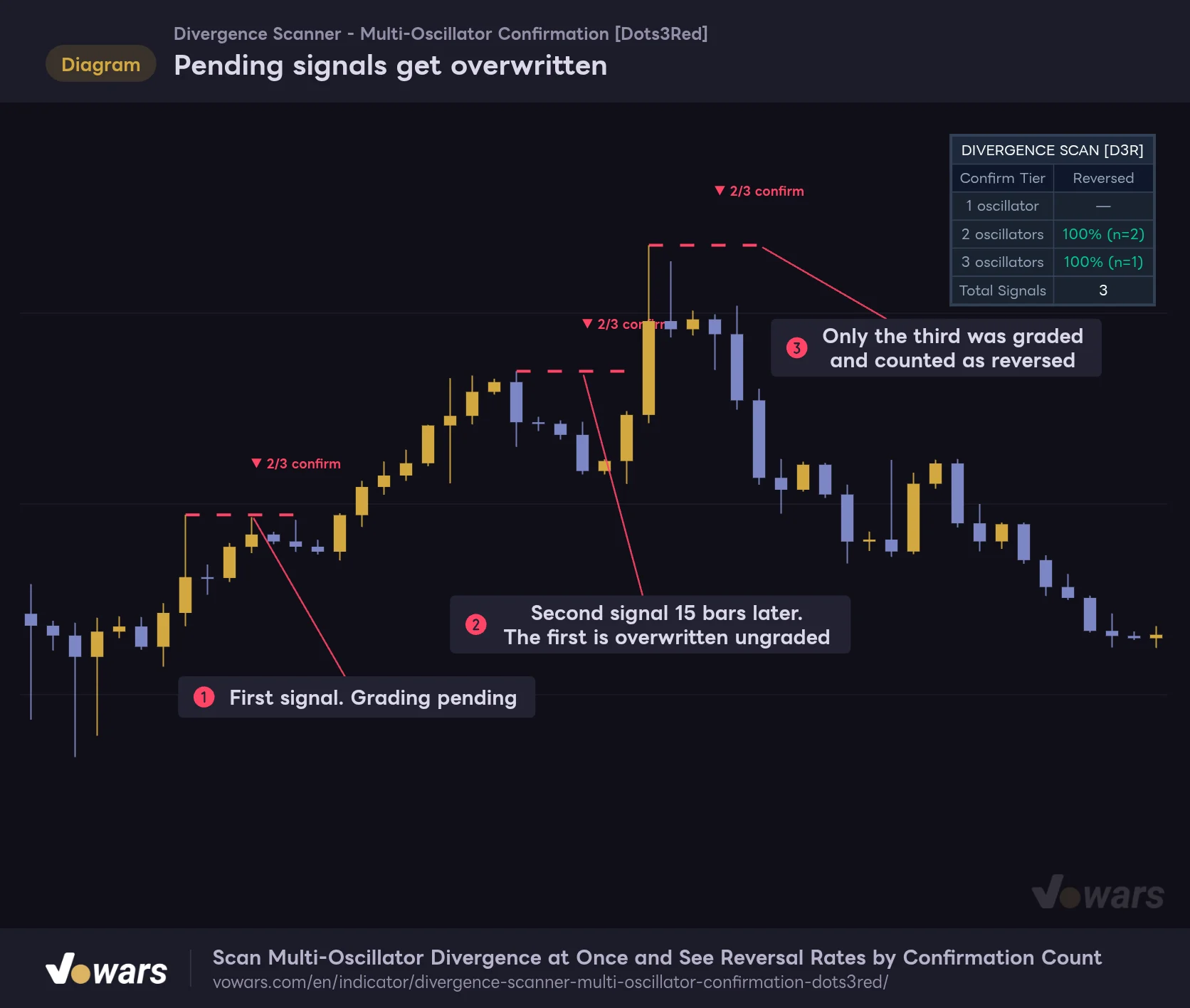
There was one more behavior I didn’t notice until I actually used it. Only one pending signal is held for each direction, bullish and bearish, so if a new signal in the same direction fires before grading is finished, the old one gets replaced without ever being counted.
Pending signals get overwritten
When same-direction signals come back to back, the earlier ungraded signal is dropped without being counted.
Vowars DE ver.3.12.30
The signal that went pending at Figure ① never got a result recorded, because Figure ② fired before 20 bars had passed. Only Figure ③ was graded, and it counted as “reversed.” The two misses during the ongoing uptrend aren’t counted anywhere in the table.
In a strong trend, it is common to see one failed counter-trend signal followed by another. When that happens, the failed signals get replaced before they are graded, so the dashboard shows a higher reversal rate than reality. This behavior isn’t mentioned in the script description. It is also why “Total Signals” is lower than the number of labels on the chart.
If this bothers you, shortening Outcome Window (bars) reduces replacements because grading finishes sooner. Just keep in mind that it changes the grading rules themselves, so the reversal rates can no longer be compared side by side with the numbers from the default settings.
The stats cover every bar loaded on the chart
The script description says the stats accumulate from the moment you add “Divergence Scanner – Multi-Oscillator Confirmation” to the chart. In practice it works a little differently: the stats are calculated over every historical bar loaded on the chart. That is why the sample size is already in the triple digits right after you add it.
Flip side: the sample size depends on how many bars you can load. TradingView loads roughly 5,000 historical bars on the Basic plan, 10,000 on Essential and Plus, and 20,000 on Premium (as of Oct 6, 2026). Even on the same symbol and timeframe, the dashboard numbers will differ depending on your plan.
Comparing the numbers across three Bitcoin timeframes
Here are the results from my own testing. With every setting left at default, I applied “Divergence Scanner – Multi-Oscillator Confirmation” to the Bitcoin 5-minute, 1-hour and daily charts (tested on Sep 29, 2026).
| Timeframe | 1 oscillator | 2 oscillators | 3 oscillators | Total Signals |
|---|---|---|---|---|
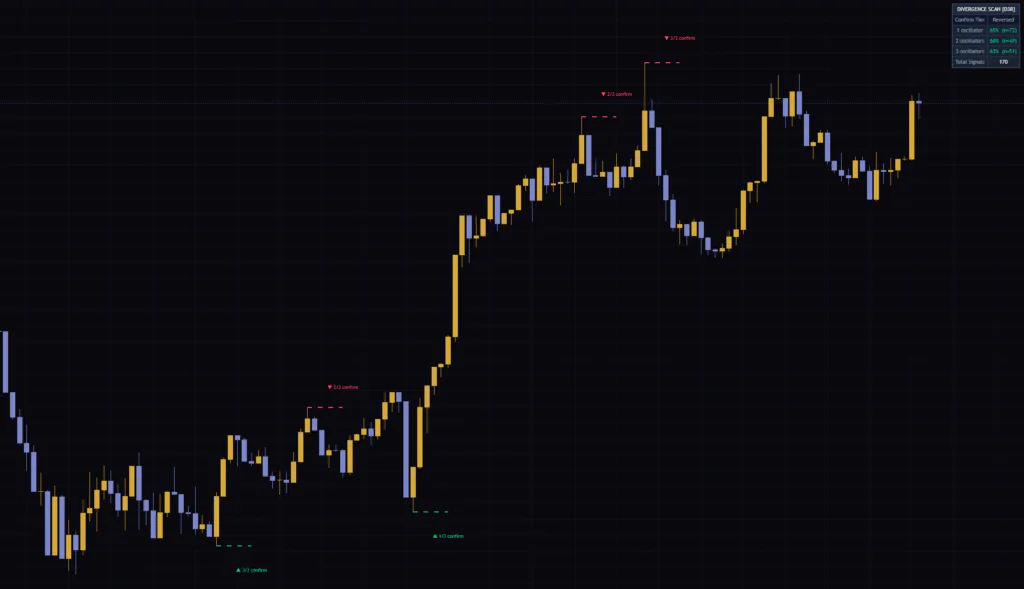
| 5m | 65% (n=72) | 66% (n=47) | 63% (n=51) | 170 |
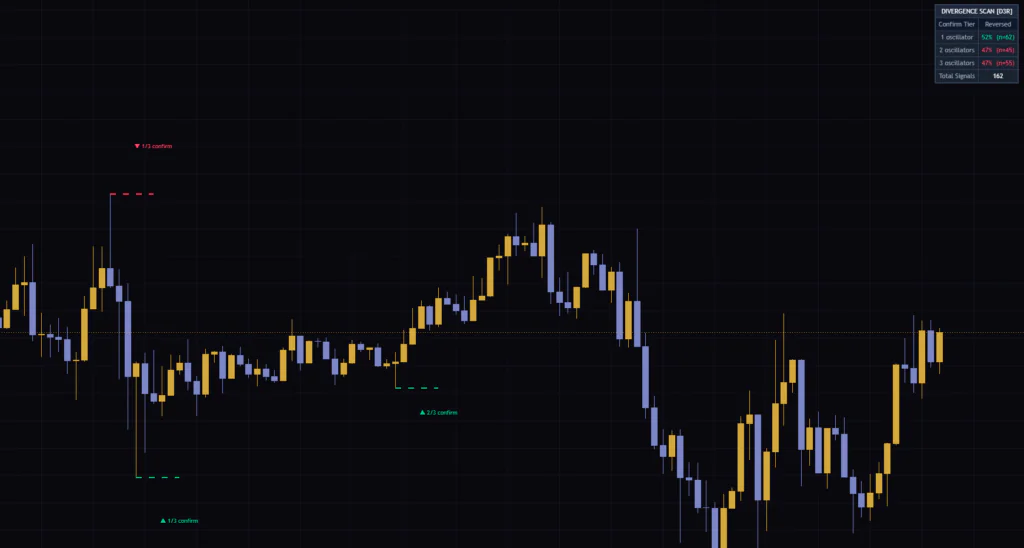
| 1H | 52% (n=62) | 47% (n=45) | 47% (n=55) | 162 |
| 1D | 65% (n=37) | 45% (n=20) | 44% (n=25) | 82 |
None of the timeframes showed a clean staircase where the reversal rate rises with the confirmation count. On the 5-minute chart the three rows are roughly flat, and on the 1-hour and daily charts, 1/3 actually scored higher than 3/3.
The daily chart stands out the most: 65% for 1/3 versus 44% for 3/3. With sample sizes only in the 20s and 30s, I can’t call it conclusive. Still, at least on the Bitcoin daily over this period, there was no evidence that “waiting for all three to line up” pays off.
This isn’t a knock on “Divergence Scanner – Multi-Oscillator Confirmation”. Finding out that “the count didn’t match my assumptions” is exactly why you use this indicator. And as covered in the previous section, the reversal rates tend to skew high. With that in mind, I’d take any number around 50% with a healthy grain of salt.
Settings, and where to start tweaking
There look to be a lot of settings, but only the top 8 affect detection and grading. The rest are colors and line styling.
| Setting | Default | Suggested | Effect |
|---|---|---|---|
| Pivot Leg (bars each side) | 5 | 5 (8 to 10 if lower timeframes give too many signals) | Number of bars required on each side to confirm a swing. Higher values pick up only the bigger swings, with fewer signals and more lag. Range is 2 to 20 |
| RSI Length | 14 | 14 | RSI length used for detection |
| MACD Fast | 12 | 12 | Fast EMA length for MACD |
| MACD Slow | 26 | 26 | Slow EMA length for MACD |
| MACD Signal | 9 | 9 | MACD signal length. Affects the histogram values |
| Williams %R Length | 14 | 14 | Williams %R length used for detection |
| Reversal Confirmation (×ATR) | 1.5 | 1.5 (adjust to your profit target) | Price move required to count as a reversal. Higher values make grading stricter and lower the reversal rate. Range is 0.3 to 5.0 |
| Outcome Window (bars) | 20 | 20 (adjust to your holding time) | Number of bars to wait for a reversal. Range is 5 to 100 |
| Divergence Lines | On | On | Shows the dashed lines |
| Confirmation Count Labels | On | On | Shows the confirmation count labels |
| Divergence Line Width | 2 | 2 | Dashed line thickness. 1 to 4 |
| Divergence Line Style | Dashed | Dashed | Line style. Solid / Dashed / Dotted |
| Confirmation Label Size | Small | Small (Normal if hard to read) | Label text size. Tiny / Small / Normal / Large |
| Label Position Style | Below/Above | Left, if you prefer | Places labels above/below the line or right next to it |
| Use Bars | Off | Off | When on, paints every candle in a single Bar Color (if Bars) color |
| Show Dashboard | On | On | Shows the dashboard |
| Position | Top Right | Top Right | Dashboard position. Choose any of the four corners |
There are also separate color settings for the dashed lines, label text and each part of the dashboard. By default, bullish is green and bearish is red.
Too many signals? Start with Pivot Leg
If you tweak only one thing, make it Pivot Leg (bars each side). On lower timeframes like the 5-minute chart, even small wiggles register as swings, so you get more signals. Raising it to 8 or 10 leaves only the obvious peaks and troughs. The tradeoff is that signals lag by 8 or 10 bars, so it comes down to whether you value speed or reliability more.
Changing the value recalculates the entire dashboard as well. Comparing how the reversal rates shift between 5 and 10 is a great way to put this indicator to work.
Match the two grading settings to your own trading
Reversal Confirmation (×ATR) and Outcome Window (bars) define “how far price has to move to call it a reversal.” There is no correct value, so it makes sense to align them with your own profit target and holding time. For example, if you take profit at 1× ATR, keeping this at 1.5 means the reversal rate won’t reflect your actual results.
Setting the oscillator lengths to whatever you normally use makes the numbers easier to interpret. If you run RSI at 9, set RSI Length to 9 as well.
Labels too far away? Switch to Left
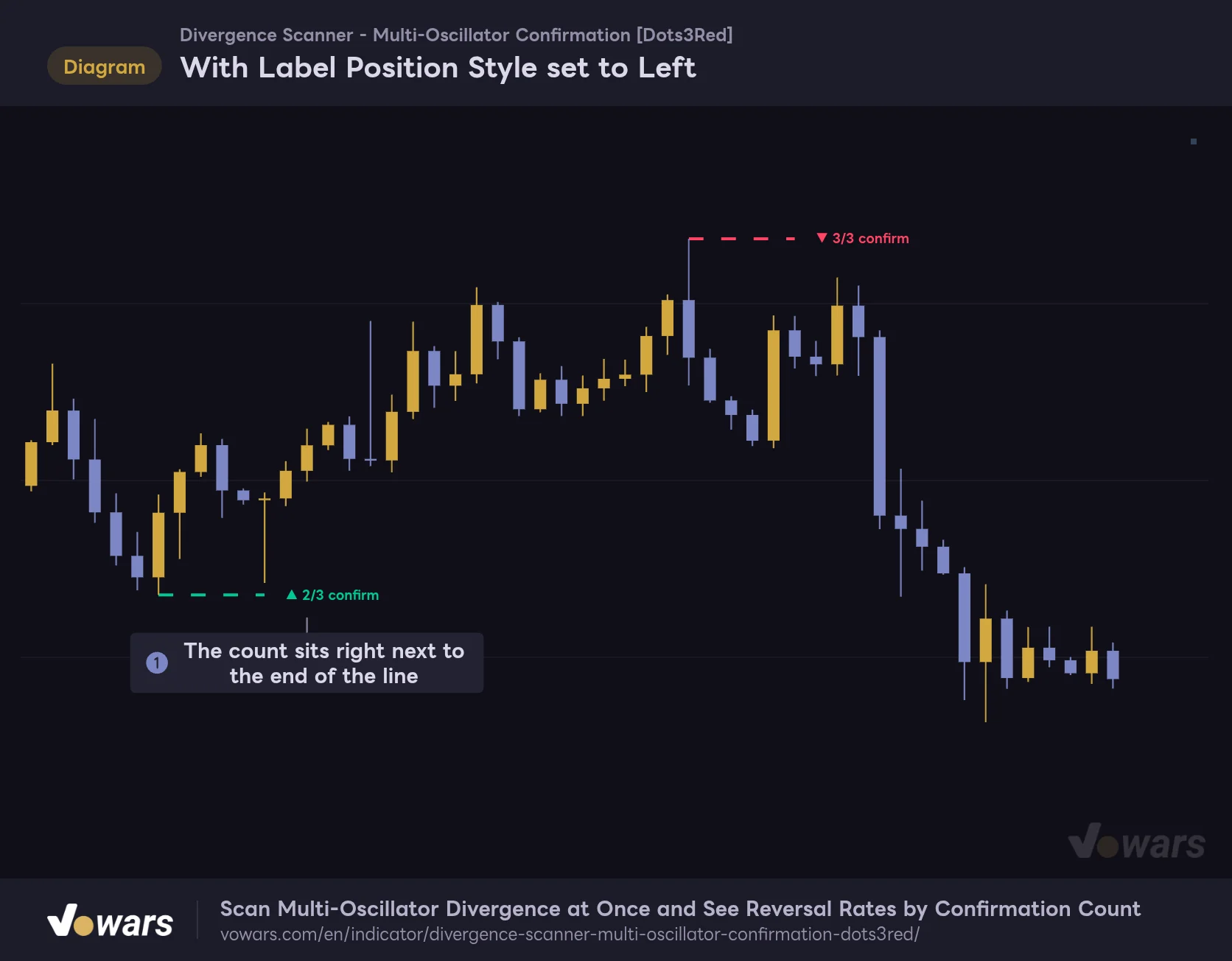
With the default Below/Above, labels sit half an ATR above or below the swing price. In volatile conditions they ended up quite far from the line, and I sometimes couldn’t tell which signal a number belonged to. Switching Label Position Style to Left fixed that for me.
With Label Position Style set to Left
Labels sit right next to the dashed line, so you don't have to hunt for text floating above or below.
Vowars DE ver.3.12.30
As Figure ① shows, the label sits right next to the line at the same height. On lower timeframes where signals come in quick succession, I found this much easier to read.
My day-to-day workflow
1 Start with the dashboard to read this chart’s tendencies
Once you pick a symbol and timeframe, the first thing to look at is the top-right table. Check whether the three rows show different reversal rates or are roughly flat. If there is a clear gap, that is a reason to prioritize signals with more confirmations. If they are flat, waiting for 3/3 doesn’t buy you much.
2 Check that the sample size is large enough
Rows with a single-digit n aren’t reliable yet. In the comments on the script page, the author suggests 20 or more as a rule of thumb. The 3/3 row fills up slowly, so if the sample is too small, drop to a lower timeframe or hold off on drawing conclusions.
3 When a new signal prints, check the count and the swing it was compared against
Read the number on the label and match it against that row’s reversal rate. Then scroll left to find the previous swing it was compared against, to make sure the two aren’t too far apart.
4 Base your entry on other confluence
By the time a signal prints, 5 bars have already passed since the swing. Treat a signal from “Divergence Scanner – Multi-Oscillator Confirmation” as context, meaning “the conditions for a reversal were in place here,” and base your actual entry on other confluence like horizontal levels or moving averages.
Overlay an EMA to see which signals to skip
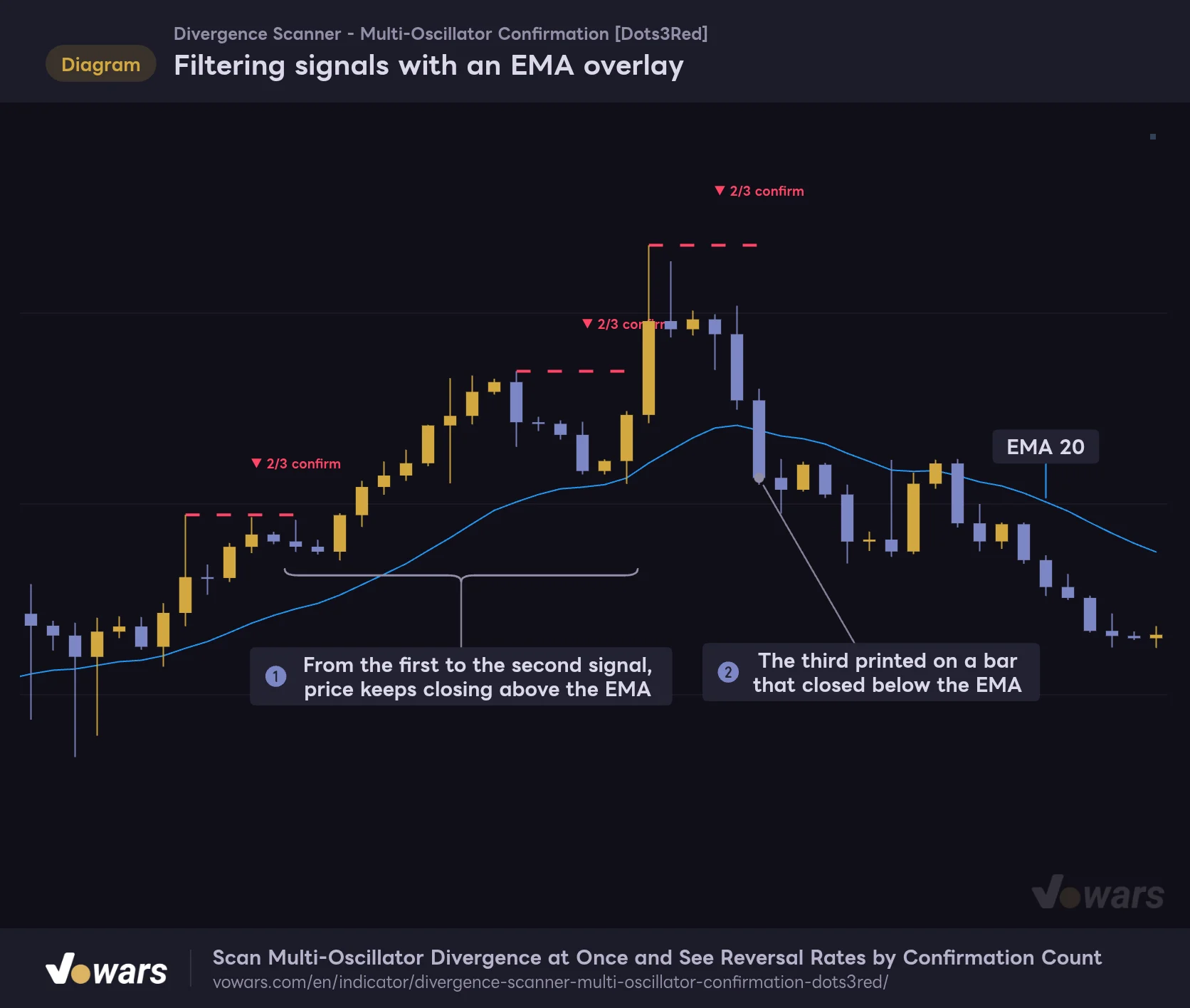
The best companion I found was a moving average. Divergence is a counter-trend signal, so checking with another indicator whether the trend is still intact or starting to break down makes the call much easier.
Filtering signals with an EMA overlay
Even when a divergence prints, the trend tends to continue as long as price keeps closing above the moving average.
Vowars DE ver.3.12.30
Here it is with TradingView’s built-in EMA set to 20. In the stretch marked Figure ①, two bearish signals printed, but price kept closing above the EMA and the uptrend didn’t stop. The third signal in Figure ② came on a bar that closed below the EMA. All three are the same 2/3, but adding the EMA lets you treat them differently.
A few other good pairings:
- The built-in RSI, MACD and Williams %R. Lets you see which oscillators actually diverged. The label only shows a count, so use these when you want the breakdown
- Horizontal levels or support and resistance indicators. Check whether the signal formed at a price level the market is watching
- Bollinger Bands. Helps you tell a divergence outside the bands apart from a minor swing inside them
Where it shines, and what to keep in mind
Where it shines
- Checks divergence on three oscillators at once and shows the confirmation count on a single label
- Tallies reversal rates by confirmation count from the history of the chart you have open
- Signals are only drawn on confirmed bars and never move afterward
- Just dashed lines, labels and a small table, so it stays out of the way alongside other indicators
- Grading criteria can be tuned to match your own trading
What to keep in mind
- Signals lag the swing by the Pivot Leg bar count
- If a same-direction signal fires while one is still pending, the earlier one is never counted. Reversal rates tend to skew high in trends
- Bullish and bearish are combined, so you can’t see reversal rates by direction
- Labels don’t show which oscillators agreed
- Sample size depends on how many bars you can load, and the 3/3 row fills up slowly
Best trading styles and timeframes
The script page names 15-minute to 4-hour charts as the sweet spot. Swings are spaced far enough apart there, and you still get enough signals. Within that range, with holding times from a few hours to a few days, it suits day trading and swing trading.
It works on 1- and 3-minute charts too, but swings form one after another and more signals get replaced before grading. If you want to use it for scalping, raising Pivot Leg (bars each side) to cut down the signals is the practical approach. On daily and higher, signals are scarce to begin with. Even in my daily test, the 3/3 row only had 25 samples. You need a long history before the numbers mean much.
It isn’t limited to Bitcoin either. The stats work the same way on gold, stock indices and forex. The dashboard numbers will likely look completely different from one market to the next, so comparing the table across the symbols you trade shows you where divergences tend to lead to reversals and where they don’t.
An indicator that builds the habit of checking the numbers
![Divergence Scanner - Multi-Oscillator Confirmation [Dots3Red]](https://vowars.com/wp-content/webp-express/webp-images/uploads/2026/10/Divergence-Scanner-Multi-Oscillator-Confirmation4-1024x527.png.webp) Image
ImageThe biggest change after using “Divergence Scanner – Multi-Oscillator Confirmation” was how I react when I see a divergence. I used to get excited whenever all three lined up and think “this is a strong one.” Now I can check the top-right table first and see how often 3/3 signals have actually reversed on this chart.
The numbers in the table have their quirks: signals replaced before grading are left out, and bullish and bearish are combined. And a past reversal rate is no guarantee for the next trade. Even so, having actual counts in front of you instead of assumptions makes a real difference.
If you already use divergence in your trading, I’d especially encourage you to pull up the table on your own symbols and timeframes. Like me, you might end up scratching your head when the numbers come out the opposite of what you expected.