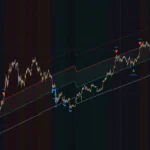

“Elliott Wave Structure” is a rough-draft tool for counting waves
If you’ve ever tried counting Elliott Waves by hand, you know the moment you freeze up deciding where wave 1 actually starts. You mark the highs and lows, draw the lines, slap on the numbers, decide it looks wrong, wipe it, and start over. It’s a grind.
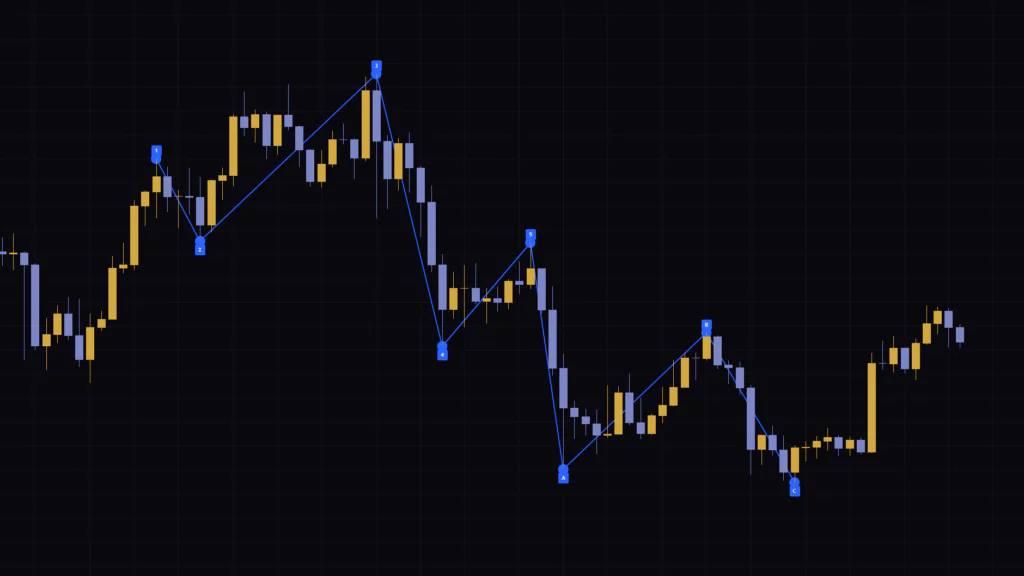
“Elliott Wave Structure,” published on TradingView, automates that prep work. It grabs the 8 most recent confirmed swing highs and swing lows, connects them with a zigzag line, and labels them “1, 2, 3, 4, 5, A, B, C” from oldest to newest. The only setting is Pivot Length plus a few visibility toggles, so your chart is set up the moment you add it.
After actually running it, though, here’s what stood out: the labels in “Elliott Wave Structure” aren’t validated against Elliott Wave rules, they’re assigned purely by the order of the swing points. Miss that, and you’ll read “1 through 5 printed, so the five-wave impulse is done” and make a bad call. Flip it around, though, and use it as a “rough draft you’ll recount,” and in my experience it cuts down a lot of time spent drawing lines by hand.
In this article, we’ll use figures to walk through what “Elliott Wave Structure” plots on the chart, how the labels get assigned, and when they change. After that, I’ll cover how to judge for yourself whether a count actually holds up as an Elliott Wave count, plus a few indicators that pair well with it.
All you get on the chart: “8 points” and “7 lines”
“Elliott Wave Structure” keeps things very clean. Blue dots are the swing points, the blue line connecting them is the wave structure, and the blue tags are the wave labels. It doesn’t use a separate pane; everything sits right on top of the candles.
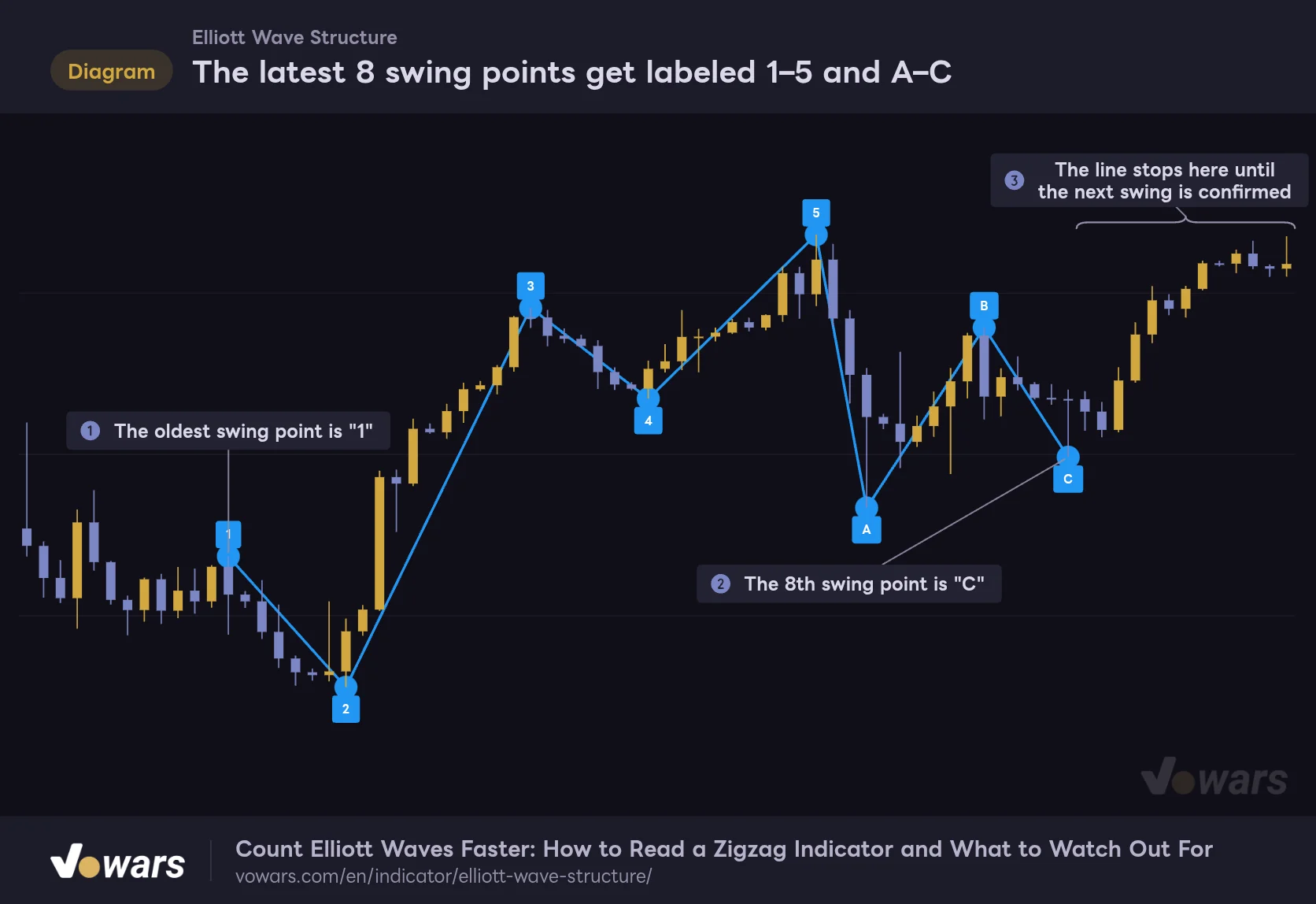
The latest 8 swing points get labeled 1–5 and A–C
The blue line traces the wave structure through the swing points, and the blue tags are the wave labels.
Vowars DE ver.3.12.32
As Figure ① shows, the oldest swing point gets “1,” followed by 2, 3, 4, 5, A, B, and C in order toward the present. The 8th point in Figure ② is “C,” and those 8 are the only swing points ever displayed. Scroll left as far as you like; older highs and lows won’t show any lines or labels.
One more thing worth checking is the right edge in Figure ③. Price keeps moving after C, but no line is drawn. The line stays parked at C until the next high or low is confirmed as a swing point.
Labels sit above highs and below lows
Label placement follows a rule too. On swing highs, the tag sits above the dot; on swing lows, it sits below. So beyond the number itself, you can read whether a point is a high or a low just from where the label sits. Once I got used to it, I could read the sequence at a glance.
The lines and labels are locked to blue. There’s no color option in the indicator’s settings, so on a blue-heavy theme the line can blend into the background. I run gold and light-purple candles, and with that combo I had no trouble seeing it.
The “1” point marks the end of wave 1
An easy one to miss is what the “1” point actually means. In standard Elliott Wave counting, labels go at the end of each wave. So the “1” point is where wave 1 finished, and the move into it, wave 1 itself, has no line drawn. Eight points means seven connecting lines, so what you’re seeing are the seven legs from wave 2 through wave C.
Where wave 1 starts (the so-called 0 point) is up to you; you’ll need to look at the chart to the left and decide. This is the one part you can’t hand off to “Elliott Wave Structure,” so keeping it in mind will save you a lot of misreads.
On symbols with limited loaded history, or when you’ve raised Pivot Length and fewer than 8 swing points have formed, the labels show up as plain numbers like “1, 2, 3…”. With 7 swing points, you get 1 through 7. If A, B, and C never appear, you just don’t have enough swing points yet.
The “5-bar wait” before a swing point locks in
“Elliott Wave Structure” treats a bar as a swing point when its high is higher, or its low is lower, than the Pivot Length bars on each side (5 bars by default). It’s the same idea as the familiar “pivot high / pivot low.”
Since it can’t make the call until 5 bars have printed to the right, every swing point is confirmed with a 5-bar delay. Let’s zoom in and see what that looks like.
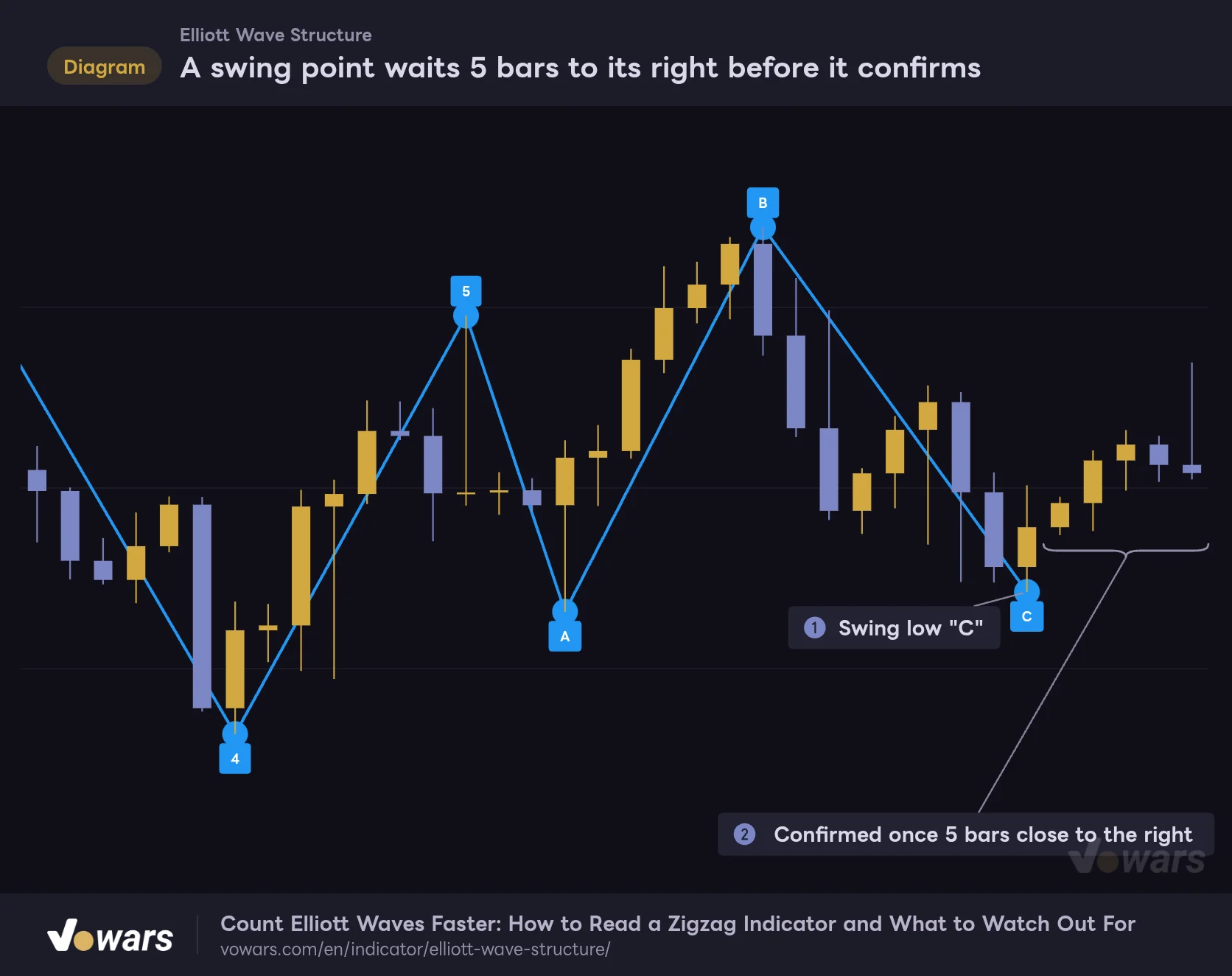
A swing point waits 5 bars to its right before it confirms
The latest "C" only showed up once 5 bars had closed to its right.
Vowars DE ver.3.12.32
The “C” in Figure ① only appeared once 5 bars had closed to its right. If even one of the 5 bars in Figure ② had undercut this low, C wouldn’t be here. The core behavior of “Elliott Wave Structure” is that once confirmed, the dot and label get plotted back on the low from 5 bars earlier.
On the 4H chart, 5 bars means a 20-hour lag; on the daily, it’s 5 days. This isn’t an indicator that calls tops and bottoms “in real time”; think of it as one that locks in the structure a little after the fact, and the lag won’t throw you off.
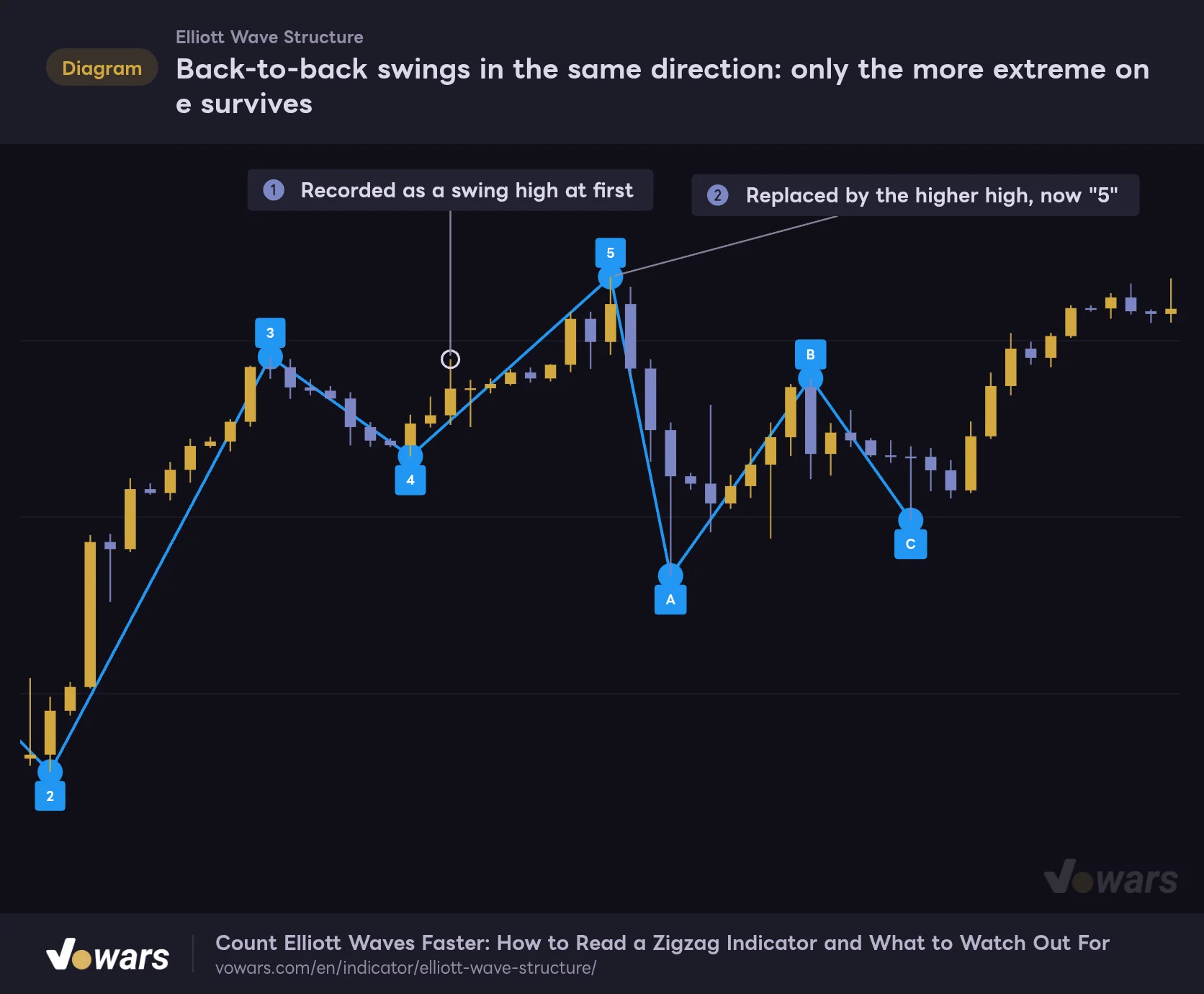
Back-to-back swings in the same direction: only the more extreme one survives
Swing highs and swing lows always alternate. So what happens if a swing high confirms, and then another swing high prints before any swing low forms in between?
Back-to-back swings in the same direction: only the more extreme one survives
The high inside the white ring in the middle was also confirmed as a swing point at one stage.
Vowars DE ver.3.12.32
The high inside the white ring in Figure ① was also recorded as a swing point at first. But no swing low confirmed afterward, and a higher high printed in Figure ②, so the stored point moved there. The same applies on the low side: a lower low takes over. And if the later high is actually lower, it simply gets ignored.
Thanks to this, minor pullbacks don’t get counted as waves even if they technically pass the 5-bar test. That replacement step is why the zigzag doesn’t get too noisy and the wave structure stays readable. The tradeoff is that the latest point keeps sliding right every time a higher high (or lower low) prints.
Add one bar, and every label can reshuffle
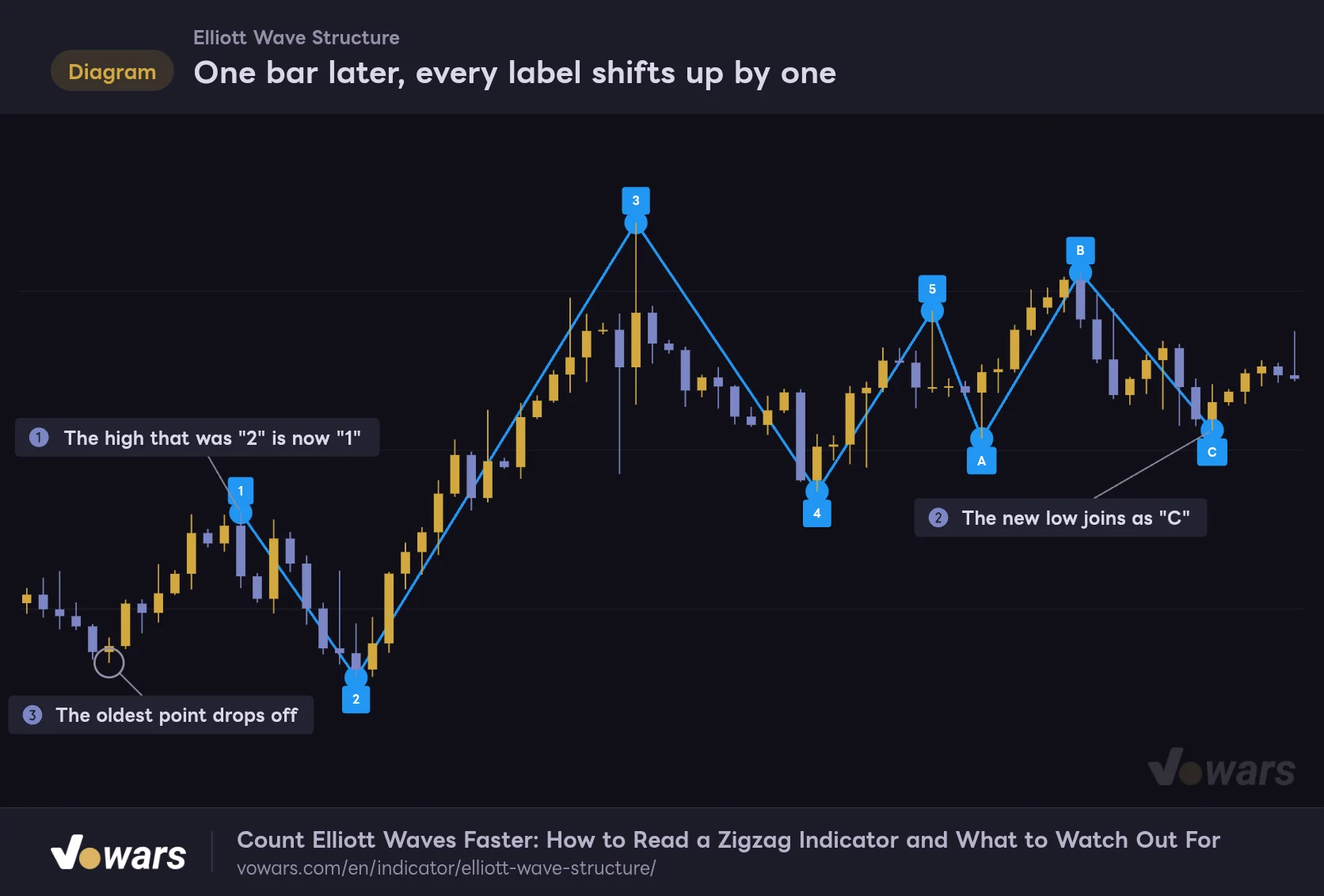
If there’s one behavior you need to understand before using “Elliott Wave Structure,” it’s this one. Labels are set by “which of the latest 8 is it,” so when a new swing point confirms, the oldest point drops off and every remaining label moves up by one.
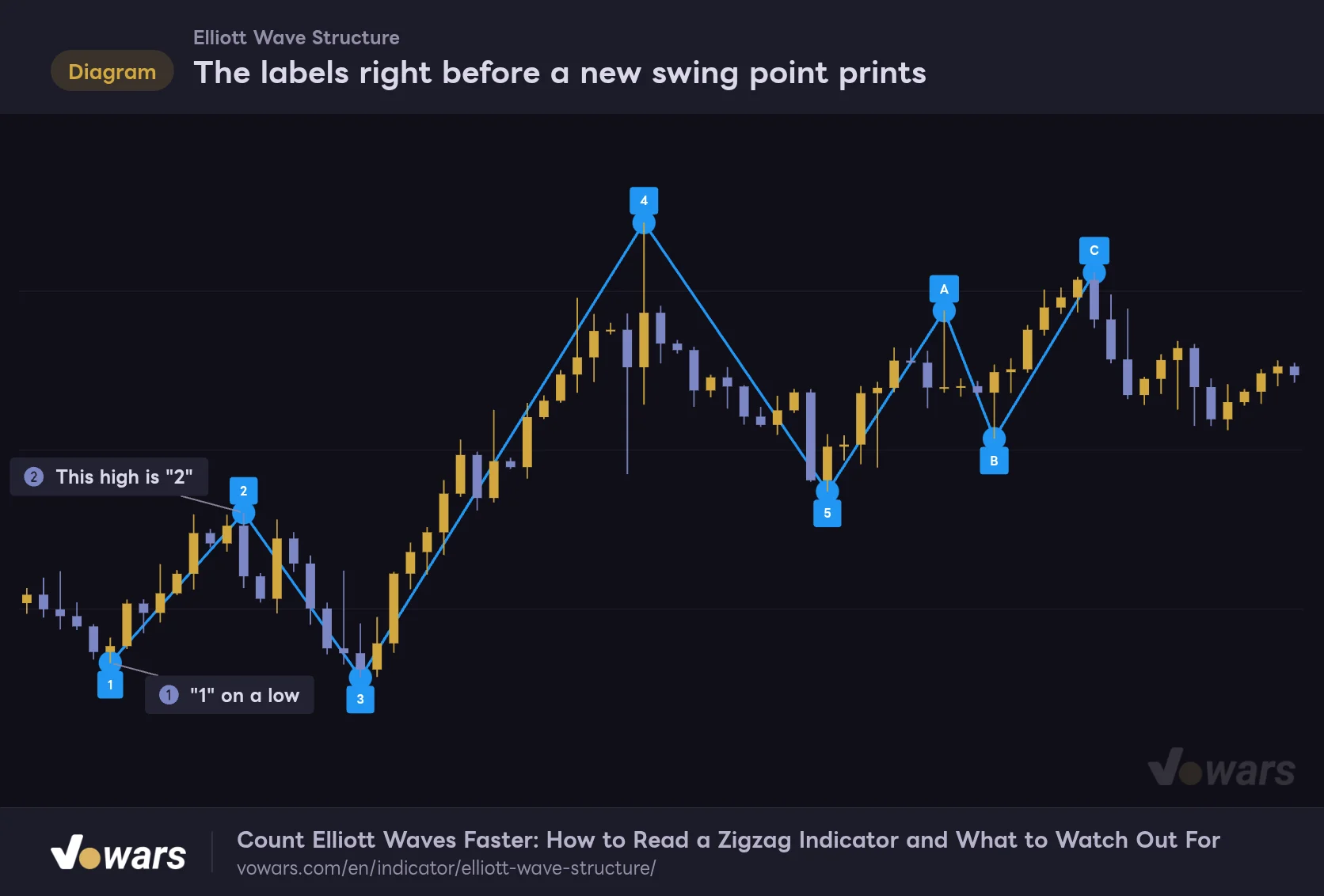
Here are two figures from the same price action, just one bar apart. First, the state right before a new swing point confirms.
The labels right before a new swing point prints
At this point, the low on the far left is "1" and the next high is "2".
Vowars DE ver.3.12.32
In Figure ①, the low on the far left is “1,” and the high in Figure ② is “2.” The next figure shows the chart one bar later, after the low on the right edge has confirmed as a swing point.
One bar later, every label shifts up by one
A single new swing low was enough to reshuffle the entire count.
Vowars DE ver.3.12.32
As Figure ① shows, the high that was “2” a moment ago is now “1.” The new low in Figure ② has joined as C, and the old low in Figure ③ has lost both its label and its line.
The key thing to notice is that the point labeled “1” flipped from a low to a high. If you were reading the first figure as a bullish impulse, one bar later you’re looking at the sequence of a bearish impulse. In other words, every new swing point can flip your bullish and bearish read.
A label that’s already printed can later change to a different number or vanish entirely. The highs and lows themselves are set on confirmed bars, but the labels attached to them get reassigned every time a new swing point appears. Even if “1 through 5” was showing at some point in the past, today’s chart keeps no record of it.
Use Bar Replay to check past counts
“Elliott Wave Structure” only ever draws the 8 points as of the latest bar. Scrolling left won’t tell you how it was counting at that time.
If you want to see how it looked at a past point in time, TradingView’s Bar Replay does the job. During replay, the indicator calculates using only the bars up to the replay point, so you can step forward bar by bar and watch the labels shift in real time. You do have to advance it manually, and how far back you can go depends on the timeframe and your plan. Per TradingView’s Help Center, daily and higher timeframes can use all available history, while intraday timeframes have plan-based limits on how far back you can replay (as of 2026/10/15).
The display can flicker on the live bar
On a live, still-forming bar, the high and low aren’t final yet. When the 5th bar to the right is still forming, a swing point can briefly confirm and show up depending on that bar’s price action, then get pulled once price moves further. Things settle once the bar closes, so it’s safest to make decisions on confirmed bars.
“1–5” gets labeled even when the sequence breaks the rules
A five-wave Elliott impulse has three basic rules. TradingView’s Help Center covers the same rules in its explanation of the Elliott Wave drawing tools.
| Wave | Basic rule | How “Elliott Wave Structure” handles it |
|---|---|---|
| Wave 2 | Never retraces beyond the start of wave 1 (less than 100% retracement) | Not checked |
| Wave 3 | Moves beyond the end of wave 1 and is never the shortest of waves 1, 3, and 5 | Not checked |
| Wave 4 | Never enters the price territory of wave 1 | Not checked |
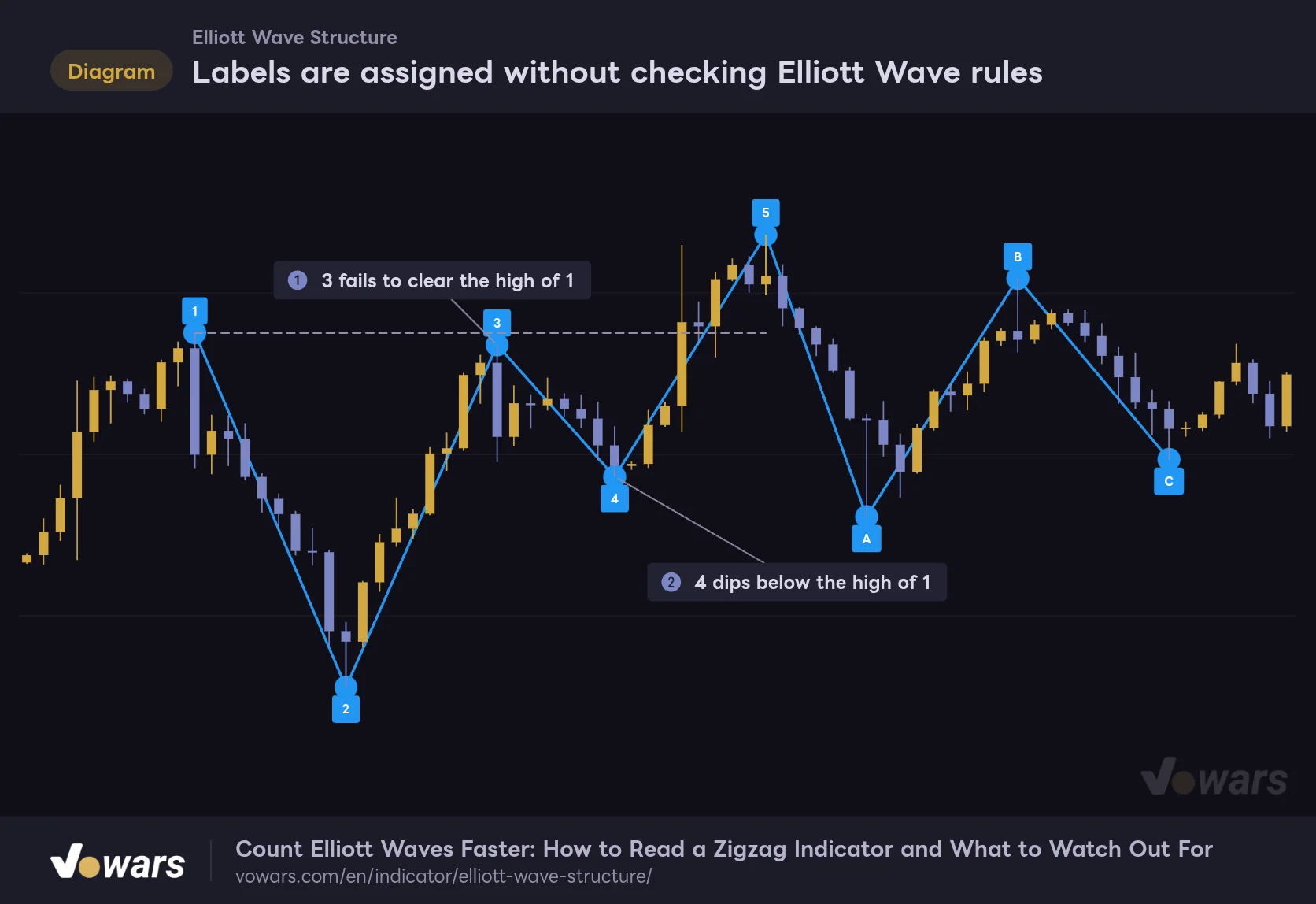
“Elliott Wave Structure” doesn’t check any of these rules. Once 8 swing points are in place, they get numbered from 1 regardless of how they line up.
Labels are assigned without checking Elliott Wave rules
The dashed gray line marks the level of the "1" high.
Vowars DE ver.3.12.32
In this figure, the “3” in Figure ① fails to clear the high of “1.” The “4” in Figure ② also dips below the “1” high marked by the dashed line. Read as a bullish impulse, both break the rules. Even so, the labels line up neatly as 1–5 and A–C.
The author also notes in the TradingView description that the display is a “potential wave structure,” not a definitive count. If the indicator’s name has you expecting “automatic Elliott Wave detection,” this is where expectations and reality part ways, so keep that in mind.
How to vet the count it shows
Here’s the step-by-step process I actually use. It feels tedious at first, but once you get the hang of it, it takes a few dozen seconds per chart.
1 Check whether “1” is a high or a low
If the “1” tag sits above its dot, it’s a high; below, it’s a low. A high means the sequence reads as a bullish impulse, a low means a bearish one. Start by checking whether that direction matches the trend you’re actually looking at.
2 Check the three rules against price
Check whether “2” breaks below the start of wave 1, whether “3” clears “1,” and whether “4” stays out of wave 1’s price territory. The start of wave 1 isn’t shown, so you’ll need to find it yourself on the chart to the left of “1.” Drop a horizontal line at the “1” price and the wave 4 check takes seconds.
3 If it doesn’t fit, change the starting point and recount
If the rules don’t hold, ditch the displayed labels and recount using only the lines and dots as a guide. For example, treat “2” as the end of wave 1, or ignore C and treat everything up to A as an impulse candidate. If needed, adjust Pivot Length (covered in the next section) to change the size of swings it picks up.
4 Lock in the count you settle on with drawing tools
Since the labels get reassigned with the next swing point, lock in the count you settle on with TradingView’s drawing tools. Under “Patterns” in the drawing tools, there are dedicated Elliott Wave tools (impulse wave 1–5, correction wave A–C, and more) that let you place labeled lines just by clicking the points.
Pivot Length decides “what degree of wave you count”
There are four settings. Only Pivot Length affects the calculation; the other three just toggle visibility.
| Setting | Default | Suggested | Effect |
|---|---|---|---|
| Pivot Length | 5 | 5 for 4H and daily; 3 for the latest smaller swings; 8–10 for tracking larger waves on the weekly | How many bars on each side are compared to qualify a swing point. Adjustable from 2 to 20; higher values pick up only larger swings and lengthen the confirmation lag |
| Show Wave Structure | On | On | Toggles the blue line connecting swing points. When off, only the dots and labels remain |
| Show Wave Labels | On | On | Toggles the 1–5 and A–C wave labels |
| Show Pivot Points | On | Off if you prefer | Toggles the blue dots on swing points. If the labels alone tell you where the points are, turning this off cleans up the chart |
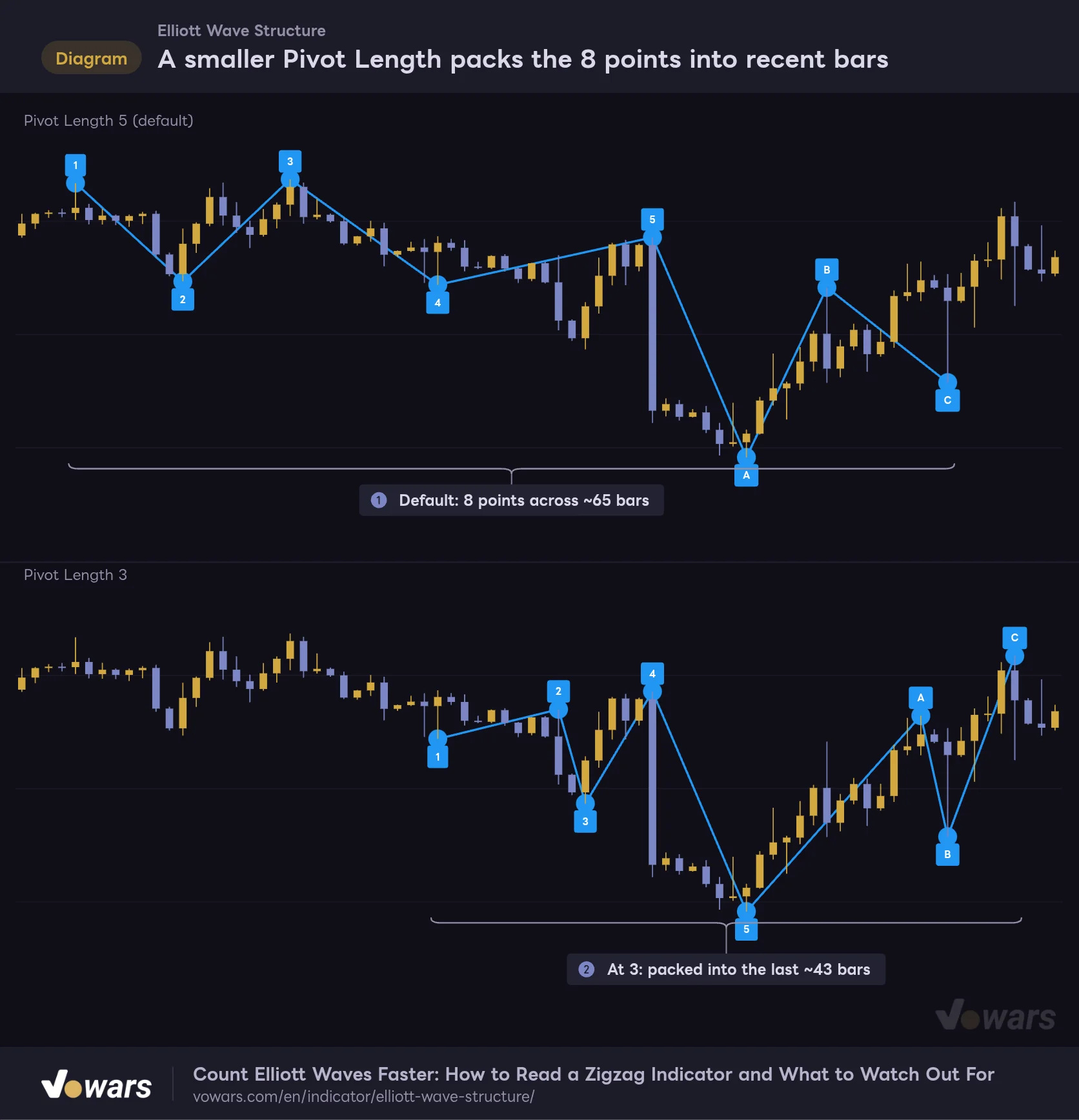
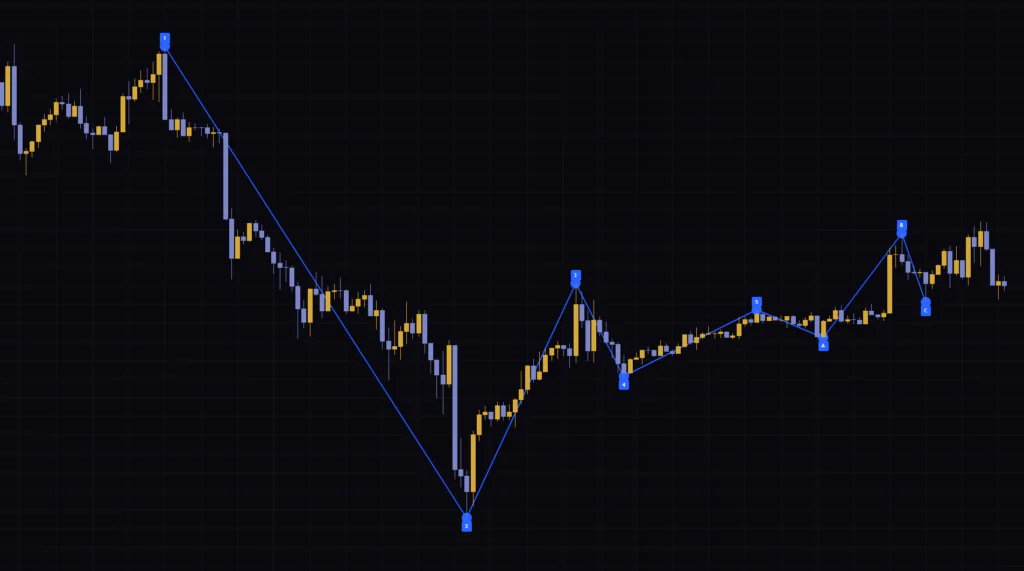
Changing Pivot Length changes not just how many swing points you get, but how much time the 8 points cover. I overlaid the default of 5 and a setting of 3 on the same candles to compare.
A smaller Pivot Length packs the 8 points into recent bars
The top panel uses the default of 5, the bottom uses 3. The candles are identical.
Vowars DE ver.3.12.32
With the default in Figure ①, the 8 points span roughly 65 bars of price action. Drop it to 3 as in Figure ②, and it starts catching smaller swings, packing the 8 points into the last 43 bars or so. Both read “1 to C,” but they’re counting waves of a completely different size.
Elliott Wave theory sees smaller waves nested inside larger ones. It helps to think of Pivot Length as the setting that picks which degree of that nesting you’re counting.
Suggested settings by use case
| Use case | Pivot Length | Reason |
|---|---|---|
| Day trading the latest smaller swings (15m to 1H) | 3–4 | Picks up minor pullbacks, so the 8 points fit within the last few days. Shorter confirmation lag too |
| Swing trading mid-sized waves (4H and daily) | 5 (default) | The replacement step filters out small pullback noise, while several weeks of structure fit into 8 points |
| Checking where you are in the bigger wave (daily and weekly) | 8–10 | Smaller swings drop out, revealing months to over a year of structure. Be aware that confirmation takes 8–10 bars |
The values above are the ranges I found easiest to read in my own testing. The same value catches a different number of swings depending on the symbol’s volatility, so tune it based on whether the 8 points cover the period you actually want to see. Push Pivot Length too high, and you may not get 8 swing points within the loaded history, leaving the labels as plain numbers.
Counting waves on the 4H, daily, and weekly
From here on are the results I got running it on BTCUSDT with default settings. Price figures are approximate, read off the chart.
On the 4H, about 10 days of price action fit into 8 points
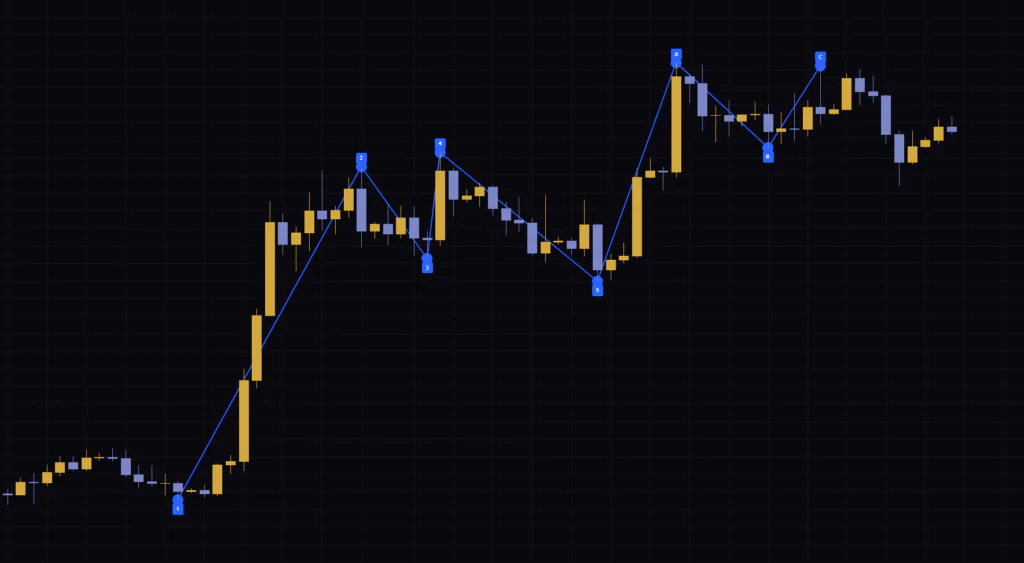
On the 4H chart, roughly Oct 1 through Oct 9, about 10 days, fit into the 8 points. “1” sat on a low near $83,200, so the sequence reads as a bearish impulse. But the “3” low (around $83,900) was above “1,” meaning wave 3 never got past wave 1. At that point, the count didn’t hold up as a five-wave impulse.
On the daily, an uptrend showed up as a bearish sequence
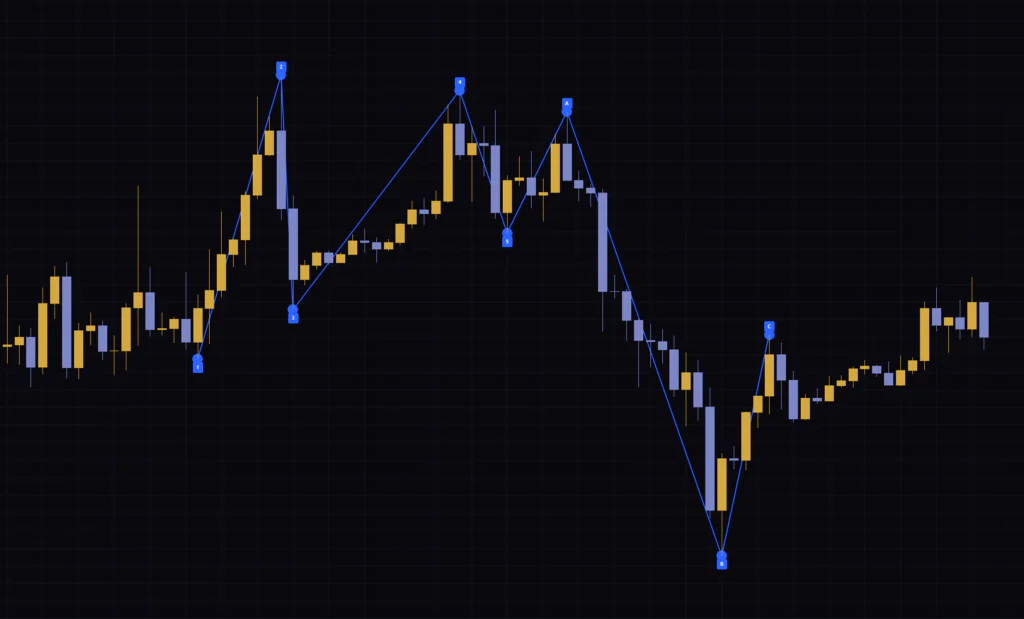
On the daily, “1” landed on the mid-August low (around $62,500), and the 8 points included the rally from there to around $87,000. The market was clearly trending up, yet since “1” was a low, the labels formed a bearish impulse. As a test, I treated “1” as the start of wave 1 (the 0 point) and shifted every label by one to reread it as a bullish impulse. Even then, the “5” low (around $75,000) undercut the “2” high (around $81,500), breaking the wave 4 rule. In the end, I read the entire August rip as one large wave and the chop since then as a correction still in progress.
The weekly shows over a year of structure
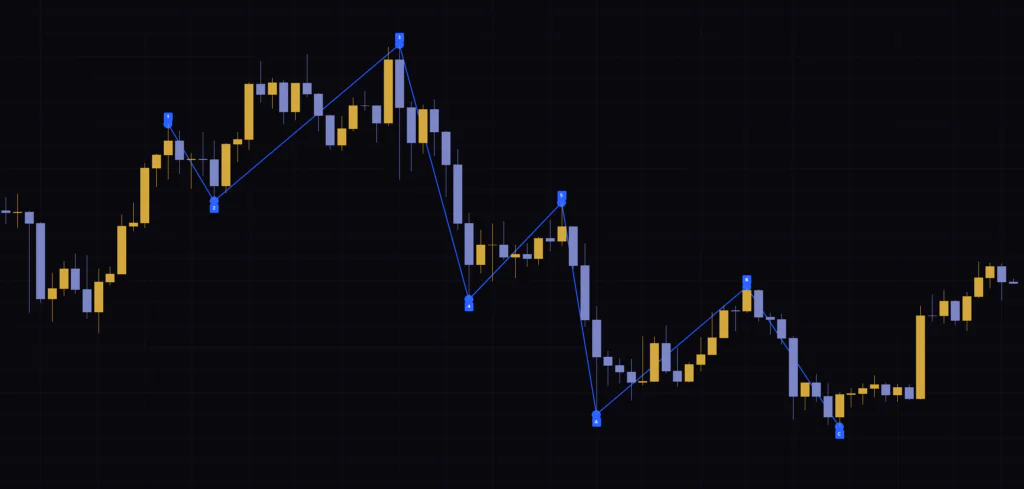
On the weekly, the high around May 2025 (roughly $110,000) became “1” and the October high (roughly $126,000) became “3,” with over a year of price action shown across 8 points. However, the “4” low (around $80,000) dropped well below the “1” high, failing the wave 4 rule. It was handy for getting a bird’s-eye view of the weekly trend, but the labels weren’t a count you could use as-is.
Across all three timeframes, my takeaway was that the lines and dots are reliable, but the labels need checking every single time. You can pretty much hand off the job of picking highs and lows, which gets you to the structure way faster than drawing lines by hand. The most efficient approach was putting that saved time into checking the rules and rethinking the starting point.
Also worth noting: the swing-point logic works the same whether it’s a 24/7 market like Bitcoin or a session-based market like gold or stock indices. Higher-volatility symbols tend to generate more swing points, so bumping Pivot Length up by one is worth a try.
Pairing it with the Awesome Oscillator to compare momentum in waves 3 and 5
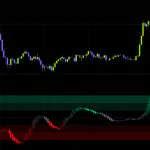
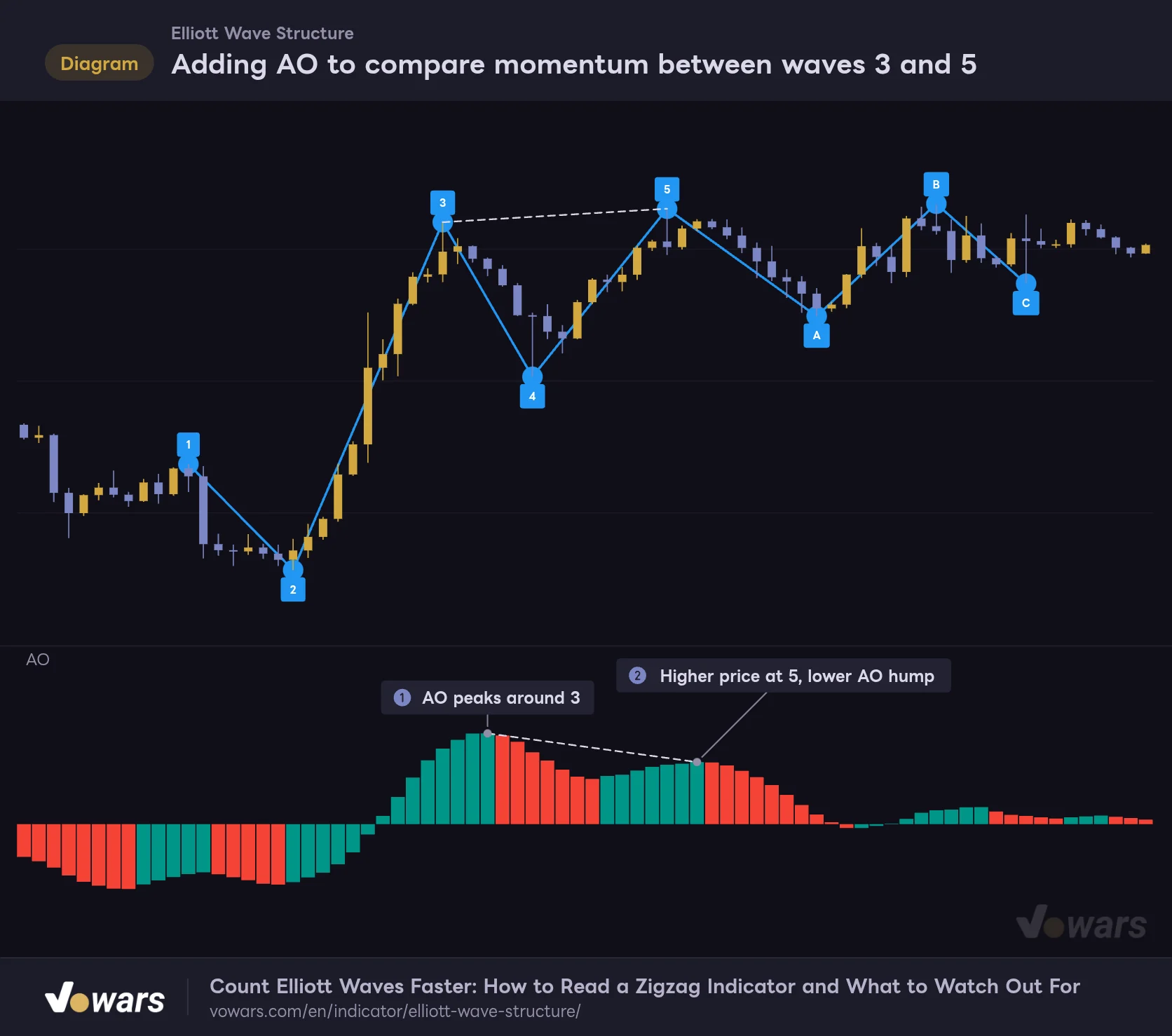
When vetting the labels, there are times when price alone doesn’t settle it. That’s where TradingView’s built-in Awesome Oscillator (AO) turned out to be a great match. AO is a momentum indicator that plots the difference between the 5- and 34-period simple moving averages of the median price as a histogram, and it’s known for being used by Bill Williams as an aid for counting Elliott Waves.
Adding AO to compare momentum between waves 3 and 5
Top: Elliott Wave Structure. Bottom: TradingView's built-in Awesome Oscillator.
Vowars DE ver.3.12.32
In a five-wave impulse, wave 3 is generally the strongest, while wave 5 tends to lose momentum even as price pushes higher. In Figure ①, notice how the AO hump peaks around “3.” At “5” in Figure ②, price slightly exceeds “3,” yet the AO hump is lower. With this setup, the “Elliott Wave Structure” labels line up with what AO is telling you.
Conversely, if AO is stretching much higher at “5” than at “3,” you can suspect you might still be inside wave 3. It works as a sanity check before you accept the labels shown.
Here are a few other pairings I found useful:
- Use the Fibonacci retracement (drawing tool) to measure how much of wave 1 the pullback from “1” to “2” retraces. Wave 2 is said to often pull back to around 50–61.8%
- Use Fibonacci extension to check whether “3” extends to around 1.618x of wave 1
- Add volume and confirm whether it expands during the “3” leg
Where it works as a rough draft, and where blind trust gets risky
Where it works as a rough draft
- Picks highs and lows automatically, cutting a lot of prep time before counting waves
- Just 8 points and 7 lines, so it won’t clutter the chart even when stacked with other indicators
- The replacement step keeps minor pullbacks out, so the wave structure stays clean
- Pivot Length alone lets you switch which degree of wave you count
- Works the same way on any timeframe or symbol
Where blind trust gets risky
- Labels follow sequence order only; they don’t check whether Elliott Wave rules are met
- Every new swing point reassigns all labels, and past counts aren’t kept
- The wave 1 leg leading into “1” isn’t drawn, so you have to find the start yourself
- Swing points confirm with a lag of Pivot Length bars
- No alert conditions, so you can’t get notified when a swing point confirms
What to keep in mind before you use it
To wrap up, here are the things to watch for when using it in live trading.
First, “Elliott Wave Structure” has no buy or sell signals. A “5” or “C” printing isn’t a reversal signal; it just means the 8 points are filled in. Avoid entering a trade based on the labels alone.
Second, it repaints. Swing point locations are set on confirmed bars, but the labels attached to them change every time a new swing point appears, and the latest point moves right whenever a more extreme high or low prints. If you look back at a chart and conclude “a 5 was showing here, so it reversed,” there’s no guarantee a 5 was actually displayed at that time. For backtesting, the reliable approach is recreating what was shown back then with Bar Replay.
As for alerts, the indicator itself doesn’t provide any alert conditions. If you want to get notified at swing point prices, one option is to draw a horizontal line at a level you care about, like the “1” high, and set an alert on that line.
Elliott Wave analysis is a method where multiple counts can be valid on the same chart. Treat the “Elliott Wave Structure” labels as just one candidate count, decide your stop-loss first, and then add it to your decision-making.
A sidekick for Elliott Wave traders who want to spend less time counting
“Elliott Wave Structure” is a very stripped-down indicator: it picks 8 confirmed highs and lows and adds lines and labels. Since the labels aren’t rule-validated, taking them at face value is something you’ll want to avoid. On the other hand, offloading the work of picking highs and lows is a big deal, and seeing the wave skeleton the moment you open a chart is really handy.
 Image
ImageIt’s best suited to traders who already know the basic Elliott Wave rules and want to spend less time counting by hand. Use the displayed labels as a starting point, then layer on your own rule checks and rethink the starting point. Used that way, from the 4H up to the weekly, it more than earns its spot as a rough draft for quickly reading wave structure.