
Twenty moving averages that use color to show whether a trend is actually in play
When you pull up a chart, the first question is usually the simplest one: is there even a trend right now? Stacking a bunch of moving averages doesn’t always help. Eyeballing their order and slope to make that call gets tiring faster than you’d think.
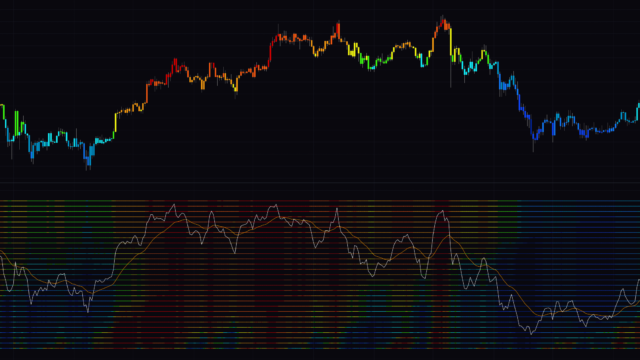
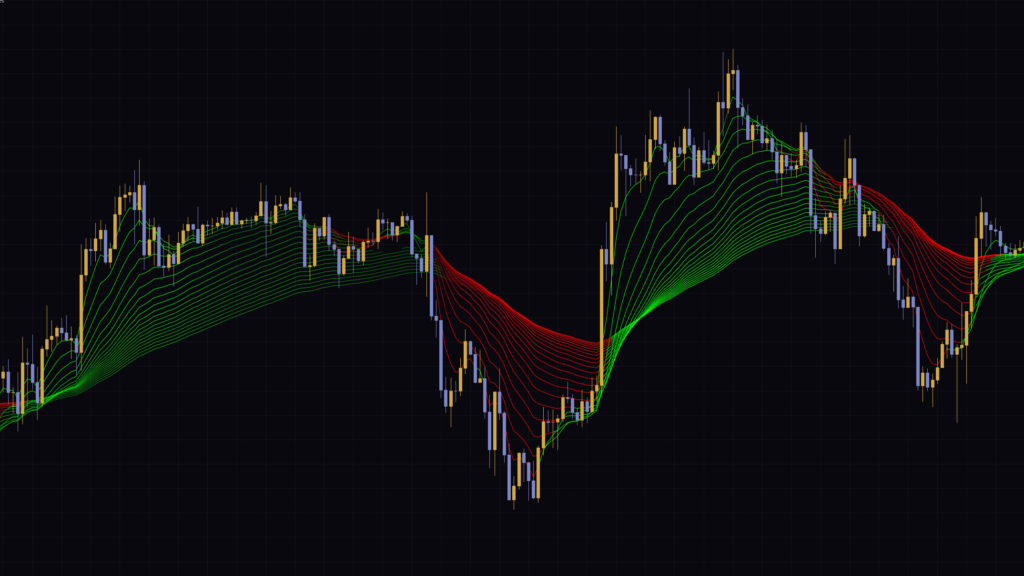
“Trend Following Moving Averages” is a TradingView indicator that plots 20 moving averages, from 5 to 100 in steps of 5, and colors each one based on its own trend reading. Lines in an uptrend turn green, lines in a downtrend turn red, and the stronger the move, the more saturated the color. Any line that reads “no trend” simply disappears for that stretch.
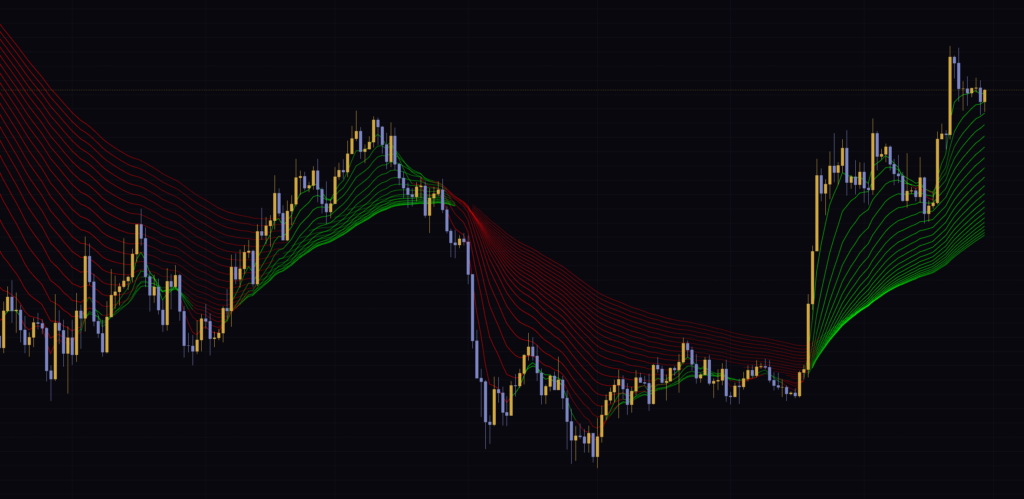
It’s a type of MA ribbon, but the coloring logic is different from most. Instead of looking at the order of the lines, it measures how far each individual line has moved recently and sets the color and intensity from that, so one glance at the ribbon tells you direction, momentum and whether a trend exists at all. I ran it on daily, 1-hour and 5-minute charts, and I’ll walk through how to read it and how to set it up based on what I saw.
Start by watching how the colors shift
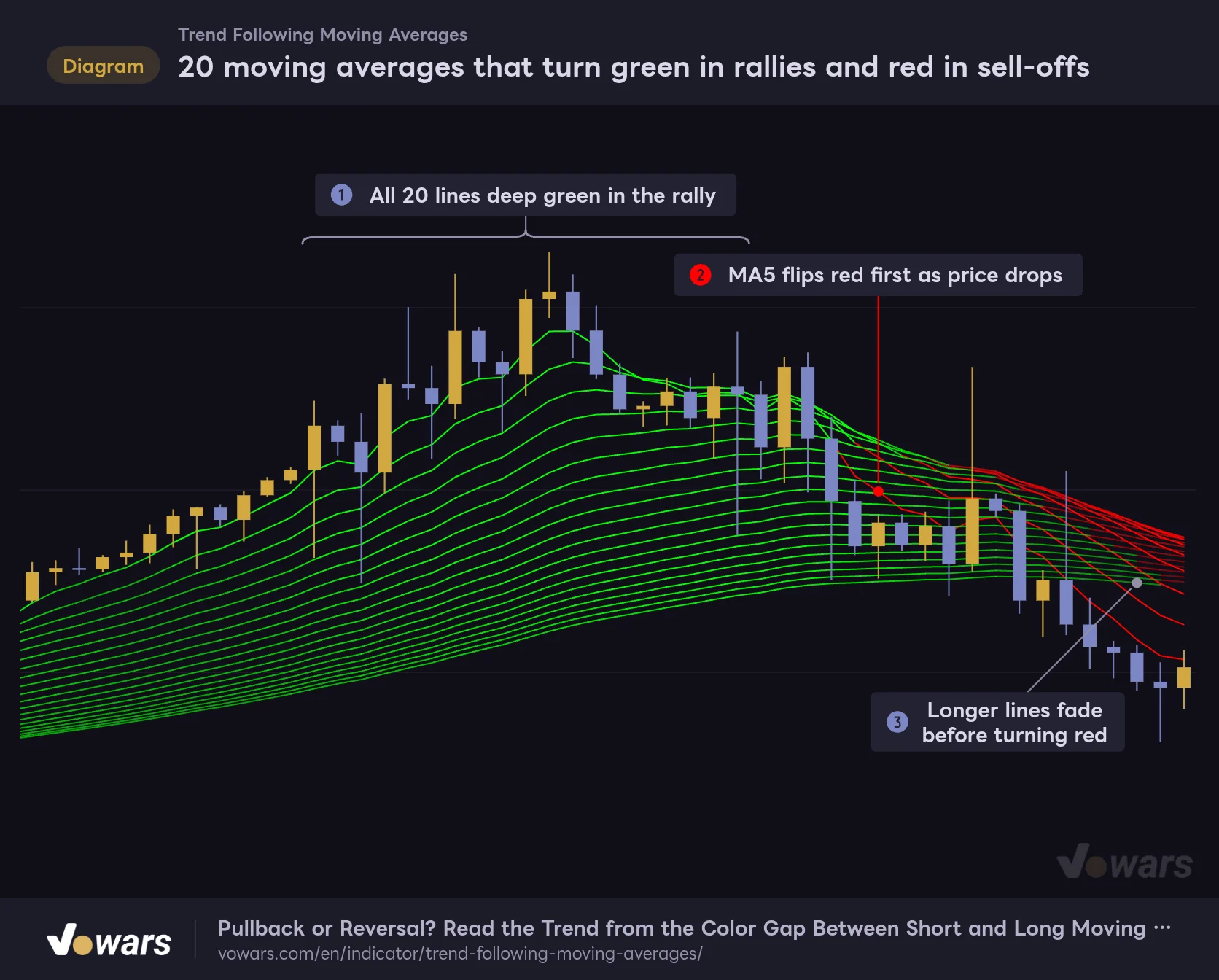
Here’s a rally rolling over into a decline. While the uptrend holds, all 20 lines are deep green, as in Figure ①. Once price starts dropping, the shortest line, the MA5, is the first to flip red, as shown in Figure ②. The longer lines fade first and only then turn red, as you can see in Figure ③.
20 moving averages that turn green in rallies and red in sell-offs
The same 20 lines change color and intensity with market direction and momentum.
Vowars DE ver.3.12.30
Short lines flip first, long lines follow later. That pattern is the foundation for reading “Trend Following Moving Averages.” The color states break down into five types.
| What the line looks like | What it’s reading | What it tells you on the chart |
|---|---|---|
| Deep green | Uptrend, with a large recent move | Strong bullish momentum |
| Faint green | Uptrend, but the move is small | Still trending up, but momentum is weak |
| Line disappears | No trend | No clear direction, or mid-transition |
| Faint red | Downtrend, but the move is small | Still trending down, but momentum is weak |
| Deep red | Downtrend, with a large recent move | Strong bearish momentum |
Breaking down how a single line flips from green to red
Once you understand what the colors actually mean, moves that look like fakeouts start to make sense. Let’s show only the MA20 out of the 20 lines and follow the exact moment its color changes. On TradingView you can toggle each line on or off in the Style tab of the settings, so you can reproduce the same view on your own chart.
The two yardsticks: the “MA channel” and the “threshold”
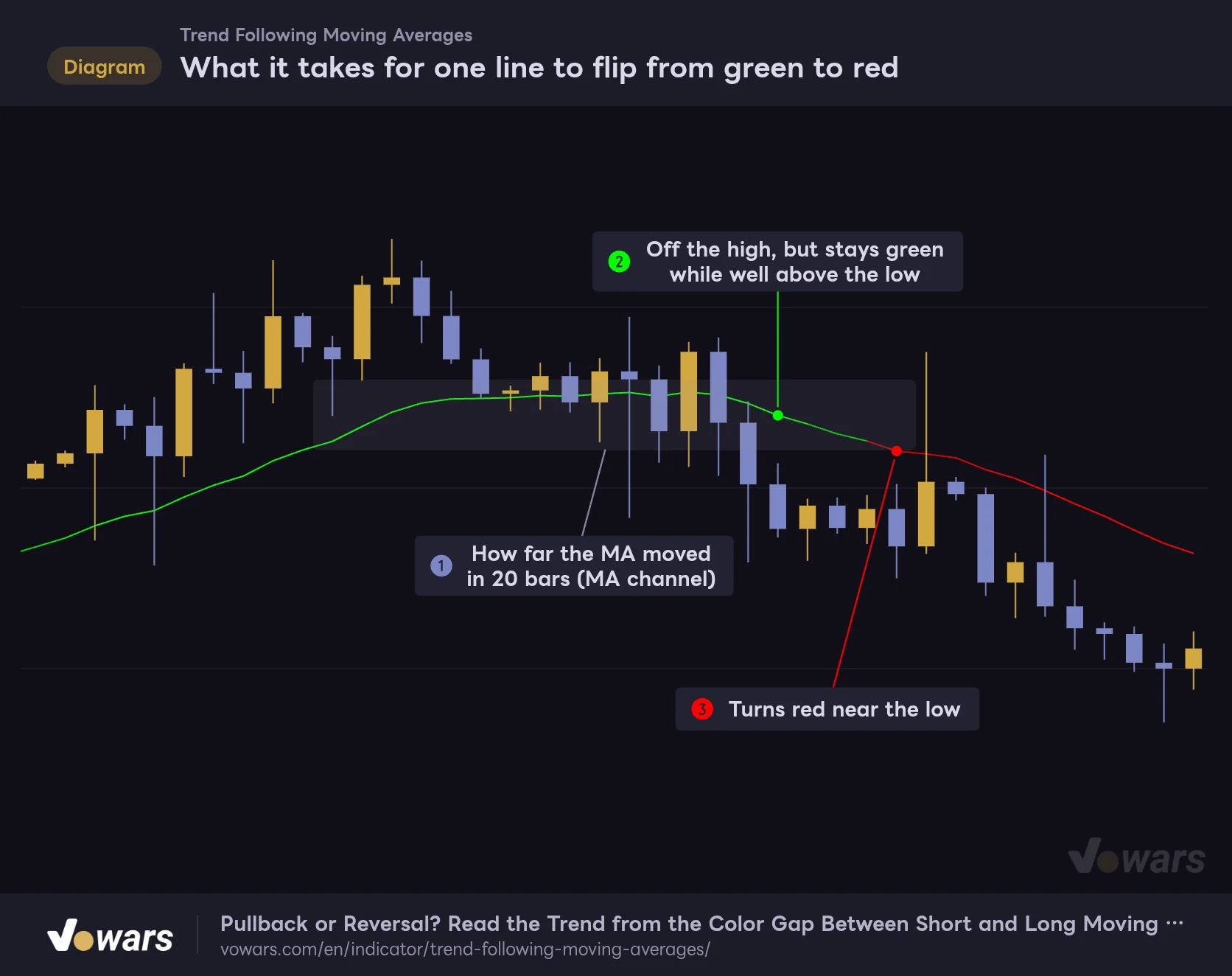
The trend reading isn’t based on the plotted MA itself but on a version smoothed further with linear regression. Linear regression fits the straight line that best matches recent values, which irons out small wiggles. The space between the highest and lowest values this smoothed line printed over the last 20 bars is what I’ll call the “MA channel.” It’s the boxed area in Figure ① below.
The second yardstick is the “threshold.” It’s the high-low range of the last 280 candles multiplied by Trend Channel Rate % (1% by default). Because it scales with the overall price range automatically, the same settings work across instruments with very different price levels and across timeframes.
What it takes for one line to flip from green to red
Showing only the MA20 out of the 20 lines to break down the moment the color changes.
Vowars DE ver.3.12.30
The decision process is simple. If the MA channel is narrower than the threshold, the line reads “no trend.” If it’s wider, the indicator first checks whether the smoothed MA sits more than one threshold above the channel low; if so, it’s an uptrend (green). If not, and the MA sits more than one threshold below the channel high, it’s a downtrend (red).
In the example, the MA20 is still green at Figure ② even though it has already rolled over from the top, because it’s still well above the channel low. It only flips red on the bar marked Figure ③, once it has dropped close to that low.
Because of the order of the checks, a line can turn green even in a downtrend if it bounces more than one threshold off its low. Flip it around and a pullback in an uptrend stays green unless the line drops close to its low. That’s why the short lines go green right away on a relief bounce after a big sell-off, and a green line doesn’t necessarily mean the trend has reversed to the upside. It’s safer to read it together with the color of the longer lines.
Color intensity is “how many thresholds it moved”
Green and red each come in 10 shades. When the MA channel is just over one threshold wide you get the faintest shade, and at 10x or more you get the deepest. In other words, the intensity is a gauge of how big a move that particular line has made recently.
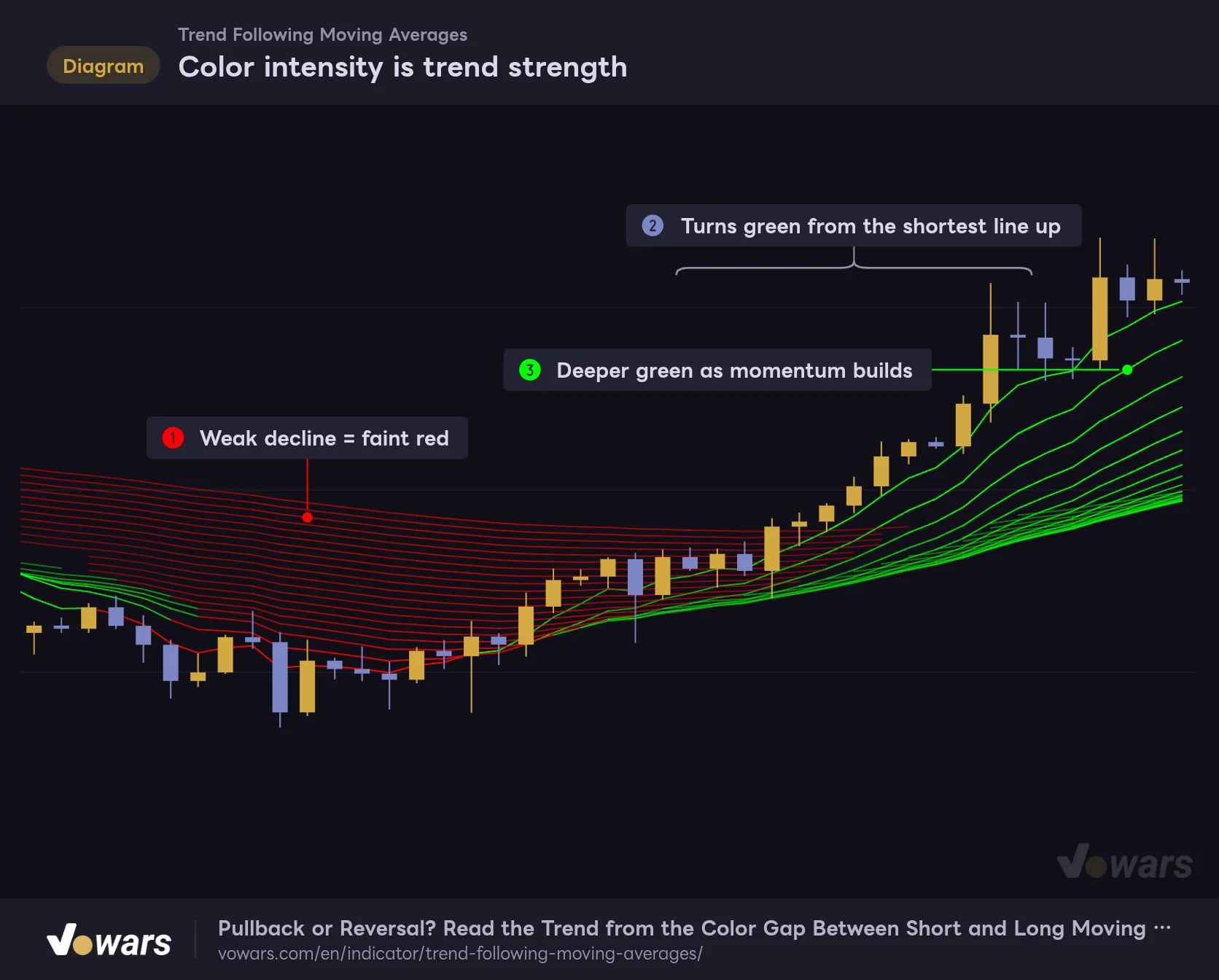
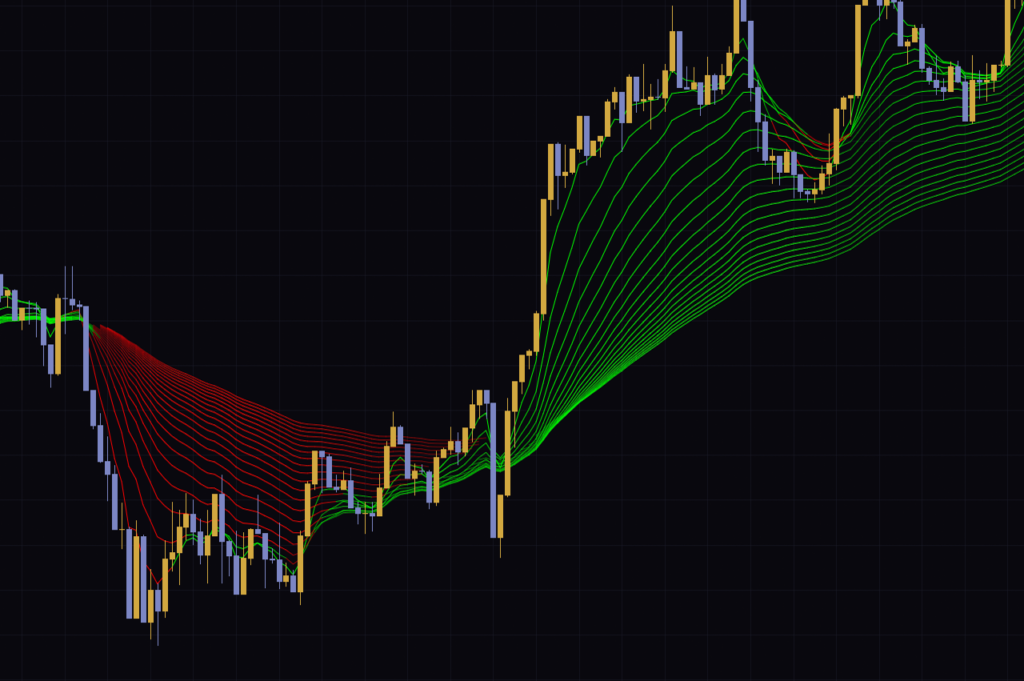
The figure below shows a weak decline turning into a rally. On the left, in Figure ①, the moves are small, so the red is very faint. Once the rally kicks in, the lines turn green from shortest to longest as in Figure ②, and they get deeper as the rally extends, as shown in Figure ③.
Color intensity is trend strength
It's not just the color. The intensity carries meaning too.
Vowars DE ver.3.12.30
What I enjoyed most on the daily chart was the start of the late-August rip. The 20 lines had been drifting sideways in faint red, and within a few bars of the big green candle they flipped to green from the shortest line up and fanned out. The momentum shows up in both the shape and the color of the ribbon, which makes this part very intuitive.
Disappearing lines mean “no trend”
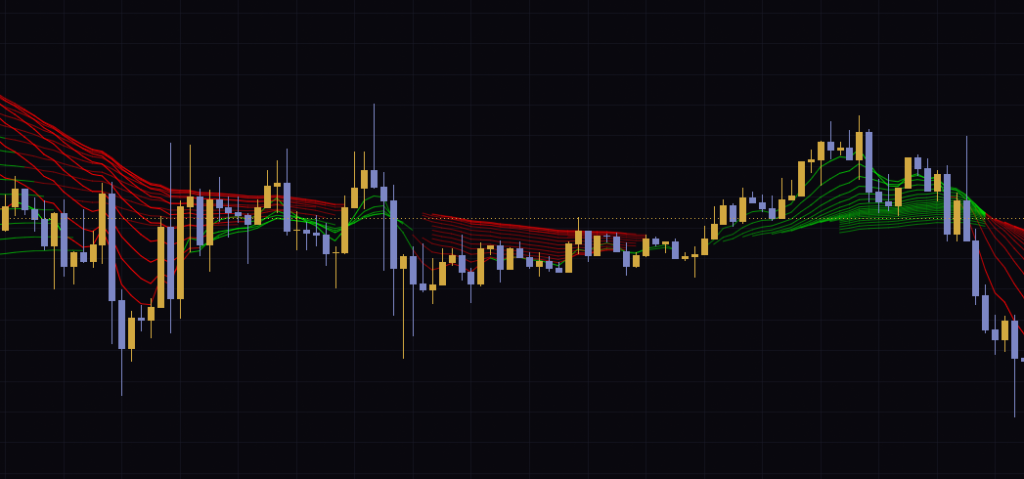
This is what threw me the most the first time I used it. When price action calms down, some lines look like they just cut off mid-chart. It isn’t a display bug. On bars that read “no trend,” the line gets no color, so that section of the line isn’t drawn. That’s by design.
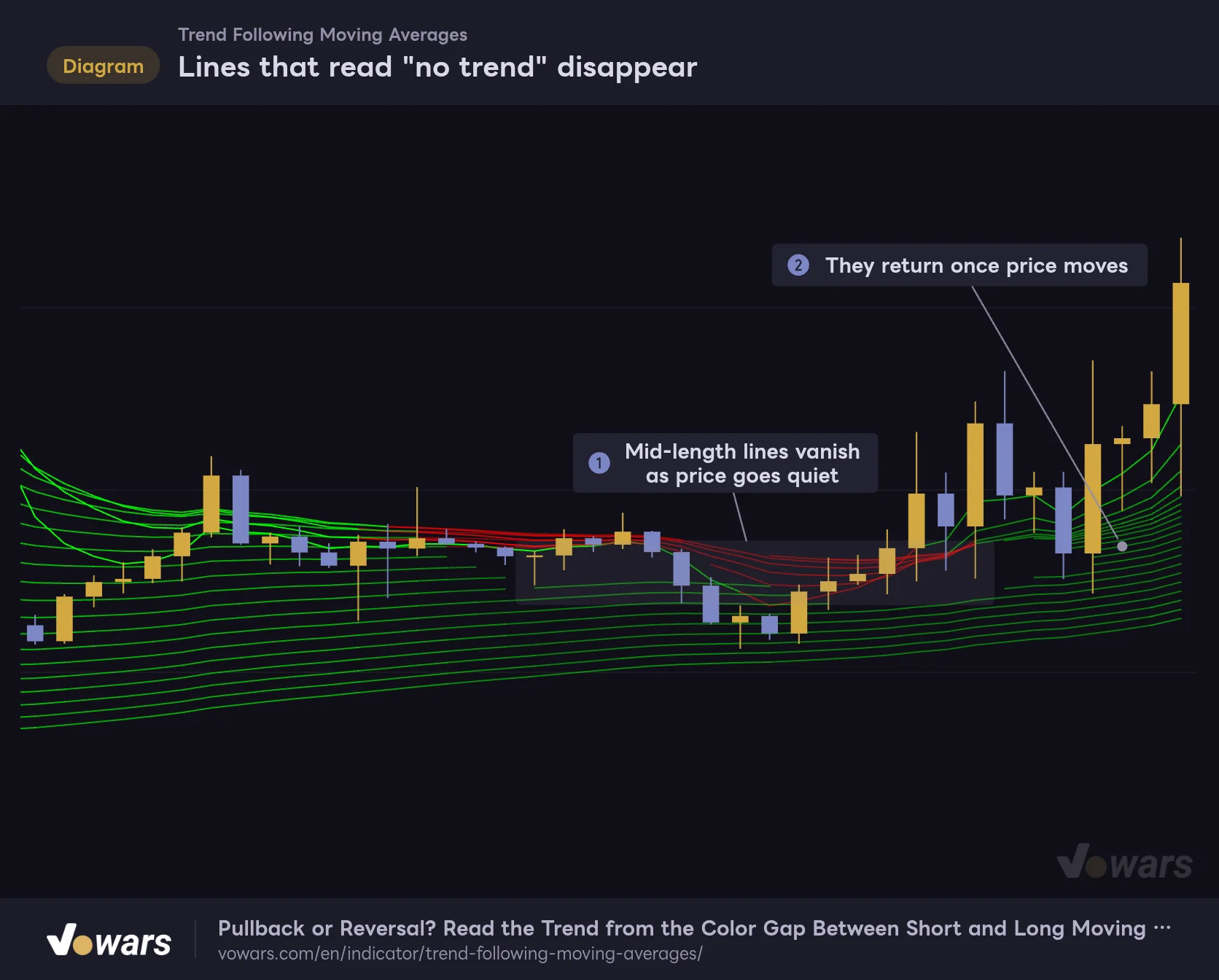
Lines that read "no trend" disappear
With this indicator, a missing line is a signal in itself.
Vowars DE ver.3.12.30
In Figure ①, the mid-length lines vanish as price goes into consolidation. Once price starts moving again, they come back in faint shades, as in Figure ②. When you see fewer lines, or lines that keep breaking up, take it as a sign that there’s no trend on those lookback periods.
Three ways to read the chart without second-guessing
Now that the mechanics are clear, let’s look at what to watch on a live chart. In my testing, the calls came down to these three situations.
1 All 20 lines are the same color
Short-term to long-term, every line is the same color, and the color is deep. That means there’s a trend on every lookback from 5 bars to 100 bars, and it’s the easiest situation to ride. In an uptrend, candles track the upper lines of the ribbon (the short MAs), and pullbacks tend to stall inside the ribbon.
The catch is that if you wait for every line to line up before getting in, a big chunk of the move may already be done. For me, full alignment worked better as a reason not to fade the move than as an entry trigger.
2 Only the short lines flip to the opposite color
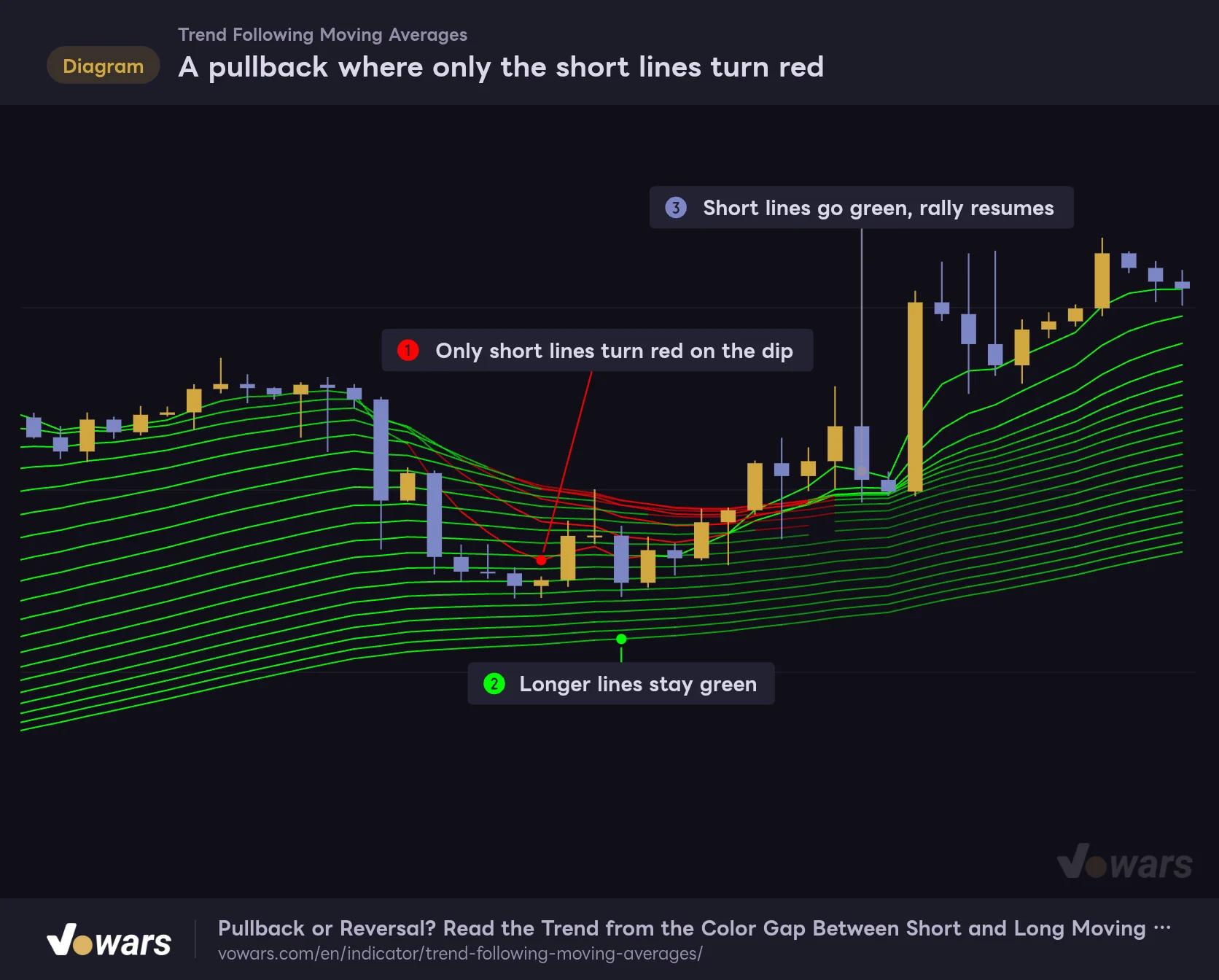
This is when only the short lines turn red in the middle of an uptrend. Even as the short lines flip red in Figure ①, the longer lines stay green in Figure ②. The bigger picture is still pointing up, so it reads as a pullback, and the rally resumes from the point where the short lines turn back to green in Figure ③.
A pullback where only the short lines turn red
Did every line turn red, or just the short ones? That's where the read changes.
Vowars DE ver.3.12.30
Personally, this “short-term against, long-term with the trend” setup is where I think “Trend Following Moving Averages” earns its spot. With regular moving averages you’re left wondering whether it’s a dip or a reversal, but here the color of the long lines gives you a marker to tell the two apart. The same read works for bounces in a downtrend, just with the colors swapped.
3 Even the long lines fade and start breaking up
It looks similar to Case 2, but once the long lines start fading and dropping out, it’s a different story. Even the longer lookbacks are losing momentum, so instead of a pullback you should suspect the trend is ending or price is moving into a range. When I tested it on the 5-minute chart, the red band tightened into a narrow bundle after the drop, and the stretch where green short lines and red long lines mixed together turned into about two hours of directionless chop. It looked a lot like Case 2, but it was actually the end of the sell-off, and from the bar that broke higher, the 20 lines flipped green from the shortest up. If you miss that the long lines are fading, you can end up trying to sell the rally and getting caught in the reversal.
The moving averages are calculated on the close, so on the live bar that hasn’t closed yet, both the position and color of the lines move with price. It’s safer to judge a color change only after that bar closes. The short lines in particular can briefly flash the opposite color before the bar is confirmed.
The five settings and how to tune them to the market
There are only five settings. The lengths of the 20 lines (5 to 100) are fixed, and what you can change is how the trend is judged and which moving average type is used.
| Setting | Default | Suggested | Effect |
|---|---|---|---|
| MA Type | EMA | EMA | Moving average type for all 20 lines. Choose from EMA, SMA, RMA, WMA or VWMA |
| Period to Check Trend | 20 | 20 (20 to 30 for swing trading) | Number of bars used to build the MA channel. Longer makes a trend easier to detect, but colors flip later |
| Trend Channel Rate % | 1 | 1 (1.5 to 2 for choppy markets) | Threshold as a percentage of range. Higher makes the reading stricter, so colors get fainter and lines drop out more easily |
| Use Linear Regression | On | On | Smooths the MA used for the trend reading with linear regression. Turning it off reacts faster but adds noise |
| Linear Regression Period | 10 | 10 (5 to 8 for faster reaction) | Linear regression length. Longer is smoother but makes the reading lag |
Period to Check Trend trades staying power for speed
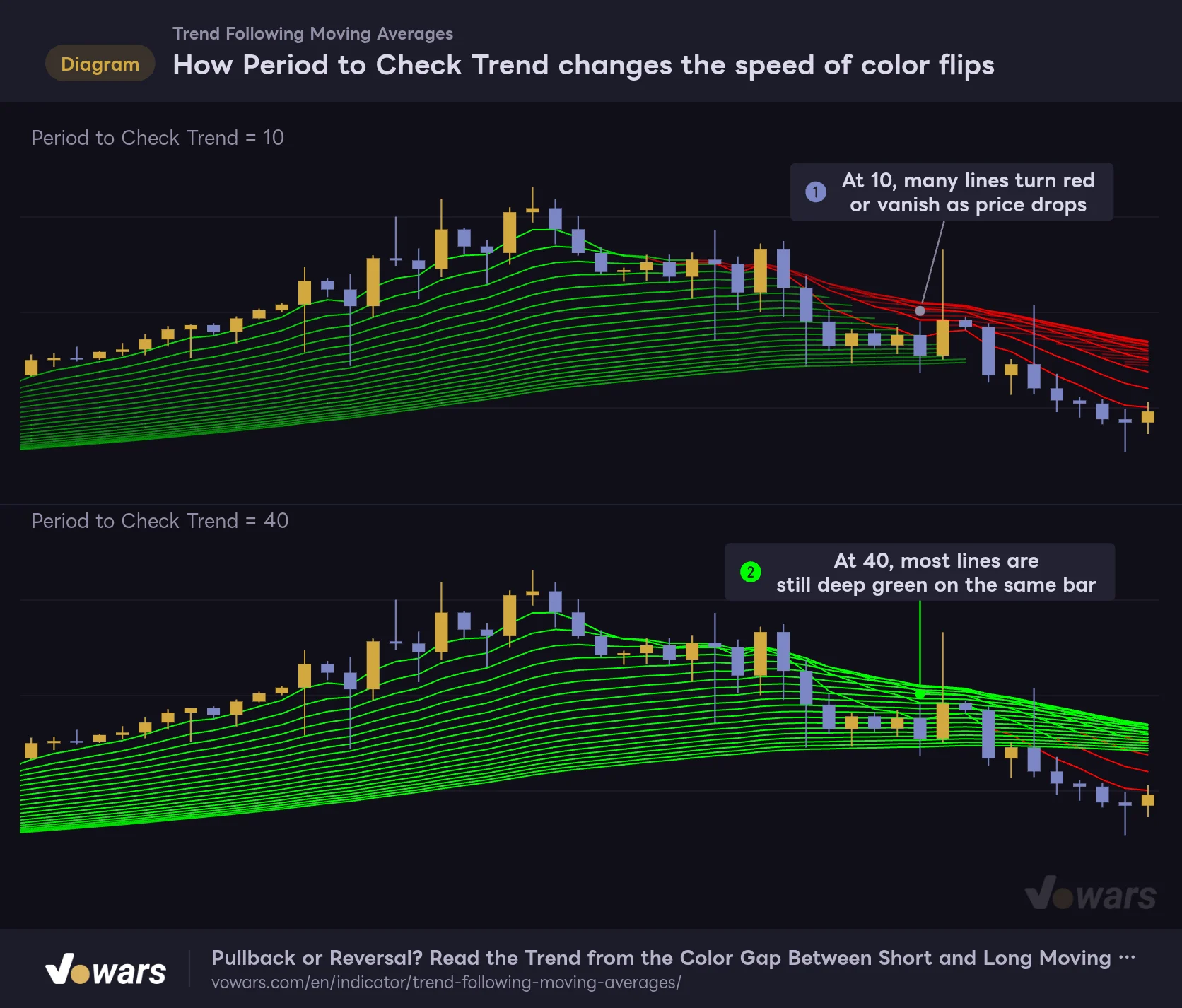
Period to Check Trend sets how many bars are used to build the MA channel. A longer period widens the channel, so a trend is detected more easily and the colors come out deeper. The trade-off is that the channel low and high sit farther away, so color changes tend to come later.
The figure below compares 10 and 40 on the same price action. At 10, in Figure ①, many lines turn red or disappear right as price starts to drop, while at 40, in Figure ②, almost every line is still deep green on the same bar.
How Period to Check Trend changes the speed of color flips
Shortening or lengthening the lookback trades reaction speed for staying power.
Vowars DE ver.3.12.30
Neither is “right.” It depends on what you want. If you want to catch reversals early, shorten it to around 15; if you don’t want to get shaken out on pullbacks, lengthen it to 25 to 30. The default of 20 felt like a well-balanced middle ground. Go too short and lines keep dropping out even in a trend, which makes the ribbon hard to read.
Trend Channel Rate % sets how strict the reading is
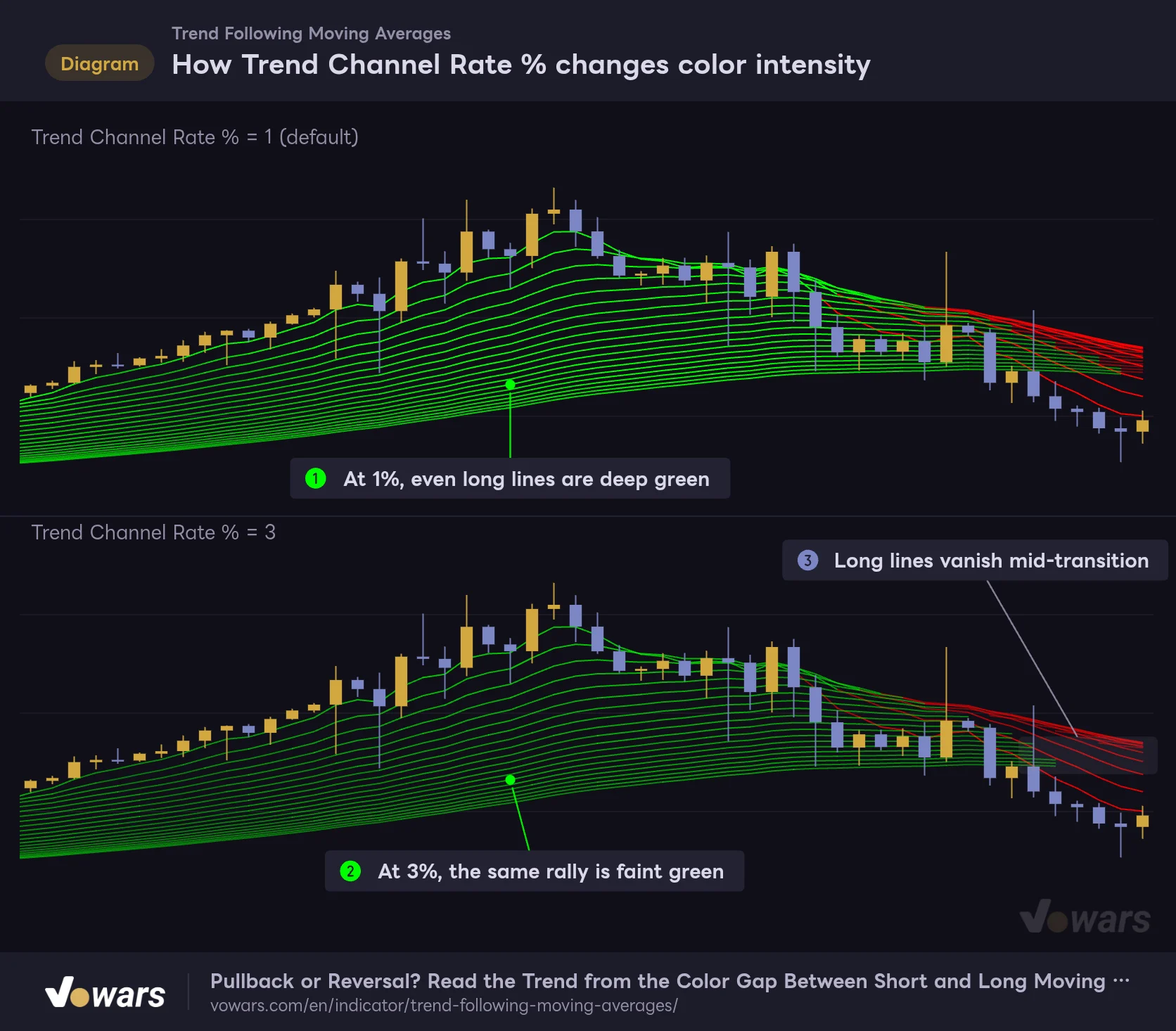
Trend Channel Rate % is the threshold percentage. Raise it and the threshold widens, so the same move gets treated as “nothing much.” The result is lower intensity levels, fainter colors overall and more no-trend stretches.
How Trend Channel Rate % changes color intensity
On the same chart, a wider threshold makes the reading stricter.
Vowars DE ver.3.12.30
Comparing 1% and 3%, the rally that turns even the long lines deep green at 1% in Figure ① only reaches a faint green at 3% in Figure ②. During the transition, the longer lines stay hidden, as in Figure ③. If you want to cut down noise in a wick-heavy, choppy market, raise it to around 1.5 to 2. On the other hand, if you’re on a low-volatility instrument and the lines barely get any color, dropping it to around 0.5 makes the ribbon easier to read.
Because the threshold is based on the range of the last 280 bars, an instrument that recently had a major crash or a huge rally ends up with a wider threshold, and the colors stay on the faint side for a while afterwards. That’s why the intensity varies by instrument and by period even with the same settings.
The two linear regression settings and MA Type
With Use Linear Regression turned on, the MA used for the trend reading is smoothed with linear regression, which keeps the colors from flickering on small up-and-down moves. Turning it off makes it react faster, but the downside is that the short lines keep flipping colors. Linear Regression Period controls how smooth it gets: the longer it is, the calmer the reading, at the cost of more lag. Note that linear regression is used only for the color reading. The 20 lines drawn on the chart are still plain moving averages of the type you selected.
MA Type applies to all 20 lines. The default EMA weights recent prices more heavily, so it reacts quickly, and I found it pairs well with the color logic. Switching to SMA spaces the lines out a bit more and gives a more relaxed look. VWMA is a volume-weighted moving average, so use it on instruments that have volume data.
Setting combinations by trading style
| Goal | Suggested timeframe | Settings | Why |
|---|---|---|---|
| Checking the trend for day trading | 15m to 1H | Defaults | The 20 lengths cover short to medium term nicely, and color changes are easy to follow |
| Buying dips on swing trades | 4H to 1D | Period to Check Trend 25 to 30 | The green long lines are less likely to drop out mid-pullback, making it easier to judge trend continuation |
| Cutting noise in choppy markets | Any | Trend Channel Rate % 1.5 to 2, Linear Regression Period 12 to 15 | Treats small moves as “no trend” and reduces color flicker |
| Spotting reversals early | 5m to 1H | Period to Check Trend 15, Linear Regression Period 5 to 8 | Reduces lag in the reading, at the cost of more fakeouts |
Overlay RSI to gauge how deep a pullback goes
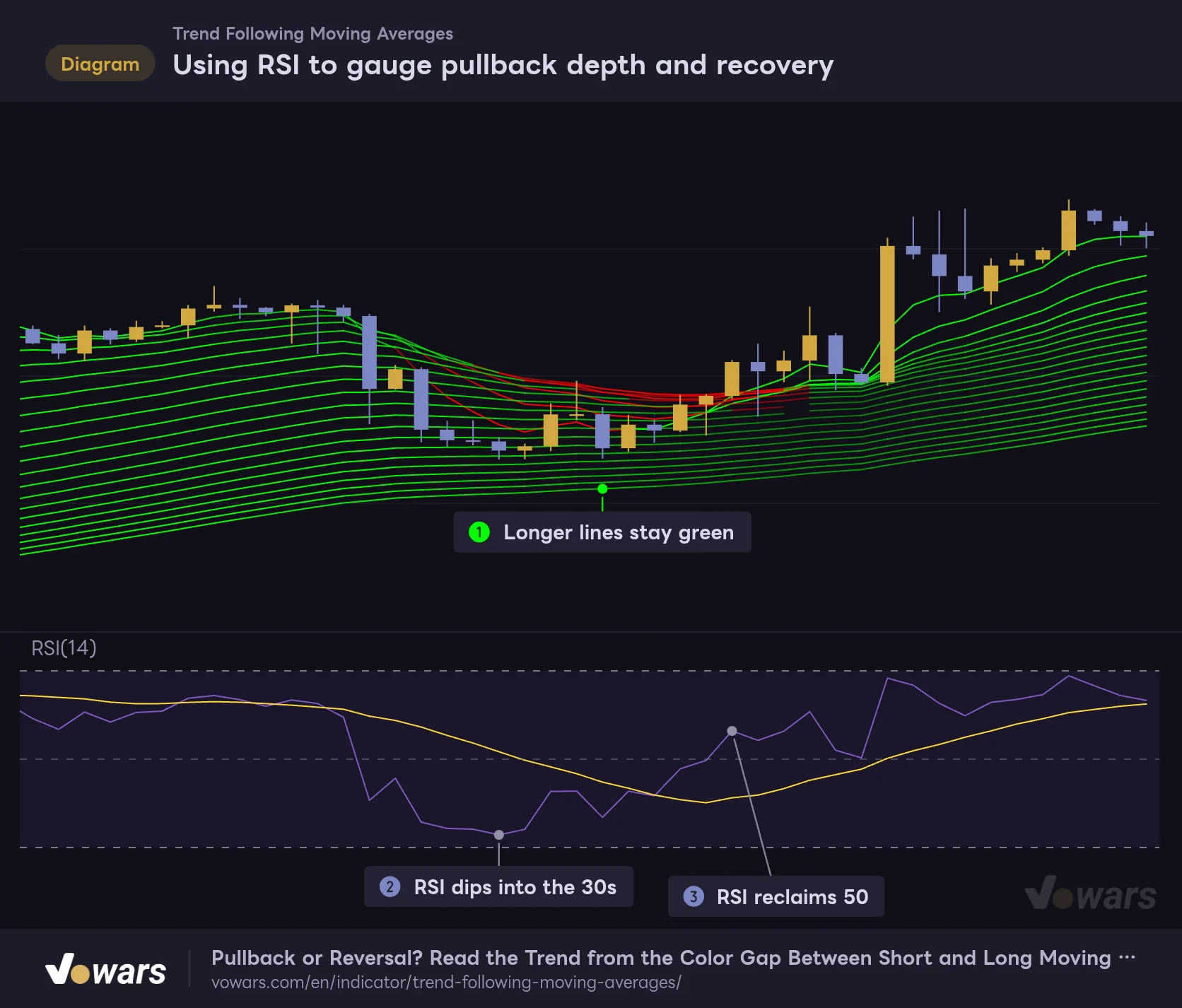
“Trend Following Moving Averages” is great at showing whether a trend exists and how strong it is, but it won’t tell you where a pullback ends. The best match I found for that was TradingView’s built-in RSI. The ribbon gives you the trend, and RSI confirms when momentum comes back.
Using RSI to gauge pullback depth and recovery
Read the trend from the colors and the momentum recovery from RSI, and pullbacks get much easier to judge.
Vowars DE ver.3.12.30
There are three steps. First, use Figure ① to check that the longer lines are still green, confirming the bigger trend is up. Next, wait for the pullback to push RSI down into the 30s or 40s, as in Figure ②. Finally, if RSI reclaims 50 as in Figure ③ and the short lines then turn back to green, odds are the pullback is over. RSI alone can’t tell you how long “oversold” will last, but the color of the long lines gives you a bias for which way price is more likely to resolve.
Other combinations worth considering:
- ADX — For when you want a number on trend strength. If deep colors line up with a rising ADX, you can be more confident about the momentum.
- The same indicator on a higher timeframe — Put it on two timeframes, say 1H and 4H, and use the color of the long lines on the higher timeframe for market context. A multi-chart layout on TradingView lets you view them side by side. The number of charts per tab depends on your plan, and the free Basic plan allows only one (as of Oct 12, 2026). In that case, just switch timeframes to check.
- Horizontal levels and support/resistance — The ribbon has no concept of key price levels, so marking the zone where you want to buy the dip with horizontal lines makes it far more practical.
What I relied on and what to watch out for
What you can rely on
- Read trend presence, direction and momentum all at once through color and intensity
- The color gap between short and long lines makes it easier to tell a pullback from a reversal
- The threshold scales with price range automatically, so the same settings work across instruments and timeframes
- Confirmed bars never change after the fact
What to watch out for
- In ranges, the 20 lines bunch up, and faint colors and broken lines overlap, making it hard to read
- Adjacent shades among the 10 intensity levels are hard to tell apart
- Being MA-based, it reacts late to sharp reversals
- The 20 lengths are fixed, so you can’t add a long period like 200
In terms of market fit, it shines on instruments that tend to trend cleanly. On the charts I tested, the color changes were clean whenever price ran hard in one direction. Instruments like gold, which tend to hold medium- to long-term trends, should suit the same read. On the flip side, on lower timeframes of instruments that spend a lot of time chopping in a tight range, the lines spend longer bunched up and flickering in and out, which makes them less useful for decisions.
A quick note on changing colors. You can change the line colors in the Style tab, but each line has a separate color for each intensity level, so recoloring everything to your liking takes some effort. The default green and red are easy to tell apart from the candles, so it’s simplest to leave them as is.
Repainting and alerts
“Trend Following Moving Averages” only uses values up to the current bar. It doesn’t reference higher-timeframe data or future values, so the lines and colors on confirmed bars never change after the fact. The only thing that moves is the live bar, as mentioned earlier.
The threshold needs the range of the last 280 bars. On recently listed instruments, or on charts with few bars like the monthly, the first 280 or so bars get no color and the lines aren’t shown. Also, the description on TradingView says the range is measured over 300 bars, but the actual calculation uses 280. The impact on the display is minor, but it’s worth knowing if you want to study the color intensity closely.
“Trend Following Moving Averages” doesn’t include a dedicated alert condition for color changes. In TradingView’s alert dialog you can pick each line’s value as a condition, so you can set alerts for price crossing above or below a specific moving average. The color change itself can’t be used as a condition, though, so you’ll need to watch for color flips yourself.
If you want to check past color changes bar by bar, TradingView’s Bar Replay is handy. Stepping forward one bar at a time, you can replay the order in which the short and long lines changed color. Daily and higher timeframes can be replayed in full, while how far back you can go on intraday timeframes depends on your plan (as of Oct 12, 2026).
An MA ribbon for traders who want to see at a glance whether there’s a trend
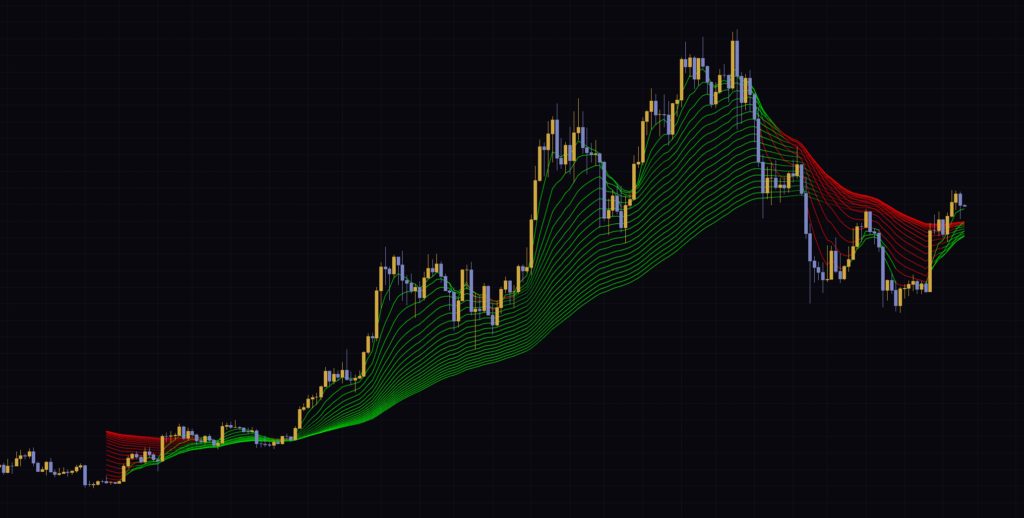
“Trend Following Moving Averages” isn’t an indicator that tells you when to buy or sell. It has each of the 20 moving averages judge whether there’s a trend on its own lookback and how strong it is, then lays the results out in color.
 Image
ImageWhat really sank in after using it for a while is that the most useful information is in the color mismatch between the short and long lines. All one color: don’t fight the trend. Only the short lines against it: look for a pullback or a bounce. Even the long lines fading and dropping out: start thinking the trend is ending. Keep those three in mind and you’ll size up the market much faster the moment you open a chart.
On the other hand, the display gets crowded in ranges and it reacts late to reversals. Use RSI, horizontal levels and the like for precise entry timing, and use “Trend Following Moving Averages” as your map of the market. Split the roles that way and it can become an indicator you keep on your charts for a long time.